Sponsored
Currently unavailable.
We don't know when or if this item will be back in stock.
Added to

Sorry, there was a problem.

There was an error retrieving your Wish Lists. Please try again.

Sorry, there was a problem.

List unavailable.
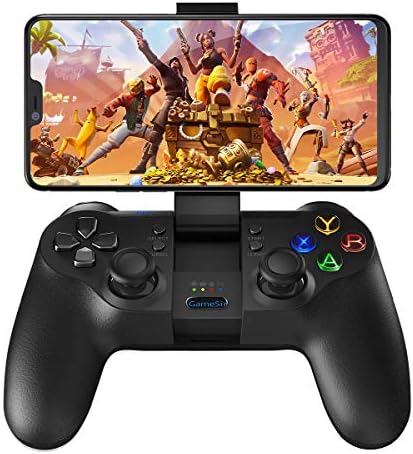
  • GameSir T1s Bluetooth 4.0 and 2.4GHz Wireless Gamepad Mobile Game Controller for Android/PC / PS3/ SteamOS

GameSir T1s Bluetooth 4.0 and 2.4GHz Wireless Gamepad Mobile Game Controller for Android/PC / PS3/ SteamOS

Platform : Electronic Game, Windows, Android, PlayStation 3
Rated: Everyone
3.9 out of 5 stars (2,102)

Currently unavailable.
We don't know when or if this item will be back in stock.

About this item

  • 【Wide Compatibility】GameSir T1s Wireless game Controller is compatible with PC (Windows XP/7/8/8.1/10), PS3, Nintendo Switch, Google Stadia, NVIDIA, Xbox Game Pass, Android Phone, Android TV Box. DOES NOT support iPhone/iPad/Amazon Frie TV/Amazon Stick/Xbox 360 / Xbox One / Mac OS.
  • 【Wireless & Wired】Our wireless technology has a long transmission distance. Once you are out of battery but are still willing to play, plug in the USB cable to connect the controller and game device, and switch to wired mode.
  • 【Rechargeable Gamepad】Built-in 600mAh rechargeable battery, 10 hours continuous playing and 30 days stand-by time with 2-3 hours fully charged; Foldable bracket for hold smart phones from 3.5-6 inches.
  • 【Dual Vibrators】 Asymmetric vibrating motor brings you various vibration levels, for example for in game headshots, explosions, and collisions, to feel as if you were right there in the battlefield.
  • 【Ergonomics Design】 The gamepad’s shape fits your hands naturally. High Quality Comfortable Leather Texture Grip. Experience the classy texture and high comfort while holding it.
Shop what you see on Prime Video
Explore looks, décor, and more from your favorite shows and movies. See more

Product information

Feedback

GameSir T1s Bluetooth 4.0 and 2.4GHz Wireless Gamepad Mobile Game Controller for Android/PC / PS3/ SteamOS


Found a lower price? Let us know. Although we can't match every price reported, we'll use your feedback to ensure that our prices remain competitive.

Where did you see a lower price?

Price Availability
/
/
/
/
Please sign in to provide feedback.

Product description

Read Before Buy

1. This product fully supports Android Fortnite.

2. As the brand seller, GameSir provide full supports to our customers, if you have any questions, please let us know that. We will provide you the solution.

Note: Xbox, PS4, Windows Tablet, Mac, Apple TV, iOS devices are not supported.

3. Here are the links of video tutorials:

Connect to PC with cable: youtu.be/whb9fPhypco

Connect to PC with 2.4G: youtu.be/lrHXOoyh2VY

Connect to Android phone: youtu.be/WMw4HV2xxT0

4. Controller-supported games list (Same as the T4 pro)

gamesir.hk/pages/gamesir-t4-pro-android-recommended-game-list

5. How to activate the mapping function:

gamesir.hk/pages/gamesir-activation-tutorial

GameSir T1s

Support Android PC Switch PS3

Support Android PC PS3 and Switch

Support Multi-Platforms Devices: It's a wireless controller, PC gaming controller, also it's the PlayStation 3 controller.

Working Modes: Android Standard/X-input/Mouse Simulation/PS3

Connection Types: Wireless 4.0 / 2.4Ghz USB dongle / Wired

Note: Xbox, PS4, Windows Tablet, Mac, Apple TV, iOS devices are not supported.

If you are an Android smartphone user, you are allowed to play the non-natively-gamepad-supported games with GameSir World app! Simply go to GameSir World app and add any games you want.

If your phone blocks the installation: Setting > Security > Lockscreen and security > Enable unknown sources

  • Dual-vibration motors. Realistic vibration and striking, each hit, crash and explosion can be vividly felt.
  • Select your desired button and Turbo key to taking action especially in shooting games.

  • With two adjustable angles (Multi-Angle, 110 degrees & 150 degrees) can be used as an individual mobile holder for 3.5~6-inch smartphones.
  • Built-in 2.4GHz wireless USB dongle

  • High Quality Comfortable Leather Texture Grip
  • Experience the classy texture and high comfort while holding GameSir T1s

sensitive D-pad
T4W Wired PC Controller
GameSir T4 Pro Wireless Game Controller
GameSir G4 Pro Wireless Game Controller
GameSir T1s Wireless Game Controller
Customer Reviews
3.8 out of 5 stars 1,009
4.3 out of 5 stars 9,098
4.1 out of 5 stars 1,107
3.9 out of 5 stars 2,102
Connection Types USB Wired Bluetooth / 2.4GHz Wireless / Wired Bluetooth / 2.4GHz Wireless / Wired Bluetooth / 2.4GHz Wireless / Wired
Working Platforms Windows PC (Windows 7 or later) PC / Android / iOS / Nintendo Switch PC / Android / iOS / Nintendo Switch Android/Windows/PS3/Switch
Phone Bracket None Yes Built-in Phone Bracket Built-in Phone Bracket
Battery Capcity No battery 600mAh 800mAh 600mAh
Working Modes X-input/D-input PC: X-input / Android HID-Gamepad / iOS: Apple Arcade, MFi / Switch: Origin Bluetooth, Gyro Supported PC: X-input / Android HID-Gamepad / iOS: Apple Arcade, MFi / Switch: Origin Bluetooth, Gyro Supported Android standard/ X-input/D-input/ PS3/ Mouse Simulation
Custom Button None 4 Customizable Button on the Back (M1-M4) Magnetic and Customizable ABXY Buttons None
Charging Port USB-A Type-C Type-C Micro USB
Turbo Button ✓ ✓ ✓ ✓
Vibration Feedback Dual Vibration Dual Vibration Dual Vibration Dual Vibration
Six-Axis Gyroscope no data ✓ ✓ no data

From the brand

Sponsored

Brands in this category on Amazon

Customer reviews

3.9 out of 5 stars
2,102 global ratings
Sponsored

Customers say

Customers report mixed experiences with the gamepad's connectivity, with some saying it connects flawlessly while others find it won't pair with their devices. The button responsiveness and ergonomics receive mixed feedback, with some praising the feel while others report issues with buttons getting stuck and a sticky physical sensation. Moreover, the build quality, responsiveness, and battery life show mixed results, with some finding it solidly built and responsive with hardly any lag, while others report durability issues with the controller breaking within three months. Additionally, customers disagree on the value for money, with some considering it worth the purchase while others find it not worth it.
AI Generated from the text of customer reviews

Select to learn more

115 customers mention connectivity, 49 positive, 66 negative
Customers have mixed experiences with the controller's connectivity: some report flawless connections, while others mention compatibility issues with Android tablets and computers.
Very poor compatibility. Does not work wireless in Windows 10....Read more
Pretty solid device for Bluetooth, but the clicks on my clip broke the first day I had it, so I can no longer adjust the angle in increments, only...Read more
It doesn't support call of duty and hard to pairRead more
...can be a little bit frustrating to pair with pc but pairs very easily with my s8 and ps3. but once paired with my pc it works great.Read more
48 customers mention ergonomics, 33 positive, 15 negative
Customers have mixed opinions about the controller's ergonomics, with some praising its nice feel in the hands and comparing it to a PS4 controller, while others note that the d-pad can feel mushy under repeated presses.
Great controller feels like a ps4 controller love it, fast shipping to thanks :)Read more
...First, the controller feels great in your hands, a little bulkier than a Ps3 or ps4 controller, but not much....Read more
...games its fine but i tried using it on overwatch and kind of hard to get a solid grip on it....Read more
...It looks great, feels great to hold, and the phone holder works really well. But unfortunately it's very cheaply made....Read more
48 customers mention value for money, 18 positive, 30 negative
Customers have mixed opinions about the controller's value for money, with some finding it worth the purchase while others say it's not worth it, particularly noting it's not suitable for fighting games.
WASTE OF MONEY DON'T BOTHER PURCHASING IT, IT BREAKS VERY EASILY THESE ARE FACTS THAT I ENCOUNTERED JUST USE UR HANDS IT'S FREE THIS THANG IS JUNKRead more
...Ryze would lead you to believe, this works and is more available and affordable....Read more
...should have stuck with my 8bitdo controller. don't buy!Read more
Not worth it.Read more
35 customers mention build quality, 21 positive, 14 negative
Customers have mixed opinions about the controller's build quality, with some finding it solidly built while others report it being poorly made and not durable.
...I play PS4 and this controller has a very similar feel and nice build quality....Read more
...Has connection issues and one of the sticks has a mind of its own. Cheaply made.Read more
...Has a very sturdy build quality and holds comfortably. I would prefer this to the major home console controllers.Read more
Crappy construction. R2 and L2 buttons fell out just from me keeping it in my back pack. It was awesome right until it broke.Read more
32 customers mention responsiveness, 10 positive, 22 negative
Customers have mixed experiences with the gamepad's responsiveness, with some praising its instant response and minimal lag, while others report significant input delay, particularly when using it with Android via Bluetooth.
...That's another minus 1 star. Update: input delay while playing blazblue CF. Tapping on the Left d pad sometime make the character jump as well....Read more
...I also felt like there was a little bit of input lag when playing wirelessly on the PS3, but I couldn't really measure that like I could with the...Read more
...Game play is like playing on PS4 or Xbox. Very responsive. And no lack awesome.Read more
...liked the design, weight, and feels good in the hand, but controls are laggy or flat out unresponsive or over responsive....Read more
25 customers mention battery life, 10 positive, 15 negative
Customers have mixed experiences with the controller's battery life, with some finding it decent while others report it doesn't last.
...is great for the first month, after about a month later, the battery will not hold charge... and that’s the part where this controller fail...Read more
Works amazing like everything about it so far. Easy to use, good battery life. No trouble hooking to my note 8. Smooth controls.Read more
...The only thing my son doesn't like about it is that the battery life is a little short, but not bad enough to rate it 4 stars.Read more
...light, easy to pair, responsive with very little lag, and has a decent battery life....Read more
69 customers mention button responsiveness, 18 positive, 51 negative
Customers report issues with button responsiveness, noting that they get stuck, don't respond properly, and aren't pleasant to touch.
Horrible controller. Got broken within 3 months. A button does not work. The seller does not abide by the warranty....Read more
...feel a little too high, the triggers are way too spongy, the buttons are a bit mushy, and the thumbsticks have some friction that is noticeable in...Read more
...Easy to use, good battery life. No trouble hooking to my note 8. Smooth controls.Read more
Not working well charging port broke on controller and buttons are stuckRead more
28 customers mention durability, 4 positive, 24 negative
Customers report significant durability issues with the game controller, with multiple units breaking within three months of use, particularly noting failures in the hinge joint and arm used for the phone.
Horrible controller. Got broken within 3 months. A button does not work. The seller does not abide by the warranty....Read more
...This one showed up with a broken left analog stick and functionality on that was just plain awful before it finally gave....Read more
...It's either my luck or bad durability but it broke again in the same spot so I cannot hold anything on it anymore, though it still works otherwise;...Read more
...It was awesome right until it broke.Read more
It works great.
5 out of 5 stars
It works great.
Works great on both Android and iPhone. I use it to fly the Tello with my Honor 8x and my daughter uses it to play mobile games on her iPhone. When ever you switch between Android and iPhone you have to do the binding again. One thing I don't see any one mentions is when you open the Tello app to connect the controller,it shows two devices: Gamesir T1s and Gamesir TGCM just click connected both and it works.
Thank you for your feedback
Sorry, there was an error
Sorry we couldn't load the review

Top reviews from the United States

  • 5 out of 5 stars
    Best controller for Android, bar none
    Reviewed in the United States on January 14, 2018
    Brief content visible, double tap to read full content.
    Full content visible, double tap to read brief content.

    I have both this and the moga pro, and this is hands down wayyy better. Maybe it's because I prefer the Playstation format controller, but primarily it's because this thing actually works, and has 1 great feature the moga pro doesn't.

    First, the controller feels great in your hands, a little bulkier than a Ps3 or ps4 controller, but not much. The analog sticks feel good, they do have a flat spot so they're not just rounded nubs like the ps4 ones, but they work well. The R3 and L3 buttons work fine. The dpad is great, nice individual feel of each direction button - not like one of those spoon dpads that are mushy and imprecise - but not quite as perfect as a ps controller. The main buttons have a fantastic feature - they not only light up, but you can controller how bright the intensity is! This is freaking fantastic, again, with the only downside it being the ABXY instead of the proper ⬜⭕✖️🔼 lol. The other major thing going for it over the moga pro is the turbo function. This is great because instead of messing with the settings of xpadder or ds4windows on PC or the emulator controller config settings for turbo (plus the fact that most Android games don't even have a turbo function), this would probably make it a winner by itself. The rumble vibration works with games that support it, and again the rumble is adjustable (so nice!). The R2 and L2 triggers feel smooth and travel well, & really the only downside to the controller is the R1 and L1 bumpers. They feel very "mushy" and not very precise. No click to them at all.

    The other great thing about it, is like the moga pro it has a built in phone holder that folds up to grab your phone. I was hoping for something really big so that I could still get some use put of my old nexus 7, but the max this will take is something around 6 inches (heh). My Pixel 2 XL in a case fits fine, but my Nexus 6p would just barely fit in a thin case like a spigen. It didn't fit in my otterbox.

    Along with the built in phone holder, this actually WORKS with most emulators and a lot of Android gsmes - more than the moga pro that's for sure. Plus there's no A->B confusing switch or setting or app, just turn it on, sync it with your phone or tablet, config and go. Works great with Shadowgun, Dead Trigger, and any of the other Android games (FPS, racing, etc) I've thrown at it. Plus, it's as easy as it should be to config with a major emulator for any system (nes, genesis, snes, ps1, n64, etc). Works perfect with those. Also, if you connect it to your Ps3 or ps4 with a micro USB cable, you can sync it and use it as an additional wireless controller for that too! I don't use my consoles much anymore, but the feature is nice. I use it primarily for my phone and tablet emulator gsmes, and sometimes for android play store games.

    Not sure if I'm forgetting anything, but fact is this is THE controller to get if you really like to use your phone for games. It's built well, functions great, has an extremely well done button layout and performance, and the thing just freakin WORKS. I put it in a private wish list and got it on sale, if you're not in a major rush to get it, but even at full price honestly it's worth it.

    19 people found this helpful
    Sending feedback...
    Thank you for your feedback.
    Sending feedback...
    Thanks, we'll investigate in the next few days.

    We'll check if this review meets our community guidelinesOpens in a new tab. If it doesn't, we'll remove it.

  • 5 out of 5 stars
    Nice controller, but with some annoying flaws.
    Reviewed in the United States on January 15, 2018
    Brief content visible, double tap to read full content.
    Full content visible, double tap to read brief content.

    Not exactly something I think is deserving of a 5-star review. However, I am being lenient and giving this 5 stars because of their customer service. But even that wasn't very good.

    The controller itself feels pretty comfortable to hold. It's a nice replica of a PS controller. The buttons are backlit and light up when I turn on the controller. Looks pretty nice. The shoulder buttons and the d-pad are a little more silent. However, the other buttons, X Y A B, are incredibly loud when I click on them. It's very loud that you can hear the clicking noise even when wearing a headphone. At first, they felt very responsive, but soon I encounter a problem. The A button was very sticky and would stay down and stuck there for about 1 second when I press on it. I had to clean it with a little water (watch tutorial if you encounter this) to get rid of this problem. The other buttons are fine, though. Seems like it's the A button that gets this usually.

    The analog sticks are clickable, just like the PS controller. In the middle, there's a holder for you to put your phone there and play. Pretty convenient.

    There is input lag when playing. I think this is a common issue with every bluetooth controller for android. Input lag is really noticeable when playing 2D games, especially ones that require precision timing for jumping and attacking like Mario or Mega Man. Try playing Mega Man X4 on PS3 or Vita, then try it on PS1 emulator with this controller. You should notice the control feels clumsier and less smooth. 3D games are less problematic, however. I am not sure what the reason is, but that is my experience. Another strange thing about the d-pad. If I press the right or left button, but press the upper part of it, it would be as if I am pressing both the up and right button at the same time. Here's an example: when playing Contra, if I press the upper part of the right button and shoot, my character would shoot upper right, as if I was holding the up button as well. I don't know if this was done on purpose or just a bad design problem.

    Regarding the sticky button. I contacted GameSir about the issue. They gave me a coupon to redeem another one, and asked me to write a 5-star review. Here's a weird thing: I have to pay 40 cents, even after applying the coupon. No, this is not tax or shipping fee. It's for the controller itself. It's like they can't cover the whole cost. I asked them why I have to pay 40 cents, and if they want me to send the controller back. I never got another response from them. Eventually I decided to just pay an extra 40 cents and get the new one. The new controller has the same sticky button problem, just not as worse. A little cleaning cured the problem. Not exactly good quality control over their products.

    The nice thing is that the controller came with 2 QR codes for you to redeem free emulators and games that work well with the controller. These are totally free. The emulators include Drastic, which is 5 bucks on the Google store, but here it's free. This is a really good deal you are getting if you are thinking of buying a DS emulator.

    If you are looking for a nice android controller, I guess this one would be enough for the job. Just beware for the slight input lag and sticky buttons. Hope you won't run into that issue.

    Sending feedback...
    Thank you for your feedback.
    Sending feedback...
    Thanks, we'll investigate in the next few days.

    We'll check if this review meets our community guidelinesOpens in a new tab. If it doesn't, we'll remove it.

  • 3 out of 5 stars
    It could have been great
    Reviewed in the United States on January 24, 2021
    Brief content visible, double tap to read full content.
    Full content visible, double tap to read brief content.

    So I bought this controller because I've been using a Gamesir G3 wired controller for the past few years. It was a great controller, and it held up. However, I decided that it's time to move on to wireless. The G3S is no longer sold, so this is Gamesir's current offering for a wireless controller that emulates the Playstation controller design.

    Ergonomics

    I really liked how the PS4 controller felt, especially the shoulder buttons. This controller pretty much mimics the PS4 controller, so it feels almost 100% identical. If you liked how the PS4 controller felt in your hands, chances are high that you'll like this one too. All the buttons are placed reasonably and are easy to access. However, my main grip is that the Home Button is not in the center of the gamepad like it is with most others. It's actually on the top, to the right of the L1/L2 buttons. When holding the controller, you'll have to stretch your left index finger over to press it, which is less than ideal. The controller has this leather-like texture on the grips, which feels quite nice in your hands. It's lighter than a PS4 controller, but not by much.

    Buttons

    The ABXY buttons feel nice and tactile, albeit a bit loud. The D-pad feels like the PS4 one, which is something I never had a complaint about. The joysticks are good, and so are the bumpers. The triggers are a huge problem, in my opinion. They have huge deadzones. You have to depress them almost halfway until they start to register. I thought I got a lemon at first, so I bought a second one, but they're exactly the same. Not to mention the triggers feel quite mushy/spongy at the end, and you can't really tell when it's depressed all the way. The Start and Select buttons are also very mushy. You have to press them with more force than expected in order to actuate them. Not ideal.

    Compatibility

    This controller registers as an Xbox controller on my Windows 10 PC, and it worked with all the games I've tried with it. No issues on PC. This controller also works with Android via Bluetooth. It works, but the connection is hit or miss. There's some latency over Bluetooth that I didn't have when I used a wired controller connected directly into my phone. This controller also works with the physical Steam Link hardware, just plug and play.

    Ease of use

    The controller is quite easy to use, for the most part. Holding down the Home button will turn it on and off. You have to hold down the Home button+face button, depending on which mode you want to use. Something to note is that if you use the controller with both your PC and your Android phone, and you keep the 2.4ghz dongle plugged into the PC all the time, it might get a bit fiddly. I had to unplug the dongle from my PC in order for the controller to connect to my phone. Kinda annoying, but not too serious. If you're only using it for PC or only using it for Android, this shouldn't be an issue.

    Build quality

    Build quality is nice. A cut above the cheaper third-party controllers out there. The plastic doesn't flex or bend, and it's got some good weight to it.

    Overall, I really wanted to like this controller, but it has some glaring issues that prevented me from giving it 5 stars, such as the deadzone/mushy triggers, mushy Start Select buttons, and spotty Bluetooth connectivity.

    5 people found this helpful
    Sending feedback...
    Thank you for your feedback.
    Sending feedback...
    Thanks, we'll investigate in the next few days.

    We'll check if this review meets our community guidelinesOpens in a new tab. If it doesn't, we'll remove it.

  • 4 out of 5 stars
    Solid controller for a solid price
    Reviewed in the United States on May 5, 2018
    Brief content visible, double tap to read full content.
    Full content visible, double tap to read brief content.

    UPDATED 7 OCTOBER 2018 - BELOW THE UPDATED REVIEW IS MY ORIGINAL REVIEW FROM MAY

    GameSir reached out to me shortly after I posted my original review in May. I explained what was happening with the controller, and without hesitation they sent me a new one within a week. The new controller has been working perfectly!

    GOOD:

    -very responsive controls with no latency

    -long lasting built-in battery that only requires occasional (usually twice weekly) charging, even with hours long daily gaming sessions

    -buttons have nice clicky feel, but aren't very loud (great for late night gaming when my wife is sleeping)

    -USB dongle makes connecting to PS3 and PC a breeze, usually taking only seconds

    BAD:

    -the built in cell phone holder gets weaker over repeated use; when I first used it, it was very tight and my phone wouldn't budge, but now its flimsy and, on a few occasions, actually closed when I tilted the controller with the phone attached

    -there have been a few incidents where my phone slipped out of the phone holding portion when my phone had its case on it; it holds better when your phone is out of its case

    Overall it is a great controller, despite the problems with the built in phone holder. It's versatility alone is worth the price, but coupled with the good build quality (phone holder notwithstanding) and amazing customer service, it would be hard to pass this up.

    This is my first third party controller, so I didn't know what to expect going in. Out of the box, it worked great initially, felt as good as a first party PS3 controller (albeit a little heavier due to my phone being attached), and left me happy with my purchase. However, a few hours in, I started having problems with the thumbsticks; the screen/character would keep moving when I moved either one a little bit. This is a problem in all the games I've tried playing, so it isn't an issue with one or two specific games.

    The biggest problem however, is it randomly stops working! It'll work for about 20 minutes or so, then stop being responsive completely. My phone shows it's still connected to Bluetooth, but does nothing. Worse still, when I turn off the controller and turn Bluetooth off and on on my phone, it will not reconnect. I'll have to wait several minutes before it connects.

    Overall, it's barely worth three stars. When it works, it's everything I could possibly ask for from a controller. When it stops working like it should, it's frustrating and unusable.

    If I can contact GameSir and get these issues resolved, I'd gladly give this a 5/5 stars. If not, it's going back, and I'll never buy a product from them again.

    8 people found this helpful
    Sending feedback...
    Thank you for your feedback.
    Sending feedback...
    Thanks, we'll investigate in the next few days.

    We'll check if this review meets our community guidelinesOpens in a new tab. If it doesn't, we'll remove it.

  • 1 out of 5 stars
    UPDATED: PSA:when you get it TEST EVERYTHING before keeping it
    Reviewed in the United States on February 25, 2018
    Brief content visible, double tap to read full content.
    Full content visible, double tap to read brief content.

    Update: this is really poor quality. I used this maybe a handful of times when I first got it for some gba phone emulator and used the dpad mainly. It was sitting in a drawer for the last 5 months and now when I want to use it on steam and desktop emulators on my pc, I find out that the left analog stick isnt registering up-left direction, it reads it maybe as 20%. Up is fully functioning as is Left and all the other directions and combinations surrounding except up/left. Lol im pretty salty at his discovery and completely regret this purchase now. Had I known about this I wouldve returned it. Maybe for a replacement to give the seller a chance to remedy a defective batch or something but considering its been 6 months since purchased im SOL with this. It isnt even usable since that is a pretty significant component of any game, maneuvering in different directions.

    Do yourself a favor and look else where honestly. I have a 2 logitech wired controllers f310 but they are very stiff and rough around the L and R button presses. Ps4 dualshock is a nightmare to set up on steam even though steam has support for it. (I dont want to install random suspicious third party apps just to use ps4 controller). I wanted this to be the answer to both android and pc gaming but it is neither. But regardless, like the title says, if you do decide to buy it TEST EVERY SINGLE FUNCTION ASAP. Dont end up like me salty and filled with regret on something I thought worked 100%

    --------------------

    Lights are kind of bright and wastes battery life. Having to manually turn them off each time by pressing a 3 key macro and reducing the light to 0 is a little irritating. Battery life isnt as well as I figured when using the 2.4ghz usb adapter but meh it works at least.

    My main issue is the charger port. The cable that comes with is the only cable I have that fits the recess on the controller. It is micro usb but the width and height of the plug base is too small for any of my micro usb cables Ive accumulated throughout the years which is disappointing.

    Sending feedback...
    Thank you for your feedback.
    Sending feedback...
    Thanks, we'll investigate in the next few days.

    We'll check if this review meets our community guidelinesOpens in a new tab. If it doesn't, we'll remove it.

  • 5 out of 5 stars
    Great GNU/Linux Support
    Reviewed in the United States on June 1, 2018
    Brief content visible, double tap to read full content.
    Full content visible, double tap to read brief content.

    It's not explicitly mentioned anywhere, but I purchased this expecting it to work with the 'xpad' kernel module and it did, but it actually worked out of the box in Android mode with the newer evdev API (make sure you add your user to the 'input' group, though).

    I'm very much a casual gamer, so it might be wise to take this review with a grain of salt, but this has been the best game controller I've ever used. Very comfortable and presented extremely well. I've seen a few people complain about the buttons being too loud, but I find that to be an exaggeration. They're loud, but not much louder than, say, a keyboard. The only issue I had was misunderstanding the instructions - I had initially plugged the controller into my desktop to charge it, and wanted to pair it with my smartphone while it was plugged in. This doesn't work, the controller needs to be unplugged for it to be discoverable.

    Latency with Bluetooth is noticeable, but that's just the nature of wireless communications. If you're concerned about input lag, just use wired. Android actually has decent support for USB gamepads if you're willing to invest in a USB to Micro-USB adapter and plug the controller into your power port.

    One person found this helpful
    Sending feedback...
    Thank you for your feedback.
    Sending feedback...
    Thanks, we'll investigate in the next few days.

    We'll check if this review meets our community guidelinesOpens in a new tab. If it doesn't, we'll remove it.

  • 2 out of 5 stars
    Won't Pair with PC - HORRIBLE D-Pad
    Reviewed in the United States on October 13, 2017
    Brief content visible, double tap to read full content.
    Full content visible, double tap to read brief content.

    I'm a very honest reviewer, and only provide facts. Please keep that in mind while reading. I've also tried these troubleshooting steps on 2 different computers with the same results.

    This item won't pair to my computer. I've owned other GameSir controllers along with multiple other PC controllers using a dongle, but this controller just won't pair. I put the controller into pairing mode by pressing X+Home and then plug in the dongle. The pairing light just keeps blinking... never goes solid. I can see the my controller being recognized by my computer, and it states that it is connected... the indicator light just keeps blinking and the controller never pairs. I've even updated all the drivers for every device listed on my PC including Bluetooth. I ran Windows updates, and went as far as updating the BIOS on my machine.

    The main reason I ordered this controller was to play PC games, so there is no reason to keep this thing. I did manage to get it to pair to my phone via Bluetooth and played a few games. BEWARE! If you are a retro gamer, this D-Pad is absolute shit. It's plain garbage. They spent so much money perfecting these analog sticks the company totally forgot about the D-Pad. Any direction you press makes the entire pad move that direction and the other directions become completely useless. For example, pressing the pad to the right completely disables the ability to press... or even rotate the pad up or down the least bit. I was playing Killer Instinct which we all know requires a lot of rolling D-Pad action. Back-Front, rolling back-down-forward.These are near impossible to get consistently.

    I owned the GameSir G3S and although the D-Pad was just as terrible, at least it connected to my computer with no effort what so ever. I just plugged the USB dongle in and.... Bam! it worked. I'm thoroughly disappointed with this game pad. I was afraid of spending $60 on a gamepad just for PC, but it looks like that's the only way to get something worth using.

    2 people found this helpful
    Sending feedback...
    Thank you for your feedback.
    Sending feedback...
    Thanks, we'll investigate in the next few days.

    We'll check if this review meets our community guidelinesOpens in a new tab. If it doesn't, we'll remove it.

  • 5 out of 5 stars
    Great controller that can be used for almost everything
    Reviewed in the United States on April 2, 2018
    Brief content visible, double tap to read full content.
    Full content visible, double tap to read brief content.

    I have purchased both the GameSir T1s and the T1. This controller, the T1s, has a USB dongle for easy connectivity to PC, Rasperry Pi, and others. That is the only distinction other than price. And I use it for both my PC and Raspberry Pi. So far I love it. It's really comfortable in my hands. It works great on my PC and Rasperry Pi running emulators. It also works great on my android phone. The fold up cell phone holder is strong and works great. I bought a second T1s for my nephew to game at home on his laptop or on the go on his android. He loves it! The buttons and analog sticks feel good. I like the dpad as well. Great controller that can be used for almost everything.

    Sending feedback...
    Thank you for your feedback.
    Sending feedback...
    Thanks, we'll investigate in the next few days.

    We'll check if this review meets our community guidelinesOpens in a new tab. If it doesn't, we'll remove it.

Top reviews from other countries

    Translated by Amazon
    See original
  • 1 out of 5 stars
    slimy game pad
    Reviewed in the United Arab Emirates on January 24, 2020
    Brief content visible, double tap to read full content.
    Full content visible, double tap to read brief content.

    the game pad was slimy and uncomfortable

    Sending feedback...
    Thanks, we'll investigate in the next few days.

    We'll check if this review meets our community guidelinesOpens in a new tab. If it doesn't, we'll remove it.

  • 5 out of 5 stars
    Multiplateforme et connexion facile
    Reviewed in France on December 1, 2018
    Brief content visible, double tap to read full content.
    Full content visible, double tap to read brief content.

    J’ai acheté cette manette pour deux utilisations différentes :

    - sur une android tv box pour la navigation dans les différents menu et pour pouvoir jouer aux jeux et alors à ce niveau vraiment super pas de latence une manette fluide et ergonomique, appairage simple et rapide.

    - sur mon iPhone X mais uniquement pour l’application Tello pour contrôler mon drone ryze tello et encore une fois très bonne surprise la manette est directement reconnue en Bluetooth et un vrai plaisir de navigation avec cette manette.

    D’un point de vue général la manette a une très bonne autonomie, elle est réactive fonctionnelle et ergonomique, elle est équipée de 2 moteurs pour les vibrations et possède également un dongle usb afin de pouvoir l’utiliser sur pc. Une très bonne manette multiplateforme avec une connexion facile.

    Multiplateforme et connexion facile
    Multiplateforme et connexion facile
    Multiplateforme et connexion facile
    Multiplateforme et connexion facile
    5 out of 5 stars
    Multiplateforme et connexion facile
    Reviewed in France on December 1, 2018

    J’ai acheté cette manette pour deux utilisations différentes :

    - sur une android tv box pour la navigation dans les différents menu et pour pouvoir jouer aux jeux et alors à ce niveau vraiment super pas de latence une manette fluide et ergonomique, appairage simple et rapide.

    - sur mon iPhone X mais uniquement pour l’application Tello pour contrôler mon drone ryze tello et encore une fois très bonne surprise la manette est directement reconnue en Bluetooth et un vrai plaisir de navigation avec cette manette.

    D’un point de vue général la manette a une très bonne autonomie, elle est réactive fonctionnelle et ergonomique, elle est équipée de 2 moteurs pour les vibrations et possède également un dongle usb afin de pouvoir l’utiliser sur pc. Une très bonne manette multiplateforme avec une connexion facile.

    Sending feedback...
    Thanks, we'll investigate in the next few days.

    We'll check if this review meets our community guidelinesOpens in a new tab. If it doesn't, we'll remove it.

    Translated from French by Amazon
    See original
  • 5 out of 5 stars
    A dir poco fenomenale.
    Reviewed in Italy on April 22, 2018
    Brief content visible, double tap to read full content.
    Full content visible, double tap to read brief content.

    Niente da dire se non che è perfetto. Comodissimo, soprattutto per il rivestimento in gomma opaca che si sente appena, rende il controller molto piacevole al tatto e allo stesso tempo da un grip impeccabile. Io ho preso la versione con vibrazione, ho speso un po' in più ma il feeling della vibrazione è morbido e preciso, piacevole più di quello che ho riscontrato in controller da gaming professionali ( esempio Nacon Revolution Pro Controller). I controlli funzionano a meraviglia, ogni click è preciso ed i trigger posteriori a molla molto buoni. Il porta-cellulare ha una presa perfetta e regge il mio enorme e pesante Xiaomi Mi Mix 2 (schermo 6") in qualsiasi posizione, ed ha anche 2 inclinazioni. Funziona perfettamente in ogni modalità usb ed anche connesso ad android via bluetooth i comandi hanno una risposta praticamente istantanea e pari a quella con cavo o usb wireless(inclusa nel controller), cosa che personalmente non mi aspettavo,e la batteria ha una durata molto alta. Che dire dell'estetica... Il design in stile ps4 che amo, opacizzato e leggermente sgranato dalla gomma e con una serie di luci, compresi i tasti a b x y, che lo rendono stupendo. Tante parole per dire semplicemente che è un prodotto perfetto, che mi ha lasciato assolutamente soddisfatto. Consiglio l'acquisto senza dubbio.

    Sending feedback...
    Thanks, we'll investigate in the next few days.

    We'll check if this review meets our community guidelinesOpens in a new tab. If it doesn't, we'll remove it.

    Translated from Italian by Amazon
    See original
  • 5 out of 5 stars
    Fiyatına göre kalitesi tatmin edici
    Reviewed in Turkey on October 12, 2018
    Brief content visible, double tap to read full content.
    Full content visible, double tap to read brief content.

    Öncelikle bu ürünü almak için en önemli sebep fiyatı ben aldığımda fiyatı baya uygundu onun için tercih ettim.Markayı da biraz araştırarak konsol kolu konusunda tecrübeli bir marka olduğunu gördüm.

    Tabiki birkaç eksiği var mesala ortada ki telefon yeri kalıte hissiyatını düşürmüş eğer telefon ile kullanmayacaksınız t2a modelini tavsiye ederim ve batarya ömrü 18 saate yakın bile değil max 8-10 saat alablirsiniz ama çok sıkıntı bir konu değil.

    Artı olarak genel kalite hissi DS4 e fazlası ile yakın aynı değil ama çok yakın.Bağlantı konusuna gelirsek hiçbir cihazda bağlantı sorunu çıkarmadı çok kolay ve çabuk bağlanıyor ve kopma 1 kere dahi olmadı.

    Tavsiye edermiyim ben 155 tlye aldım ve memnunum ama fiyatı 230 tl ve üstü olsaydı (diğer bütün sitelede olduğu gibi) biraz daha verip 300tiye xbox one controller alırdım

    Sending feedback...
    Thanks, we'll investigate in the next few days.

    We'll check if this review meets our community guidelinesOpens in a new tab. If it doesn't, we'll remove it.

    Translated from Turkish by Amazon
    See original
  • 5 out of 5 stars
    概ね満足。カラーバリエーションを増やして欲しい。
    Reviewed in Japan on July 10, 2021
    Brief content visible, double tap to read full content.
    Full content visible, double tap to read brief content.

    ゲームによってボタンの名前や配置が違うが商品説明を読んだり、ゲームの初期段階で試し押しすると大体把握できる。

    SteamのリモートプレイにてスマートフォンとBluetooth接続した本品を使用したが、ゲーム自体がコントローラー対応であれば問題なく使用できます。

    FFシリーズをいくつかプレイして問題ありませんでした。

    コントローラー非対応のゲームも試したがキャンセルボタンなど一部のみ動作するがプレイできる感じではない。

    これはゲーム自体がコントローラー非対応のためでこの商品の問題ではない。

    使用感としては握りやすく滑りにくいグリップ、押しやすいボタンとトリガー。

    充電用micro usb端子は上部にありプレイの邪魔にはならない。

    振動も結構強めで、ぼーっと気を抜いている時にブルっと来ると驚きます。

    激しい遅延はないが時々わずかに反応が鈍い時がある。

    FPSをしないので検証していないため、命取りになるほどの遅延かは分からない。

    スマートフォンを挟む部分については、最近は大きいサイズのスマートフォンが増えているのでもしかすると挟めないスマートフォンもあるかも。

    ROG phone,Blackshark,Moto g pro,Redmi note8 proなどは挟めました。電源ボタンなどが当たって真ん中に挟めない物もあるが、プレイに支障が出るほどずらす必要はなかった。

    Sending feedback...
    Thanks, we'll investigate in the next few days.

    We'll check if this review meets our community guidelinesOpens in a new tab. If it doesn't, we'll remove it.

    Translated from Japanese by Amazon
    See original
Sponsored