The default advice for new HTTPS services on GCP is “use a Global External ALB”, and most of the time it’s right. One anycast IP answers from Google’s edge everywhere, certificate maps attach to it, and one load balancer replaces dozens. Regional External ALBs solve a narrower problem better: traffic that lives in one region, ccTLD services that should keep their cert, LB and backend together, and egress costs you can cut with Standard Tier.
Below we compare what each tier supports and break down real TTFB numbers from the global LB. We also show how certificates attach on the regional side (directly, never through a certificate map) and the Gateway API change that moves a GKE service between tiers. The gcloud certificate upload, certificate map and proxy-only subnet steps below were re-run in europe-west1 in November 2026 with Google Cloud SDK 591.0.0, and the Gateway TLS fields were checked against Google’s documentation the same month; the Terraform and latency captures are from the original run.
Compare What the Two LB Tiers Support
Both products are called “External Application Load Balancer”, but they run on different data planes. The global one runs on Google Front Ends (GFEs): a single anycast IP, TLS terminated at the GFE closest to the client, then Google’s backbone to your backend. The regional one runs on managed Envoy proxies inside one region, uses a regional IP, and needs a proxy-only subnet in that region before you can create it.
Most of the feature gap follows from that. Google’s load balancer feature comparison lists these differences, and the certificate row is the one that tripped up the earlier version of this article:
| Capability | Global External ALB | Regional External ALB |
|---|---|---|
| How certificates attach | Certificate map (one per target proxy, up to 5,000 entries per project) | Certificate Manager certificates directly on the target proxy (up to 100), no certificate map |
| Google-managed certificates | Compute Engine or Certificate Manager | Certificate Manager only |
| Cloud Armor | Backend and edge security policies | Regional backend security policies |
| Identity-Aware Proxy | Yes | Yes |
| Cloud CDN | Yes | No |
| HTTP/3 (QUIC) | Yes | No |
| Automatic cross-region failover | Yes | No (backends in one region) |
| Network Service Tier | Premium only | Premium or Standard |
| Proxy-only subnet | Not needed | Required in the region |
Read the first row carefully, because it decides how much of your consolidation work carries over. A global LB gets its Certificate Manager certificates from exactly one certificate map, which is where the wildcard and hostname entries from earlier in this series live. A regional LB has no certificate map at all: you list Certificate Manager certificates on the target proxy itself. Everything else in the table is a capability you either need or don’t, and if you need Cloud CDN, HTTP/3 or failover across regions, the decision is already made for you.
Measure the PoP Hop
To see where the time goes on the global tier, time three separate requests from a workstation in Nairobi to food.cfg-lab.computingforgeeks.com, which sits behind the global LB with a backend in europe-west1:
for i in 1 2 3; do
  curl -o /dev/null -s -w "connect=%{time_connect}s tls=%{time_appconnect}s \
ttfb=%{time_starttransfer}s\n" https://food.cfg-lab.computingforgeeks.com/
done
Each curl run is a new process, so every request pays for a fresh TCP and TLS handshake. Run 1 also paid for the DNS lookup, which time_connect includes:
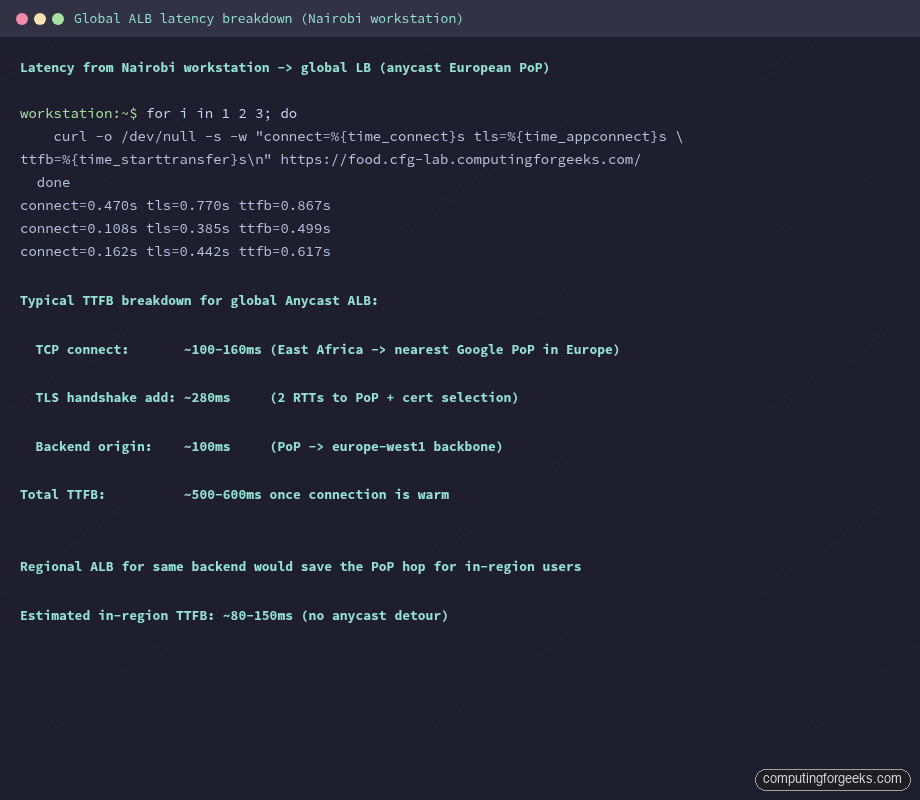
Curl’s timers are cumulative, so we subtract each one from the next to get the phase costs. Runs 2 and 3 are the honest ones once DNS is cached:
- TCP connect: 108 to 162 ms, the round trip to the GFE that answered
- TLS handshake: about 280 ms more on top of the connect time
- Request to first byte: 114 to 175 ms, the GFE to
europe-west1backbone leg plus the backend
For this client the expensive part is the distance to the GFE, not the backbone hop behind it. A regional LB wouldn’t fix that, because TCP and TLS would then terminate at the Envoy proxies in Belgium, so every handshake round trip covers the full distance. On Premium Tier those packets still enter Google’s network at a nearby PoP and ride the backbone; on Standard Tier the packets also ride the public internet most of the way. The image’s summary panel, including its in-region estimate, was composed for the original article; only the three curl lines are measurements. The regional tier only wins for clients already near the region, where skipping the GFE leaves a direct path to an Envoy proxy next to the backend. Expect that saving in tens of milliseconds, so it matters for real-time traffic and very little for a dashboard.
Pick Regional for These Services
Any one of these signals is enough to justify a regional LB for a service:
- Latency-bound traffic with users in one region. WebSockets for live ordering, order-book streams, game matchmaking. When the budget is counted in milliseconds and the users sit next to the region, the shorter path is worth having.
- ccTLD or data-residency services. A
.frservice for French users keeps its certificate, LB and backend all ineurope-west9. Rotation, incident response and any residency argument stay inside one region. - Egress-heavy services that can live on Standard Tier. Forwarding rules cost the same on both load balancer types, so the saving isn’t there. It comes from the network tier: the regional LB can run on Standard Tier, which has cheaper outbound data transfer, while the global LB is Premium only.
Pick Global for Everything Else
Again, any one of these settles it:
- Users in many regions. Anycast lands every user on a nearby GFE. The alternative, one regional LB per region behind DNS steering, is a lot more to run.
- Certificate consolidation on a shared LB. Only the global tier takes a certificate map, and one map holds the wildcard and per-host entries for every service behind it. That’s the pattern the shared LB cert map swap builds.
- Edge features. Cloud CDN, Cloud Armor edge security policies, HTTP/3 and cross-region failover exist only on the global tier.
What we argue for across this series is not either-or. Run the global LB with its certificate map for the bulk of your services, and give the small number of latency-bound or ccTLD services their own regional LB with directly attached certificates.
Scope the Regional Certificate
Every Certificate Manager certificate has a location. A global certificate goes on global LBs; a regional one goes only on regional LBs in the same region. The Terraform module from the wildcard DNS authorization guide takes location as an input, so the regional stack only changes the region token:
inputs = {
  location      = "europe-west1"
  dns_zone_name = dependency.dns.outputs.zone_name

  dns_auth_domains = {
    regional = "cfg-regional.computingforgeeks.com"
  }

  certificates = {
    "cfg-regional-wildcard" = {
      domains       = ["*.cfg-regional.computingforgeeks.com",
                       "cfg-regional.computingforgeeks.com"]
      dns_auth_keys = ["regional"]
    }
  }
}
Apply it from the stack directory:
cd live/article-lab/europe-west1/certs-cfg-regional
terragrunt apply -auto-approve
Terraform creates three resources (the DNS authorization, the ACME CNAME and the certificate), and Google then validates the DNS-01 challenge in the background:
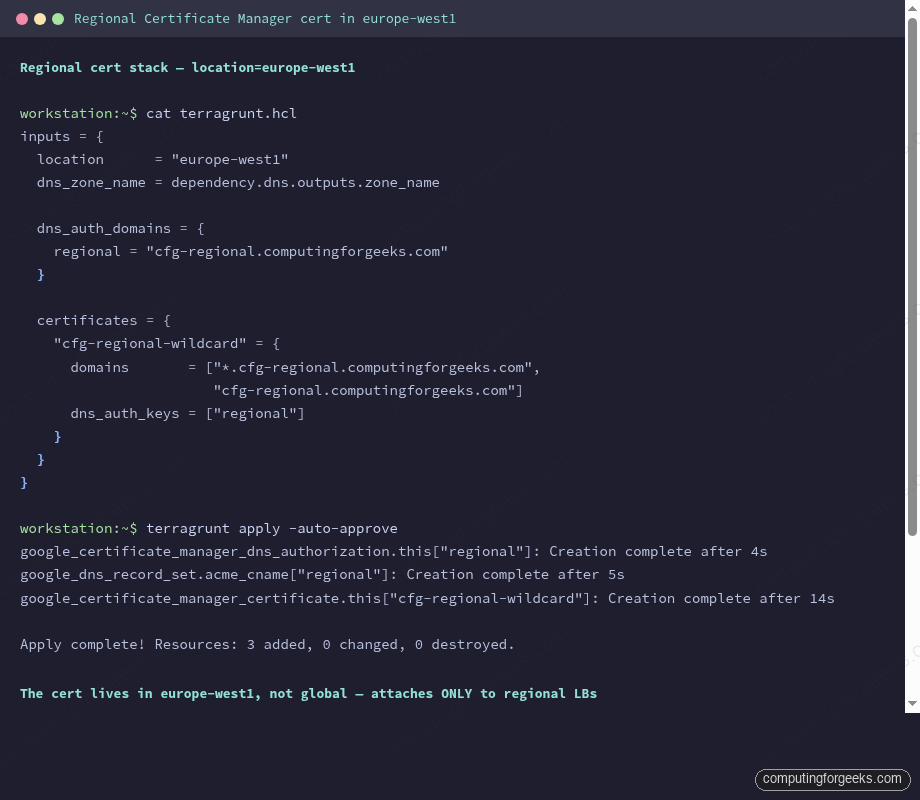
The DNS authorization behind it is regional too, and that changes the record you publish. Google’s regional Google-managed certificate guide allows only the PER_PROJECT_RECORD type for regional certificates, so the CNAME name carries a project-specific token, such as _acme-challenge_<token>.cfg-regional.computingforgeeks.com, instead of the plain _acme-challenge name a global authorization uses. Copy the name and target from gcloud certificate-manager dns-authorizations list --location=europe-west1 rather than typing them; --location narrows the list to the regional authorizations.
If you bring your own certificate instead, the regional upload is one command once the Certificate Manager API is on. A project that skipped the earlier articles needs it enabled first:
gcloud services enable certificatemanager.googleapis.comFor the November run we generated a short-lived self-signed ECDSA pair to stand in for a real certificate. Use your own PEM pair in production:
openssl req -x509 -newkey ec -pkeyopt ec_paramgen_curve:prime256v1 -nodes -days 30 \
  -keyout key.pem -out cert.pem -subj '/CN=cfg-regional.example.com' \
  -addext 'subjectAltName=DNS:cfg-regional.example.com,DNS:*.cfg-regional.example.com'
Then upload the pair to europe-west1:
gcloud certificate-manager certificates create cfg-regional-cert \
  --certificate-file=cert.pem \
  --private-key-file=key.pem \
  --location=europe-west1
gcloud waits on the regional operation and prints Created certificate [cfg-regional-cert]. when it finishes. Running gcloud certificate-manager certificates describe cfg-regional-cert --location=europe-west1 confirms the location in the resource name and shows the SANs Google read from the PEM (PEM body and timestamps trimmed):
name: projects/your-gcp-project-id/locations/europe-west1/certificates/cfg-regional-cert
sanDnsnames:
- cfg-regional.example.com
- '*.cfg-regional.example.com'
selfManaged: {}
The locations/europe-west1 segment is what makes this certificate usable by a regional LB in Belgium and by nothing else. A certificate created without --location lands in global and won’t attach to a regional target proxy.
Reuse DNS Authorizations Within One Location
One DNS authorization can back many certificates for the same domain, but only inside its own location. Google says it plainly: “You can’t use global DNS authorizations with regional certificates.” So the hybrid pattern, a global wildcard on the shared LB plus a regional wildcard for a ccTLD service on the same domain, needs two authorizations:
- a global authorization with the
_acme-challengeCNAME, shared by every global certificate for that domain - a regional authorization in each region you use, with its own
_acme-challenge_<token>CNAME
Both CNAMEs live in the same zone without conflict because their names differ. In Terraform that means one cert stack per location, each with its own dns_auth_domains map, rather than one stack that tries to point a global and a regional certificate at the same authorization key. Plan on a regional authorization per region per domain; the default quota is 300 regional DNS authorizations per region.
Confirm Certificate Maps Are Global Only
Certificate maps have no regional form. Google’s Certificate Manager overview lists maps only for the global and classic load balancers, and the API refuses a map in a region outright. Creating one in europe-west1 and then a global one shows the difference:
gcloud certificate-manager maps create cfg-regional-cert-map --location=europe-west1
gcloud certificate-manager maps create cfg-global-map
In our run the regional call failed before anything was created, and the global one succeeded:
ERROR: (gcloud.certificate-manager.maps.create) INVALID_ARGUMENT: Malformed name: 'projects/your-gcp-project-id/locations/europe-west1/certificateMaps/cfg-regional-cert-map'
- '@type': type.googleapis.com/google.rpc.BadRequest
  fieldViolations:
  - description: Invalid location in resource URL path
    field: projects/your-gcp-project-id/locations/europe-west1/certificateMaps/cfg-regional-cert-map
Waiting for 'operation-1794458455362-6600ceacbcd66-325587d1-d29e324b' to complete...
........done.
Created certificate map [cfg-global-map].
That error is the whole answer to “can a regional LB use a cert map”. There’s nothing to point it at, so a regional design attaches certificates to the target proxy and a global map has no role there. If your Terraform or Helm values carry a certificate map name for a regional service, delete it rather than looking for a regional equivalent.
Swap the Gateway Class and the TLS Option
On GKE, the Gateway API does the LB wiring for you, but moving a Gateway between tiers takes more than swapping the class name. If your services still sit behind Ingress, do the GKE Ingress to Gateway API migration first. Google’s Secure a Gateway page documents the regional form, and it differs from the global one in three places:
gatewayClassNamebecomesgke-l7-regional-external-managed- the
networking.gke.io/certmapannotation goes away - the listener lists certificates in
tls.optionsundernetworking.gke.io/cert-manager-certs
Here is the regional Gateway with those changes applied:
apiVersion: gateway.networking.k8s.io/v1
kind: Gateway
metadata:
  name: cfg-regional-gw
  namespace: cfg-demo
spec:
  gatewayClassName: gke-l7-regional-external-managed
  listeners:
  - name: https
    protocol: HTTPS
    port: 443
    tls:
      mode: Terminate
      options:
        networking.gke.io/cert-manager-certs: cfg-regional-wildcard
    allowedRoutes:
      namespaces:
        from: Same
Here cert-manager-certs names the regional certificate from the Terraform stack above, and the value takes a comma-separated list, so a second certificate for another hostname goes on the same line. HTTPRoutes, Services and the cluster stay as they are.
Our earlier version of this article kept the certmap annotation on the regional Gateway and added an empty networking.gke.io/pre-shared-certs option. Neither belongs there. Certificate maps attach only to global load balancers, and on the regional class pre-shared-certs refers to regional, self-managed Compute Engine SSL certificate resources, not to Certificate Manager. If you copied that manifest, replace both lines with the cert-manager-certs option.
The regional class also needs a proxy-only subnet in the cluster’s region before the Gateway can program. On a default auto-mode VPC, the obvious 10.129.0.0/23 range is rejected, so pick one outside 10.128.0.0/9:
gcloud compute networks subnets create proxy-only-ew1 \
  --purpose=REGIONAL_MANAGED_PROXY --role=ACTIVE \
  --region=europe-west1 --network=default --range=172.31.100.0/23
Our first attempt used 10.129.0.0/23, and gcloud refused it:
ERROR: (gcloud.compute.networks.subnets.create) Could not fetch resource:
 - Invalid value for field 'resource.ipCidrRange': '10.129.0.0/23'. Extended subnetworks in auto subnet mode networks cannot overlap with 10.128.0.0/9.
Auto-mode networks reserve the whole 10.128.0.0/9 block for their own regional subnets, so any proxy-only range inside it collides. The 172.31.100.0/23 range went through on the second try:
Created [https://www.googleapis.com/compute/v1/projects/your-gcp-project-id/regions/europe-west1/subnetworks/proxy-only-ew1].
NAME            REGION        NETWORK  RANGE            STACK_TYPE  IPV6_ACCESS_TYPE  INTERNAL_IPV6_PREFIX  EXTERNAL_IPV6_PREFIX
proxy-only-ew1  europe-west1  default  172.31.100.0/23
One proxy-only subnet serves every regional Envoy-based load balancer in that VPC and region, so you create it once, not per Gateway. A /23 is Google’s recommended size and leaves room for the proxies to scale.
Rebuild the Backends for the Regional Tier
A regional URL map can only reference regional backends, so nothing global carries over. A google_compute_backend_bucket built for the global LB is a global resource; for the regional LB you create a regional backend bucket (gcloud compute backend-buckets create cfg-static-ew1 --gcs-bucket-name=my-bucket --region=europe-west1 --load-balancing-scheme=EXTERNAL_MANAGED) or put the content behind a regional backend service. Cloud Run, GKE Services and external origins go through a regional backend service with a serverless, zonal or internet NEG.
GKE Gateway handles this for you, because the controller builds the regional backend services and NEGs from the HTTPRoute’s Service references. A hand-written Terraform LB is where the work lands: every google_compute_backend_service becomes a google_compute_region_backend_service, and every health check becomes a regional one.
Compare the Costs
Google’s network pricing page charges forwarding rules the same on both tiers, which surprises people who expect regional to be cheaper per LB. The us-central1 list prices, checked in November 2026:
| Item | Global External ALB | Regional External ALB |
|---|---|---|
| First 5 forwarding rules | $0.025 per hour each | $0.025 per hour each |
| Each additional forwarding rule | $0.01 per hour | $0.01 per hour |
| Data processed by the LB | $0.008 per GiB inbound and outbound (charged by the region that processes it) | $0.008 per GiB inbound and outbound |
| Network tier for egress | Premium only | Premium or Standard |
| One rule running a full month | About $18 | About $18 |
At low traffic, the forwarding rule is most of the bill on either tier, and choosing regional saves nothing there. The difference shows up in egress. A regional LB on Standard Tier pays Standard Tier internet egress rates, which run below Premium, and for an egress-heavy service in one region that can be the largest line on the invoice. Check your own region’s rates on the pricing page before you put a number in a design doc.
Run the Decision Tree
- Does the service need cross-region failover, Cloud CDN, Cloud Armor edge policies or HTTP/3? Global.
- Should its certificate live in a shared certificate map? Global.
- Is it latency-bound, with users concentrated near one region? Regional.
- Is it a ccTLD or residency-bound service, or egress-heavy enough for Standard Tier to matter? Regional.
- None of the above? Global.
Our decision tree maps onto the outcome matrix in the certificate sprawl audit that opens the series: “regional LB for latency-critical apps” is one outcome and “certificate maps on shared LBs” is another. Both hold in the same organization, for different services, as long as the regional ones carry their own directly attached certificates.
Know What This Comparison Leaves Out
We took the latency numbers from one client against the global LB. A fair regional-versus-global latency benchmark needs probes in several countries running timed loops against both tiers, which is a separate project. Google’s External Application Load Balancer overview describes both architectures, and the conclusion holds without the benchmark: a regional LB shortens the path for users near its region and does nothing for users far from it.
We use the regional certificate again later in the series. The zero-incident rotation demo serves food.cfg-regional.computingforgeeks.com as a regional-LB variant of the main food service, so both tiers rotate certificates in the same session.
Clean Up
Within the free first 100 certificates per project, a regional certificate with nothing attached costs nothing, and a Google-managed one renews on its own, so you can leave it between articles. When you do tear it down, terragrunt destroy in the cert stack removes the certificate, the ACME CNAME and the DNS authorization in dependency order. Delete the proxy-only subnet only after the last regional LB in that region is gone, because every regional Gateway in the VPC uses it.
If you ran the gcloud steps by hand, remove the uploaded certificate, the test map and the subnet with:
gcloud certificate-manager certificates delete cfg-regional-cert --location=europe-west1 --quiet
gcloud certificate-manager maps delete cfg-global-map --quiet
gcloud compute networks subnets delete proxy-only-ew1 --region=europe-west1 --quiet
Each delete waits for its long-running operation, and the subnet delete fails while any regional LB still uses it.
Move to Private CA Next
Regional and global ALBs cover the public traffic plane. The next article starts the financial-services outcome: Private CA with CA Service, a dedicated LB kept apart from the shared one, and a separate certificate chain that can later back SPKI pinning. That’s the hard trust boundary the consolidation plan deliberately keeps.