Repository navigation
Basespace Data Download
Majority of NGS sequencing facilities provide Illumina sequencing data to clients using Illumina's cloud service Basespace. Transfer data from Basespace to Xanadu with the following steps:
-
Create an account on basespace (free service) and provide account details (email associated with basespace account) to sequencing facility.
-
Sequencing facility shares data or transfers the ownership using the your e-mail associated with the basespace account (you will get an e-mail notification).
-
Log in to basespace account, accept ownership of data, and data is transferred to your account.
Data may be downloaded at command line interface (be sure to use an interactive session) or with a script.
-
(Executed on Basespace website) Log in to your Basespace account and find the data related to your project. Select Project and then Samples to see available data sets.
-
Log in to Xanadu cluster using your CAM credentials and start an interactive session using the srun command
srun --pty -p general --qos=general --mem=2G bash
-
Create the following two directories in the directory where you would like to copy the data from basespace. The best way would be to download data in
/scratchand then move the data to the location of your choice (/path/to/dataFinalLocation/).# Create a main data directory (preferably by your userid, e.g. here we are using jurassic) mkdir -p /scratch/jurassic # navigate inside the directory cd /scratch/jurassic mkdir basespace #(you will be able to see contents of your basespace account in this directory after mounting (4)) mkdir -p /path/to/dataFinalLocation/dinosaur #(replace it with your project name and path for the final location of your data)
-
Check available modules with
module availand look for basemount. Load the most recent basemount module:module load basemount/0.13.3.1573 -
Mount basespace directory:
```
basemount basespace
```
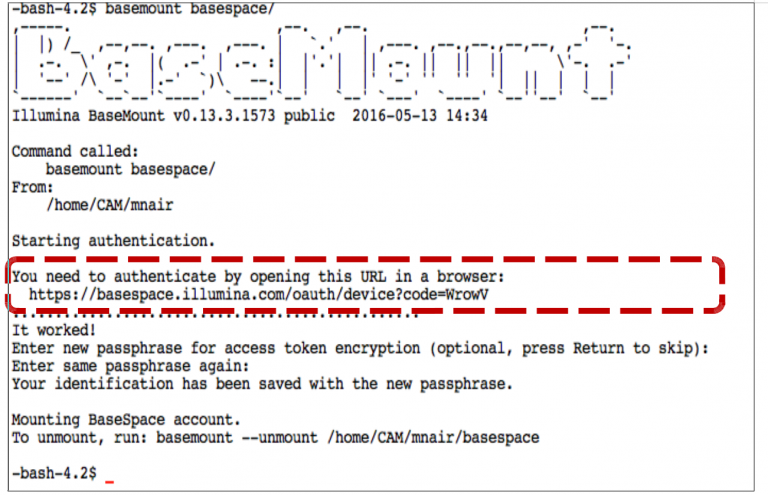
It will give the following output:
-
Copy the URL from your output shown in the example in the red box and paste in browser. (Do not copy from the above example, copy from your output)! This will open up the Basespace login window. Log in using your credentials and that will authenticate the connection. It may not ask for authentication in future sessions.
-
Your datasets (fast.gz files) are now available in
basespace/Projects/$PROJECT_NAME/Samples/$SAMPLE_NAME/Files/(most likely). -
Copy fastq.gz files from the
$PROJECT_NAMEdirectory to local directory. In this example$PROJECT_NAMEisdinosaur:cd basespace/Projects/${PROJECT_NAME}/Samples/ sample_list=$(ls) for each in $sample_list > do > mkdir /path/to/dataFinalLocation/dinosaur/$each > cp $each/Files/*.fastq* /path/to/dataFinalLocation/dinosaur/$each/ > done cd /scratch/jurassic
Once this is completed, check to ensure transfer.
-
Unmount basespace:
basemount --unmount basespace
-
Remove your directory in scratch.
rm -r /scratch/jurassic
Use a text editor:
nano basespace_download.sh
Then modify the following code to use as your own script:
#!/bin/bash
#SBATCH --job-name=Basespace_download
#SBATCH --mail-user=first.last@uconn.edu
#SBATCH --mail-type=ALL
#SBATCH -n 1
#SBATCH -c 1
#SBATCH --partition=general
#SBATCH --qos=general
#SBATCH -o %x_%j.out
#SBATCH -e %x_%j.err

module load basemount/0.13.3.1573

mkdir /scratch/jurassic
cd /scratch/jurassic

PROJECT_NAME=$<your project name>. # provided by sequencing facility

mkdir -p /path/to/dataFinalLocation/${PROJECT_NAME}

mkdir -p basespace

basemount basespace
cd basespace/Projects/${PROJECT_NAME}/
sample_list=$(ls)
for each in $sample_list
do
    mkdir /path/to/dataFinalLocation/${PROJECT_NAME}/$each
    cp $each/Files/*.fastq* /path/to/dataFinalLocation/${PROJECT_NAME}/$each/
done

cd /scratch/jurassic
basemount --unmount basespace
cd ..
rm -r /scratch/jurassic
Run the script in the directory you would like the files copied to:
SBATCH basespace_download.sh