Repository navigation
Themes
You can create your own theme by modifying the configuration file.
It is possible to modify:
- Sprites like: cursor, fonts, virtual keyboard, buttons, icons…
- The palette
- The SFX
- The screen size…
Use other's themes by replacing your configuration cart by the theme cart.
Run folder in the console to open the storage folder; the configuration cart is .local/<build-hash>/config.tic inside it.
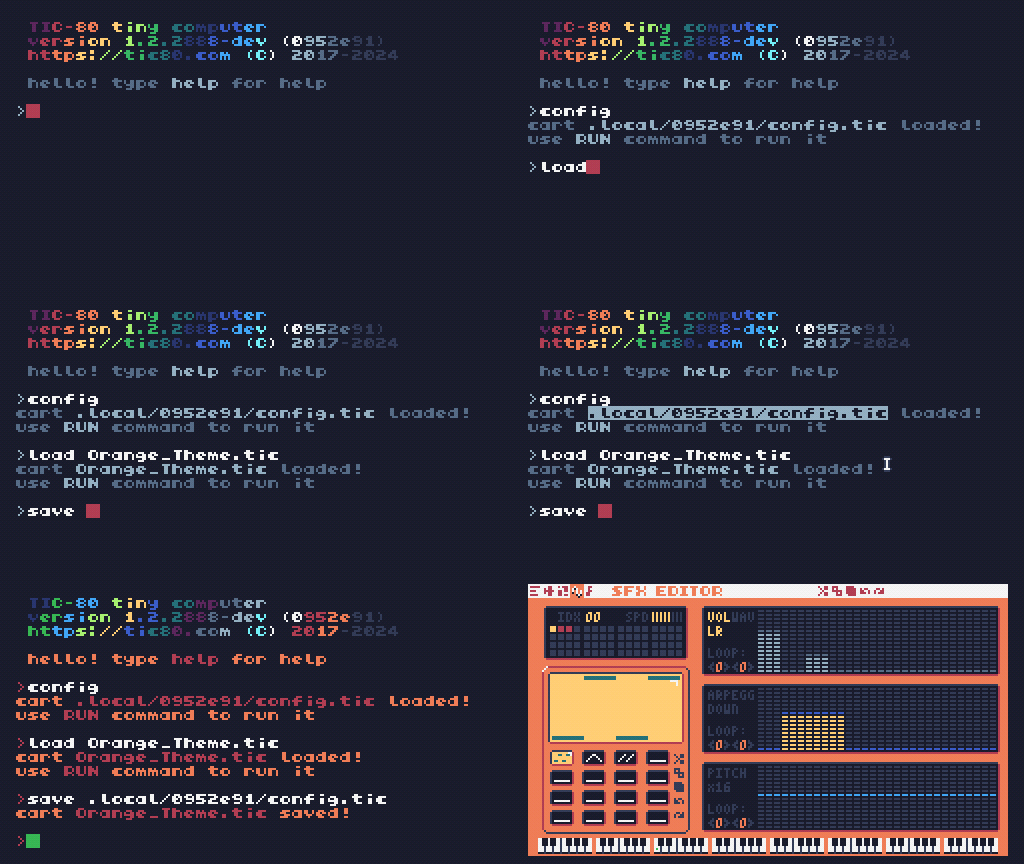
You can also choose to use only part of the theme by using the load function to load only the code, sprites, palette... to your config.tic cart.
Share your theme here.
I changed the palette keeping the Sweetie16 colors but reorganizing them, and I re-drew most of the sprites.
The theme cart is at https://tic80.com/play?cart=3609


This theme was designed to celebrate Christmas 2023.
In addition to changing colour numbers used by the code editor, this theme also adds a custom palette, sound effects, font and even the keyboard graphic.
The theme cart is at https://tic80.com/play?cart=3639


Running a cart with an empty TIC() function will display the cover, or if there is no cover, it will keep the screen as it is.
Therefore one can switch to the editor of choice, run the game with empty TIC() function to get the editor displayed in game and press F7 to get this editor as cover.
function TIC()
end
That works better with some editors than others.
