Overview
You can report conversations, shared links, responses, GPTs, and forum posts that may violate OpenAI’s Terms of Use or applicable laws via our content reporting webform.
Reported domains and other content may be reviewed by OpenAI’s Model Quality team, which may apply filters or other mitigations to help prevent ChatGPT from relying on unreliable sources in future responses.
You may also be able to make a report in-product; see below for how to report across platforms.
If you are a UK user and wish to opt out of future communications once you have submitted your report, please use the content reporting form so you can elect to opt-out.
Reporting intellectual property concerns
If you believe content on an OpenAI product infringes your intellectual property rights, you can report it using the relevant form below:
Copyright infringement: https://openai.com/form/copyright-disputes/
Trademark infringement or counterfeit goods: https://openai.com/form/trademark-counterfeit-disputes/
In-product reporting may also be available. However, using the relevant form above will help ensure that your report includes the information required for review.
Conversations with ChatGPT
You can report a ChatGPT conversation directly from the message in question on both mobile (iOS and Android) and web (chatgpt.com).
Tap thumbs down (👎) under a ChatGPT message.
Tap Select an issue.
Select “Safety or Legal concern”.
Follow the prompts to submit your feedback.
Shared links
You don’t need to be signed in to report a shared conversation. When prompted, describe the issue and identify the type of problem you’re reporting.
Report a shared scheduled task
Open the shared scheduled task link.
If Report is available, select it.
Follow the prompts to submit the report.
If Report is not available, submit the link using the OpenAI content reporting form.
For information about scheduled task links, see: Scheduled tasks in ChatGPT.
iOS (App)
Tap the three-dot menu (...) at the top-left of the screen.
Tap Report.
Follow the prompts to submit your feedback.
Android (App)
Open a Shared Link. Scroll to the bottom of the shared link page.
Scroll to the top of the conversation.
Click 'Report conversation' and follow the prompts.
Web (chatgpt.com/share/...)
Open a Shared Link.
Scroll to the top of the conversation.
Click ‘Report conversation’ and follow the prompts.
Conversations with GPTs
iOS (App)
Click on a GPT and start a conversation.
Tap ‘GPT Name’ on the top-middle of the screen.
Tap Report.
Tap 'Report conversation' and follow the prompts.
Android (App)
Click on a GPT and start a conversation.
Tap the three-dot menu (⋮) at the top-right.
Select ‘Report’ then ‘Conversation’ and follow the prompts.
Web (chat.openai.com)
Start a conversation with a GPT.
Click on the (...) button at the top right of your screen.
Click Report and follow the prompts.
GPTs
iOS (App)
Click on a GPT.
Tap ‘GPT Name’ on the top-middle of the screen.
Tap Report.
Follow the prompts to submit your feedback.
Android (App)
Click on a GPT.
Tap ‘GPT Name’ on the top-middle of the screen.
Tap Report.
Follow the prompts to submit your feedback.
(Note: if you’ve already started a conversation with the GPT, you’ll click ‘Report’ then ‘GPT’ to report the GPT as a whole and not your specific conversation)
Web (chat.openai.com)
Click on a GPT from the GPT Store, or from an external link.
Click the GPT’s name at the top left of your screen
Click ‘Report GPT’ and follow the prompts
Ads content
Web
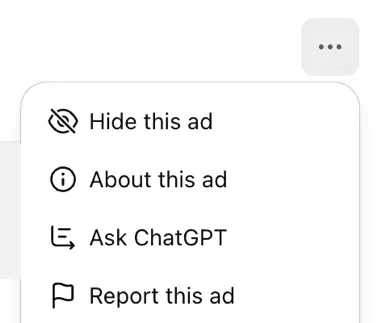
To report an ad in ChatGPT:
On the ad, click ⋯ (top right).
Select Report this ad.
In the pop-up, choose why you’re reporting it.
(Optional) Provide additional details in the text box.
Click Submit. You can submit without entering any additional details.
ChatGPT Sites
ChatGPT Sites do not currently have an in-product reporting option. To report a Site, use the Report Contact Form.
OpenAI Forums
OpenAI Community Forum
Submit your report with a link to the content in question.
📎 Tip: Copy the URL of the message directly from your browser’s address bar.
OpenAI Developer Forum
Navigate to openai.com/form/report-content, or click “Report illegal content” from the footer of any thread.
To report a specific comment:
Click the link icon (🔗) on the bottom-right of the post or comment.
Copy that URL and paste it in the report form.
