Heos Scale for Aseprite
A downloadable tool
Heos Scale is a Lua script for Aseprite that enlarges and rotates pixel art with 13 pixel art scaling algorithms, from 1x to 16x, with a live preview to compare each one against plain nearest scaling.
Useful for HD versions of old sprites, promotional art and thumbnails, smooth rotations without broken lines, tiles and textures, and for comparing the classic emulator filters on your own drawings. It is free and released under the GPL v3.

Original (normal resize):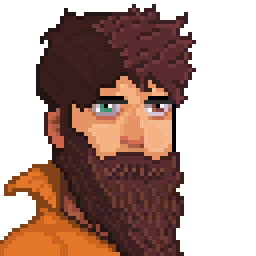
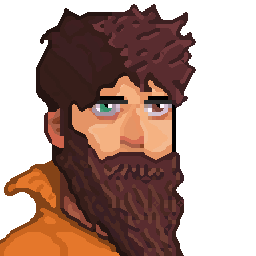
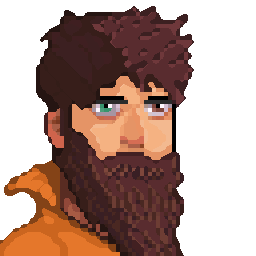
Some Algorithms: (x4)
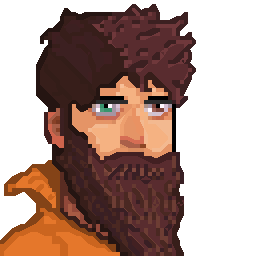
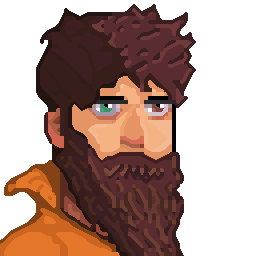
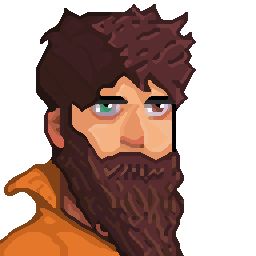
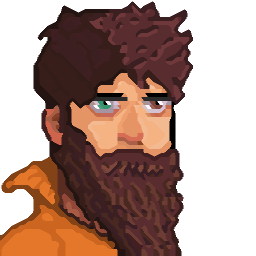

- 1. Open a sprite: RGB, Grayscale or Indexed.
- 2. Pick a Scale and an Algorithm: Turn on Allow new colors to see the algorithms that blend colors.
- 3. Preview: Open Preview and drag the white line to compare the result with plain nearest scaling.
- 4. Allons-y!: The result opens in a new sprite. Your original is never touched.

Each algorithm looks at the neighbors of every pixel to guess which edges are lines and curves, and fills the new pixels so diagonals and corners stay smooth instead of turning into stairs. Larger factors chain passes of 2x and 3x, and the list of scales only shows the ones the chosen algorithm can make by itself.
- Same palette: Scale2x, Eagle, MMPX, ScaleFX, cleanEdge and xBR Sharp only reuse the colors of the source, so the result stays clean pixel art.
- Allow new colors: xBR, xBRZ, hqx, OmniScale, 2xSaI, Super 2xSaI and Super Eagle blend colors for softer, rounded edges (RGB and Grayscale).
- Rotate: Any angle, clockwise, RotSprite style: the drawing is enlarged inside, rotated and sampled back, so lines stay clean. Quarter turns are exact, and 1x rotates without scaling.

- Scale: 1x, 2x, 3x, 4x, 6x, 8x, 9x, 12x and 16x, depending on the algorithm.
- Rotate: Degrees, with -90, 0 and 90 buttons; 180 is the end of the slider.
- Tolerance: Colors within this many levels per channel count as equal. Raise it for dithering or soft antialiasing (same palette algorithms only).
- Silhouette: Smooth rounds the outline; Keep never lets the shape grow or shrink.
- Frames: All frames or only the current one.
- Layers: Flatten merges what you see; Keep scales each layer on its own, copying groups, opacity and blend modes.
- Selection only: Scales just the selected area.
- Tile edges: Wraps the borders so tiles still match.

Live preview
Its own window with the real output, pixel for pixel. Split shows nearest on the left and the result on the right: click to place the white line and drag it. Mouse wheel zoom, right drag to pan, Ctrl+wheel to rotate in 15° steps, 1:1 and Fit view.
Fixed source
Sprites made with Allons-y! are never used as source, so you can try several algorithms in a row from the same original.
Free and open source
Heos Scale is released under the GNU GPL v3: you can use it, change it and share it, keeping the license and the credits. LICENSE.txt lists every algorithm with its author and license.

Requires Aseprite 1.3.x. Works in RGB, Grayscale and Indexed color modes (the algorithms that blend colors need RGB or Grayscale).

- 1. Open the folder: In Aseprite, go to File > Scripts > Open Scripts Folder.
- 2. Copy the script: Put Heos_Scale.lua inside that folder.
- 3. Rescan: Back in Aseprite, use File > Scripts > Rescan Scripts Folder (F5).
- 4. Run it: Open it from File > Scripts.
Faster with Heos Launcher: With Heos Launcher open and its Drop a .lua to install it option turned on, just drag the .lua file onto Aseprite. It is copied to the scripts folder, the menu is rescanned and the script opens.

- The algorithms are made for hard edged pixel art. For dithering or antialiased art, raise Tolerance a little.
- For rotations, cleanEdge usually gives the cleanest lines. Use Scale 1x to rotate without enlarging.
- A very large result is refused: use a selection or a smaller factor.

I love seeing how you use Heos Scale in your projects. If you have questions, ideas, or just want to share what you've made, feel free to leave a comment or reach out directly. It's always great to see your work in action.

If you found this tool useful, taking a moment to leave a rating really helps. Thanks for the support. ❤️
Download
Click download now to get access to the following files:

