Thank you for such a wonderful tool, it is fantastic but i can't for some reason draw with my pen tablet, i have tried everyhing from changing the button setups, to trying to make it windows link, mouse only, I am using a xp pen and a windows 10
I love pixelorama and I use it for almost anything including no pixelart functions jaja
I am making a game and I use so much the spritesheet for animations instead of frames.
It's so useful the previsualization panel with "animation mode: current frame as spritesheet" but is not so much usable.
When navigating through the animation preview using the middle mouse button, it is very easy to move the cursor outside the preview panel, which causes the movement to stop, presumably because the system stops registering mouse input once the cursor leaves the panel area. It would be much more convenient if the movement continued, with the system still registering mouse input in this specific scenario. This would also resolve an issue that occurs when the cursor re-enters the preview panel: if you release the middle mouse button while the cursor is outside the panel, the system fails to detect that the button has been released, which is quite inconvenient.
Here are some additional suggestions regarding this preview panel:
- It would be more convenient if the “spritesheet options” section were always expanded.
- Regarding the “start frame” and “end frame” settings: currently, you have to enter the frame numbers manually without any visual reference, which is tedious. It would be much better to remove these fields and implement the following:
Include a button in the animation preview panel that initiates the frame-selection process within the main panel, based on the dimensions defined by the “horizontal frames” and “vertical frames” settings, allowing you to select frames in your desired order by either dragging the mouse or clicking on them individually. This same button could also be used to finalize the selection process. This would function similarly to how AnimatedSprite2D works in Godot.
Is an usability suggestion, I don't want to cause any trouble
Damn, man, what a beautiful game! Your art is fucking awesome. If you ever need any help with another project, you can count on me—I’d love to help you take your projects to the next level. It’s definitely worth it!
Hey friend! Your app is brilliant—I’m so glad Godot recommended it on their site. I literally started getting into video games and pixel art a year ago, and I’ve been using your app ever since. I use it in all its formats—even the online version, which is perfect for making the most of some downtime at the office where I work ( ͡° ͜ʖ ͡°) When someone asks what to use to create pixel art, this is what I recommend.
First, thank you for creating and maintaining Pixelorama! I really love the project.
I'd love to see a keyframe-based transform animation system designed for pixel art. Something that allows us to set a starting position, rotation, or scale, move forward on the timeline, set another keyframe, and automatically interpolate the movement between them.
It would also be amazing to have basic 2D bone rigging, so we can cut a character into parts (arms, legs, head, etc.) and animate them smoothly without manually drawing every frame.
I think this would be a fantastic addition to Pixelorama, especially for people who want to create character animations while keeping their pixel art workflow simple.
I've been trying to connect my Huion Drawing Pad to Pixelorama and it doesn't seem to work?
The app detects the pen as the cursor works fine and can even select the tools and settings but when I try to draw, it doesn't do anything.
I've tried changing the Tablet Drivers and checked my Huion Driver and double checked if I'm on the right layer or using the brush pen or if my opacity is fine and the sort and all seems in order.
This plugin is really cool! As an artist, I’ve run into a few issues while working with it and would like to suggest some improvements:
When using custom brushes, even if I set “brush color from” to 100, lowering the opacity of my selected color does not change the brush‑stroke opacity at all. It would be great if custom brushes could respect stroke‑opacity adjustments.
The zoom tool has some usability problems with drawing tablets. When I drag left, the view zooms in; dragging right zooms out. Most drawing programs work the opposite way —‑ drag‑left to zoom out, drag‑right to zoom in. This feels really counter‑intuitive once you are used to standard workflows. Also, switching the “mode” setting between “zoom out” and “zoom in” makes no visible difference.
What’s more, dragging to zoom does not pivot around the cursor position. If I keep zooming in and out without releasing the pen, the view drifts steadily away from my original focal point. Mouse‑wheel zoom works correctly in this regard.
I’d also love two extra preferences: zoom speed and zoom‑range limits. Right now zooming happens way too fast; I often accidentally zoom all the way out until I can barely see my artwork, which breaks my painting flow.
When “single tool mode” is enabled, the tool‑icon HUD shows up at the bottom‑left corner instead of centered on my cursor. Multiple overlapping icons can get confusing. This behaves differently from how most mainstream painting software handles single‑tool mode. Adding toggle‑style compatibility options here would help users coming from other apps.
The “interface” slider under the “contrast” setting lags badly. The slider is hard to drag and stutters while adjusting values.
This is genuinely the best pixel art app I've ever tried.
However, I do have a little problem, and it's that I can't figure out how to add a reference image.
I'm on mobile, so I don't know if it's something that hasn't been implemented yet or if it's a “my phone” problem, but yeah. Besides that, the best, I can't recommend it enough ^^
Thank you very much! It should work the same on all platforms, if you go to File -> Open and select the image that you want, a window should appear that lets you change the "Import as" option to "New reference image". Just make sure that the current project is not empty, otherwise the image will open as a new project instead.
Thank you!, it actually might've been a “my phone” problem, because last time I tried I kept getting an error message but now it worked just fine. Anyways, thanks a lot, hope you're having a great day!! ( ˶ˆ꒳ˆ˵ )
Good luck on your journey!! It can take time at first to reach an audience, but you can do this, we believe in you! And of course, feel free to share your project with us :D
hello there is a critical bug in pixelorama when you draw something and use the rectangle select tool to select an area and use the bucket tool the whole app freezes and stop responding it need to end it using task manager please fix it soon
This is an awesome app. Thank you for making this. I made a couple of small projects in Godot ver. 3.5, but since then the engine underwent big changes that made it difficult to work in without re-learning everything from scratch!
Hi Pixelorama team! First, thank you for all the hard work on this amazing project. I've been loving using it, and I wanted to suggest a couple of quality-of-life features that would really enhance the drawing workflow:
1. Dedicated Spray Tool
It would be awesome to have a Spray / Airbrush Tool for quickly adding texture, noise, and dithering effects.
Suggested Controls:
Radius / Size: Controls the area of the spray area.
Density / Flow: Controls how many pixels are emitted per tick/click.
1-Pixel Lock: An option to ensure emitted particles snap cleanly to individual pixels without overlapping into blocky clusters.
2. Dedicated Brush Layout & Management Panel
Right now, working with custom brushes can be a bit tedious. It would be incredibly helpful to have a dedicated UI panel or layout specifically for selecting, adding, and managing custom brushes.
What would make it great:
Visual Grid / Library: A clean grid layout displaying thumbnails of saved custom brushes so we can swap between them quickly.
Quick Add: A simple button in the panel to instantly save the current selection as a new custom brush.
Management Options: The ability to rename, organize, delete, or export/import brush presets directly from this panel without navigating away from the canvas.
Having a dedicated brush library panel combined with a spray tool would make pixel shading and texturing feel much faster and more intuitive.
Thanks again for building such a fantastic pixel art editor! Looking forward to seeing where Pixelorama goes next.
Thank you for the detailed feedback! At some point we definitely want to improve the brush experience and create a proper brush engine, so improving the brush UI is definitely something that we're interested in! :D
Ah shit, this tool has recently become a core part of my workflow. Anyone looking for an intuitive sprite image editor for Mac OS should buy this immediately! I was able to switch back to Unity from GM thanks to this tool.
hi, I love this app a lot - but I was having trouble running it on my lenovo yoga l380
the touch screen was just not playing nice with it (lots of randomly like, line being pulled across canvas) and needing to restart if I wanted to try using the app in "tablet mode"
at the time I was running windows 10 and these problems may have been fixed since then
but just wanted to say that that mightb something to look into - otherwise loved the app ^w^
edit: and THANK YOU for the linux builds, highly appreciated
Hey, thank you for the report! Unfortunately we don't have this tablet to do tests, but perhaps it may be a similar case to drawing tablets where you need to change the tablet driver, which can be done so by going to the Edit menu, Preferences, under the Driver category.
Great Thanks. I was struggling to find a button ✅ n the same place as the pallet and all the other palette buttons. Maybe there should be something there too... Or een just a hint. Cheers
We will most likely release it on Play Store and F-Droid at some point, but the Android version is still in an experimental stage. It needs more UI improvements, polishing and touch-related features in order to be production ready. Once we reach that stage, we will look into releasing it to stores :)
I saved my file but now its saying that it can't open it anymore. I don't know what I did wrong the file itself is there but it won't actually open it. Very unfortunate to happen during artfight..
Hi, the program is really nice however it won't seem to work with my drawing tablet. From what I can see is that the part of the program that allows you to draw will not sink with the pen, the actual cursor will and everything else works fine with the pen, it just won't move with the pen when drawing. Drawing with mouse is always an option I suppose however that really hurts my wrist :(
I managed to fix it :D if your also struggling with this go to edit then preferences then all the way down to driver. I got mine to work by setting Tablet Driver to Dummy however wintab also worked for my device.
Hello, I have a problem. When I try to search for an extension online, I get a window that says "Parameter out of range." I'm using Windows 10, so I've tried using the firewall and running the program as administrator, but nothing works. I know I can download the extensions online, but I find it more convenient to do it directly from the application. If there's no other solution, that's fine. Thanks!

← Return to tool
Comments
Log in with itch.io to leave a comment.
Thank you for such a wonderful tool, it is fantastic but i can't for some reason draw with my pen tablet, i have tried everyhing from changing the button setups, to trying to make it windows link, mouse only, I am using a xp pen and a windows 10
I love pixelorama and I use it for almost anything including no pixelart functions jaja
I am making a game and I use so much the spritesheet for animations instead of frames.
It's so useful the previsualization panel with "animation mode: current frame as spritesheet" but is not so much usable.
When navigating through the animation preview using the middle mouse button, it is very easy to move the cursor outside the preview panel, which causes the movement to stop, presumably because the system stops registering mouse input once the cursor leaves the panel area. It would be much more convenient if the movement continued, with the system still registering mouse input in this specific scenario. This would also resolve an issue that occurs when the cursor re-enters the preview panel: if you release the middle mouse button while the cursor is outside the panel, the system fails to detect that the button has been released, which is quite inconvenient.
Here are some additional suggestions regarding this preview panel:
- It would be more convenient if the “spritesheet options” section were always expanded.
- Regarding the “start frame” and “end frame” settings: currently, you have to enter the frame numbers manually without any visual reference, which is tedious. It would be much better to remove these fields and implement the following:
Include a button in the animation preview panel that initiates the frame-selection process within the main panel, based on the dimensions defined by the “horizontal frames” and “vertical frames” settings, allowing you to select frames in your desired order by either dragging the mouse or clicking on them individually. This same button could also be used to finalize the selection process. This would function similarly to how AnimatedSprite2D works in Godot.
Is an usability suggestion, I don't want to cause any trouble
whatever you do, thanks and sorry
It's amazing!!
Please add 32bit support for Android
Noted!
Damn, man, what a beautiful game! Your art is fucking awesome. If you ever need any help with another project, you can count on me—I’d love to help you take your projects to the next level. It’s definitely worth it!
Not sure what game you're talking about, but thank you I guess 😅
Hey friend! Your app is brilliant—I’m so glad Godot recommended it on their site. I literally started getting into video games and pixel art a year ago, and I’ve been using your app ever since. I use it in all its formats—even the online version, which is perfect for making the most of some downtime at the office where I work ( ͡° ͜ʖ ͡°)
When someone asks what to use to create pixel art, this is what I recommend.
Thank you so much for the kind words and for recommending it to other people! We're very happy that you enjoy using it!
First, thank you for creating and maintaining Pixelorama! I really love the project.
I'd love to see a keyframe-based transform animation system designed for pixel art. Something that allows us to set a starting position, rotation, or scale, move forward on the timeline, set another keyframe, and automatically interpolate the movement between them.
It would also be amazing to have basic 2D bone rigging, so we can cut a character into parts (arms, legs, head, etc.) and animate them smoothly without manually drawing every frame.
I think this would be a fantastic addition to Pixelorama, especially for people who want to create character animations while keeping their pixel art workflow simple.
Thank you for your amazing work!
Hy, There is already a keyframe timeline in Pixelorama (to transform, your layer should have the offset FX attached)
There is bone rigging too (see Skeletor) https://variable-interactive.itch.io/skeletor-pixelorama-extension
thx <3 that was really helpful
Very good program. I can’t wait to be able to actually spend money on it to support you guys
Thank you, we greatly appreciate the support! 🥹
I can't download it on my Samsung Galaxy A01.
Literally my favorite app!
Thank you so much, it means a lot to us!
Hi!
I've been trying to connect my Huion Drawing Pad to Pixelorama and it doesn't seem to work?
The app detects the pen as the cursor works fine and can even select the tools and settings but when I try to draw, it doesn't do anything.
I've tried changing the Tablet Drivers and checked my Huion Driver and double checked if I'm on the right layer or using the brush pen or if my opacity is fine and the sort and all seems in order.
I would appreciate the help!
You may have accidentally enabled alpha lock
Can you check if there is a lock icon on it or not?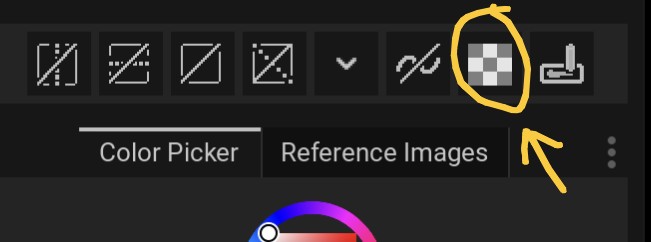
I've checked and its turned off.
The pen is still not drawing anything even if it moves the cursor
I've also checked the browser version and the pen works fine there
Hello! Just to make sure, assuming you are on Windows, have you tried changing your tablet drivers from Pixelorama's preferences? https://pixelorama.org/troubleshooting/#my-drawing-tablet-is-not-working
Yes. I've tried changing the Drivers in Preferences in Pixelorama and even disabled Windows Ink my Huion Driver.
The cursor moves just fine with the pen and can be used to interact with the settings and the sort but it won't draw.
Nice
Thanks!
This plugin is really cool! As an artist, I’ve run into a few issues while working with it and would like to suggest some improvements:
Thank you very much for the suggestions, they are very helpful! We will keep them in mind for future versions!
This is genuinely the best pixel art app I've ever tried.
However, I do have a little problem, and it's that I can't figure out how to add a reference image.
I'm on mobile, so I don't know if it's something that hasn't been implemented yet or if it's a “my phone” problem, but yeah. Besides that, the best, I can't recommend it enough ^^
Thank you very much! It should work the same on all platforms, if you go to File -> Open and select the image that you want, a window should appear that lets you change the "Import as" option to "New reference image". Just make sure that the current project is not empty, otherwise the image will open as a new project instead.
Thank you!, it actually might've been a “my phone” problem, because last time I tried I kept getting an error message but now it worked just fine. Anyways, thanks a lot, hope you're having a great day!! ( ˶ˆ꒳ˆ˵ )
Nice, I just discover this, time to suffer while learning how to draw :D
Wish my project could also reach people ;c
Good luck on your journey!! It can take time at first to reach an audience, but you can do this, we believe in you! And of course, feel free to share your project with us :D
I tried sharing, but... Yeah, nothing at all. I also suck by a lot.
I have no idea how to share it here, because of how only allows very small things.
They mean that you can share it in their discord server 😁
Oh, no. I don't, or ever will, have Discord.
No problem, there's always other platforms 😁.
Been using this for almost 3 years now, such great program. Practical, easy to use and getting better with each update!
Thank you so much! We appreciate it a lot :)
hello there is a critical bug in pixelorama when you draw something and use the rectangle select tool to select an area and use the bucket tool the whole app freezes and stop responding it need to end it using task manager please fix it soon
Hello we know about it and have fixed it for next version. It will be available soon but you can download the nightly here https://nightly.link/Orama-Interactive/Pixelorama/workflows/dev-desktop-builds/master
thanks <
fun and easy to use, thanks !!
Glad you like it!! :)
It's a very pretty and very good app, I use it on my laptop but when I use it on my cell phone it only shows half the screen :(.
Thanks for the feedback! Have you tried using it in landscape mode in your phone? The app is not very well optimized for portrait mode at the moment.
si y es donde no se ve bien :(
Great app!! I suck at making pixel arts but it's sooo much easier to learn it there :DD This literally THE PERFECT pixel art app haha
Thank you so much! This means a lot to us!! 🥹
Once you switch to Pixelorama, you never look back! Goated App!
Thank you so much! We appreciate our goated community <3
awesome stuff
Thank you!
This is an awesome app. Thank you for making this. I made a couple of small projects in Godot ver. 3.5, but since then the engine underwent big changes that made it difficult to work in without re-learning everything from scratch!
Thank you for the kind words!
Hi Pixelorama team! First, thank you for all the hard work on this amazing project. I've been loving using it, and I wanted to suggest a couple of quality-of-life features that would really enhance the drawing workflow:
1. Dedicated Spray Tool
It would be awesome to have a Spray / Airbrush Tool for quickly adding texture, noise, and dithering effects.
2. Dedicated Brush Layout & Management Panel
Right now, working with custom brushes can be a bit tedious. It would be incredibly helpful to have a dedicated UI panel or layout specifically for selecting, adding, and managing custom brushes.
Thanks again for building such a fantastic pixel art editor! Looking forward to seeing where Pixelorama goes next.
Hi, there is a spray mode available in the pencil tool. You have to adjust density
Thx <3
Thank you for the detailed feedback! At some point we definitely want to improve the brush experience and create a proper brush engine, so improving the brush UI is definitely something that we're interested in! :D
Ah shit, this tool has recently become a core part of my workflow. Anyone looking for an intuitive sprite image editor for Mac OS should buy this immediately! I was able to switch back to Unity from GM thanks to this tool.
Thank you so much, we're so happy that it works well for you!!
This is really well made and I made multiple good animations and sprites with this, but I don't seem smart enough to import an audio file xD
Drag and drop it
Hello, we've extended the "Import" page in Pixelorama's documentation to better cover how audio importing works, it may help you. https://pixelorama.org/user_manual/Import#importing-audio
how do i deselect the polygon tool? my polygon selection won't go away
Press Ctrl + D
ωραίος!
Ευχαριστούμε!
hi, I love this app a lot - but I was having trouble running it on my lenovo yoga l380
the touch screen was just not playing nice with it (lots of randomly like, line being pulled across canvas) and needing to restart if I wanted to try using the app in "tablet mode"
at the time I was running windows 10
and these problems may have been fixed since then
but just wanted to say that that mightb something to look into - otherwise loved the app ^w^
edit: and THANK YOU for the linux builds, highly appreciated
Hey, thank you for the report! Unfortunately we don't have this tablet to do tests, but perhaps it may be a similar case to drawing tablets where you need to change the tablet driver, which can be done so by going to the Edit menu, Preferences, under the Driver category.
How do I import a palette? I have either gpl or png files i can use. Cheers
Hello! You can simply drag and drop the palette files into Pixelorama, or open them from the File menu and selecting Open. More info here: https://pixelorama.org/user_manual/palettes#palettes-import
Great Thanks. I was struggling to find a button ✅ n the same place as the pallet and all the other palette buttons. Maybe there should be something there too... Or een just a hint. Cheers
Great tool. I love it! Thanks for the Linux builds. :-)
Thank you very much!
Any info about releasing 1.2? I would use it as flatpak.
It's in Release candidate stage so i think it should be available in a couple weeks https://nightly.link/Orama-Interactive/Pixelorama/workflows/dev-desktop-builds/master
I would avoid nightly ;)
Are there plans for google play store?
I would buy it a second time.
edit: anything is wrong with the nightly links: "Sorry, only *.zip downloads are supported by nightly.link for the moment."
No worries, i was just telling you the estimated time based on current status.
Android release would likely be free. Play store isn't planned to my knowledge, it was originally planned to be published on F-Droid though recently there there are are some potential problems whith this approach (for details see https://orama-interactive.itch.io/pixelorama/devlog/1487558/pixelorama-v119-is-out)
If the nightly links are broken try these (they are in Release candidate stage so they are close to stable):
Linux 64bit: https://github.com/Orama-Interactive/Pixelorama/actions/runs/29092152987/artifac...
Pixelorama-Linux-ARM64: https://github.com/Orama-Interactive/Pixelorama/actions/runs/29092152987/artifac...
We will most likely release it on Play Store and F-Droid at some point, but the Android version is still in an experimental stage. It needs more UI improvements, polishing and touch-related features in order to be production ready. Once we reach that stage, we will look into releasing it to stores :)
thx for that info :)
I saved my file but now its saying that it can't open it anymore. I don't know what I did wrong the file itself is there but it won't actually open it. Very unfortunate to happen during artfight..
That's unfortunate, but there should be backups available from Help > Restore Backup
THANK YOU SO MUCH
Hi, the program is really nice however it won't seem to work with my drawing tablet. From what I can see is that the part of the program that allows you to draw will not sink with the pen, the actual cursor will and everything else works fine with the pen, it just won't move with the pen when drawing. Drawing with mouse is always an option I suppose however that really hurts my wrist :(
I managed to fix it :D if your also struggling with this go to edit then preferences then all the way down to driver. I got mine to work by setting Tablet Driver to Dummy however wintab also worked for my device.
Deserves more recognition.
Glad you think so! We want to do some more promotion to eventually make it more known, but anyone is welcome to help by spreading the word! 💚
Hope it'll help! (Survival Rift's credits)
Thank you very much, we greatly appreciate it!
Thank you, glad you like it!
Muchas gracias por existir, no sabia que hubiera otra opción además de Aseprite o Piskel, gracias.
💚💚💚
this is really bad
i take that back
So with the 3d options, does anyone have a suggestion for importing and posing a 3d person obj file?
It's likely that your system time is wrong, in your windows time setting you should set it to take the hour from internet.
Oh God, it's true, thank you so much, I really appreciate it.
Glad to help