
Statement 2 (Flexible State Machines)
A downloadable tool
Make a statement with your states!
Flexible state machines for GameMaker
At some point, every game ends up with state logic. People often have their first foray into states with a simple state variable and a switch block, or maybe even a series of if statements *shudder*. That kinda works for a few minutes, and then almost immediately starts collapsing under its own weight.
You need an attack that can't be interrupted. Then a stun that can interrupt it. Then you need to return to whatever the character was doing before the stun. Then an enemy has its own nested behaviour states. And your animation changes never seem to trigger properly.
As you try to fix things, your simple state variable gradually accumulates a pile of flags, conditionals and special cases that gets harder to change every time you add something new, and constantly seems to break with weird edge cases.
Statement is here to stop that spiral before it starts.
Statement lets you keep state logic clean with simple functions instead of one enormous switch block, or a buttload of if...else statements, build complicated states with a bunch of advanced features that let you add a lot of bespoke behaviour to your states easily, and inspect your state machines visually in-game with Statement Lens (a fully interactive visual debugger for your states!)
Statement is quick to setup
// Create Event
/// Create your state machine
state_machine = new Statement(self);

/// Create a state
var _idle = new StatementState(self, "Idle")

/// Add code to run when the state is entered
    .AddEnter(function(_state, _transition) {
        sprite_index = spr_idle;
    })

/// Add your state code
    .AddUpdate(function(_state) {
        if (keyboard_check(vk_right)) {
            state_machine.ChangeState("Move");
        }
    });

/// Another state
var _move = new StatementState(self, "Move")
    .AddEnter(function(_state, _transition) {
        sprite_index = spr_move;
    })
    .AddUpdate(function(_state) {
        x += 4;
        if (!keyboard_check(vk_right)) {
            state_machine.ChangeState("Idle");
        }
    });

/// Add the states to your state machine
state_machine
    .AddState(_idle)
    .AddState(_move);
// Step Event
state_machine.Update();
That's it at its simplest. Create some named states, give them their own logic, and let Statement handle which one is active. (Statement also has extensive documentation to guide you through the process of getting started using it, so even if that looks scary, you can quickly pick it up).
Statement Lens
Statement comes with a sweet visual debugger that runs in your game, so you can literally check out how your state machine is acting.
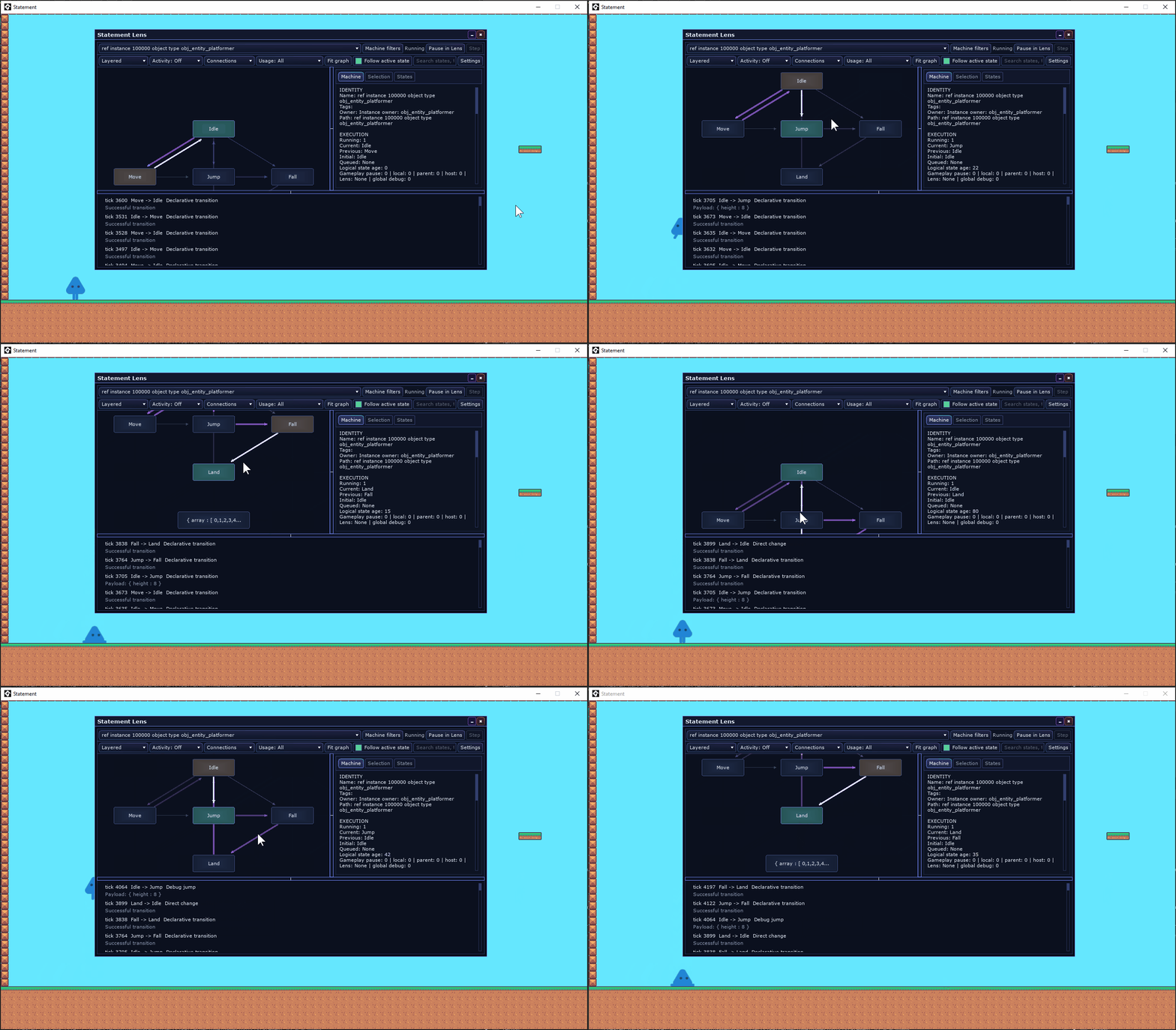
You can see the active state and recent transitions in real time, search through states and machines, inspect transition rules, see why transitions were blocked, and a ton of other little things that let you debug incorrect state behaviour.
Transitions
Statement 2 now introduces transitions into Statement. Transitions let you easily add rules-based transitions between states, which helps keep your code obvious (instead of having to search through a states function for each ChangeState() call, you can see them all grouped together) and provides an easy way to poll for changing conditions.
The transition rules let states describe when they should transition instead of filling every state function with random transition checks. Rules have a bunch of stuff you can apply, like priorities, what data they carry through to the next state, whether they apply across the entire machine, and a bunch of other little things you can tweak.
_idle.AddTransition(
    new StatementTransitionRule("Move", function(_state, _rule) {
        return keyboard_check(vk_right);
    })
);
And the transitions have a result so you can check if it failed, and other stuff like that.
Exit locks and guards
Sometimes a state, quite simply, isn't allowed to exit yet no matter how much you beg. Things like an attack that needs to reach its recovery phase before the player can act again, or a spellcasting animation needs to finish before the spellcast state can exit.
Statement 2 introduces lock and guards, so different systems can independently control whether a state is currently allowed to exit. And you always have the option of forcing a transition (good for things like a death state that needs to override any locks or guards).
Other sweet stuff
There's a lot of other things that Statement has likePushState() and PopState() for states that need to temporarily take over and then return to whatever was happening before, nested state machines, state templates that let you define reusable state behaviour once and build out copies for different objects (and alter how those copies run, so you can build a default attack state template, and then change how the attack works for a light enemy vs a heavy enemy without having to recreate the state from scratch), and a lot more advanced tooling stuff.
It's something that I just immediately import into all of my projects by default because hey, I know I'm going to need states at some point, and Statement covers all the ground I could possibly want from state machines.
Want the broader gameplay toolkit?

Statement is also available as part of the Ignition Kit alongside Pulse and Catalyst, with Echo included.

If you want the entire RefresherTowel Games toolkit collection instead, the Full Suite Pass includes all current and future RefresherTowel Games tools.
Also included: Echo
A purchase of Statement also includes Echo, my GameMaker debugging toolkit, for free.
Echo gives you level-based logging, tags, filtering, optional stack traces, history, file dumps and in-game debugging tools.
Statement Lens is built on Echo's in-game debug UI system.
Documentation
Statement has full online documentation written to take you from zero to hero when using Statement. If you're on the fence, I highly recommend having a look through the documentation, as it will help you figure out if you like the library much quicker than any itch sales page can.
Statement Documentation:
https://refreshertowel.github.io/docs/statement/
Requirements
GameMaker 2024.8 or later.
Support and feedback
If you run into a bug, want to request a feature, or just need help figuring out how to build something:
GitHub Issues:
https://github.com/RefresherTowel/Statement/issues
Discord:
Works well alongside Statement

Pulse - signals, events and queries for communication between game systems. Statement can manage what an object is currently doing while Pulse lets the rest of the game react to those changes without tightly coupling everything together.

Catalyst 2 - gameplay statistics, resources and effects. Statement can control behaviour and state while Catalyst handles the values, buffs, resources and temporary effects that influence that behaviour.
Purchase
In order to download this tool you must purchase it at or above the minimum price of $5.99 USD. You will get access to the following files:
Development log
- Statement Hotfix - Statement Lens & Echo Console10 days ago
- Transition Sweetness (Statement 2 update)81 days ago
- Lens Not Lensing - Statement Update (v1.3.7)Apr 22, 2026
- To Declaratively Transition Or Not To Declaratively Transition - Statement Updat...Mar 10, 2026
- Statement v1.3.5 - Transition data and event handler chainingJan 24, 2026
- Statement v1.3.1 - Minor bugfixJan 18, 2026
- Statement v1.3 - State templates & transition hooksJan 04, 2026
- Statement v1.2 - Statement gives birth to childrenDec 27, 2025


