Clean a Messy Date Column with Mixed Formats in Pandas
Tips and Tricks to Deal with a Messy Date String Column in Pandas Dataframe

Working with datetime in Pandas can sometimes be tricky if your datetime column is a string with messy, mixed formats. You will need to do some pre-processing and convert the mixed formats to the standard datetime type in order to perform any subsequent data analysis.
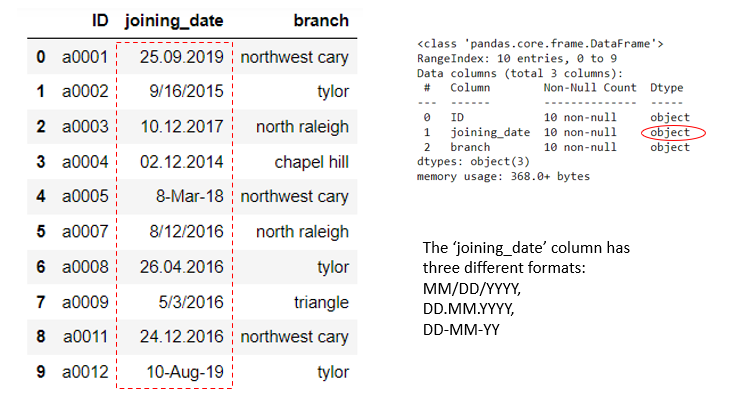
Let's take a look at the following example. In this dataframe, we have a column named 'joining_date' which appears to be a datetime column but is actually a string column. Moreover, the dates are all arranged in different formats.
For example, for ID a0001, the date string is arranged in the DD.MM.YYYY format in which the day is written first. For ID a0005, the date string is displayed in the DD-MM-YY format in which the day is also written first. For ID a0002, the date string is arranged in the format MM/DD/YYYY with the month being written first which is common in the U.S.
So what can we do to clean this messy date string column that has mixed formats, easily and efficiently?
Let's first try Pandas' to_datetime() method which can parse any valid date strings to datetime easily. If we simply do the following without any additional arguments, we get the results shown below:
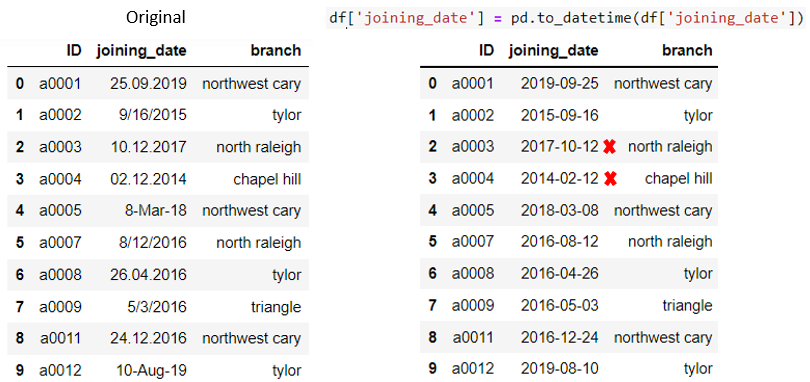
We can see that with the pd.to_datetime() method, we are able to parse the date strings that have mixed formats to datetime with a standard format (default is YYYY-MM-DD). Since pd.to_datetime() by default parses string with month first (MM/DD, MM DD, or MM-DD) format, it mixed up the day and month for date strings with day first format (e.g., DD.MM.YYYY for the dates with red cross marks).
To fix this problem, we can simply add the argument dayfirst=True in the code below:
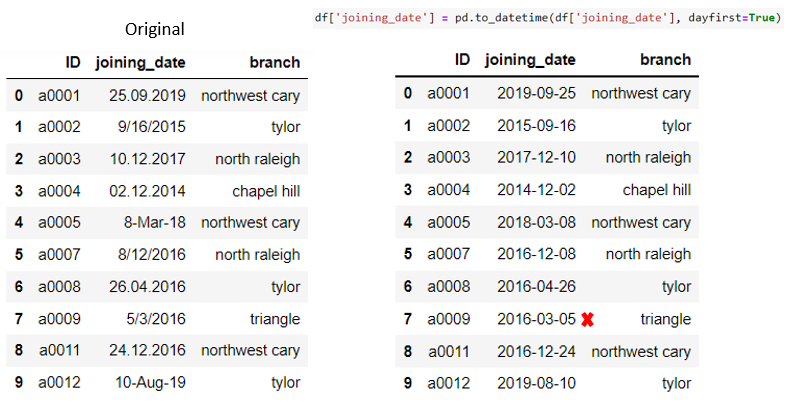
Ok. So this fixed the previous problem but created a new problem. For the date string that has the format MM/DD/YYYY (row 7), since we set the argument dayfirst= to True, it converted 5/3/2016 to 2016–03–05, treating 5 as the day and 3 as the month.
To fix this new problem, we can apply the np.where() condition to only set the argument dayfirst= to True for the date strings that have the day written first.
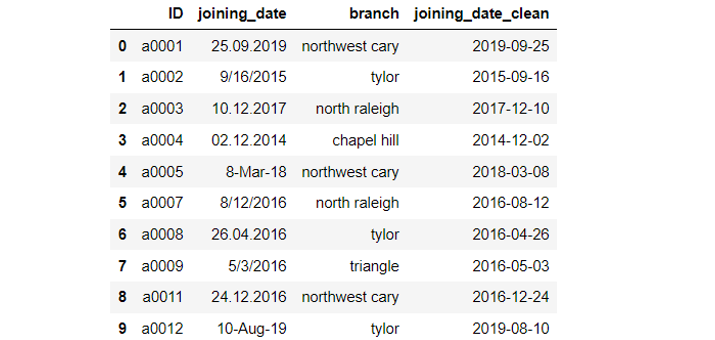
It works! Now we have a much cleaner date column to work with. Please notice that you can also specify the output date format other than the default one, by using the dt.strftime() method. For example, you can choose to display the output date as MM/DD/YYYY by specifying dt.strftime('%m/%d/%Y').
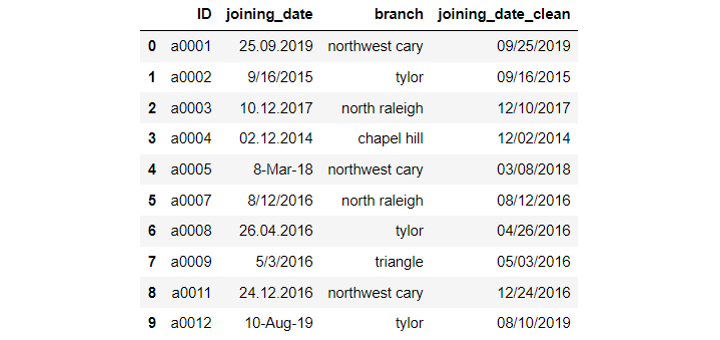
There you go! Without needing to do any fancy string operations, we are able to convert the messy date strings in the original dataset to a standard datetime column. I hope you learned some tricks about working with messy date string columns in Pandas. Thanks for reading and hope you enjoyed this short tutorial.
Data Source:
The sample dataset used in this post was created by the author for demonstration purposes.
You can unlock full access to my writing and the rest of Medium by signing up for Medium membership ($5 per month) through this referral link. By signing up through this link, I will receive a portion of your membership fee at no additional cost to you. Thank you!