Shop SALTYFACE
Currently unavailable.
We don't know when or if this item will be back in stock.
Added to

Sorry, there was a problem.

There was an error retrieving your Wish Lists. Please try again.

Sorry, there was a problem.

List unavailable.
  • 10 VIDEOS
  • Logitech MX Master 3S for Mac - Wireless Bluetooth Mouse with Ultra-Fast Scrolling, Ergo, 8K DPI, Quiet Clicks, Track on Glass, Customization, USB-C, Apple, iPad - Pale Grey

Logitech MX Master 3S for Mac - Wireless Bluetooth Mouse with Ultra-Fast Scrolling, Ergo, 8K DPI, Quiet Clicks, Track on Glass, Customization, USB-C, Apple, iPad - Pale Grey

4.5 out of 5 stars (2,411)

Currently unavailable.
We don't know when or if this item will be back in stock.
Brief content visible, double tap to read full content.
Full content visible, double tap to read brief content.
Style: Select Style
Color: Select Color

About this item

  • Remastered for Mac: MX Master 3S for Mac performance mouse is optimized for macOS, and compatible with iPadOS (1)
  • Feel the performance: MX Master 3S for Mac Bluetooth mouse features an 8K DPI track-on-glass sensor(2) and Quiet Clicks - offering 90% less click noise (3)
  • Magspeed scrolling: A computer mouse with remarkable speed, precision, and near silence - MagSpeed scrolling is 90% faster (4), 87% more precise (5), and ultra quiet
  • Ergonomic design: Work comfortably with a precision mouse featuring a silhouette crafted for a more natural wrist posture and optimally placed thumb controls
  • App-specific customizations: Speed up and customize your workflow with predefined macOS and app-specific profiles in the improved Logi Options plus (6)
  • Multi Mac Workflow: Pair this cordless mouse with up to 3 Mac computers or laptops and effortlessly transfer text, images, and files between them (6)
  • USB-C to USB-C rechargeable: Stay powered for up to 70 days on a full charge and get 3 hours of use from this wireless mouse with just a 1-minute quick charge (7)
  • Plastic parts in MX Master 3S for Mac include certified post consumer recycled plastic (Space Gray: 27%, Pale Gray: 22%(9).

Check Compatibility

Choose your brand

Focus on sustainability

a man working on a computer using mx keys mini wireless advanced keyboard
recycled plastic icon

MADE WITH RECYCLED PLASTIC

The plastic parts in MX Master 3S for Mac include post consumer recycled plastic —27% for Space Gray and 22% for Pale Gray* — to give a second life to end-of-life plastic from old consumer electronics and help reduce our carbon footprint. *Excludes plastic in printed wiring assembly (PWA), receiver, wire, FFC cable, and packaging.

responsible packaging icon

RESPONSIBLE PACKAGING

The paper packaging of the MX Master 3S for Mac comes from FSC-certified forests and other controlled sources. By choosing this product, you are supporting responsible management of the world's forests.


From the manufacturer

The video showcases the product in use.The video guides you through product setup.The video compares multiple products.The video shows the product being unpacked.

aplus content video

A man working on a computer using MX Master 3S for Mac

FEEL THE PERFORMANCE. OPTIMIZED FOR MAC

Works with macOS and iPadOS – now with 8K DPI track-on-glass sensor and Quiet Clicks.

MX Master 3S for Mac in use

MAGSPEED SCROLLING

Ultimate speed and precision. Scroll 1,000 lines per second and stop on a pixel.

MX Master 3S for Mac in use

QUIET CLICKS – 90% LESS NOISE

Quiet Clicks deliver the satisfying feel you love with 90% less click noise (compared to MX Master 3 for Mac).

MX Master 3S for Mac in use

SCULPTED FOR YOUR HAND

Work comfortably with an ergonomic silhouette crafted to support your palm and fingers.
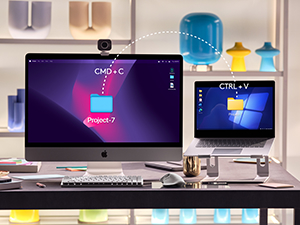
MX Master 3S for Mac

MULTIPLE COMPUTERS, ONE FLOW

Easily connect and switch between up to 3 Mac devices with Bluetooth Low Energy, and effortlessly transfer text, images, and files between them.
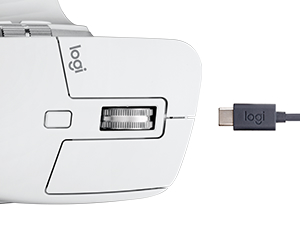
A zoom of MX Master 3S for Mac and its charging cable

QUICK CHARGING , LONG LASTING

USB-C quick charge in 1 min for 3 hrs of use – full charge lasts up to 70 days. Battery life may vary based on user and computing conditions.

Product guides and documents

Product Description

Logitech MX Master 3S For Mac Performance Wireless Mouse Introducing Logitech MX Master 3S for Mac – an iconic mouse remastered for Mac. Now with Quiet Clicks(3) and 8K DPI any-surface tracking for more feel and performance in your Mac computer set-up. Get creative with a complimentary 1-month Creative Cloud subscription with your purchase of MX Master 3S for Mac, and create, make, and do like never before. Product details: Dimensions: 2 x 3.3 x 4.9 in (51 x 84.3 x 124.9 mm) Weight: 4.97 oz (141 g) Compatible with macOS and iPadOS(1) operating systems Compatible with Logi Bolt USB Receiver only (not included) Rechargeable Li-Po (500 mAh) battery Buttons: 7 buttons (Left/Right-click, Back/Forward, App-Switch, Wheel mode-shift, Middle click) Wireless operating distance: 33 ft (10 m) (8) Footnotes: (1) Device basic functions will be supported without software for operating systems other than Windows and macOS (2) 4 mm minimum glass thickness (3) Compared to MX Master 3 for Mac, MX Master 3S for Mac has 90% less Sound Power Level left and right click, measured at 1m (4) Compared to regular Logitech mouse without an electromagnetic scroll wheel (5) Compared to Logitech Master 2S mouse with Logitech Options installed and Smooth scrolling enabled (6) Requires Logi Options+ software, available for Windows and macOS (7) Battery life may vary based on user and computing conditions (8) Wireless range may vary depending on operating environment and computer setup.

Product information

Warranty & Support

Amazon.com Return Policy:You may return any new computer purchased from Amazon.com that is "dead on arrival," arrives in damaged condition, or is still in unopened boxes, for a full refund within 30 days of purchase. Amazon.com reserves the right to test "dead on arrival" returns and impose a customer fee equal to 15 percent of the product sales price if the customer misrepresents the condition of the product. Any returned computer that is damaged through customer misuse, is missing parts, or is in unsellable condition due to customer tampering will result in the customer being charged a higher restocking fee based on the condition of the product. Amazon.com will not accept returns of any desktop or notebook computer more than 30 days after you receive the shipment. New, used, and refurbished products purchased from Marketplace vendors are subject to the returns policy of the individual vendor.

Feedback

Logitech MX Master 3S for Mac - Wireless Bluetooth Mouse with Ultra-Fast Scrolling, Ergo, 8K DPI, Quiet Clicks, Track on Glass, Customization, USB-C, Apple, iPad - Pale Grey


Found a lower price? Let us know. Although we can't match every price reported, we'll use your feedback to ensure that our prices remain competitive.

Where did you see a lower price?

Price Availability
/
/
/
/
Please sign in to provide feedback.

Safety and product resources

Safety documents

What's in the box

  • MX MASTER 3S Mouse
  • USB-C charging cable (USB-C to USB-C)
  • User documentation
  • Top Brand: Logitech

    Highly Rated
    100K+ customers rate items from this brand highly
    Trending
    100K+ orders for this brand in past 3 months
    Low Returns
    Customers usually keep items from this brand

    Customer reviews

    4.5 out of 5 stars
    2,411 global ratings

    Customers say

    Customers find the mouse performs well and appreciate its ergonomic design that fits hands naturally, along with its many customizable features. The battery life receives mixed feedback, with some saying it lasts a long time while others report it dead in less than a year. Customers disagree on the value for money, with some finding it worth the price while others consider it an expensive product. The connectivity and button responsiveness also receive mixed reviews, with some reporting seamless connections while others experience connection drops, and while the buttons are great for shortcuts and commands, some report left-click button troubles.
    AI Generated from the text of customer reviews

    Select to learn more

    377 customers mention performance, 318 positive, 59 negative
    Customers love the performance of this mouse, describing it as one of the nicest they've used.
    ...editing in both Photoshop, Lightroom and posting photos this is a great mouse. Smooth, multi-button and assignable features. Worth every dollar!...Read more
    Best mouse ever. I try to tell everyone how it’s life changing if you’re on a computer all the time....Read more
    ...Returned that one and bought the MX Master 3S for Mac & love it. Just started using it this morning and have not reverted to my trackpad yet!...Read more
    Love this mouse. Very easy and inuitive and the ergonomics are amazing. Easy to use and set-up and works with PC or Mac....Read more
    162 customers mention ergonomics, 140 positive, 22 negative
    Customers appreciate the mouse's ergonomic design, noting it feels premium in hand and fits well, with one customer mentioning it works well for both large and small hands.
    Love the smooth, soft, and flawless performance of this multi-functional bluetooth mouse. Performs well with my new iMac. Highly recommended.Read more
    ...It feels great in the hand. Weighty, the soft textured finish that really makes it feel like a quality product....Read more
    This mouse is definitely very ergonomic and fits nicely in your palm, Will take you a few days to get used to it and you'll fall in love with...Read more
    ...instagram influencers using this mouse, it is beautiful and ergonomic, the wheel glides and feels amazing but there's no point to all of this if the...Read more
    107 customers mention customizability, 97 positive, 10 negative
    Customers appreciate the mouse's customizability, particularly its ability to customize buttons in various ways, with one customer highlighting its extensive options for Lightroom.
    ...So much better than the Apple mice. Much more versatile and customizable. Fits my larger hands perfectly....Read more
    This mouse is a game-changer, comfort, precision, customization, and battery life....Read more
    Love this mouse. A bit big for me but it is otherwise perfect. Very customizable. Easy to set up. HIghly recommend.Read more
    ...This mouse has so many features: dual scroll, programmable buttons, glass-tracking, and personalized configuration for global controls AND local...Read more
    237 customers mention reliability, 137 positive, 100 negative
    Customers have mixed experiences with the mouse's reliability: while some report it works well, particularly with MacBook, others mention it stops working after two years or has issues with the scroll wheel.
    ...I’m glad I did! This mouse works great, has the old bells and whistles I love (and a couple new ones like the fast scrolling scroll wheel), and it...Read more
    Stopped working after a year.Read more
    works well with Mac, people love this mouse for a good reason and its great with mapping like copying and pasting or swiping left and right....Read more
    This mouse was really good for about 9 months. Then it started acting up, not letting me highlight consistently, it would drop the selection when...Read more
    114 customers mention battery life, 72 positive, 42 negative
    Customers have mixed experiences with the mouse's battery life, with some reporting it lasts a long time, while others mention it only lasted eight months and suddenly stopped working.
    ...It’s so easy to use and so smooth and quiet. Battery lasts a long time. Easy to connect and nice that it works with multiple devices.Read more
    ...mice for years and have generally been happy, but this one only lasted eight months (won't hold a charge)....Read more
    ...course daily, loved the side scrolling feature, very comfy and easy to charge but at this point while it scrolls and moves just fine the clicker is...Read more
    ...Really the perfect size. Has great battery life and tracks on any surface, my desk mat is black and other mice have struggled, this doesn't miss a...Read more
    103 customers mention value for money, 52 positive, 51 negative
    Customers have mixed opinions about the mouse's value for money, with some finding it worth the investment while others consider it an expensive product that doesn't meet expectations.
    ...All in all, it's worth the price given how much time you likely will spend using it.Read more
    Expensive but a great mouse for mac. Tried the magic mouse…. So uncomfortable. This fits my large hands perfectly....Read more
    ...of almost disappearing most days, so that alone makes this thing worth every penny. Add in the great performance and I couldn’t be happier.Read more
    ...not seem like a huge deal but it's quite annoying and not acceptable for a $100 mouse....Read more
    98 customers mention button responsiveness, 56 positive, 42 negative
    Customers have mixed experiences with the mouse buttons, with some finding them great for shortcuts and commands, while others report issues with the left-click button giving troubles.
    I love the way this feels in my hand. The buttons are well placed and top notch. The side scroll wheel is amazing, and makes navigation a breeze....Read more
    ...wararnty runs out (12 months) this product often begins having issues registering clicks....Read more
    ...I love the soft clicks and the button placement and its non-gamer-y-ness. The driver/software could not be worse than what it is....Read more
    ...were loud and it had my hand and finger stiff because the buttons are hard to press. I had been looking at the Logitech MS3....Read more
    78 customers mention connectivity, 50 positive, 28 negative
    Customers have mixed experiences with the mouse's Bluetooth connectivity, with some reporting seamless and easy connection to multiple devices, while others mention issues with the Bluetooth connection suffering and dropping mid-use.
    ...it's a very well designed mouse with great features, software, and connectivity all while feeling great.Read more
    ...I love the mouse until it randomly disconnects. Now I think this is more of the software than it is the bluetooth strength....Read more
    ...It wasn't. The Bluetooth works well so I didn't want to hassle with a return. If I need one I'll have to order from Amazon for $15....Read more
    ...its lightweight 2) easy to connect - does not need Bluetooth hardware plugged into the USB....Read more
    My go-to computer accessories.
    5 out of 5 stars
    My go-to computer accessories.
    I’ve used Logitechs computer accessories in the past and purchased this programmable mouse with the keyboard to use together. I love their products and the ability to program so many options which makes my computer use so much easier and quicker. I’m able to program these to 3 devices and quickly switch between laptops. I praise them for their connectivity, ergonomic design and fit, weight and portability.
    Thank you for your feedback
    Sorry, there was an error
    Sorry we couldn't load the review

    Top reviews from the United States

    • 5 out of 5 stars
      Great, feature rich mouse for both Mac & PC
      Reviewed in the United States on November 22, 2024
      Brief content visible, double tap to read full content.
      Full content visible, double tap to read brief content.

      I've had many mice over the years and this is one of the best. It works well and connects great with multiple devices; if that's as far as you need, then this mouse has got it. The scroll wheel has two modes and one of them is a super satisfying free scroll where the wheel acts like a ball bearing. By itself, it's an amazing fidget tool but will help you get to the bottom or top of your page super quickly. The other buttons are great for shortcuts and commands and is all customizable. This mouse can also be used on almost any surface and is advertised to work on glass. The form is ergonomic and great on the hand.

      Other mice may have higher DPI but will not have the same connectivity, nor software/customizability, nor features/buttons, etc. The people who whinge about DPI are "gamers" but I game too and this mouse does a great job.

      For the reviews you see about "the white/gray colorway is easily stained!" are likely the same people complaining about the sheen on the previous models. The feeling of the mouse in this iteration is pleasant and softer than hard plastic. If you eat Cheetos and DON'T WASH YOUR HANDS yes it will stain. I mean, just look at their review photos; it's gross and so obvious! I'm surprised that people here haven't learned how to wash their damn hands before using the mouse (or many other things for that matter). Even still, wipe the mouse down after you eat Cheetos if you can't help yourself. Their problems are larger than the choice in material for the mouse.

      TL;DR it's a very well designed mouse with great features, software, and connectivity all while feeling great.

      21 people found this helpful
      Sending feedback...
      Thank you for your feedback.
      Sending feedback...
      Thanks, we'll investigate in the next few days.

      We'll check if this review meets our community guidelinesOpens in a new tab. If it doesn't, we'll remove it.

    • 5 out of 5 stars
      MX Master 3S mouse is working great
      Reviewed in the United States on November 21, 2024
      Brief content visible, double tap to read full content.
      Full content visible, double tap to read brief content.

      I've been using this Mac Version of the Logitech MX Master 3S for about a month now, every day, all day, and with lots of activity. I bet I click this thing 1000x a day or more. My experience has been flawless, a very nice mouse that does what it's supposed to do, and is the right size and shape for my large hands to reduce operator fatigue.

      I'm using the mouse on both a Windows 11 laptop and a 2017 Mac Book Pro both via bluetooth, and selecting with computer with the button on the bottom which allows you to switch from one device to the next. Both PCs pick up the mouse immediately. No lag, no skips, no stops, and most importantly no random disconnects. Although this is a "Mac" mouse, it works perfectly on Windows, no downsides, no lost features. If you have only have a Windows computer, I'd recommend buying this version just incase you ever decide to use a Mac with it.

      I've also tried the software based feature that allows you move your mouse cursor off the edge of the display on one computer, then have it continue onto the other computer, and allow cut and paste between the two. This does require both PCs to be on the network, and the feature does work, although the cursor may not always show up in the place you expect it. Should be noted that I'm using this feature between a Microsoft Windows PC and an Apple Mac PC, and it actually works well.

      The features work well, the scroll wheels are in the best places, both work very smooth, and are a pleasure to use. I really enjoy the top scroll wheel feature that if you spin the wheel quickly, to detent mechanism releases, and the wheel free spins. (of course you can also push the button on top to keep the mouse wheel in free spin)

      I also like how this mouse only has 2 extra buttons which can be used as back and forward. Mice that have more buttons are just too confusing to hit the right button. There's also a palm button which can be useful too. All the buttons can be assigned to different tasks using Logitech's driver software.

      Battery life seems to be great so far. I charged the mouse once when I bought it, and have used it for a month, so far, haven't recharged a second time. Also, nice how you can use the mouse while it's recharging and that it's USB C.

      My only complaint is that the white rubberized coating is difficult to clean or keep clean. Would be nice if they could make this a smooth material that can be cleaned, or offer skins that can be removed and replaced.

      Overall, I highly recommend this mouse. Yes, it's expensive, but it's so much better than many of the cheap mice on the market.

      10 people found this helpful
      Sending feedback...
      Thank you for your feedback.
      Sending feedback...
      Thanks, we'll investigate in the next few days.

      We'll check if this review meets our community guidelinesOpens in a new tab. If it doesn't, we'll remove it.

    • 5 out of 5 stars
      Comfortable ergonomic design, great everyday mouse
      Reviewed in the United States on September 12, 2026
      Brief content visible, double tap to read full content.
      Full content visible, double tap to read brief content.

      Really happy with this purchase. The ergonomic shape fits my hand naturally and is super comfortable to use for long working sessions without wrist fatigue. The scrolling is smooth, the quiet clicks are a nice touch, and it pairs effortlessly with Mac. Love the overall design and build quality.

      Sending feedback...
      Thank you for your feedback.
      Sending feedback...
      Thanks, we'll investigate in the next few days.

      We'll check if this review meets our community guidelinesOpens in a new tab. If it doesn't, we'll remove it.

    • 5 out of 5 stars
      Amazing performance + significantly reduced elbow/wrist pain!
      Reviewed in the United States on November 10, 2025
      Brief content visible, double tap to read full content.
      Full content visible, double tap to read brief content.

      I’ve worked in marketing & creative fields for 13 years and have never upgraded my mouse until this purchase. For context, my setup includes an iMac (stock apple keyboard & mouse), an iPad Pro with Apple Pencil, and a MacBook Pro. Though I’m primarily a manager now, I have worked for years as a designer, illustrator, and in content generation/post-production, and the years of poor posture and disregarding the importance of ergonomic tools finally caught up with me. I had chronic elbow & shoulder pain, and it took me forever to realize that there was no amount of yoga, exercise, or massage therapy that would solve this problem; I needed to change the way I worked (quite literally). After some research I purchased this mouse (among making several other changes) and WOW I can’t recommend this more. It’s super comfortable, the battery lasts FOREVER, and you can dial in the settings to make it work perfectly for your style/needs. It usually takes a heartbeat for it to Bluetooth connect to my apple devices when I first start them, but it’s super brief and doesn’t bother me at all. My elbow/shoulder pain has significantly reduced to the point of almost disappearing most days, so that alone makes this thing worth every penny. Add in the great performance and I couldn’t be happier.

      One person found this helpful
      Sending feedback...
      Thank you for your feedback.
      Sending feedback...
      Thanks, we'll investigate in the next few days.

      We'll check if this review meets our community guidelinesOpens in a new tab. If it doesn't, we'll remove it.

    • 5 out of 5 stars
      Better than the Magic Mouse
      Reviewed in the United States on April 26, 2024
      Brief content visible, double tap to read full content.
      Full content visible, double tap to read brief content.

      A few years ago, I had to (VERY regrettably) switch from a MacBook to a PC for work. At the time I absolutely LOVED the Apple Bluetooth keyboard except that at the time it did not have a num pad. I also had a wired version that did have the numpad, but obviously now that MB doesn't have USB anymore that's not practical anymore. So back then I looked for a PC keyboard to replace my Apple one, and I settled on the MX Keys and the Master mouse since that came the closest I could find to the Apple keyboard.

      I also really liked the Magic Mouse, except for a few things. It always felt a little sluggish (like it would not slide lightly over my desk, and I've tried a number of different things like mousepads and blotters), I was always accidentally touching it and triggering gestures, and the biggest was that I could not get used to the whole thing being a button, you had to push down the whole mouse to click. As I've used the MX mouse over the years, I have become very attached to it, it fits in my hand like a glove and it is such a pleasure using it.

      Fast forward to 2024 and I have to say that I love this MX Keys/Mouse a lot better than my Magic key/mouse. So much so even that when the opportunity came to switch back to MacBook, I was very happy to find out that Logi has Mac versions. Took me about 2 seconds to order them for my new Mac.

      Luckily the Apple BT connectivity is super stable (unlike Windows, BT is so crap that you have to use the universal wireless dongle) so there are no wires or dongles necessary. It's pricey for sure, but I spend my whole day typing and using the mouse that it's totally worth it to me. I haven't really played with the gestures but so far all the buttons work the same as I've become used to on the PC version.

      When I first started working on a Mac back in 2013, I really liked having the Magic mouse and loved how intuitive it was and how the touch surface had the gestures. The MX just fits so much better, there is zero tension in my hand, and the Logi software lets you customize the buttons down to the app level.

      Maybe it doesn't look as cool as the Magic Mouse, but it runs circles around it in every day use. For me this is the perfect mouse.

      18 people found this helpful
      Sending feedback...
      Thank you for your feedback.
      Sending feedback...
      Thanks, we'll investigate in the next few days.

      We'll check if this review meets our community guidelinesOpens in a new tab. If it doesn't, we'll remove it.

    • 5 out of 5 stars
      Logitech MX Master 3S: A Video Editor's Dream Mouse
      Reviewed in the United States on January 30, 2024
      Brief content visible, double tap to read full content.
      Full content visible, double tap to read brief content.

      As a video editor who's constantly toggling between my 16" M1 MacBook Pro, iPad Pro, and occasionally other devices, I've found a trusty sidekick in the Logitech MX Master 3S for Mac. This mouse isn't just a tool; it's my editing and productivity wand.

      The ease of switching between devices is akin to magic. Just like its cousin, the MX Keys keyboard, the transition is seamless. I can be trimming a clip on my MacBook and then switch to my iPad for some quick graphic work with just a click. It's like having multiple assistants at my beck and call.

      Now, let's talk about the programmability - a video editor's dream. The Logi app transforms this mouse into a Swiss Army knife of shortcuts and functions. Every button, scroll wheel, and gesture can be customized to my workflow. It's like having a bespoke suit; everything is tailored exactly to my needs, making editing a breeze and saving me precious time.

      Need to make custom program-specific hotkeys? Consider it done!

      The ergonomics are top-notch, too. After hours of editing, my wrist and hand still feel as fresh as a daisy. The mouse fits my hand like it was custom-made for it, and the strategically placed thumb controls are a godsend.

      And the battery life? I get a solid 2-3 weeks of all-day use on a single charge. It's like the Energizer Bunny of mice - it just keeps going and going. Plus, with USB-C charging, I'm back in action quickly when it does need a boost.

      Some people have mentioned connectivity hiccups, but I've never experienced one.

      In short, the Logitech MX Master 3S for Mac is a powerhouse mouse that's transformed my editing workflow. It's comfortable, customizable, and keeps up with my demanding schedule. If you're a video editor or a multi-device power user, this mouse is a no-brainer.

      Logitech MX Master 3S: A Video Editor's Dream Mouse
      Logitech MX Master 3S: A Video Editor's Dream Mouse

      As a video editor who's constantly toggling between my 16" M1 MacBook Pro, iPad Pro, and occasionally other devices, I've found a trusty sidekick in the Logitech MX Master 3S for Mac. This mouse isn't just a tool; it's my editing and productivity wand.

      The ease of switching between devices is akin to magic. Just like its cousin, the MX Keys keyboard, the transition is seamless. I can be trimming a clip on my MacBook and then switch to my iPad for some quick graphic work with just a click. It's like having multiple assistants at my beck and call.

      Now, let's talk about the programmability - a video editor's dream. The Logi app transforms this mouse into a Swiss Army knife of shortcuts and functions. Every button, scroll wheel, and gesture can be customized to my workflow. It's like having a bespoke suit; everything is tailored exactly to my needs, making editing a breeze and saving me precious time.

      Need to make custom program-specific hotkeys? Consider it done!

      The ergonomics are top-notch, too. After hours of editing, my wrist and hand still feel as fresh as a daisy. The mouse fits my hand like it was custom-made for it, and the strategically placed thumb controls are a godsend.

      And the battery life? I get a solid 2-3 weeks of all-day use on a single charge. It's like the Energizer Bunny of mice - it just keeps going and going. Plus, with USB-C charging, I'm back in action quickly when it does need a boost.

      Some people have mentioned connectivity hiccups, but I've never experienced one.

      In short, the Logitech MX Master 3S for Mac is a powerhouse mouse that's transformed my editing workflow. It's comfortable, customizable, and keeps up with my demanding schedule. If you're a video editor or a multi-device power user, this mouse is a no-brainer.

      35 people found this helpful
      Sending feedback...
      Thank you for your feedback.
      Sending feedback...
      Thanks, we'll investigate in the next few days.

      We'll check if this review meets our community guidelinesOpens in a new tab. If it doesn't, we'll remove it.

    • 1 out of 5 stars
      Great Mouse but it has bluetooth issues
      Reviewed in the United States on July 11, 2024
      Brief content visible, double tap to read full content.
      Full content visible, double tap to read brief content.

      I love Logitech and all of their keyboard and mouse offerings as I have had them for years. This will probably be a great mouse for you and is seen as the gold standard.

      Time to explain the 1 star:

      This rating is written as my review, in MY situation, with the one product. The odds that you will be in the same situation is small but I did not find any mention of it until after I had purchased this unit and had to research this issue.

      My desk is a large sheet metal desk and my Mac is in a metal cabinet beneath this desk. So basically this mouse is surrounded my metal. The Mac is on the top of the desk that is maybe only 3 feet away from the PC, but again, metal everywhere.

      I had issue with the basic function of the mouse. It would move across the computer screen but was crazy laggy and very frustrating to use. I could not have this basic issue with a critical piece of equipment and started researching the problem. Logitech Support, Apple Support were of no help. But in the process of troubleshooting, I left the Mac Bluetooth window open on the screen while trying to use the mouse. I noticed the Bluetooth connection to the mouse would drop very frequently. This lead down a research rabbit hole that landed on some video reviewing the bluetooth performance of this mouse. I cannot remember the exact source of this video saying this mouse did not have the best bluetooth connection but it sure made sense given the amount of metal in my setup.

      I then moved my PC out of the metal cabinet, and on top of the metal desk. My Mac was 1 to 2 feet from the mouse and it worked flawlessly! I found the problem. I then moved the Mac 3 feet away where I wanted to keep it, surrounded my metal. I even left the door open to my cabinet below and the bluetooth connection was terrible and laggy moving the mouse across the screen.

      So the bluetooth capabilities of this mouse are not the best and made this product ultimately unusable for me in my situation. I have a metal desk and even though it was 3 feet or less from my Mac, it was a 1 star product.

      I returned this mouse, bought a wired Logitech mouse, and have never looked back. Basic mouse function restored to my setup. I am not an electrical engineering and do not know if Logitech could even improve this or if any other bluetooth mouse would have this problem.

      I stand by this 1 star review for me. But my situation if specific and given the amount of people using this, some my be in the same boat. Hopefully this review helps anyone with connection issues to this mouse.

      5 people found this helpful
      Sending feedback...
      Thank you for your feedback.
      Sending feedback...
      Thanks, we'll investigate in the next few days.

      We'll check if this review meets our community guidelinesOpens in a new tab. If it doesn't, we'll remove it.

    • 4 out of 5 stars
      Best Mouse for Mac Users - Customization and Comfort at its Best
      Reviewed in the United States on July 7, 2024
      Brief content visible, double tap to read full content.
      Full content visible, double tap to read brief content.

      1-Remastered for Mac:

      - Claim: Optimized for macOS and compatible with iPadOS.

      - Reality: The MX Master 3S seamlessly integrates with macOS, providing smooth and reliable performance. It pairs effortlessly with my Mac and iPad, making it versatile for all my Apple devices.

      2-Feel the Performance:

      - Claim: 8K DPI track-on-glass sensor and Quiet Clicks with 90% less click noise.

      -Reality: The tracking is incredibly precise, even on glass surfaces. The quiet clicks are a significant improvement, reducing noise without sacrificing responsiveness. This is perfect for quiet environments and late-night work sessions.

      3-MagSpeed Scrolling:

      - Claim: 90% faster, 87% more precise, and ultra-quiet scrolling.

      - Reality: MagSpeed scrolling is a game-changer. It offers smooth, fast, and precise scrolling, making it easy to navigate through long documents and web pages. The near-silent operation is a bonus.

      4-Ergonomic Design:

      - Claim: Crafted for a natural wrist posture with optimally placed thumb controls.

      - Reality: The ergonomic design is one of the best I’ve experienced. It fits perfectly in my hand, providing comfort during long hours of use. The thumb controls are conveniently placed and enhance the overall usability.

      5-App-specific Customizations:

      - Claim: Speed up and customize your workflow with predefined macOS and app-specific profiles.

      - Reality: The customization options are unparalleled. The predefined profiles for macOS and various apps make my workflow more efficient. The Logi Options+ software is intuitive and offers extensive customization.

      6- Multi Mac Workflow:

      - Claim: Pair with up to 3 Mac computers and transfer text, images, and files between them.

      - Reality: This feature is incredibly useful. Switching between devices is seamless, and the ability to transfer files and text between them is a huge productivity boost.

      7- USB-C to USB-C Rechargeable:

      - Claim: Stay powered for up to 70 days on a full charge and get 3 hours of use from a 1-minute quick charge.

      - Reality: The battery life is outstanding. I’ve been using the mouse for weeks without needing to recharge. The quick charge feature is handy for those moments when you need a quick boost.

      8- Sustainable Design:

      - Claim: Plastic parts include certified post-consumer recycled plastic.

      - Reality: It’s great to see Logitech's commitment to sustainability. The use of recycled materials is a step in the right direction.

      Final Thoughts

      The Logitech MX Master 3S for Mac is the best mouse I’ve ever used. It offers unmatched customization, comfort, and performance. The ergonomic design, exceptional battery life, and advanced features make it a must-have for any Mac user. I’m nothing but pleased with all the features it offers, and it has become an indispensable part of my workflow. Highly recommended!

      8 people found this helpful
      Sending feedback...
      Thank you for your feedback.
      Sending feedback...
      Thanks, we'll investigate in the next few days.

      We'll check if this review meets our community guidelinesOpens in a new tab. If it doesn't, we'll remove it.

    Top reviews from other countries

      Translated by Amazon
      See original
    • 5 out of 5 stars
      Very good
      Reviewed in Egypt on September 14, 2025
      Brief content visible, double tap to read full content.
      Full content visible, double tap to read brief content.
      Sending feedback...
      Thanks, we'll investigate in the next few days.

      We'll check if this review meets our community guidelinesOpens in a new tab. If it doesn't, we'll remove it.

    • 5 out of 5 stars
      Excellent mouse, comfortable and battery lasts forever
      Reviewed in Canada on September 1, 2026
      Brief content visible, double tap to read full content.
      Full content visible, double tap to read brief content.

      We bought it on Amazon. We like everything, works great.

      Battery lasts a very long time, we charge it rarely. Easy to switch between devices - as I show in the video, when we watch TV we switch to 2, for the computer we switch to 1. Very convenient.

      Very comfortable for the hand, ergonomic shape, fingers don't get tired even after long use. Quiet clicks, smooth scroll wheel.

      Great quality, highly recommend. 5 stars.

      Excellent mouse, comfortable and battery lasts forever
      Excellent mouse, comfortable and battery lasts forever
      5 out of 5 stars
      Excellent mouse, comfortable and battery lasts forever
      Reviewed in Canada on September 1, 2026

      We bought it on Amazon. We like everything, works great.

      Battery lasts a very long time, we charge it rarely. Easy to switch between devices - as I show in the video, when we watch TV we switch to 2, for the computer we switch to 1. Very convenient.

      Very comfortable for the hand, ergonomic shape, fingers don't get tired even after long use. Quiet clicks, smooth scroll wheel.

      Great quality, highly recommend. 5 stars.

      Sending feedback...
      Thanks, we'll investigate in the next few days.

      We'll check if this review meets our community guidelinesOpens in a new tab. If it doesn't, we'll remove it.

    • 5 out of 5 stars
      Lo volvería a comprar.. !! Me encantó Color gris espacial
      Reviewed in Mexico on November 18, 2023
      Brief content visible, double tap to read full content.
      Full content visible, double tap to read brief content.

      Excelente producto, materiales premium, lo compré para usarlo con una MacBook Pro M2 MAX y se vínculo sin problemas, incluye:

      1.- Manual

      2.- Cable para cargarlo

      El producto llegó antes de lo previsto y en excelente condiciones sin daños en el embalaje, lo recomiendo 100% y es súper ergonómico.

      Lo volvería a comprar.. !! Me encantó Color gris espacial
      Lo volvería a comprar.. !! Me encantó Color gris espacial
      Lo volvería a comprar.. !! Me encantó Color gris espacial
      5 out of 5 stars
      Lo volvería a comprar.. !! Me encantó Color gris espacial
      Reviewed in Mexico on November 18, 2023

      Excelente producto, materiales premium, lo compré para usarlo con una MacBook Pro M2 MAX y se vínculo sin problemas, incluye:

      1.- Manual

      2.- Cable para cargarlo

      El producto llegó antes de lo previsto y en excelente condiciones sin daños en el embalaje, lo recomiendo 100% y es súper ergonómico.

      Sending feedback...
      Thanks, we'll investigate in the next few days.

      We'll check if this review meets our community guidelinesOpens in a new tab. If it doesn't, we'll remove it.

      Translated from Spanish by Amazon
      See original
    • 5 out of 5 stars
      بطارية ممتازة واستجابة سريعة
      Reviewed in Egypt on July 1, 2025
      Brief content visible, double tap to read full content.
      Full content visible, double tap to read brief content.

      الماوس ممتاز، الاستجابة سريعة جدًا، بطارية فوق الخيال جايبه ليا أسبوع كان 60% وحاليا 50%

      Sending feedback...
      Thanks, we'll investigate in the next few days.

      We'll check if this review meets our community guidelinesOpens in a new tab. If it doesn't, we'll remove it.

      Translated from Arabic by Amazon
      See original
    • 5 out of 5 stars
      Finally, a Mac mouse that gets it right!
      Reviewed in Canada on June 5, 2025
      Brief content visible, double tap to read full content.
      Full content visible, double tap to read brief content.

      I switched to this mouse after years of using Apple’s Magic Mouse on my M2 MacBook Pro, and it’s been a revelation. The ergonomic shape is an absolute dream—no more hand cramps during marathon work sessions. The thumb rest and sculpted design make it feel like an extension of my hand, and the textured finish gives it a premium, grippy feel.

      The standout feature is the scroll wheel: I love flipping between the tactile "click" mode for precise scrolling in spreadsheets and the buttery-smooth "free-spin" mode for flying through long documents. The buttons are whisper-quiet (no more loud clicks during Zoom meetings!), and the side wheel is genius for horizontal scrolling in Final Cut Pro. Battery life has been stellar—I’ve used it daily for 3 months and only charged it once via USB-C (while still using it!).

      Setup was seamless over Bluetooth, and Logi Options+ lets me customize gestures per app (e.g., Mission Control with the thumb button). My only tiny nitpick? It occasionally takes 2–3 seconds to reconnect when my Mac wakes from sleep—but once paired, it’s flawless.

      Compared to the Magic Mouse, this is a massive upgrade in comfort and functionality. If you value ergonomics and productivity, it’s worth every penny. Logitech nailed it!

      Sending feedback...
      Thanks, we'll investigate in the next few days.

      We'll check if this review meets our community guidelinesOpens in a new tab. If it doesn't, we'll remove it.