

JdbcTemplate is a central class in Spring's JDBC framework, simplifying database interactions by abstracting much of the boilerplate code. A common use case involves querying the database with a dynamic list of values in the IN clause. This article will guide you through the process of using a list of values in a JdbcTemplate IN clause, ensuring efficient and secure database querying.
When you need to query the database with a variable number of parameters, the IN clause is particularly useful. However, using a list of values in the IN clause with JdbcTemplate requires careful handling to avoid SQL injection and to ensure the safe binding of parameters to the SQL query.
Key Points:
- Use
?placeholders in the SQL query. - Convert the list to an array when passing it to
JdbcTemplate. - Use the
querymethod for safe execution of the query.
Implementation: Using a List of Values in a JdbcTemplate IN Clause in a Spring Boot Project
Step 1: Create a New Spring Boot Project
Create a new Spring Boot project using IntelliJ IDEA or another IDE of your choice. Choose the following options:
- Project: Maven Project
- Language: Java
- Spring Boot: Latest version (3.x)

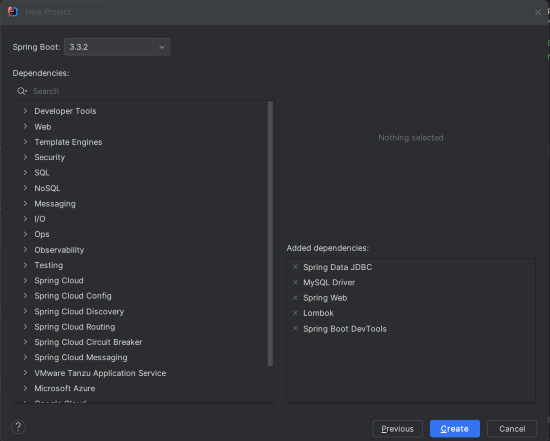
Step 2: Add Dependencies
Add the following dependencies into the Spring Boot project.
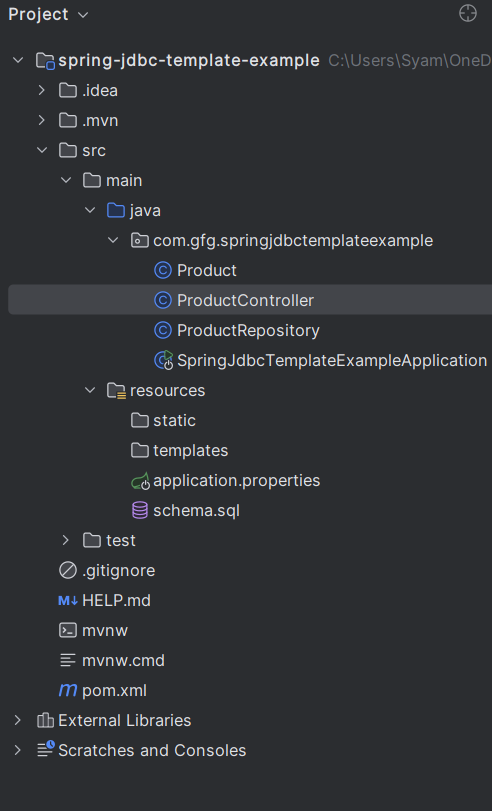
Project Structure
Once the project is created, the file structure should resemble the following:
Step 3: Configure Application Properties
In the application.properties file, configure the MySQL database connection:
spring.application.name=spring-jdbc-template-example

spring.datasource.url=jdbc:mysql://localhost:3306/testdb
spring.datasource.username=root
spring.datasource.password=mypassword
spring.datasource.driver-class-name=com.mysql.cj.jdbc.Driver
spring.jpa.hibernate.ddl-auto=update
spring.sql.init.mode=always
Step 4: Create the Database Table
Create a products table in the MySQL database:
CREATE TABLE products (
    id INT AUTO_INCREMENT PRIMARY KEY,
    name VARCHAR(255) NOT NULL,
    category VARCHAR(255) NOT NULL,
    price DECIMAL(10, 2)
);

INSERT INTO products (name, category, price) VALUES
('Laptop', 'Electronics', 1200.00),
('Headphones', 'Electronics', 150.00),
('Book', 'Books', 20.00),
('Smartphone', 'Electronics', 800.00),
('Novel', 'Books', 10.00);
Step 5: Create the Product Entity
Create a Product entity to represent the table data:
package com.example.springjdbctemplateexample;

import java.math.BigDecimal;

public class Product {
    private int id;
    private String name;
    private String category;
    private BigDecimal price;

    // Constructors, Getters, and Setters
}
Step 6: Create the ProductRepository Class
Create a repository class to handle database operations:
package com.example.springjdbctemplateexample;

import org.springframework.beans.factory.annotation.Autowired;
import org.springframework.jdbc.core.JdbcTemplate;
import org.springframework.stereotype.Repository;

import java.util.Collections;
import java.util.List;

@Repository
public class ProductRepository {

    @Autowired
    private JdbcTemplate jdbcTemplate;

    public List<Product> findProductsByCategories(List<String> categories) {
        String sql = "SELECT * FROM products WHERE category IN (" +
                String.join(",", Collections.nCopies(categories.size(), "?")) + ")";
        return jdbcTemplate.query(sql, categories.toArray(), (rs, rowNum) ->
            new Product(
                rs.getInt("id"),
                rs.getString("name"),
                rs.getString("category"),
                rs.getBigDecimal("price")
            )
        );
    }
}
Explanation:
- The SQL query is dynamically generated based on the size of the
categorieslist. Collections.nCopies(categories.size(), "?"): Creates placeholders for the SQL query.categories.toArray()converts the list to an array, whichJdbcTemplaterequires for theINclause.- The
querymethod executes the SQL query and maps the result set to theProductobject.
Step 7: Create the ProductController Class
Create a controller to expose the API endpoint:
package com.example.springjdbctemplateexample;

import org.springframework.beans.factory.annotation.Autowired;
import org.springframework.web.bind.annotation.GetMapping;
import org.springframework.web.bind.annotation.RequestParam;
import org.springframework.web.bind.annotation.RestController;

import java.util.List;

@RestController
public class ProductController {

    @Autowired
    private ProductRepository productRepository;

    @GetMapping("/products")
    public List<Product> getProductsByCategories(@RequestParam List<String> categories) {
        return productRepository.findProductsByCategories(categories);
    }
}
Step 8: Main class
The main class remains unchanged:
package com.example.springjdbctemplateexample;

import org.springframework.boot.SpringApplication;
import org.springframework.boot.autoconfigure.SpringBootApplication;

@SpringBootApplication
public class SpringJdbcTemplateExampleApplication {

    public static void main(String[] args) {
        SpringApplication.run(SpringJdbcTemplateExampleApplication.class, args);
    }
}
pom.xml file:
<?xml version="1.0" encoding="UTF-8"?>
<project xmlns="https://maven.apache.org/POM/4.0.0" xmlns:xsi="https://www.w3.org/2001/XMLSchema-instance"
         xsi:schemaLocation="https://maven.apache.org/POM/4.0.0 https://maven.apache.org/xsd/maven-4.0.0.xsd">
    <modelVersion>4.0.0</modelVersion>
    <parent>
        <groupId>org.springframework.boot</groupId>
        <artifactId>spring-boot-starter-parent</artifactId>
        <version>3.3.2</version>
        <relativePath/> <!-- lookup parent from repository -->
    </parent>
    <groupId>com.gfg</groupId>
    <artifactId>spring-jdbc-template-example</artifactId>
    <version>0.0.1-SNAPSHOT</version>
    <name>spring-jdbc-template-example</name>
    <description>spring-jdbc-template-example</description>
    <url/>
    <licenses>
        <license/>
    </licenses>
    <developers>
        <developer/>
    </developers>
    <scm>
        <connection/>
        <developerConnection/>
        <tag/>
        <url/>
    </scm>
    <properties>
        <java.version>17</java.version>
    </properties>
    <dependencies>
        <dependency>
            <groupId>org.springframework.boot</groupId>
            <artifactId>spring-boot-starter-data-jdbc</artifactId>
        </dependency>
        <dependency>
            <groupId>org.springframework.boot</groupId>
            <artifactId>spring-boot-starter-web</artifactId>
        </dependency>

        <dependency>
            <groupId>org.springframework.boot</groupId>
            <artifactId>spring-boot-devtools</artifactId>
            <scope>runtime</scope>
            <optional>true</optional>
        </dependency>
        <dependency>
            <groupId>com.mysql</groupId>
            <artifactId>mysql-connector-j</artifactId>
            <scope>runtime</scope>
        </dependency>
        <dependency>
            <groupId>org.projectlombok</groupId>
            <artifactId>lombok</artifactId>
            <optional>true</optional>
        </dependency>
        <dependency>
            <groupId>org.springframework.boot</groupId>
            <artifactId>spring-boot-starter-test</artifactId>
            <scope>test</scope>
        </dependency>
    </dependencies>

    <build>
        <plugins>
            <plugin>
                <groupId>org.springframework.boot</groupId>
                <artifactId>spring-boot-maven-plugin</artifactId>
                <configuration>
                    <excludes>
                        <exclude>
                            <groupId>org.projectlombok</groupId>
                            <artifactId>lombok</artifactId>
                        </exclude>
                    </excludes>
                </configuration>
            </plugin>
        </plugins>
    </build>

</project>
Step 9: Run the Application
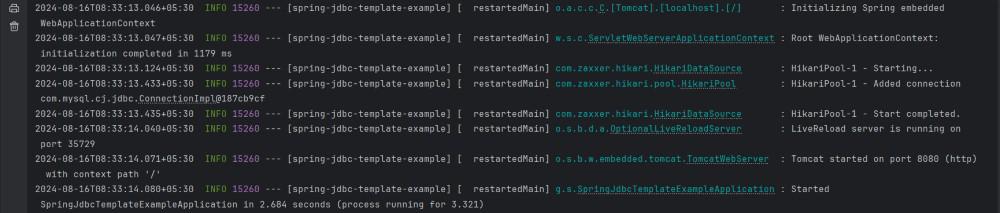
After completing the project setup, run the application. It will start on port 8080.
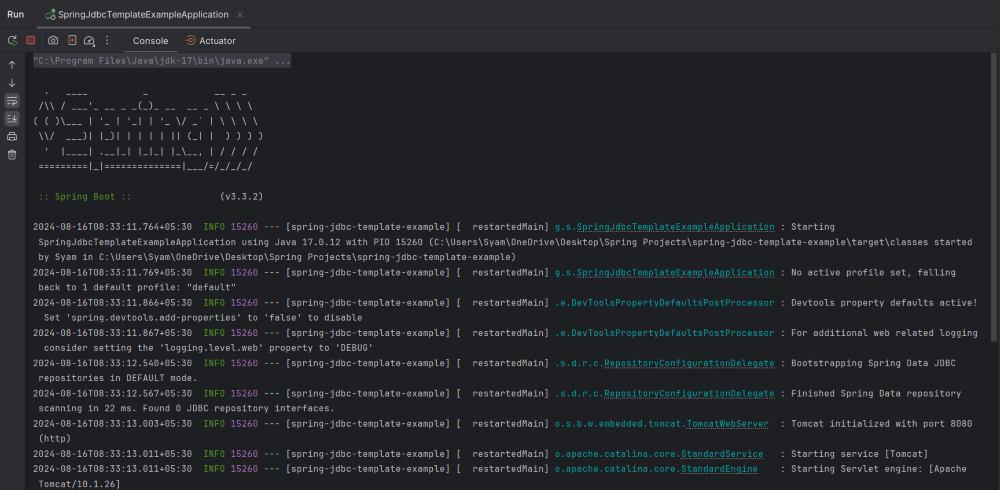
Console logs:
Step 10: Test the API Endpoints
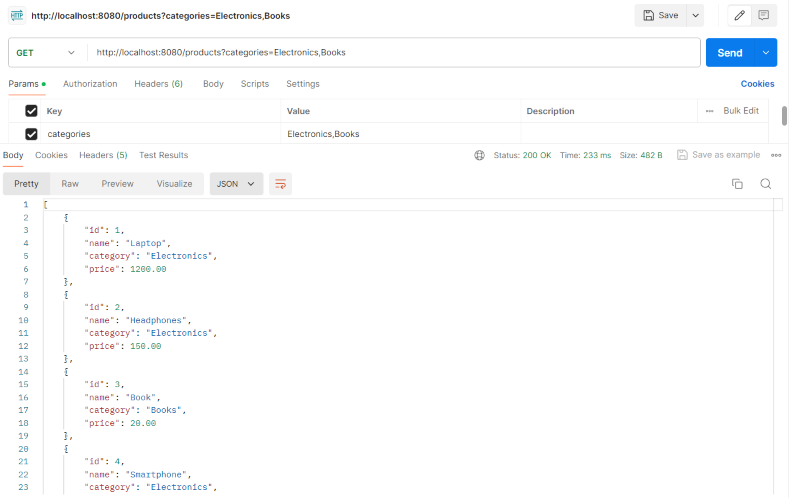
Test the API by making a GET request:
GET http://localhost:8080/products?categories=Electronics,BooksThis endpoint indicates that the IN clause worked correctly with the list of the categories.
Output:
This example project provides a guide on how to use a list of values in a JdbcTemplate IN clause within a Spring Boot application, demonstrating how to integrate dynamic database queries efficiently and securely.
