

Grok 3 is an AI chatbot from xAI, designed to help with coding, problem-solving, and answering questions in a conversational way. Think of it as a tireless assistant who understands your coding needs. It’s available for free (with usage limits) on X, grok.com, and mobile apps for iOS and Android. For more access, you can opt for a SuperGrok subscription or X Premium+. Inspired by The Hitchhiker’s Guide to the Galaxy, Grok 3 brings a witty, helpful vibe to coding, making it a go-to tool for developers and learners alike.
Features of Grok 3
Grok 3 is packed with features that make coding a breeze:
- Code Generation - Grok 3 can write code for you, like suggesting small bits or complete functions. For example, if you’re making a website, it can create a button in JavaScript or a loop in Python. It works with many languages, like C++ for games or Python for apps, so you don’t have to start from scratch. Just tell Grok 3 what you need, and it gives you code you can use right away.
- DeepSearch - This feature lets Grok 3 search the web and X posts instantly to find the latest coding solutions. If you’re stuck on a problem, like how to connect a database, DeepSearch grabs up-to-date tips or code examples. It’s like having a super-fast research assistant who always finds the newest ideas. This helps you stay current with coding trends and tools.
- Think Mode - Think Mode is like having a patient teacher who thinks carefully before answering. It breaks down tough coding problems step-by-step, making them easier to understand. For example, if you’re building a game, it can plan how to move characters or score points. This feature helps you tackle big projects without feeling overwhelmed.
- Big Brain Mode - Big Brain Mode is Grok 3’s extra-powerful setting for super tricky coding challenges. It’s like turning up the brainpower to solve complex tasks, such as designing a smart algorithm for a school project. This mode isn’t available for free, but it’s great for professionals working on big apps or systems. It helps you find solutions that are accurate and creative.
- Multimodal Support - Grok 3 can work with text and images, and soon it’ll handle audio too. For coding, this means you can describe a picture (like a webpage design) and get code to match it. For example, you could show a sketch of a button, and Grok 3 would suggest HTML code for it. This makes it easier to turn ideas into real programs.
- Context Awareness - Grok 3 understands what you’re working on, like a friend who knows your project inside out. If you’re coding a website, it suggests code that fits your style or fixes errors based on your program. This saves time because you don’t have to explain everything from the start. It’s like having a helper who gets your work instantly.
How Smart Is Grok 3?
Grok 3 isn’t just smart — it’s one of the top performers among AI tools:
- 93.3% on AIME: High school-level math competition.
- 85% on GPQA: PhD-level science problems.
- 88% on MMLU-Pro: Covers academic subjects.
- 92% on HumanEval: Excellent at writing and explaining code.
- 95% on GSM8K: Handles grade-school math with ease.
- 80% on ARC-AGI: Solves complex reasoning puzzles.
It’s faster and more accurate than most models, especially in math, coding, and problem-solving — outperforming GPT-4o, Claude 3.5, and others.
Architecture of Grok 3
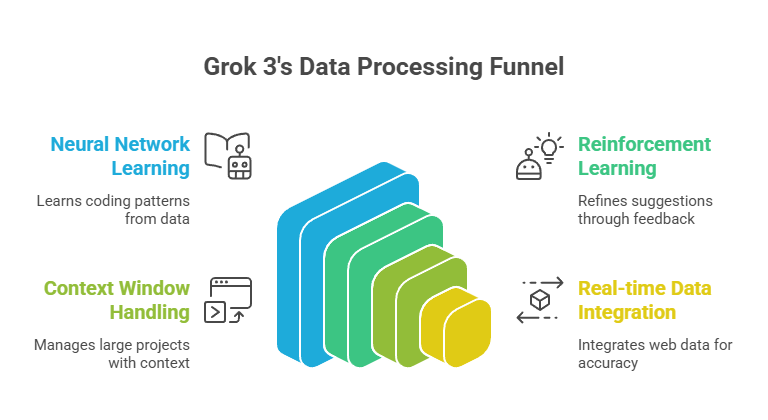
Grok 3 runs on xAI’s Colossus supercomputer, powered by 200,000 NVIDIA GPUs—think of it as a massive digital brain! It uses a transformer-based neural network, which is like a super-smart librarian who learns coding patterns from vast datasets, including 12.8 trillion tokens of text and code. Reinforcement learning helps it refine its suggestions, while a 1-million-token context window lets it handle huge projects. DeepSearch integrates real-time web data, making Grok 3 fast and accurate for coding tasks big and small. This setup ensures quick, reliable suggestions that fit your needs.
How Grok 3 Was Trained
- Human Feedback: Real people helped fine-tune how it talks and responds.
- Synthetic Data: Grok made its own training examples to handle rare or tricky questions.
- Privacy in Mind: Training was done securely and efficiently.
- Bias Reduction: Ongoing work to make sure answers are fair and balanced.
- Diverse Learning: Grok learned from academic sources, websites, social media, and more.
How to Use Grok 3
Getting started with Grok 3 is simple, whether you’re a beginner or a seasoned coder. Here’s how to use it:
Step 1: Access Grok 3
- Visit grok.com, use the X platform, or download the Grok iOS/Android app. Sign in with an xAI account. Free access has usage limits, but SuperGrok or X Premium+ offers more.

Step 2: Ask a Question or Describe Your Task
- Type a clear prompt, like “Write a Python function to sort a list” or “Debug this JavaScript code.” Be specific about the language or goal for better results.

Step 3: Choose a Mode
- For complex tasks, activate Think Mode via the UI’s “Think” button for step-by-step guidance. Big Brain Mode, if available, tackles advanced problems (requires premium access).

Step 4: Review the Response
- Grok 3 will provide code, explanations, or solutions. For example, ask for a webpage, and it might return HTML/CSS with comments explaining each part.
Step 5: Refine or Iterate
- If the output isn’t perfect, tweak your prompt (e.g., add “include error handling”) or ask for variations. Use DeepSearch for real-time web insights if needed.
Step 6: Test and Apply
- Copy the code into your project and test it in a safe environment. Save outputs or share them via X or your preferred platform.
Use Cases
Grok 3 shines in real-world coding scenarios. Here are some examples with prompts and outputs:
- Debugging Code
Prompt: “Find the error in this Python loop:for i in range(10): print(i + )”
Output:# Error: Missing number after '+'. Fixed code:for i in range(10):print(i + 1) - Writing Functions
Prompt: “Write a JavaScript function to fetch API data”
Output:async function fetchData(url) {const response = await fetch(url);return await response.json();} - Learning Concepts
Prompt: “Explain how Python lists work”
Output: “Python lists are like digital shopping lists. You can store items (numbers, strings, etc.) in order, access them with indices (e.g., list[0]), and add or remove items using methods like .append() or .pop().” - Building Apps
Prompt: “Generate GeeksForGeeks webpage using HTML and CSS”
Output:

These examples show how Grok 3 can simplify coding tasks and learning.
Where Grok 3 Lacks and Tips to Avoid It
Grok 3 isn’t flawless. It may struggle with highly specialized or complex coding tasks, and DeepSearch can be slow for real-time queries. Its multimodal features are still growing (e.g., no image generation yet), and vague prompts can lead to errors. To avoid issues:
- Use specific prompts with clear details.
- Test code in a safe environment before using it.
- Enable Think or Big Brain mode for tough problems.
- Double-check outputs for accuracy and project fit.
By being mindful, you can sidestep these limitations and get reliable results.
Best Practices for Best Outputs
To unlock Grok 3’s full potential, craft clear prompts. For example:
- Bad Prompt: “Write some code”
Result: Generic or incorrect code, likeprint("Hello"). - Good Prompt: “Write a Python function to sort a list of dictionaries by the ‘age’ key”
Result:def sort_by_age(people):return sorted(people, key=lambda x: x['age']) - Tips: Specify the language, include project context (e.g., “for a web app”), and request specific outputs (e.g., “include comments”). Use Think mode for complex logic. Experiment with phrasing to refine results. Clear prompts lead to precise, usable code.
