

Large Language Models (LLMs) can generate output based on training data collected up to a fixed point in time, known as knowledge cutoff, but they cannot directly access real-time information or interact with external systems. Tools allows AI models to overcome these limitations by connecting with external applications and services.
- Can explain how to send emails, write files, or update records, but it cannot perform these actions on its own.
- Cannot access real-time information such as today's weather, exchange rates, stock prices, or other data that changed after its knowledge cutoff.
- Tools help generate structured outputs, such as JSON with specific fields, that follow a predefined format.
- Tool use allows Claude to connect with external systems, including databases, APIs, search engines, and other applications.
Using Claude as an example, it can request external information or actions through connected tools like live information, browse the web, query databases, or perform actions such as sending emails.
How Tool Use Works
The tool use process follows a simple request-and-response cycle:
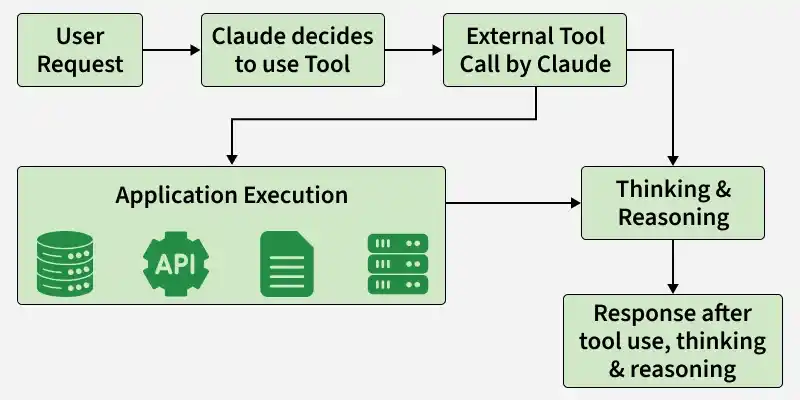
- A tool is defined with its name, description, and input schema.
- Claude analyzes the user's request and decides whether the tool is needed.
- It generates a tool request with the required input instead of executing the task itself.
- The application or service executes the requested operation, such as querying a database or calling an API.
- The tool returns the result to Claude.
- Claude uses the returned information to generate the final response for the user.
Note: Claude does not execute tools directly. It only generates a structured request, while the actual execution is handled by the connected application or service.
Client Tools and Server Tools
Tools fall into two categories based on where execution happens.
| Feature | Client Tools | Server Tools |
|---|---|---|
| Executed On | Calling application | Anthropic's infrastructure |
| Execution Code Required | Yes | No |
| Examples | Custom developer-defined tools, bash, text_editor, computer | web_search, web_fetch, code_execution, tool_search, memory |
| Common Use Cases | Accessing internal APIs, databases, and file systems | Searching the web, fetching web pages, executing code, and managing memory |
Client tools include both custom tools created by developers and predefined tools provided by Anthropic, such as bash, text_editor and computer. Although Anthropic defines their schema, the calling application is responsible for executing them.
Server tools run entirely on Anthropic's infrastructure. They do not require execution code in the calling application, although some may have additional usage-based charges.
Anthropic's Built-in Tools
Anthropic provides several built-in tools with predefined schemas that developers can use without defining them from scratch.
| Tool | Type | Function |
|---|---|---|
| bash | Client | Runs shell commands in a persistent session. |
| text_editor | Client | Views and edits text files. |
| computer | Client | Takes screenshots and controls mouse and keyboard input in a desktop environment. |
| web_search | Server | Searches the web and returns cited results. |
| web_fetch | Server | Retrieves the content of a web page or PDF. |
| code_execution | Server | Executes Python or Bash code in a sandboxed environment. |
| tool_search | Server | Discovers and loads tools on demand. |
| memory | Server | Manages persistent memory across a session. |
Anthropic assigns a version suffix to built-in tools (for example, web_search_20250305) so existing applications continue to work even when newer tool versions are released.
Common Misconceptions About Tool Use
- Claude does not execute tools directly. It only generates a tool request, while the actual execution happens in the calling application or on Anthropic's servers.
- Tool use is not limited to Claude Code. It is a feature of the Claude API and can be used in any application built with the API.
- Adding more tools does not always improve performance. Including too many or irrelevant tools increases token usage and can make tool selection less accurate.
- Tool use and Model Context Protocol (MCP) are different concepts. Tool use is the mechanism for requesting tool execution, whereas MCP is a protocol for connecting to external tool servers.
- Tool use is essentially the same concept as function calling, which is used by many other large language model providers.
