A Contact Management System is a practical project that demonstrates core C# programming concepts including collections, LINQ, object-oriented principles and data management. This console application allows users to add, view, search, update, and delete contacts.
Functionalities Overview
The Contact Management System provides functionality to:
- Add new contacts with details (name, phone, email, address)
- View all contacts in a formatted display
- Search contacts by name or phone number
- Update existing contact information
- Delete contacts from the system
- Sort contacts alphabetically
Steps to Implement
Step 1: Initialize empty contact list using List<T>
Step 2: Display menu options to user
Step 3: Process user choice:
- Add: Create new contact object and add to list
- View: Display all contacts using LINQ ordering
- Search: Filter contacts using LINQ queries
- Update: Find contact and modify properties
- Delete: Remove contact from collection
Step 4: Continue until user chooses to exit
Program Implementation
using System;
using System.Collections.Generic;
using System.Linq;

namespace ContactManagement
{
    class Contact
    {
        public int Id { get; set; }
        public string Name { get; set; }
        public string Phone { get; set; }
        public string Email { get; set; }
        public string Address { get; set; }
        public override string ToString() => $"[{Id}] {Name} | {Phone} | {Email} | {Address}";
    }

    class Program
    {
        static List<Contact> contacts = new List<Contact> {
            new Contact { Id = 1, Name = "John Doe", Phone = "555-0123", Email = "john@email.com", Address = "123 Main St" },
            new Contact { Id = 2, Name = "Jane Smith", Phone = "555-0456", Email = "jane@email.com", Address = "456 Oak Ave" }
        };
        static int nextId = 3;

        static void Main(string[] args)
        {
            Console.WriteLine("=== Contact Management System ===");
            var actions = new Dictionary<string, Action> {
                {"1", AddContact}, {"2", ViewAllContacts}, {"3", SearchContact},
                {"4", UpdateContact}, {"5", DeleteContact}
            };

            while (true)
            {
                Console.WriteLine("\n1. Add Contact\n2. View All Contacts\n3. Search Contact");
                Console.WriteLine("4. Update Contact\n5. Delete Contact\n6. Exit");
                Console.Write("Choose option: ");
                string choice = Console.ReadLine();

                if (choice == "6") { Console.WriteLine("Goodbye!"); break; }
                if (actions.ContainsKey(choice)) actions[choice]();
                else Console.WriteLine("Invalid option!");
            }
        }

        static void AddContact()
        {
            string GetInput(string prompt) { Console.Write(prompt); return Console.ReadLine(); }
            contacts.Add(new Contact {
                Id = nextId++,
                Name = GetInput("Enter name: "),
                Phone = GetInput("Enter phone: "),
                Email = GetInput("Enter email: "),
                Address = GetInput("Enter address: ")
            });
            Console.WriteLine("Contact added successfully!");
        }

        static void ViewAllContacts()
        {
            if (!contacts.Any()) { Console.WriteLine("No contacts found!"); return; }
            Console.WriteLine("\n--- All Contacts ---");
            contacts.OrderBy(c => c.Name).ToList().ForEach(Console.WriteLine);
        }

        static void SearchContact()
        {
            Console.Write("Enter search term (name/phone): ");
            string term = Console.ReadLine()?.ToLower();
            var results = contacts.Where(c => c.Name.ToLower().Contains(term) || c.Phone.Contains(term)).ToList();
            Console.WriteLine(results.Count == 0 ? "No contacts found!" : $"\nFound {results.Count} contact(s):");
            results.ForEach(Console.WriteLine);
        }

        static void UpdateContact()
        {
            Console.Write("Enter contact ID to update: ");
            if (!int.TryParse(Console.ReadLine(), out int id)) { Console.WriteLine("Invalid ID!"); return; }
            var contact = contacts.FirstOrDefault(c => c.Id == id);
            if (contact == null) { Console.WriteLine("Contact not found!"); return; }

            Console.WriteLine($"Updating: {contact}\nPress Enter to keep current value");
            string UpdateField(string field, string current) {
                Console.Write($"{field} [{current}]: ");
                string input = Console.ReadLine();
                return string.IsNullOrEmpty(input) ? current : input;
            }
            contact.Name = UpdateField("Name", contact.Name);
            contact.Phone = UpdateField("Phone", contact.Phone);
            contact.Email = UpdateField("Email", contact.Email);
            contact.Address = UpdateField("Address", contact.Address);
            Console.WriteLine("Contact updated!");
        }

        static void DeleteContact()
        {
            Console.Write("Enter contact ID to delete: ");
            if (!int.TryParse(Console.ReadLine(), out int id)) { Console.WriteLine("Invalid ID!"); return; }
            var contact = contacts.SingleOrDefault(c => c.Id == id);
            if (contact == null) { Console.WriteLine("Contact not found!"); return; }

            Console.WriteLine($"Deleting: {contact}");
            Console.Write("Are you sure? (y/n): ");
            if (Console.ReadLine()?.ToLower() == "y") {
                contacts.Remove(contact);
                Console.WriteLine("Contact deleted!");
            } else Console.WriteLine("Deletion cancelled.");
        }
    }
}
Outputs
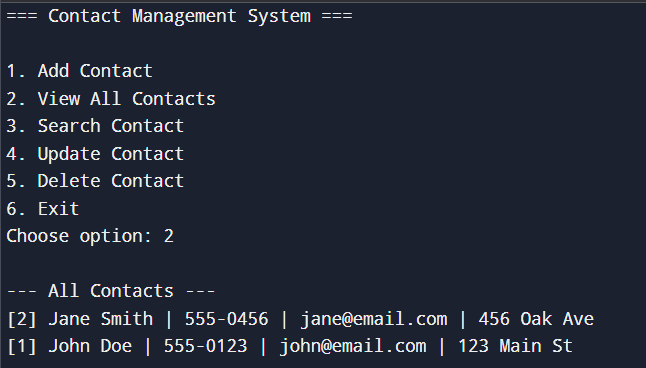
1: View All Contacts (after initialization)
Initial state: Contacts list has 2 entries: John Doe, Jane Smith.
Steps:
- Program starts: sample contacts are added.
- User chooses option
2(View All Contacts). - LINQ orderby sorts contacts by Name.
Output:
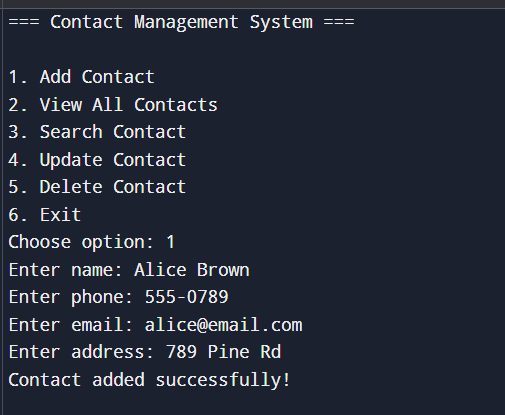
2: Add Contact
Initial state:
- Contacts: John Doe (Id=1), Jane Smith (Id=2).
- nextId = 3.
Steps:
- User chooses option 1 (Add Contact).
- Enter details.
- Program creates a new Contact with Id = 3 and adds it.
Output:
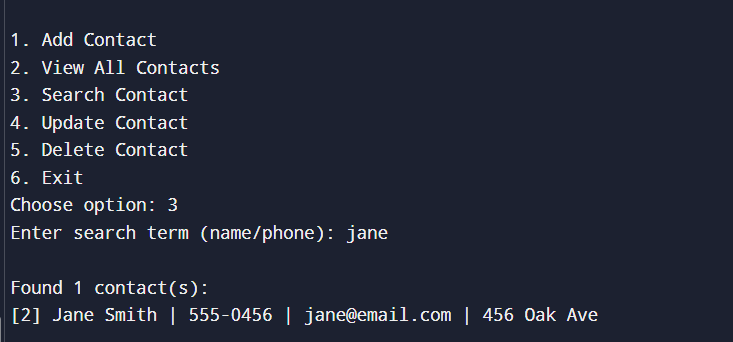
3. Search Contact
Initial state:
- Contacts: John Doe (1), Jane Smith (2), Alice Brown (3).
Steps:
- User chooses option 3 (Search Contact).
- Enters search term: jane.
- LINQ .Where() finds matches in Name or Phone.
Output:
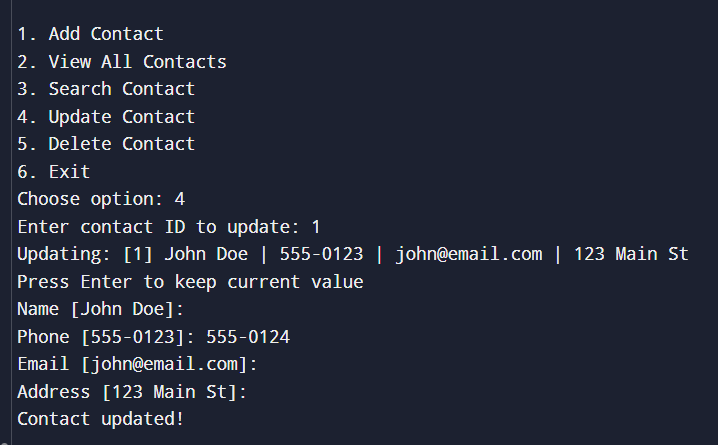
4: Update Contact
Initial state:
- Contacts: John Doe (1), Jane Smith (2), Alice Brown (3).
Steps:
- User chooses option 4 (Update Contact).
- Enters contact ID: 1.
- Program loads John Doe.
- User enters new phone and skips others (presses Enter):
- John Doe’s phone is updated.
Output:
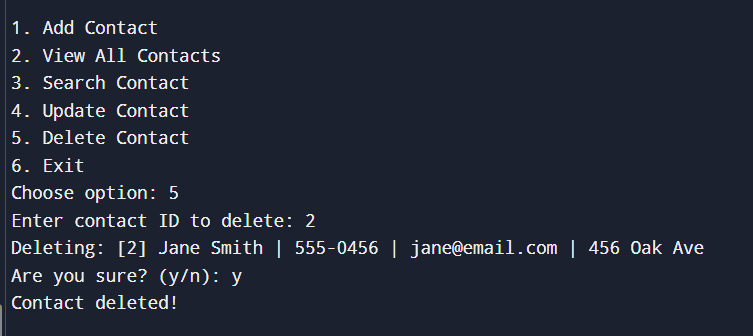
5: Delete Contact
Initial state:
- Contacts: John Doe (1), Jane Smith (2), Alice Brown (3).
Steps:
- User chooses option 5 (Delete Contact).
- Enters ID: 2.
- Program loads Jane Smith and asks for confirmation
- Contact removed from list.
Output: