

Command-line arguments in Java are values passed to a program when it is launched from the command line. These values are received as a String array in the main() method.
- Allow programs to accept input without hardcoding values.
- Commonly used to pass file names, configuration values and runtime parameters.
Syntax of Command-Line Arguments
Arguments are specified after the class name when running a Java program.
java ClassName arg1 arg2 ... argN
For example: java Geeks Hello World
Here, Geeks is the class name, while Hello and World are command-line arguments.
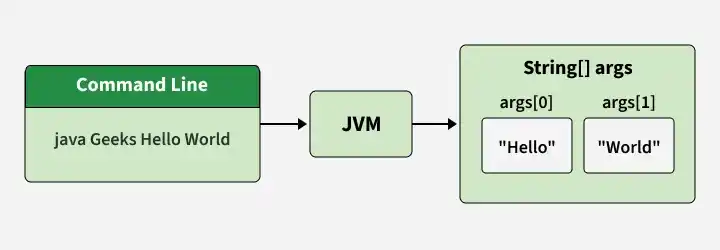
- args[0] stores "Hello".
- args[1] stores "World".
- args.length returns the total number of arguments.
Accessing Command-Line Arguments
Example 1: Program to access the first command-line argument.
public class Geeks{
    public static void main(String[] args){

        // Print the first argument
        if (args.length > 0) {
            System.out.println(args[0]);
        } else {
            System.out.println("No arguments provided.");
        }
    }
}
Compile and Run:
javac Geeks.java
java Geeks GeeksforGeeks
Output:
GeeksforGeeks
Explanation: The program accesses the first argument using args[0]. The args.length condition prevents ArrayIndexOutOfBoundsExceptionwhen no arguments are provided.
Accessing Multiple Command-Line Arguments
An enhanced for loop can be used to traverse the args array and access all the arguments.
Example 2: Program to print multiple command-line arguments.
class Geeks{
    public static void main(String[] args){

        // Iterate through the arguments
        for (String val : args) {
            System.out.println(val);
        }
    }
}
Compile and Run:
javac Geeks.java
java Geeks Learn Java Programming
Output:
Learn
Java
Programming
Explanation: The enhanced for loop iterates through the args array and prints each argument on a separate line.
Passing Numeric Arguments
Command-line arguments are received as strings. Numeric values must be converted into the required data type before performing arithmetic operations.
Example 3: Program to add two numbers passed as command-line arguments.
class Geeks{
    public static void main(String[] args){

        if (args.length != 2){
            System.out.println("Provide two numbers.");
            return;
        }

        // Convert strings into integers
        int a = Integer.parseInt(args[0]);
        int b = Integer.parseInt(args[1]);

        System.out.println("Sum: " + (a + b));
    }
}
Compile and Run:
javac Geeks.java
java Geeks 10 20
Output:
Sum: 30
Important Points About Command-Line Arguments
- All command-line arguments are received as strings.
- Numeric arguments must be converted using methods such as Integer.parseInt() and Double.parseDouble().
- Arguments containing spaces can be enclosed in double quotes, such as java Hello "Hello World".
- Valid array indices range from 0 to args.length - 1.
