

A HashMap is a data structure that stores data as key-value pairs, allowing values to be accessed quickly using their corresponding keys. In C++, HashMaps are implemented using the unordered_map container, which uses hashing for efficient data storage and retrieval.
- Each key must be unique.
- Provides average O(1) time complexity for insertion, deletion, and search operations.
- Uses hashing for fast access and does not maintain elements in sorted order.
#include <iostream>
#include <unordered_map>
using namespace std;

int main(){

    unordered_map<string, int> fruits;

    fruits["Apple"] = 10;
    fruits["Mango"] = 20;
    fruits["Cherry"] = 30;

    cout << "Apple : " << fruits["Apple"] << endl;
    cout << "Mango : " << fruits["Mango"] << endl;
    cout << "Cherry : " << fruits["Cherry"] << endl;

    return 0;
}
Output
Apple : 10
Mango : 20
Cherry : 30
Explanation:
- This program creates an unordered_map named fruits to store fruit names as keys and their quantities as values.
- It inserts three key-value pairs into the HashMap and then retrieves and displays the values associated with each fruit name.
Header File Required
To use HashMaps in C++, include the following header file:
#include <unordered_map>
Syntax
unordered_map<key_type, value_type> hashMap;
How Hash Maps Work
A HashMap uses a hash function to convert a key into a numerical value called a hash code. The hash code determines the location (bucket) where the key-value pair will be stored.
Components of Hashing
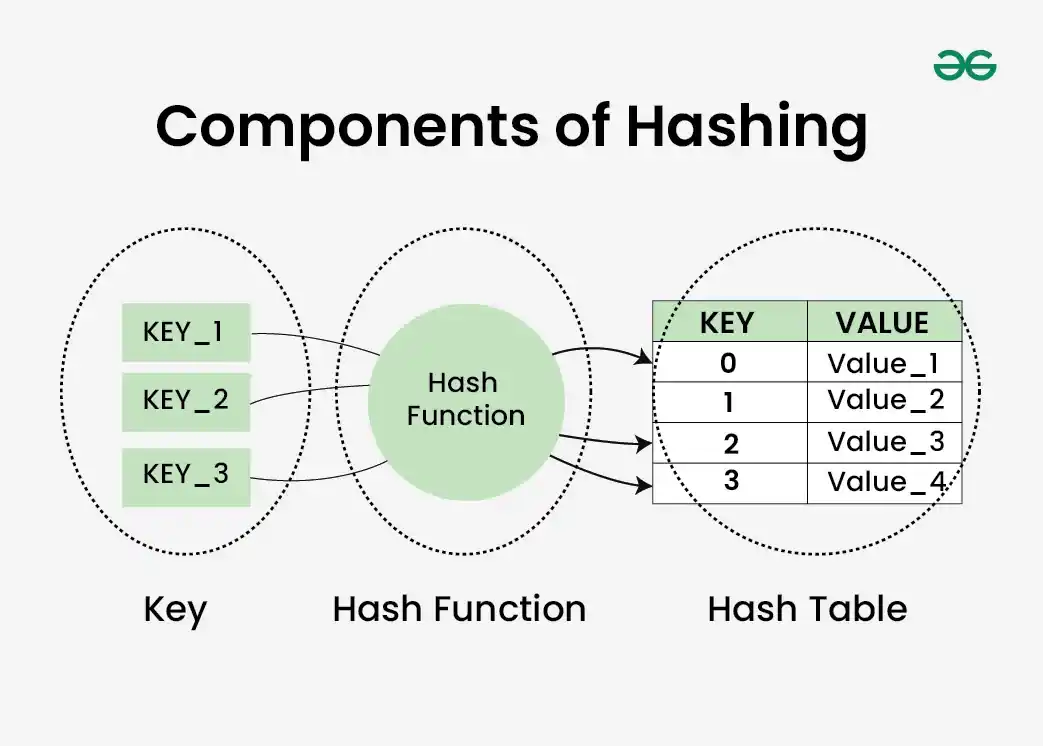
In above diagram:
- Key: The input data used to identify a value (e.g., Apple, Mango, Cherry).
- Hash Function: Converts a key into a hash value or bucket index.
- Hash Table: Stores the actual key-value pairs at the computed locations.
- The hash function helps locate data quickly without searching the entire table.
Suppose we store:
| Key | Value |
|---|---|
| Apple | 10 |
| Mango | 20 |
| Cherry | 30 |
The hash function may generate:
| Key | Hash Code | Bucket |
|---|---|---|
| Apple | 105 | 5 |
| Mango | 212 | 2 |
| Cherry | 318 | 8 |
When searching for "Mango", the hash function is applied again, directly locating bucket 2 instead of scanning all elements.
Example: Common HashMap Operations
#include <iostream>
#include <unordered_map>
using namespace std;

int main() {

    unordered_map<string, int> mp;

    // Insert
    mp["Apple"] = 10;
    mp["Mango"] = 20;
    mp["Cherry"] = 30;

    // Access
    cout << "Apple Value: "
         << mp["Apple"] << endl;

    // Search
    if(mp.find("Mango") != mp.end())
    {
        cout << "Mango Found" << endl;
    }

    // Traverse
    cout << "\nElements:\n";

    for(auto pair : mp)
    {
        cout << pair.first
             << " -> "
             << pair.second
             << endl;
    }

    // Delete
    mp.erase("Cherry");

    cout << "\nSize After Deletion: "
         << mp.size();

    return 0;
}
Explanation:
- Creates a HashMap named mp to store fruit names as keys and quantities as values.
- Inserts three key-value pairs: Apple → 10, Mango → 20, and Cherry → 30.
- Accesses and searches data by displaying Apple's value and checking if Mango exists.
- Traverses the HashMap using a loop to print all key-value pairs.
- Deletes Cherry from the HashMap and displays the updated number of elements.
Time Complexity Analysis
| Operation | Average Case | Worst Case |
|---|---|---|
| Insertion | O(1) | O(n) |
| Search | O(1) | O(n) |
| Deletion | O(1) | O(n) |
| Access | O(1) | O(n) |
| Traversal | O(n) | O(n) |
