

SSL/TLS certificates are digital files that verify a website’s identity and enable encrypted communication over the internet. They work using Public Key Infrastructure (PKI) to provide security through authentication, encryption and data integrity.
- Authentication: Confirms that the website is genuine using a digital certificate issued by a trusted Certificate Authority (CA).
- Encryption: Encrypts data exchanged between the browser and the server to prevent unauthorized access.
- Data Integrity: Ensures that data is not modified while being transmitted.
- HTTPS: Enables secure communication over HTTPS, protecting sensitive information such as passwords and payment details.
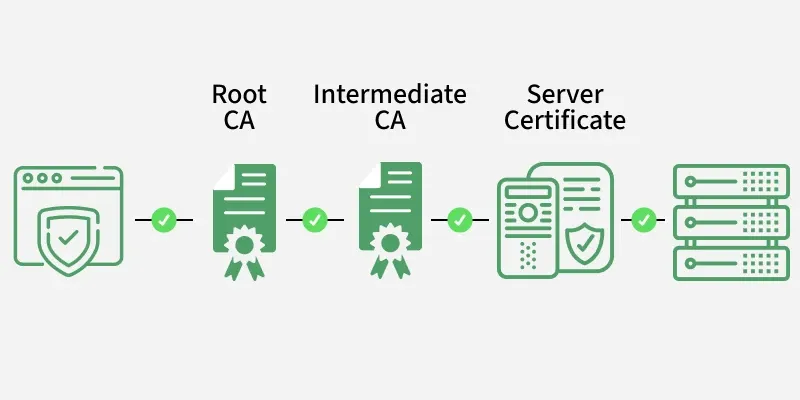
Secure Socket Layer
Secure Sockets Layer (SSL), is an Internet security protocol that encrypts data to keep it safe. It was created by Netscape in 1995 to ensure privacy, authentication and data integrity in online communications. SSL is the older version of what we now call TLS (Transport Layer Security).
Secure Socket Layer (SSL) Certificate
An SSL certificate is a digital certificate that can be used for authentication of a website and it creates a secure connection between the client and the web server. When installed, it enables the website to move from HTTP to HTTPS.
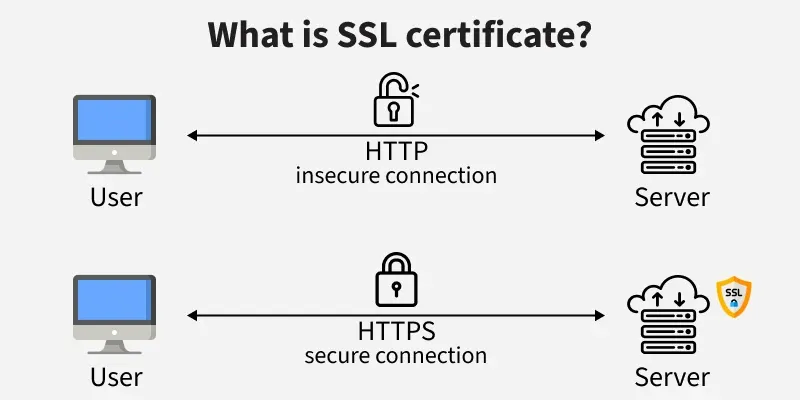
- Identity Information: Contains the domain name, certificate owner (organization, individual or device), issuing Certificate Authority (CA), associated subdomains and certificate validity period.
- Cryptographic Information: Includes the public key and the CA's digital signature used to verify certificate authenticity and establish secure SSL/TLS communication.
Transport Layer Security
Transport Layer Securities (TLS) are designed to provide security at the transport layer. TLS was derived from a security protocol called Secure Socket Layer (SSL). TLS ensures that no third party may tamper with any message. It protects against
- Secure Communication: TLS is a transport-layer security protocol derived from SSL that provides encrypted, authenticated and integrity-protected communication between clients and servers.
- Security Protection: Prevents eavesdropping through encryption, detects data tampering using cryptographic integrity checks and mitigates impersonation attacks through certificate-based authentication.
SSL/TLS Communication Workflow
Here is the step-by-step story so you can see exactly what’s happening behind the scenes when you connect securely to a website.
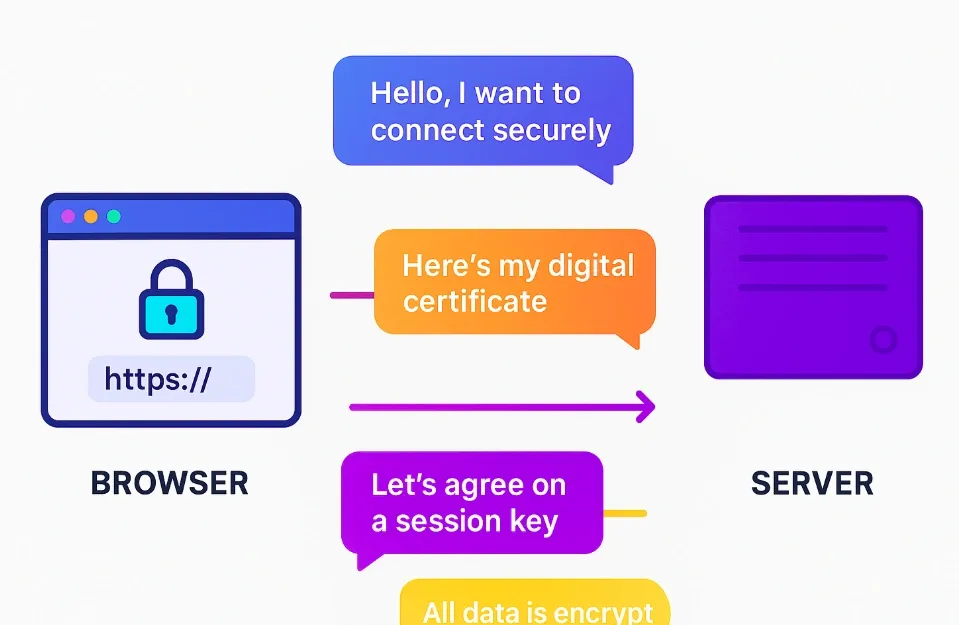
Step 1: Browser says “Hello”
When you type a URL like: The client initiates the TLS handshake by sending a ClientHello message containing the supported TLS versions, cipher suites and a client-generated random value.
https://www.geeksforgeeks.orgStep 2: Server sends its digital certificates
The server responds with a ServerHello message, its X.509 digital certificate, selected cipher suite and a server-generated random value for authentication.
Step 3: They agree on a Session Key
The client verifies the certificate and performs a key exchange (e.g., ECDHE or RSA) to securely establish a shared session key.
Step 4: Encrypt Everything with the Session Key
The client and server use the negotiated symmetric session key to encrypt data and apply cryptographic integrity checks for secure HTTPS communication.
Digital Certificates
A digital certificate is a file or electronic password that uses public key infrastructure (PKI) and cryptography to prove and verify the legitimacy of a device, server or user.
- Organizations guarantee that only users and devices can connect to their networks with digital certificate authentication.
- Verifying a website's legitimacy to a web browser is another typical usage for digital certificates and is most commonly referred to as Secure Sockets Layer or SSL certificates.
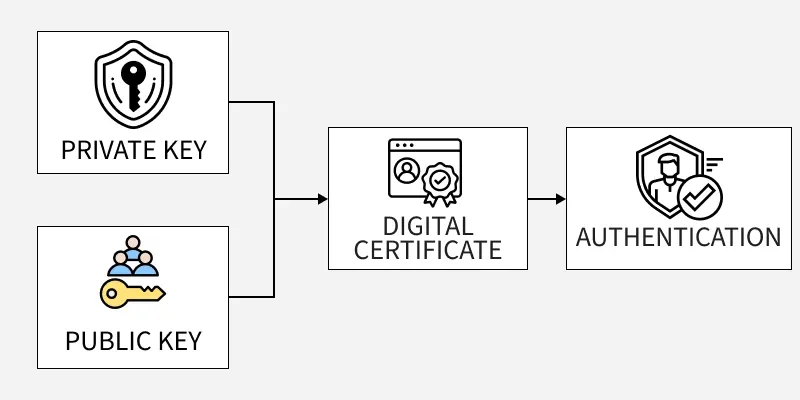
- Here is the certificate details typically found in HTTPS (SSL/TLS) certificates for secure websites:

Role of SSL/TLS Certificates in Securing Online Communication
Here is a clear and structured explanation of how SSL/TLS certificates secure your online activities:
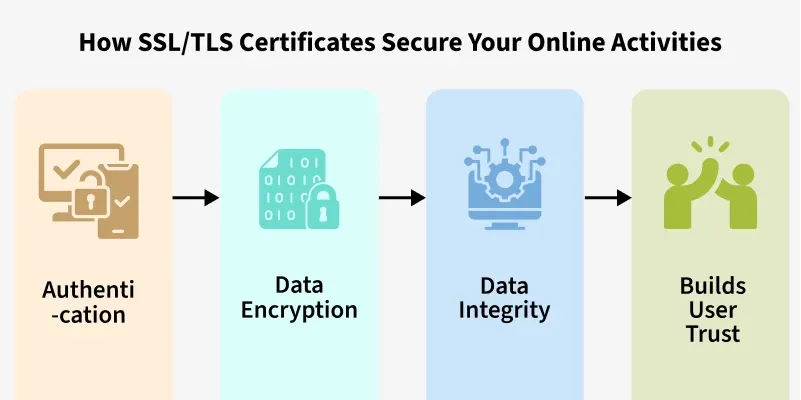
1. Authentication
When You Visit a Secure Website (e.g., https://www.geeksforgeeks.org ), Your Browser:
- Checks the certificate's digital signature: Verifies it was signed by a trusted Certificate Authority.
- Confirms the certificate is valid: Checks the expiry date and revocation status.
- Matches the domain name: Ensures the domain in the address bar matches the domain listed in the certificate.
2. Data Encryption
Once the SSL/TLS certificate is verified, your browser and the server perform a secure handshake to agree on a shared session key. The following data gets encrypted over HTTPS:
- Password & Credit card numbers and payment information
- Personal Information like name, address and phone number
- Chats and messages, form submission
3. Data Integrity
SSL/TLS ensures data integrity by verifying that the information has not been altered or tampered with during transit. It uses cryptographic techniques like hash functions and Message Authentication Codes (MACs) to detect any unauthorized changes to the data as it travels between the client and server.
4. Builds User Trust
When a site has a valid SSL/TLS certificate, then the browser shows a padlock when an SSL is active and this indicates to users that their connection is secure. This is essential for:
- E-commerce sites & Online banking.
- Login portals.
Table Representation
Here is a clear table representation showing how SSL/TLS secures online activities:
| Security Function | Role of Certificate |
|---|---|
| Authentication | Verifies the website’s identity |
| Encryption | Hides your data from attackers |
| Data Integrity | Ensures your data is not changed |
| Trust & Confidence | Shows users that the connection is secure |
Best Practices for Protecting SSL/TLS Certificates and Keys
1. Protect Private Keys
Store private keys securely using Hardware Security Modules (HSMs) or restricted file permissions and never expose them through public repositories or insecure channels.
Example: Store a website's private key inside an HSM instead of saving it in a publicly accessible folder.
2. Use Strong Cryptography
Use RSA-2048/ECC keys with TLS 1.2 or TLS 1.3 and disable weak algorithms and deprecated SSL/TLS versions.
Example: Configure a web server to use TLS 1.3 with an RSA-2048 certificate instead of TLS 1.0 and SHA-1.
3. Manage Certificate Lifecycle
Monitor certificate validity, automate renewals and immediately revoke certificates if the associated private key is compromised.
Example: Use Certbot to automatically renew a website's SSL/TLS certificate before it expires.
4. Restrict Certificate Access
Enforce the Principle of Least Privilege (PoLP), isolate administrative accounts and monitor certificate access through audit logs.
Example: Allow only the web server administrator to access the SSL private key files.
5. Rotate Cryptographic Keys
Regularly rotate encryption keys and replace them immediately after any suspected compromise to minimize security risks.
Example: Generate a new SSL private key and certificate every year or immediately after a security incident.
