

An Intrusion Prevention System (IPS) actively monitors network and system traffic to detect and block malicious activity in real time. It extends traditional IDS capabilities by not only identifying threats but also automatically preventing attacks before they cause damage.
- Detects and blocks attacks such as malware, DoS/DDoS, SQL injection, and brute-force attacks.
- Blocks malicious traffic by dropping packets, resetting connections, or blocking IP addresses.
- Provides real-time alerts, logs, and packet inspection to improve network security
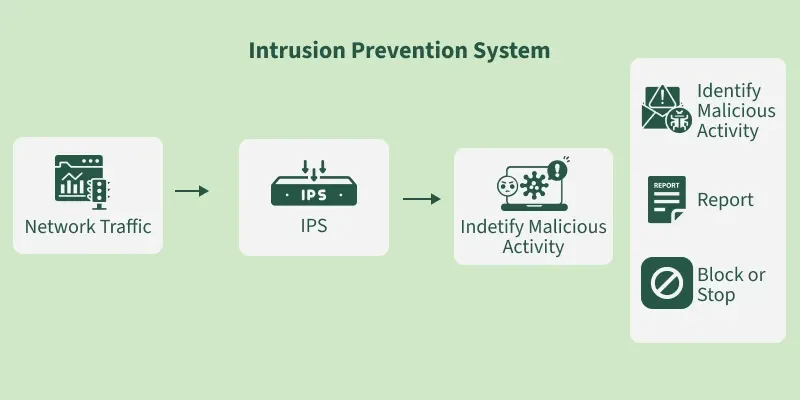
IPS Working
An IPS works by analyzing network traffic in real-time and comparing it against known attack patterns and signatures. When the system detects suspicious traffic, it blocks it from entering the network.
1. Inline Deployment
An IPS is typically deployed in-line, meaning it is placed directly in the path of network traffic between internal networks and external sources (such as the internet).
2. Traffic Preprocessing
Before deep inspection begins, the IPS preprocesses incoming traffic to ensure it's correctly interpreted:
- Traffic Normalization: It standardizes traffic formats to prevent attackers from using encoding tricks to evade detection.
- Packet Reassembly: The IPS reassembles fragmented packets to ensure no data is missed and malicious content isn't hidden in fragments.
3. Layered Packet Inspection
An IPS performs deep packet inspection (DPI) to understand both the structure and intent behind the network traffic. This analysis occurs at multiple layers of the OSI model:
- Network Layer: Checks packet origins and destinations.
- Transport Layer: Examines the reliability and integrity of the connections.
- Application Layer: Inspects the type of data being transmitted (e.g., login credentials, file transfers).
4. Detection Mechanisms
The IPS uses various detection mechanisms to identify threats:
- Signature-Based Detection: Compares traffic against known attack patterns or signatures (like fingerprints of known malware or exploits).
- Anomaly-Based Detection: Flags any behavior that deviates from normal network activity, such as sudden spikes in traffic or unusual request patterns.
- Behavior-Based Detection: Monitors and tracks actions over time, identifying suspicious patterns like repeated failed login attempts or unauthorized access attempts.
- Policy-Based Detection: Enforces custom rules defined by administrators (e.g., blocking traffic from specific countries or blocking certain file types).
5. Automated Response Actions
Once a threat is detected, the IPS can immediately take action to mitigate it:
- Drop Malicious Packets: Discards harmful traffic before it reaches its target.
- Block Source IP: Prevents further connections from the attacker’s IP address.
- Terminate Sessions: Ends suspicious or unauthorized sessions.
- Trigger Alerts/Logs: Generates alerts or logs for the administrator to review.
- Update Firewall Rules: Automatically adjusts firewall settings to block traffic from malicious sources.
6. Tuning and Maintenance
An IPS requires regular updates and fine-tuning to stay effective:
- Update Signatures: Regular updates are needed to add new attack signatures and detection patterns.
- Reduce False Positives: Fine-tuning helps minimize alerts for non-malicious traffic, ensuring the system only triggers legitimate threats.
- Optimize Performance: Adjust settings to ensure the IPS can handle high traffic loads without performance degradation.
Types of IPS
IPS systems can be classified into the following types based on their monitoring focus and deployment:
- Network-Based Intrusion Prevention System (NIPS): Monitors and inspects network traffic in real time to detect and block malicious packets before they reach target systems.
- Host-Based Intrusion Prevention System (HIPS): Protects individual endpoints by monitoring system calls, processes, file integrity, and inbound/outbound host traffic.
- Wireless Intrusion Prevention System (WIPS): Secures wireless networks by detecting and preventing rogue access points, unauthorized devices, and wireless protocol attacks.
- Network Behavior Analysis (NBA): Analyzes network traffic patterns to identify abnormal behavior such as DDoS attacks, malware propagation, and unusual traffic flows.
Comparison of Intrusion Prevention System Technologies
Each IPS type is designed to monitor different parts of an IT environment, providing specialized protection based on where threats occur. Understanding these differences helps in selecting the right combination of technologies for a stronger security posture.
- Coverage varies from entire networks to individual hosts and wireless environments
- Detection approaches include signature-based, anomaly-based and behavior-based analysis
- Some IPS types are better suited for identifying large-scale attacks like DDoS, while others focus on endpoint-level threats
- Using multiple IPS technologies together helps reduce security gaps and improve overall defense
Benefits of an IPS
An IPS is an essential tool for network security. Here are some reasons why:
- Protection Against Known and Unknown Threats: An IPS can block known threats and also detect and block unknown threats that haven't been seen before.
- Real-Time Protection: An IPS can detect and block malicious traffic in real-time, preventing attacks from doing any damage.
- Compliance Requirements: Many industries have regulations that require the use of an IPS to protect sensitive information and prevent data breaches.
- Cost-Effective: An IPS is a cost-effective way to protect your network compared to the cost of dealing with the aftermath of a security breach.
- Increased Network Visibility: An IPS provides increased network visibility, allowing you to see what's happening on your network and identify potential security risks.
