

Server misconfiguration is one of the most common security weaknesses exploited by cybercriminals. Even organizations with advanced security tools can become vulnerable if their servers are improperly configured.
- Misconfigured servers can expose sensitive data, provide unauthorized access to attackers, and lead to severe security breaches.
- A single configuration mistake can result in Data breaches, Regulatory compliance violations, Service disruption, Privilege escalation, Website defacement, Malware infections.
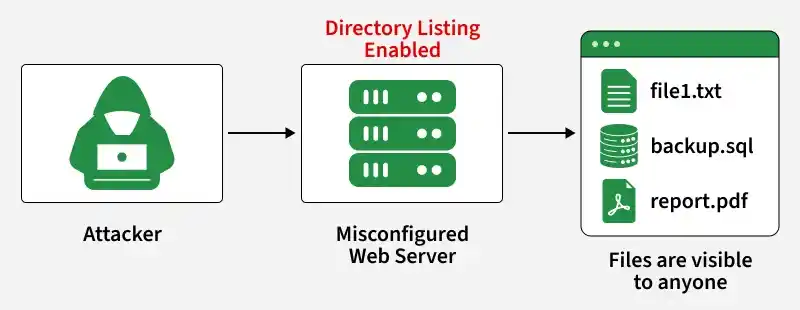
Types of Server Misconfiguration
Server misconfigurations can occur in different environments.
- Web Server Misconfiguration: Examples include Directory browsing enabled, Default pages exposed, Weak SSL configuration, Unnecessary modules enabled.
- Database Server Misconfiguration: Examples include No authentication required, Excessive user privileges, Open database ports.
- Cloud Server Misconfiguration: Examples include Public storage buckets, Misconfigured IAM policies, Open security groups.
- Application Server Misconfiguration: Examples include Debug mode enabled, Hardcoded credentials, Sensitive information exposed.
Attackers Exploit Misconfigured Servers
Attackers typically follow these steps:
- Scan Target Servers: Attackers perform network reconnaissance to identify active hosts, open ports, and accessible network services.
- Identify Exposed Services and Ports: They enumerate publicly accessible services to discover vulnerable applications or unnecessary open ports.
- Search for Default Credentials: Attackers attempt to authenticate using vendor-default or weak usernames and passwords left unchanged.
- Examine Configuration Files: They inspect exposed or improperly secured configuration files to extract sensitive information such as credentials, API keys, or system settings.
- Exploit Exposed Directories: Attackers access unsecured directories or files through directory listing, improper permissions, or predictable paths.
- Gain Unauthorized Access: They exploit vulnerabilities or misconfigurations to bypass authentication and obtain unauthorized system access.
- Escalate Privileges: Attackers leverage privilege escalation flaws or misconfigured permissions to obtain administrative or root-level access.
- Steal Data or Deploy Malware: After compromising the system, they exfiltrate sensitive data or install malware, ransomware, or backdoors to maintain persistence.
Detect Server Misconfiguration
Organizations can identify misconfigurations through:
- Vulnerability Scanners: Popular tools include Nessus, OpenVAS, Qualys, Rapid7 InsightVM.
- Security Audits: Regular audits help verify that configurations comply with security policies.
- Penetration Testing: Penetration testers simulate attacks to discover weaknesses before attackers do.
- Configuration Reviews: Administrators should routinely review User permissions, Open ports, Firewall rules, SSL settings, Installed services.
Common Causes of Server Misconfiguration
Several factors contribute to server misconfiguration vulnerabilities.
- Default Credentials: Many servers are deployed with default usernames and passwords. If administrators fail to change them, attackers can easily gain access. Example: Username = admin, Password = admin.
- Unnecessary Open Ports: Leaving unused ports open increases the attack surface and provides additional entry points for attackers. If these services are not required, they should be disabled. Example: Port 21 (FTP), Port 23 (Telnet), Port 3389 (RDP).
- Directory Listing Enabled: Directory listing allows users to view files stored within web directories. Example: http://example.com/uploads/. An attacker may gain access to: Backup files, Configuration files, Documents, Database exports.
- Incorrect File Permissions: Improper permissions can allow unauthorized users to modify, delete, or access sensitive files. Example: chmod 777 config.php, This grants full read, write, and execute permissions to everyone.
- Outdated Software: Unpatched operating systems, web servers, and applications often contain known vulnerabilities. Examples include: Apache vulnerabilities, Nginx vulnerabilities, Windows Server vulnerabilities, Database server flaws.
- Exposed Error Messages: Detailed error messages can reveal valuable information about the server environment. Example information disclosure: Apache/2.4.57 running on Ubuntu 22.04, Attackers can use this information to identify exploitable vulnerabilities.
- Misconfigured SSL/TLS Settings: Weak encryption protocols can expose communications to interception. Examples: SSL 2.0, SSL 3.0, Weak cipher suites. Modern servers should use TLS 1.2 or TLS 1.3.
- Publicly Accessible Cloud Resources: Cloud storage buckets and databases are frequently exposed due to incorrect access controls. Examples: Public AWS S3 buckets, Exposed MongoDB databases, Open Elasticsearch servers.
Lab: Demonstrating Directory Listing (Server Misconfiguration)
- Objective: Understand how a server misconfiguration can expose files through directory listing and how to fix it.
- Environment: Kali Linux or Ubuntu VM.
Step 1: Create a Test Directory
mkdir -p ~/server-misconfig/uploads
cd ~/server-misconfig/uploads

Create some sample files
echo "Employee Records" > employees.txt
echo "Database Backup" > backup.sql
echo "Confidential Report" > report.pdf
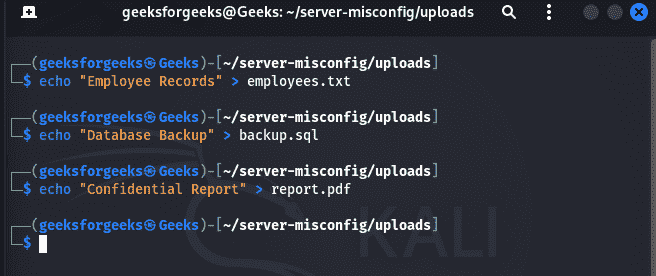
Step 2: Start a Simple Web Server
Move to the parent directory:
cd ~/server-misconfigStart Python's built-in web server:
python3 -m http.server 8000You should see:
Serving HTTP on 0.0.0.0 port 8000 (http://0.0.0.0:8000/)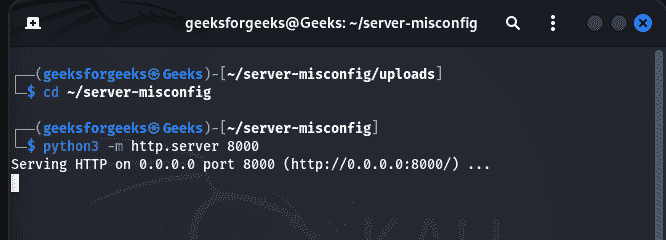
Step 3: Access the Directory
Open a browser and visit:
http://localhost:8000/uploads/Because directory listing is enabled by default in Python's simple server, you will see a list of files:
employees.txt
backup.sql
report.pdf
This simulates a server misconfiguration where sensitive files are exposed.
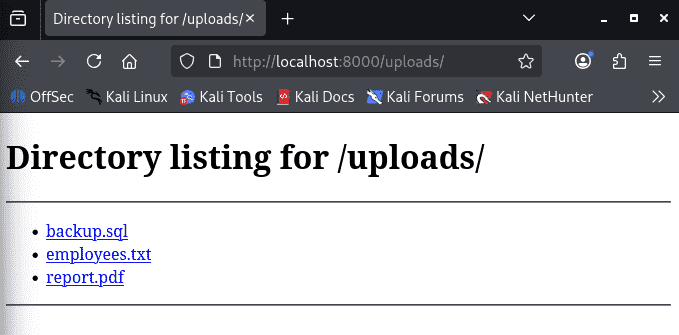
Verification
Try opening:
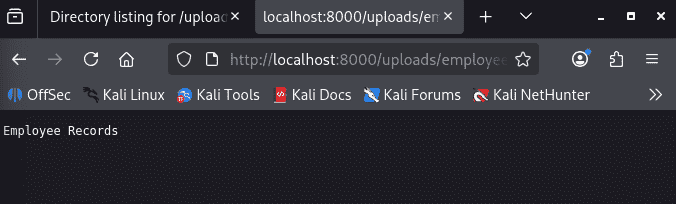
http://localhost:8000/uploads/employees.txtThe file contents should be displayed.
Best Practices to Prevent Server Misconfiguration
- Change Default Credentials: Always replace vendor-supplied usernames and passwords.
- Apply Security Updates: Keep operating systems, web servers, and applications updated.
- Disable Unnecessary Services: Remove or disable unused applications and ports.
- Implement Least Privilege: Users and services should only have the permissions necessary for their tasks.
- Configure Firewalls Properly: Restrict access to essential ports and services only.
- Disable Directory Listing: Prevent users from browsing server directories.
- Secure SSL/TLS Configuration: Use modern encryption standards and strong cipher suites.
- Monitor Server Activity: Implement logging and security monitoring solutions.
- Conduct Regular Security Assessments: Perform routine vulnerability scans and penetration testing.
