

Full Stack Developer interview questions evaluate your knowledge of front-end, back-end, databases, APIs, and web application development.
- Covers front-end and back-end technologies.
- Includes databases, APIs, and authentication.
- Tests problem-solving and web development skills.
1. What is MERN Stack?
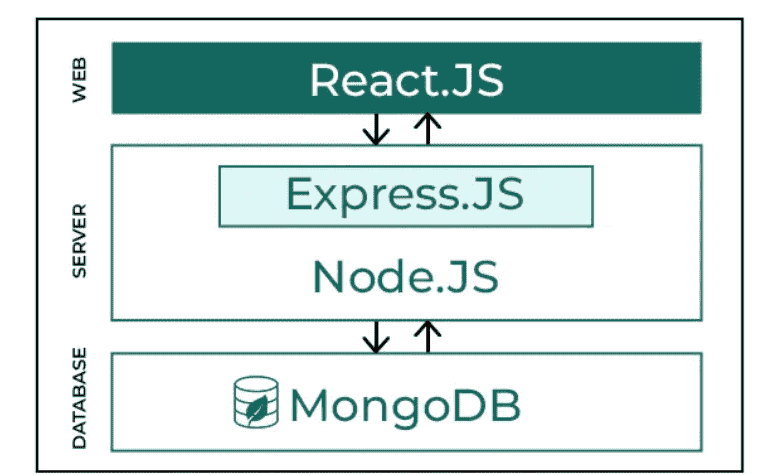
MERN Stack is a JavaScript-based technology stack used to build full-stack web applications. It consists of four technologies that work together for front-end, back-end, and database development.
- MongoDB: NoSQL database for storing application data.
- Express.js: Backend framework for building APIs and handling server-side logic.
- React: Front-end library for building interactive user interfaces.
- Node.js: JavaScript runtime for executing server-side code.
2. How MERN Stack Works?
The MERN Stack uses React for the front end, Express.js and Node.js for the backend, and MongoDB for storing application data.
- React: Sends user requests and displays data in the browser.
- Express.js & Node.js: Process requests, execute business logic, and handle APIs.
- MongoDB: Stores and retrieves application data.
3. What is DNS?
DNS is a hierarchical system that translates user-friendly domain names into IP addresses, enabling browsers to locate and connect to websites efficiently.
- DNS resolves domain names like www.geeksforgeeks.org to their corresponding IP addresses.
- It eliminates the need to remember numerical IP addresses for every website.
- DNS is distributed and scalable, supporting the global internet infrastructure.
- Ensures efficient routing of web requests to the correct servers.
4. How DNS Works?

When you enter a website address, DNS translates it into an IP address through a series of checks and server queries, enabling your browser to locate and load the site.
- User Input: Enter the website URL (e.g., www.geeksforgeeks.org) in the browser.
- Local Cache Check: Browser checks its cache for a recent IP; uses it if found.
- DNS Resolver Query: Sends a request to the ISP’s DNS resolver if IP is not cached.
- Root DNS Server: Directs the query to the correct TLD server based on the domain extension.
- TLD Server: Points to the authoritative DNS server for the specific domain.
- Authoritative DNS Server: Provides the actual IP address of the website.
- Final Response: Resolver returns the IP to your computer, allowing the page to load.
5. Difference between HTTP and HTTPS
HTTP | HTTPS |
|---|---|
HTTP stands for HyperText Transfer Protocol. In HTTP, the URL begins with “http://”. | HTTPS stands for HyperText Transfer Protocol Secure. In HTTPS, the URL starts with “https://”. |
HTTP uses port number 80 for communication. | HTTPS uses port number 443 for communication. |
Hyper-text exchanged using HTTP goes as plain text i.e. anyone between the browser and server can read it relatively easily if one intercepts this exchange of data and due to which it is Insecure. | HTTPS is considered to be secure but at the cost of processing time because Web Server and Web Browser need to exchange encryption keys using Certificates before actual data can be transferred. |
HTTP does not use encryption, which results in low security in comparison to HTTPS. | HTTPS uses Encryption which results in better security than HTTP. |
HTTP speed is faster than HTTPS. | HTTPS speed is slower than HTTP. |
6. Difference between previous version of HTML and HTML 5
Before HTML5 | HTML5 |
|---|---|
| It didn’t support audio and video without the use of Flash player support. | It supports audio and video controls with the use of <audio> and <video> tags. |
| It uses cookies to store temporary data. | It aded Local Storage and Session Storage |
| Does not allow JavaScript to run in the browser. | Allows JavaScript to run in the background. This is possible due to JS Web worker API in HTML5. |
| Vector graphics are possible in HTML with the help of various technologies such as VML, Silver-light, Flash, etc. | Vector graphics is additionally an integral part of HTML5 like SVG and canvas. |
| It does not allow drag-and-drop effects. | It allows drag-and-drop effects and support target blank attribute. |
7. Difference between HTML and XHTML
HTML | XHTML |
|---|---|
| HTML stands for Hypertext Markup Language. | XHTML stands for Extensible Hypertext Markup Language. |
| It was developed by Tim Berners-Lee. | It was developed by W3C i.e., lowercase World Wide Web Consortium. |
| It was developed in 1991. | It was released in 2000. |
| It is extended from SGML. | It is extended from XML and HTML. |
| The format is a document file format. | The format is a markup language. |
| All tags and attributes are not necessarily to be in lower or upper case. | In this, every tag and attribute should be in lower case. |
8. Explain the difference between client-side and server-side programming?
The client-side and server-side refer to two distinct parts of a web application that work together to deliver functionality to users.
Client-Side
Runs in the user's browser and handles the user interface and interactions.
- Executes JavaScript in the browser for tasks like form validation, animations, and DOM updates.
- Renders HTML and CSS to display the user interface.
- Communicates with the server using REST APIs to fetch or send data asynchronously.
Examples:
- Clicking a button to display a popup using JavaScript.
- Loading additional content using fetch() or axios without refreshing the page.
Server-Side
Runs on the server and processes client requests, business logic, and database operations.
- Executes server-side languages such as Node.js, Java, or Python.
- Handles authentication, authorization, and database interactions securely.
- Returns data (typically JSON) to the client through REST APIs.
Examples:
- Verifying user login credentials against a database.
- Returning a list of products in JSON format for the client to display
9. What do you mean by CORS (Cross-Origin Resource Sharing)?
CORS (Cross-Origin Resource Sharing) is a browser security mechanism that enables controlled access to resources from a different origin. It extends the Same-Origin Policy (SOP) by allowing cross-origin requests only when permitted by the server.
- Allows secure communication between different domains, ports, or protocols.
- Uses HTTP headers (e.g., Access-Control-Allow-Origin) to control access.
- Prevents unauthorized cross-origin requests by default.
- Commonly used when the frontend and backend are hosted on different origins.
10. Explain event loop in Node.js.
The event loop in Node.js is a mechanism that allows asynchronous tasks to be handled efficiently without blocking the execution of other operations. It:
- Executes JavaScript synchronously first and then processes asynchronous operations.
- Delegates heavy tasks like I/O operations, timers, and network requests to the libuv library.
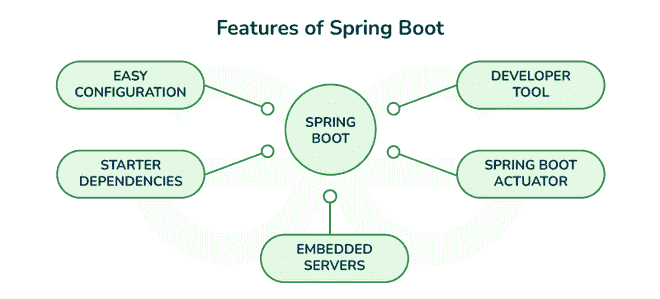
- Ensures smooth execution of multiple operations by queuing and scheduling callbacks efficiently.
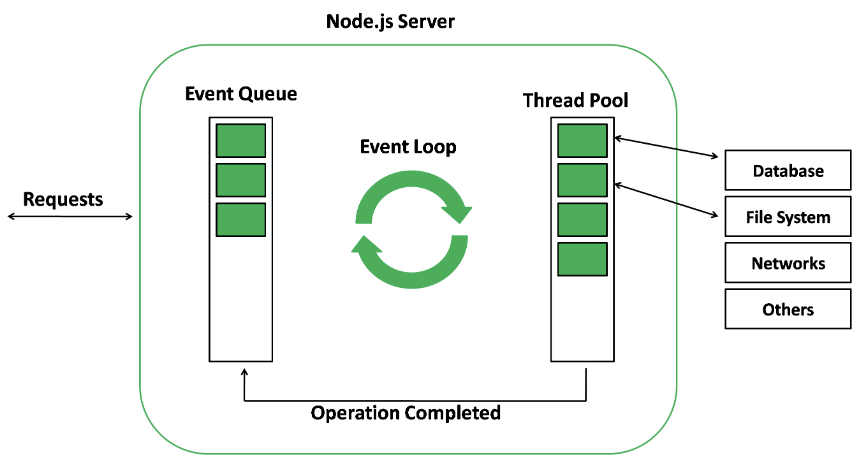
Therefore, when an async function (or an I/O) needs to be executed, the main thread relays it to another thread, allowing v8 (Javascript engine) to continue processing or running its code. In the event loop, there are different phases, like pending callbacks, closing callbacks, timers, idle or preparing, polling, and checking, with different FIFO (First-In-First-Out) queues.
11. What is Promise and explain its states?
A Promise is a JavaScript object used to handle asynchronous operations. It represents the eventual result (success or failure) of an asynchronous task and helps avoid callback hell by providing cleaner code and better error handling.
- Represents the result of an asynchronous operation.
- Improves code readability compared to nested callbacks.
- Supports chaining using .then(), .catch(), and .finally().
- Provides better error handling for asynchronous code.
Promise States:
- Pending: Initial state; the operation is still in progress.
- Fulfilled: The operation completed successfully, and a value is returned.
- Rejected: The operation failed, and an error is returned.
12. Explain the Restful API and write its usage.
REST API stands for REpresentational State Transfer API. It is a type of API (Application Programming Interface) that allows communication between different systems over the internet. REST APIs work by sending requests and receiving responses, typically in JSON format, between the client and server.
REST APIs use HTTP methods (such as GET, POST, PUT, DELETE) to define actions that can be performed on resources. These methods align with CRUD (Create, Read, Update, Delete) operations, which are used to manipulate resources over the web.
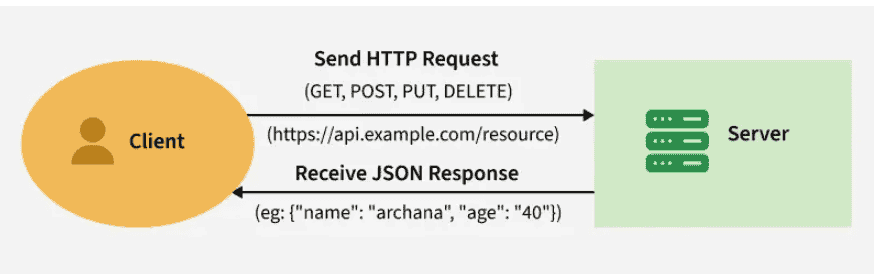
A request is sent from the client to the server via a web URL, using one of the HTTP methods. The server then responds with the requested resource, which could be HTML, XML, Image, or JSON, with JSON being the most commonly used format for modern web services.
13. State the difference between GET and POST?
GET and POST are two different HTTP request methods.
GET | POST |
|---|---|
Retrieve (read) data from the server. | Send (create or submit) data to the server. |
Data is sent in the URL query string. | Data is sent in the request body (JSON, form-data, etc.). |
Idempotent—multiple identical requests have no side effects. | Non-idempotent—repeating a request may create duplicate data or other side effects. |
Responses are cacheable by default. | Responses are not cacheable by default. |
Used for fetching pages, images, search results, or API data. | Used for form submission, file uploads, and creating resources. |
14. What is the difference between PUT and PATCH method?
PUT | PATCH |
|---|---|
Updates or replaces an entire resource. | Updates only specific fields of a resource. |
Requires the complete resource in the request body. | Requires only the fields to be changed. |
May create the resource if it doesn't exist (implementation-dependent). | Typically updates only existing resources. |
Less efficient for small changes since the full resource is sent. | More efficient for partial updates. |
Best for replacing a resource completely. | Best for making small or partial updates. |
Example: PUT /users/1 with the complete user object. | Example: PATCH /users/1 with { "email": "new@example.com" }. |
15. What is event bubbling and capturing in JavaScript?
The propagation of events inside the DOM (Document Object Model) is known as 'Event Flow' in JavaScript. The event flow defines the order or sequence in which a particular web page receives an event. Accordingly, event flow (propagation) in JS is dependent on the following aspects:
- Event Bubbling: With Event Bubbling, the event is captured and handled first by the innermost element, and then propagates to the outermost element. Events propagate up the DOM tree from child elements until the topmost element is handled.
- Event Capturing: With Event Capturing, the event is captured and handled first by the outermost element, and then propagates to the innermost element. Event cycles propagate starting with the wrapper elements and ending with the target elements that initiated the event cycle.
The following diagram will help you to understand the event propagation life cycle.

16. Explain the meaning of multithreading?
The thread is an independent part or unit of a process (or an application) that is being executed. Whenever multiple threads execute in a process at the same time, we call this "multithreading". You can think of it as a way for an application to multitask.
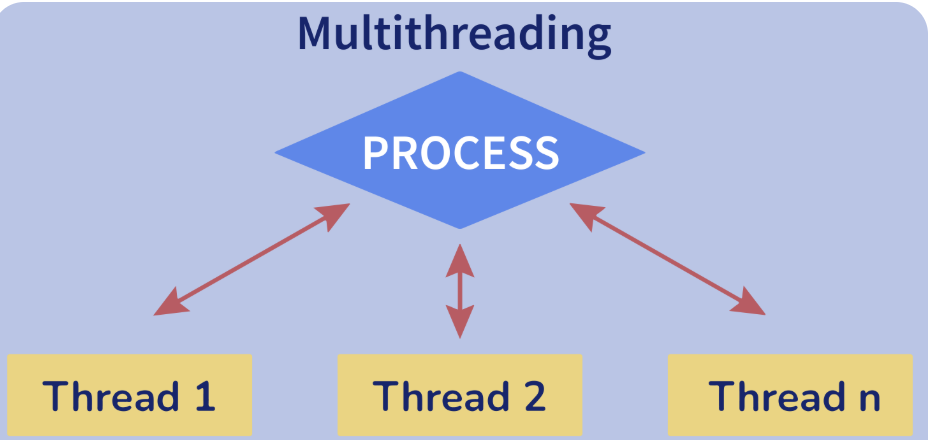
- By multithreading, computing resources are also minimized and used more effectively.
- The response time of the application is improved since requests from one thread do not block requests from other threads.
- Consequently, if one of the threads encounters an exception, it will not affect the other threads.
- Multithreading, on the other hand, uses fewer resources than running multiple processes simultaneously.
- The overhead, time usage, and management associated with creating processes are much higher when compared to creating and managing threads.
17. What is the difference between == and === in JavaScript?
- ==: Compares values with each other directly, performing type conversion if required first (example: '5' == 5 → true).
- ===: This operator strictly compares values and types with each other. There is no type conversion performed with this operator. For example, if you try to compare a string and a number, the result will always be false, no matter what: '5' === 5 → false.
18. What is the difference between Relational and Non-Relational Databases?
Relational Database | Non-Relational Database |
|---|---|
Stores structured data in tables. | Stores structured, semi-structured, or unstructured data. |
Uses a fixed schema. | Uses a flexible or schema-less design. |
Best for complex transactions. | Best for high-volume, high-velocity data. |
Supports ACID properties. | Typically prioritizes scalability over full ACID compliance (varies by database). |
Primarily scales vertically (adding more resources to one server). | Primarily scales horizontally (adding more servers). |
Suitable for moderate data volumes. | Suitable for large-scale data and distributed systems. |
Examples: MySQL, PostgreSQL, Oracle. | Examples: MongoDB, Cassandra, Redis. |
19. How would you handle user authentication in a web application?
User authentication verifies a user's identity before granting access to protected resources. A common approach is using JWT (JSON Web Token) for secure authentication.
- Collect user credentials through a login form.
- Verify credentials on the server against the database.
- Generate and return a signed JWT if authentication is successful.
- Send the JWT with subsequent requests (typically in the Authorization header).
- Validate the JWT on the server before allowing access to protected routes.
20. What is the difference between Authentication and Authorization?
Authentication | Authorization |
|---|---|
In the authentication process, the identity of users are checked for providing the access to the system. | In authorization process, a user's permissions or privileges are checked before allowing access to resources. |
Users are verified during authentication. | A user's permissions or access rights are validated during authorization. |
It is performed before the authorization process. | It is performed after the authentication process. |
It typically requires the user's login credentials (username, password, OTP, etc.). | It requires the user's roles, permissions, or security levels. |
Authentication determines who the user is. | Authorization determines what the user is allowed to access or perform. |
Authentication establishes the user's identity (often using sessions, JWTs, or ID Tokens depending on the authentication system). | Authorization is typically enforced using roles, permissions, or Access Tokens (depending on the authorization mechanism). |
Authentication is usually visible to the user (e.g., login). | Authorization usually happens in the background and is not directly visible to the user. |
Example: Employees authenticate by logging into the company network before accessing company email. | Example: After authentication, the system determines whether an employee can access emails, files, or admin features. |
21. What is the purpose of package.json in a Node.js project?
The package.json file is the configuration file of a Node.js project. It stores project metadata, manages dependencies, and defines scripts for running and maintaining the application.
- Stores project information such as name, version, and description.
- Lists dependencies and devDependencies.
- Defines scripts (e.g., start, test, build).
- Enables consistent dependency installation using npm install.
22. What is Callback Hell?
Callback Hell (also called the Pyramid of Doom) occurs when multiple nested callback functions make asynchronous code difficult to read, maintain, and debug.
- Caused by deeply nested callbacks.
- Makes code less readable and harder to maintain.
- Complicates debugging and error handling.
- Can be avoided using Promises or async/await.
23. State difference between normalization and denormalization.
Normalization | Denormalization |
|---|---|
Removes redundant data by organizing it into multiple related tables. | Adds redundancy by combining data to improve query performance. |
Reduces data duplication and improves consistency. | Improves read performance at the cost of data redundancy. |
Maintains high data integrity. | May reduce data integrity due to duplicated data. |
Optimizes storage space. | Requires more storage space. |
Increases the number of related tables. | Reduces the number of tables by merging data where appropriate. |
Best for transactional systems (OLTP). | Best for read-heavy and reporting systems (OLAP). |
24. What do you mean by Temporal Dead Zone in ES6?
The Temporal Dead Zone (TDZ) is the period between entering a block scope and the declaration of a let or const variable. Accessing the variable during this time results in a ReferenceError.
- Applies only to let and const, not var.
- Starts when the block scope is entered and ends when the variable is declared.
- Prevents access to variables before initialization.
- Accessing a variable in the TDZ throws a ReferenceError.
console.log(varNumber); // undefined
console.log(letNumber); // ReferenceError

var varNumber = 3;
let letNumber = 4;
Both let and const variables are in the TDZ from the moment their enclosing scope starts to the moment they are declared.
25. Explain the purpose of a version control system and Git workflow?
A Version Control System (VCS) tracks changes to source code, enables team collaboration, and allows developers to restore previous versions when needed.
- Tracks and manages code changes.
- Supports collaboration among multiple developers.
- Maintains version history and enables rollback.
- Helps resolve code conflicts during development.
Typical Git Workflow:
- Clone the repository (
git clone). - Create a new branch (
git checkout -b feature-branch). - Make changes and stage them (
git add .). - Commit changes (
git commit -m "message"). - Push the branch (
git push origin feature-branch). - Create a Pull Request (PR).
- Review and merge into the main branch.
26. What are WebSockets, and how do they differ from HTTP requests?
WebSockets are a communication protocol that enables real-time, two-way (full-duplex) communication between a client and a server over a single persistent connection.
HTTP | WebSockets |
|---|---|
Uses a request-response model. | Uses a persistent, full-duplex connection. |
Client must initiate every request. | Client and server can send data at any time. |
A new connection is established for each request. | A single connection remains open. |
Best for fetching web pages and REST APIs. | Best for live chat, notifications, multiplayer games, and live updates. |
Example: Client repeatedly polls for new messages. | Example: Server instantly pushes new messages to the client. |
27. How do you use Postman for testing APIs?
Postman is an API testing tool used to send HTTP requests, inspect responses, and automate API validation.
- Create a request by selecting the HTTP method (GET, POST, etc.) and entering the API URL.
- Add query parameters, headers, or a request body (JSON, form-data, etc.).
- Click Send to view the response (status, headers, and body).
- Organize requests into Collections for easier testing.
- Use the Tests tab to write JavaScript assertions for automated validation.
pm.test("Status is 200", () => {
  pm.response.to.have.status(200);
});
28. How do you debug an issue that occurs in both the frontend and back-end?
Debugging full-stack issues involves tracing the request from the frontend to the backend to identify where the problem occurs.
- Reproduce the issue consistently.
- Use Browser DevTools to inspect console errors and network requests.
- Check server logs and use a debugger to identify backend errors.
- Verify API endpoints, request/response payloads, and data formats.
- Test APIs independently using Postman to isolate whether the issue is in the frontend or backend.
29. What is !DOCTYPE?
<!DOCTYPE> is a declaration that tells the browser which version of HTML the document uses, ensuring the page is rendered in standards mode.
- Declares the document type.
- Helps browsers render pages correctly.
- Not an HTML tag or element.
- HTML5 uses the following declaration:
<!DOCTYPE html>30. What are elements and tags in HTML?
HTML tags define the markup, while HTML elements represent the complete structure, including the tags and the content.
HTML Tags:
- Markup enclosed within < >.
- Used to define the start and end of an HTML element.
- Example: <p> and </p>.
HTML Elements:
- Consist of an opening tag, content, and a closing tag.
- Represent the complete HTML structure.
- Example: <p>Hello World</p>.
31. What are the various heading tags and their importance?
HTML provides six heading tags (<h1> to <h6>) to define headings, where <h1> is the highest level and <h6> is the lowest.
Heading Tags:
- <h1>: Main heading
- <h2>: Subheading
- <h3>: Section heading
- <h4>: Sub-section heading
- <h5>: Minor heading
- <h6>: Smallest heading
Importance:
- Defines the structure and hierarchy of a webpage.
- Improves readability and content organization.
- Helps search engines understand and index page content (SEO).
- Enhances accessibility for screen readers.
32. How to redirect to a particular section of a page using HTML?
Use the anchor (<a>) tag with the href attribute and the target element's id to navigate to a specific section of the same page.
- Assign a unique id to the target section.
- Use an anchor tag with href="#id" to link to that section.
- Clicking the link scrolls directly to the specified section.
Example:
<a href="#contact">Contact Us</a>

<section id="contact">
  <h2>Contact Us</h2>
</section>
33. What are attributes?
HTML attributes provide additional information or define properties of an HTML element. They are specified inside the opening tag as name-value pairs.
- Provide extra information about an element.
- Written in the opening tag.
- Consist of a name and a value.
- Attribute values are typically enclosed in quotes.
Example:
<a href="https://example.com">Visit Website</a>
Here, href is the attribute name, and "https://example.com" is its value.
34. Are <b> and <strong> tags same? If not, then why?
No, <b> and <strong> both display text in bold by default, but they have different purposes.
<b> Tag:
- Makes text bold for visual presentation.
- Does not convey semantic importance.
<strong> Tag:
- Indicates that the text is important or has strong emphasis.
- Has semantic meaning and is recognized by search engines and screen readers.
- Typically rendered as bold by browsers.
<b>Bold Text</b>
<strong>Important Text</strong>
35. What are <em> and <i> tags?
Both <em> and <i> display text in italics by default, but they serve different purposes.
<i> Tag:
- Displays text in italics for presentation.
- Used for technical terms, foreign words, thoughts, or alternate voice.
- Does not add semantic emphasis.
<em> Tag:
- Indicates emphasized text with semantic meaning.
- Helps screen readers convey emphasis.
- Typically rendered as italics by browsers.
<i>Homo sapiens</i>
<em>This is important.</em>
36. How are comments added in HTML?
HTML comments are used to add notes or explanations in the code. They are ignored by the browser and are not displayed on the webpage.
Syntax:
<!-- This is a comment -->Types of Comments:
- Single-line comment
- Multi-line comment
Example:
<!--
This is a
multi-line comment
-->
37. What is the difference between block and inline elements?
Block elements occupy the full available width and start on a new line, whereas inline elements occupy only the required width and remain on the same line.
Block Elements | Inline Elements |
|---|---|
Take up the full available width. | Take up only the required width. |
Always start on a new line. | Do not start on a new line. |
Used to structure page content. | Used to format or link small portions of content. |
Examples: <div>, <p>, <h1>–<h6>, <section> | Examples: <span>, <a>, <strong>, <em> |
38. Are <div> and <span> tags similar?
Both <div> and <span> are generic HTML containers used to group content, but they differ in how they are displayed.
<div> Tag:
- A block-level element.
- Starts on a new line and takes up the full available width.
- Used to group and structure larger sections of a webpage.
<span> Tag:
- An inline element.
- Takes up only the required width and stays on the same line.
- Used to style or group small portions of text or inline elements.
<div>
  Welcome to <span>GeeksforGeeks</span>
</div>
39. Differences between <div> & <span> tag?
<div> tag | <span> tag |
|---|---|
A block-level element. | An inline element. |
Starts on a new line and takes up the full available width. | Stays on the same line and takes up only the required width. |
Used to group or structure larger sections of a webpage. | Used to style or group small portions of text or inline elements. |
Commonly used for page layout and containers. | Commonly used for applying styles to specific words or phrases. |
40. What is the difference between classes and id?
id | class |
|---|---|
Identifies a unique element on a page. | Can be used for multiple elements. |
An element should have only one unique id. | An element can have multiple classes. |
Referenced in CSS using '#'. | Referenced in CSS using ' .' |
Commonly used for unique styling, JavaScript, and anchor links. | Commonly used for reusable styling and grouping elements. |
<div id="header"></div>
<p class="highlight">Hello</p>
<p class="highlight">World</p>
41. What are meta tags? How are they important?
Meta tags provide metadata (information) about an HTML document. They are placed inside the <head> section and are not displayed on the webpage.
- Store information such as description, author, keywords, and character encoding.
- Help browsers and search engines understand the webpage.
- Improve Search Engine Optimization (SEO).
- Not visible to users on the webpage.
<meta attribute-name="value">42. What is CSS?
Cascading Style Sheets fondly referred to as CSS, is a simply designed language intended to simplify the process of making web pages presentable. CSS allows you to apply styles to web pages. More importantly, CSS enables you to do this independent of the HTML that makes up each web page. CSS is easy to learn and understood, but it provides powerful control over the presentation of an HTML document.
43. Why do we use CSS?
CSS is used to style and format web pages, making them visually appealing while keeping the design separate from the HTML structure.
- Saves time by reusing styles across multiple pages.
- Makes website maintenance easier with centralized styling.
- Separates content (HTML) from presentation (CSS).
- Provides advanced styling and layout capabilities.
- Helps create responsive and consistent web designs.
44. How is CSS different from CSS 3?
CSS | CSS3 |
|---|---|
| Earlier versions of CSS (CSS1/CSS2). | Latest evolution of CSS with new features and modules. |
| Provides basic styling for web pages. | Adds advanced features such as animations, transitions, gradients, and flexbox/grid support. |
| Limited support for responsive design. | Supports responsive design through media queries and modern layout modules. |
| Developed as a single specification. | Organized into independent modules (e.g., Selectors, Flexbox, Grid, Animations). |
| Limited animation and transformation capabilities. | Supports animations, transitions, and 2D/3D transforms. |
Supported by older browsers. | Requires modern browser support for some features. |
45. What is the syntax for CSS?
A CSS style rule consists of a selector, property, and its value. The selector points to the HTML element where CSS style is to be applied. The CSS property is separated by semicolons.
Syntax:
selector {
    Property: value;
}
46. In how many ways can we add CSS to our HTML file?
CSS can be added to an HTML document in three ways, depending on the scope and reusability of the styles.
1. Inline CSS
- Applied directly to an HTML element using the style attribute.
- Best for styling a single element.
<p style="color: blue;">Hello</p>2. Internal (Embedded) CSS
- Written inside a <style> tag within the <head> section.
- Used for styling a single HTML page.
<style>
  p {
    color: blue;
  }
</style>
3. External CSS
- Written in a separate .css file and linked using the <link> tag.
- Best for styling multiple web pages and improving maintainability.
<link rel="stylesheet" href="styles.css">47. How can we add comments in CSS?
Comments are the statements in your code that are ignored by the compiler and are not executed. Comments are used to explain the code. They make the program more readable and understandable.
Syntax:
/* content */
Comments can be single-line or multi-line.
48. What does the ‘a’ in rgba mean?
The 'A' in rgba stands for Alpha, which controls the transparency (opacity) of a color.
- A (Alpha) defines the transparency level.
- Values range from 0 to 1.
- 0 = Fully transparent.
- 1 = Fully opaque (no transparency).
Syntax:
color: rgba(R, G, B, A);Example:
color: rgba(255, 0, 0, 0.5);This applies a 50% transparent red color.
49. What are CSS HSL Colors?
HSL stands for Hue, Saturation, and Lightness. It is a color model used in CSS to define colors in a more intuitive way.
- Hue (H): Defines the color on a scale from 0° to 360°.
- Saturation (S): Controls the intensity of the color (0% = Gray, 100% = Fully saturated).
- Lightness (L): Controls the brightness of the color (0% = Black, 100% = White).
Syntax:
color: hsl(H, S, L);Example:
h1 {
  color: hsl(120, 100%, 30%);
}
50. What are the different CSS border properties?
CSS border properties are used to define the style, width, and color of an element's border.
- border-style: Specifies the border style (e.g., solid, dashed, dotted). It must be set for the border to be visible.
- border-width: Sets the border thickness (e.g., 1px, medium, thick).
- border-color: Sets the border color using color names, HEX, RGB, or HSL values.
51. What are Data Types in JavaScript?
JavaScript data types are categorized into two parts i.e. primitive and non-primitive types.
1. Primitive Data Type: The predefined data types provided by JavaScript language are known as primitive data type. Primitive data types are also known as in-built data types.
2. Non-Premitive Data Type: The data types that are derived from primitive data types are known as non-primitive data types. It is also known as derived data types or reference data types.
52. Which symbol is used for comments in JavaScript?
Comments are used to explain code or temporarily disable it. They are ignored during execution.
Types of Comments:
- Single-line comment: Uses //
- Multi-line comment: Uses /* ... */
Example:
// This is a single-line comment

/*
  This is a
  multi-line comment
*/
53. What would be the result of 3+2+”7″
let x=3+2+"7"
console.log(x);
Output:
57Here, 3 and 2 behave like an integer, and “7” behaves like a string. So 3 plus 2 will be 5. Then the output will be 5+”7″ = 57.
54. What is the use of the isNaN function?
The isNan function checks whether a value is Not-a-Number (NaN) or cannot be converted to a valid number.
- Returns true if the value is NaN or cannot be converted to a number.
- Returns false if the value is a valid number or can be converted to one.
55. Which is faster in JavaScript and ASP script?
JavaScript is generally faster for client-side interactions because it runs directly in the user's browser, whereas ASP Script executes on the server before sending the response.
- JavaScript: Client-side scripting language executed in the browser.
- ASP Script: Server-side scripting language executed on the web server.
- JavaScript provides faster UI interactions since it doesn't require a server round trip for client-side logic.
- ASP Script is used for server-side processing such as database operations and generating dynamic web pages.
Note: Classic ASP Script (VBScript/JScript in ASP) is a legacy technology. Modern applications typically use server-side technologies such as ASP.NET, Node.js, Java, or Python instead.
56. What is negative infinity?
NEGATIVE_INFINITY is a special numeric value in JavaScript that represents a value smaller than any other number. It is displayed as -Infinity.
- Represents a value less than all finite numbers.
- Can result from certain arithmetic operations (e.g., dividing a negative number by 0).
- The value is displayed as -Infinity.
57. Is it possible to break JavaScript Code into several lines?
Yes, JavaScript code can span multiple lines. Strings can include line breaks using \n, and statements can also be split across multiple lines when the syntax allows.
- Use
\nto insert a new line inside a string. - JavaScript statements can be written across multiple lines for better readability.
- Avoid breaking code in places where it causes syntax errors.
Example:
console.log("Hello\nWorld");

let total =
  10 +
  5;
58. Which company developed JavaScript?
JavaScript was developed by Netscape Communications and was created by Brendan Eich in 1995.
59. What are undeclared and undefined variables?
An undefined variable has been declared but not assigned a value, whereas an undeclared variable has not been declared before it is used.
Undefined Variable:
- Declared but not initialized.
- Has the value undefined.
- Accessing it does not cause an error.
Undeclared Variable:
- Not declared before use.
- Accessing it directly throws a ReferenceError.
- Using typeof on an undeclared variable returns "undefined".
Example:
let a;
console.log(a);        // undefined

console.log(typeof b); // "undefined"
console.log(b);        // ReferenceError
60. Write a JavaScript code for adding new elements dynamically.
<html>
<head>
</head>
<body>
    <button onclick="create()">
        Click Here!
    </button>

    <script>
        function create() {
            let geeks = document.createElement('geeks');
            geeks.textContent = "Geeksforgeeks";
            geeks.setAttribute('class', 'note');
            document.body.appendChild(geeks);
        }
    </script>
</body>
</html>
61. What are global variables? How are these variables declared, and what are the problems associated with them?
A global variable is a variable declared outside of any function or block. It has global scope, meaning it can be accessed from anywhere in the program.
- Declared outside any function or block using var, let, or const.
- Accessible throughout the program (subject to module/block scope rules for let and const).
Problems with Global Variables:
- Can be modified from anywhere, making bugs harder to track.
- Increase the risk of variable name conflicts.
- Make code harder to debug, test, and maintain.
- Reduce code modularity and reusability.
Example:
let petName = "Kaalingas";

function myFunction() {
  console.log(petName);
}

myFunction();
console.log(petName);
62. What do you mean by NULL in JavaScript?
null is a special value in JavaScript that represents the intentional absence of a value. It is used to indicate that a variable currently has no value or object.
- Represents an intentionally empty value.
- Assigned explicitly by the developer.
- Different from undefined, which indicates a variable has not been initialized.
- typeof null returns "object" (a legacy behavior in JavaScript).
63. How to delete property-specific values?
The delete operator is used to remove a property and its value from a JavaScript object.
- Deletes the specified property from an object.
- Returns true if the property is deleted successfully.
- Does not affect other properties in the object.
let gfg = {
  Course: "DSA",
  Duration: 30
};

delete gfg.Course;

console.log(gfg);
64. What is a prompt box?
A prompt box is a dialog box in JavaScript that displays a message and allows the user to enter input.
- Created using the prompt() method.
- Accepts text input from the user.
- Returns the entered text as a string.
- Returns null if the user clicks Cancel.
65. What is the ‘this’ keyword in JavaScript?
The this keyword refers to the object that is currently executing the code. Its value depends on how a function is called, not where it is defined.
- Refers to the current execution context.
- Its value changes based on how the function is invoked.
- In an object method, this refers to the object itself.
- In the global context, this refers to the global object (or undefined in strict mode).
66. Explain the working of timers in JavaScript. Also explain the drawbacks of using the timer, if any.
JavaScript timers allow code to execute after a specified delay or repeatedly at fixed intervals.
- setTimout() executes a function once after a specified delay.
- setInterval() executes a function repeatedly at fixed intervals.
- clearTimeout() cancels a pending setTimeout().
- clearInterval() stops a running setInterval().
Drawbacks:
- Timing is not guaranteed and may be delayed if the main thread is busy.
- Repeated timers can affect performance if not cleared properly.
- Background browser tabs may throttle timer execution.
67. What is ReactJS?
ReactJS is an open-source JavaScript library used to build fast, interactive, and reusable user interfaces, especially for single-page applications (SPAs).
- Uses a component-based architecture to create reusable UI components.
- Uses a Virtual DOM for efficient rendering and better performance.
- Supports JSX to write HTML-like syntax within JavaScript.
- Uses Hooks (e.g., useState, useEffect) to manage state and side effects in functional components.
68. Explain the MVC architecture.
The Model-View-Controller (MVC) is a software design pattern that separates an application into three components, making it easier to develop, maintain, and scale.
- Model: Manages application data and business logic.
- View: Displays the user interface and presents data to the user.
- Controller: Handles user requests, processes input, and coordinates between the Model and View.
69. Explain the building blocks of React.
React is built on several core concepts that help create fast, reusable, and maintainable user interfaces.
- Components: Reusable pieces of UI that return React elements.
- JSX: HTML-like syntax used to write UI within JavaScript.
- Props: Read-only data passed from a parent component to a child component.
- State: Stores component-specific data that can change over time.
- Virtual DOM: A lightweight copy of the real DOM that improves rendering performance by updating only changed elements.
70. What is virtual DOM in React?
The Virtual DOM is a lightweight, in-memory copy of the real DOM. React uses it to efficiently update the user interface by minimizing direct DOM manipulations.
- Acts as a lightweight copy of the real DOM.
- React compares the current and previous Virtual DOM using a diffing algorithm.
- Updates only the changed elements in the real DOM.
- Batches multiple updates to improve performance.
- Reduces unnecessary re-rendering, making applications faster.
Workflow:
1. State or props change.
2. React creates a new Virtual DOM.
3. React compares it with the previous Virtual DOM (diffing).
4. Only the changed parts are updated in the real DOM.
71. What is JSX?
JSX (JavaScript XML) is a syntax extension for JavaScript that allows you to write HTML-like code inside JavaScript. React uses JSX to describe the user interface.
- Simplifies writing React components.
- Combines HTML-like syntax with JavaScript.
- JavaScript expressions are enclosed in {}.
- JSX is transpiled into JavaScript by tools like Babel.
const name = "Learner";

function App() {
  return <h1>Hello, {name}!</h1>;
}
72. What are components and their type in React?
Components are the building blocks of a React application. They are reusable pieces of code that define and render parts of the user interface.
Types of Components:
- Functional Components: JavaScript functions that return JSX. They are the preferred approach in modern React and support Hooks.
- Class Components: ES6 classes that extend React.Component. They use lifecycle methods and state but are less commonly used in modern React.
function Welcome() {
  return <h1>Hello, React!</h1>;
}

export default Welcome;
73. How do browsers read JSX?
Browsers cannot understand JSX directly. JSX is first converted into regular JavaScript before it is executed.
- Browsers can execute only standard JavaScript.
- Babel transpiles JSX into JavaScript.
- The transpiled JavaScript is then executed by the browser.
- This process allows developers to write HTML-like syntax in React.
74. Explain the steps to create a react application and print Hello World?
A React application can be created using Create React App. After creating the project, write a simple component and run the application.
Steps:
1. Create a React project:
npx create-react-app my-app2. Navigate to the project:
cd my-app3. Update App.js:
function App() {
  return <h1>Hello World!</h1>;
}

export default App;
4. Run the application:
npm start75. How to create an event in React?
React events are handled by attaching event handlers (such as onClick or onChange) to JSX elements. When the event occurs, the associated function is executed.
function App() {
  const handleClick = () => {
    alert("Button clicked!");
  };

  return <button onClick={handleClick}>Click Me</button>;
}
76. Explain the creation of a List in react?
Lists in React are created by using the map() method to render multiple elements from an array.
- Use map() to iterate over an array.
- Return a React element for each item.
- Assign a unique key prop to each list item.
const numbers = [1, 2, 3, 4, 5];

function App() {
  return (
    <ul>
      {numbers.map((number) => (
        <li key={number}>{number}</li>
      ))}
    </ul>
  );
}
77. What is a key in React?
A key is a special React attribute used to uniquely identify elements in a list. It helps React efficiently update, add, or remove list items during rendering.
- Used when rendering lists with map().
- Must be unique among sibling elements.
- Helps React optimize rendering performance.
- Should be a stable and unique value (such as an ID).
78. What is MongoDB, and How Does It Differ from Traditional SQL Databases?
MongoDB is a NoSQL, document-oriented database that stores data in BSON (Binary JSON) format. Unlike SQL databases, it uses flexible documents instead of tables with rows and columns.
MongoDB | SQL Databases |
|---|---|
Document-oriented database | Relational database |
Stores data as BSON documents | Stores data in tables (rows and columns) |
Flexible, schema-less design | Fixed schema |
Scales horizontally | Typically scales vertically |
Best for unstructured or rapidly changing data | Best for structured data and complex transactions |
79. Explain BSON and Its Significance in MongoDB.
BSON (Binary JSON) is the binary-encoded format MongoDB uses to store documents. It extends JSON by supporting additional data types and enables efficient data storage and retrieval.
- Stores data in binary format for better performance.
- Supports additional data types like Date, ObjectId, and Binary.
- Improves storage efficiency and query performance.
- Used internally by MongoDB to store and exchange data.
80. What is Express.Js?
Express.js is a lightweight web framework for Node.js that simplifies building web applications and RESTful APIs.
- Provides routing and middleware to handle HTTP requests and responses.
- Commonly used with MongoDB, React, and Node.js in the MERN stack.
81. Why use Express.Js?
Express.js is used to simplify backend development in Node.js, making it faster and easier to build web applications and APIs.
- Simplifies routing, middleware, and HTTP request handling.
- Lightweight, flexible, and scalable for building server-side applications.
82. What is Spring Boot?
Spring Boot is a Java framework built on top of the Spring Framework that simplifies the development of stand-alone, production-ready applications with minimal configuration.
- Provides embedded servers (such as Tomcat) to run applications without external server setup.
- Simplifies development through auto-configuration and rapid application setup.
83. What are the Features of Spring Boot?
Spring Boot provides several features that simplify Java application development and make it faster to build production-ready applications.
- Auto-configuration: Automatically configures the application based on dependencies.
- Starter POMs: Provide pre-configured dependencies for common functionalities.
- Embedded Servers: Includes Tomcat, Jetty, etc., eliminating the need for external servers.
- Actuator: Offers health checks, metrics, and application monitoring.
- Spring Boot CLI: Simplifies project creation, dependency management, and application execution.
84. What is Django?
Django is a high-level, open-source Python web framework used to build secure, scalable, and dynamic web applications quickly.
- Follows the MVT (Model-View-Template) architecture.
- Supports rapid development with built-in features like ORM, authentication, and an admin panel.
- Encourages clean, reusable, and maintainable code.
85. What is the difference between Flask and Django?
| Flask | Django |
|---|---|
| Lightweight micro-framework | Full-stack web framework |
| Full-stack web framework | Comes with many built-in features |
| Uses extensions for ORM, authentication, etc. | Includes built-in ORM, authentication, and admin panel |
| Flexible project structure | Follows a conventional project structure |
| Best for small to medium applications and APIs | Best for large, complex, and scalable applications |
| Faster to learn and set up | More features but has a steeper learning curve |
86. What is Git?
Git is a distributed version control system (DVCS) that is used to track changes in source code during software development. It permits multiple developers to work on a project together without interrupting each other's changes. Git is especially popular for its speed, and ability to manage both small and large projects capably.
87. What is a repository in Git?
A Git repository (or repo) is like a file structure that stores all the files for a project. It continues track changes made to these files over time, helping teams work together evenly. Git can control both local repositories (on your own machine) and remote repositories (usually hosted on platforms like GitHub, GitLab, or Bitbucket), allowing teamwork and backup.
88. What is an anchor tag in HTML?
The <a> tag (anchor tag) in HTML is used to create a hyperlink on the webpage. This hyperlink is used to link the webpage to other web pages. It’s either used to provide an absolute reference or a relative reference as its “href” value. Click Here to know more in detail.
Syntax:
<a href = "link"> Link Name </a>Example
<html>

<body>
    <h1>
    Welcome to
        <a href="https://www.geeksforgeeks.org/">
            GeeksforGeeks
        </a>
    </h1>
    <h2>This is anchor Tag</h2>
</body>
</html>
89. What are void elements?
Void Elements are HTML elements that do not have a closing tag and cannot contain any content.
- Contain only a start tag and optional attributes.
- Common examples include <br>, <hr>, <img>, <input>, <meta>, and <link>.
90. How to change an inline element into a block-level element?
An inline element can be converted into a block-level element using the CSS display property.
- Set display: block; on the element.
- The element will start on a new line and occupy the available width.
91. How Container tag is different from the Empty tag in HTML?
Container tags enclose content using opening and closing tags, whereas empty (void) tags do not have closing tags and cannot contain any content.
Container Tags | Empty (Void) Tags |
|---|---|
Have both opening and closing tags. | Have only an opening tag (no closing tag). |
Can contain text, elements, or other content. | Cannot contain any content. |
Used to wrap and structure content. | Used for standalone elements. |
Examples: <div>, <p>, <span>, <body> | Examples: <br>, <hr>, <img>, <input>, <meta> |
92. What tags are used to separate a section of text?
HTML provides several tags to separate and organize text for better readability and structure.
<br>:<br> inserts a line break within the same block of text.<p>:<p> defines a new paragraph with spacing before and after it.<blockquote>:<blockquote> defines a block of quoted text, typically displayed with indentation.
93. In how many ways you can apply CSS to your HTML file?
CSS can be applied to an HTML document in three different ways to style web pages.
Ways to Apply CSS:
- Inline CSS: Inline CSS uses the style attribute directly inside an HTML element.
- Internal CSS: Internal CSS defines CSS rules inside a <style> tag within the <head> section.
- External CSS: Stores CSS in a separate .css file and links it using the <link> tag.
94. How to include one CSS file in another?
One CSS file can be included in another using the @import rule.
- Uses the @import rule to import another stylesheet.
- The imported CSS is loaded before the remaining styles in the current file.
Example:
@import url("styles.css");Note: In modern web development, using multiple <link> tags is generally preferred over @import for better loading performance.
95. How can you apply JS in your HTML?
JavaScript can be added to an HTML document in three ways to provide interactivity and dynamic behavior.
Ways to Apply JavaScript:
- Internal JavaScript: Write code inside the <script> tag within the <head> or <body> section.
- External JavaScript: Link a separate .js file using the <script src="..."> tag.
- Inline JavaScript: Write JavaScript directly inside an HTML element using event attributes (e.g., onclick).
96. What are logical and physical tags in HTML?
Logical tags describe the meaning of content, while physical tags define its appearance.
Logical Tags:
- Indicate the semantic meaning of content.
- Improve accessibility and SEO.
- Examples: <strong>, <em>, <cite>, <code>.
Physical Tags:
- Control the visual formatting of content.
- Focus on how text is displayed.
- Examples: <b>, <i>, <u>, <sup>, <sub>
97. What is MathML in HTML 5?
The MathML (Mathematical Markup Language) is an HTML5 markup language used to display mathematical equations and expressions on web pages.
- Written inside the <math> element.
- Represents mathematical formulas in a structured, machine-readable format.
- Supported by modern web browsers for rendering mathematical content.
<math>
  <mi>x</mi>
  <mo>+</mo>
  <mn>2</mn>
</math>
98. Can we overlap elements in CSS?
Yes, CSS allows elements to overlap by using positioning and the z-index property to control their stacking order.
- Use position (relative, absolute, fixed, or sticky) to place elements.
- Use z-index to determine which overlapping element appears on top.
99. What are the various positioning properties in CSS?
The CSS position property specifies how an element is positioned on a web page.
Positioning Properties:
- static: Default positioning; follows the normal document flow.
- relative: Positioned relative to its normal position.
- absolute: Positioned relative to the nearest positioned ancestor.
- fixed: Positioned relative to the viewport and remains fixed during scrolling.
- sticky: Behaves like relative until a scroll threshold is reached, then acts like fixed.
100. What is CSS overflow?
The CSS overflow property controls what happens when an element's content exceeds its available space.
- visible: Content is displayed outside the element (default).
- hidden: Extra content is clipped and not visible.
- scroll: Always displays scrollbars to access overflowing content.
- auto: Displays scrollbars only when needed.
- overflow-x / overflow-y: Control horizontal and vertical overflow separately.
.container {
  overflow: auto;
}
101. What does the CSS float property do?
The CSS float property positions an element to the left or right of its container, allowing surrounding content to wrap around it.
- left: Floats the element to the left.
- right: Floats the element to the right.
- none: Default value; the element does not float.
- inherit: Inherits the float value from its parent element.
102. What does display:inline-block do?
Inline-block uses both properties: block and inline. So, this property aligns the div inline but the difference is it can edit the height and the width of the block. Basically, this will align the div both in the block and inline fashion.
<html>
    <head>
        <title>CSS | Display property</title>
        <style>
        #main{
                height: 100px;
                width: 200px;
                background: teal;
                display: inline-block;

            }
            #main1{
                height: 100px;
                width: 200px;
                background: cyan;
                display: inline-block;

            }
            #main2{
                height: 100px;
                width: 200px;
                background: green;
                display: inline-block;
            }
            .gfg {
                margin-left:200px;
                font-size:42px;
                font-weight:bold;
                color:#009900;
            }
            .geeks {
                font-size:25px;
                margin-left:210px;
            }
            .main {
                margin:50px;
            }
        </style>
    </head>
    <body>
        <div class = "gfg">GeeksforGeeks</div>
        <div class = "geeks">display: Inline-block; property</div>
        <div class = "main">
            <div id="main"> BLOCK 1 </div>
            <div id="main1"> BLOCK 2</div>
            <div id="main2">BLOCK 3 </div>
        </div>
    </body>
</html>
103. How can we vertically center a text in CSS?
Text can be vertically centered using several CSS techniques, with Flexbox being the most common and recommended approach.
- Flexbox: Use display: flex with align-items: center.
- Line-height: Set line-height equal to the container's height (for single-line text).
- Grid: Use display: grid with place-items: center.
.container {
  display: flex;
  justify-content: center;
  align-items: center;
  height: 200px;
}
104. How can we center an image in CSS?
An image can be centered horizontally and vertically using CSS, with Flexbox being the simplest and most commonly used approach.
- Flexbox: Use display: flex with justify-content: center and align-items: center.
- Grid: Use display: grid with place-items: center.
- Positioning: Use position: absolute with transform: translate(-50%, -50%).
105. What are CSS Combinators?
CSS combinators define the relationship between selectors, allowing styles to be applied based on the position of elements in the HTML structure.
Types of Combinators:
- Descendant ( ): Selects all matching descendants of an element.
- Child (>): Selects only the direct children of an element.
- Adjacent Sibling (+): Selects the immediately following sibling element.
- General Sibling (~): Selects all sibling elements that follow the specified element.
106. What are pseudo-classes in CSS?
A pseudo-class is used to style an element based on its state or position without adding extra HTML.
Common Pseudo-classes:
- :hover: Applies styles when the user hovers over an element.
- :focus: Applies styles when an element receives focus.
- :active: Applies styles while an element is being clicked.
- :visited: Applies styles to visited links.
- :first-child: Selects the first child of its parent.
Note: Pseudo-class names are not case-sensitive.
107. What are the looping structures in JavaScript?
JavaScript provides several looping structures to execute a block of code repeatedly based on a condition or iterable.
- for loop: Executes code for a specified number of iterations.
- while loop: Repeats code as long as a condition is true.
- do...while loop: Executes the code at least once, then repeats while the condition is true.
- for...of loop: Iterates over iterable objects like arrays and strings.
- for...in loop: Iterates over the enumerable properties (keys) of an object.
108. How can the style or class of an element be changed in JavaScript?
The style or class of an HTML element can be changed dynamically using JavaScript by accessing the element through the DOM.
- Change style: Modify the element's style property.
- Change class: Update the className or use the classList property.
document.getElementById("myText").style.fontSize = "16px";
document.getElementById("myText").className = "highlight";
Note: In modern JavaScript, classList.add(), classList.remove(), and classList.toggle() are preferred over className for managing CSS classes.
109. How do you read and write a file using JavaScript?
In Node.js, files are read and written using the built-in fs (File System) module.
- fs.readFile(): fs.readFile() reads the contents of a file asynchronously.
- fs.writeFile():fs.writeFile() writes data to a file asynchronously (creates the file if it doesn't exist).
const fs = require("fs");

fs.readFile("data.txt", "utf8", (err, data) => {
  console.log(data);
});

fs.writeFile("data.txt", "Hello World!", (err) => {
  console.log("File written successfully.");
});
110. What is called Dynamic typing in JavaScript?
JavaScript is a dynamically typed language, meaning a variable can hold values of different data types during program execution.
- A variable can change its data type without being redeclared.
- The data type is determined automatically at runtime.
let value = 42;
value = "GeeksforGeeks";
111. How do you convert a string of any base to an integer in JavaScript?
The parseInt() function converts a string to an integer. You can specify the number's base (radix) as the second argument.
- parseInt(string, radix) converts a string to an integer.
- The radix specifies the number base (e.g., 2, 8, 10, 16).
- Returns NaN if the string cannot be converted to a valid number.
112. How can you detect the operating system on the client machine in JavaScript?
JavaScript can detect the client's operating system using the navigator.userAgent or navigator.userAgentData (where supported).
- navigator.userAgent: Returns information about the browser and operating system.
- navigator.userAgentData: Provides structured user-agent information in supported browsers.
console.log(navigator.userAgent);113. What are the types of Pop up boxes available in JavaScript?
JavaScript provides built-in pop-up boxes to display messages, get user confirmation, or collect input.
Types:
- alert():alert displays a message with an OK button.
- confirm(): confirm displays a confirmation dialog with OK and Cancel buttons, returning true or false.
- prompt(): prompt displays an input dialog that allows the user to enter text and returns the entered value or null if canceled.
114. What is the difference between an alert box and a confirmation box?
An alert box displays a message, while a confirmation box asks the user to confirm or cancel an action.
Alert Box | Confirmation Box |
|---|---|
Displays a message to the user. | Asks the user to confirm an action. |
Has only an OK button. | Has OK and Cancel buttons. |
Does not return a value. | Returns true (OK) or false (Cancel). |
Created using alert(). | Created using confirm(). |
115. What are the disadvantages of using innerHTML in JavaScript?
The innerHTML property replaces an element's HTML content, but excessive use can lead to security, performance, and maintainability issues.
- Replaces all existing HTML content inside the element.
- Removes event listeners attached to replaced child elements.
- Can introduce Cross-Site Scripting (XSS) vulnerabilities if used with untrusted input.
- Less efficient than updating specific DOM elements for frequent changes
116. What is the use of void(0) in JavaScript?
void(0) evaluates an expression and returns undefined. It is commonly used to prevent a link from navigating or refreshing the page.
- Returns undefined regardless of the expression.
- Prevents the browser from navigating when used in an anchor (<a>) tag.
- Often used with javascript:void(0) for placeholder links.
117. What are JavaScript Cookies ?
Cookies are small text files stored in a user's browser to save information such as user preferences, login sessions, and website settings.
- Store small amounts of data on the client side.
- Used for session management, authentication, and remembering user preferences.
- Sent with HTTP requests between the browser and the web server.
- Can be created, read, and deleted using JavaScript or the server.
118. How do you create a cookie using JavaScript?
A cookie is created by assigning a string containing the cookie name, value, and optional attributes to the document.cookie property.
- Use document.cookie to create a cookie.
- You can specify attributes such as expires, max-age, path, and Secure.
- If no expiration is set, the cookie becomes a session cookie.
119. How to read a cookie using JavaScript?
You can read cookies using the document.cookie property, which returns all cookies for the current page as a single string of name=value pairs separated by semicolons (;).
Example:
console.log(document.cookie);- Use document.cookie to read all cookies for the current page.
- Cookies are returned as name=value pairs separated by semicolons (;).
- To read a specific cookie, split the string and search for the desired cookie name.
120. How to delete a cookie using JavaScript?
You can delete a cookie by setting its expiration date to a past date. When deleting a cookie, use the same name, path, and domain (if specified) that were used when creating it.
Example:
document.cookie = "username=; expires=Thu, 01 Jan 1970 00:00:00 UTC; path=/";- Set the cookie's expires attribute to a past date to delete it.
- Specify the correct path and domain (if used) to ensure the cookie is removed.
- If the path or domain doesn't match the original cookie, the cookie may not be deleted.
121. What are escape characters and escape() function?
Escape Characters
Escape characters use a backslash (\) to represent special characters inside a string, such as quotes, newlines, and tabs.
Example:
console.log("GeeksforGeeks: A Computer Science Portal \"for Geeks\"");Common Escape Characters:
- \" : Double quote
- \' : Single quote
- \\ : Backslash
- \n : New line
- \t : Tab
escape() Function
The escape() function encodes a string by replacing certain characters with escape sequences, making it suitable for transmission using ASCII characters.
Example:
console.log(escape("Hello World!"));- Encodes special characters into escape sequences.
- Deprecated and should not be used in modern JavaScript.
- Use encodeURI() or encodeURIComponent() instead for encoding URLs.
122. What is conditional rendering in React?
Conditional rendering is a technique in React that displays different UI components or elements based on a condition.
Example:
function App({ isLoggedIn }) {
  return (
    <>
      {isLoggedIn ? <DisplayLoggedIn /> : <DisplayLoggedOut />}
    </>
  );
}
- Renders different components or UI based on a condition.
- Commonly implemented using the ternary operator (? :), logical AND (&&), or if statements.
- Helps create dynamic and interactive user interfaces based on application state or user actions
123. What is react router?
React Router is a routing library for React that enables navigation between different components or pages in a single-page application (SPA). It keeps the UI synchronized with the browser URL without reloading the page.
- Enables client-side routing in React applications.
- Allows navigation without full page reloads.
- Maps URLs to specific React components.
- Provides components such as BrowserRouter, Routes, Route, and Link for defining and navigating routes.
124. Explain the components of a react-router
The main components of React Router (react-router-dom) are:
- BrowserRouter: The top-level router component that enables client-side routing using the browser's History API.
- Routes: Groups all Route components and renders the first route that matches the current URL. (Replaces Switch in React Router v6.)
- Route: Maps a URL path to a React component using the path and element props.
- Link: Creates navigation links between routes without reloading the page.
- NavLink: Similar to Link, but adds styling or classes automatically for the active route.
125. Explain the lifecycle methods of components
A React component goes through the following lifecycle phases:
- Initialization: The component is created with its initial props and state, typically in the constructor (for class components).
- Mounting: The component is added to the DOM and rendered for the first time.
- Updating: The component re-renders when its props or state change.
- Unmounting: The component is removed from the DOM, allowing cleanup of resources such as timers or event listeners.
126. Explain the methods used in mounting phase of components
The mounting phase occurs when a component is created, added to the DOM, and rendered for the first time.
Class Component Lifecycle Methods:
- constructor(): Initializes the component's state and binds methods.
- render(): Returns the JSX to be displayed on the screen.
- componentDidMount(): Invoked after the component is mounted. Commonly used for API calls, event listeners, and timers.
Note: componentWillMount() is deprecated and should not be used in modern React.
127. What is this.setState function in React?
The setState() method is used in class components to update a component's state. It schedules a state update and triggers a re-render of the component with the new state.
- Used only in class components.
- Updates the component's state and triggers a re-render.
- Can update one or more state properties without replacing the entire state object.
- In functional components, state is updated using the useState Hook instead of setState().
128. What is the use of ref in React?
A ref (reference) provides direct access to a DOM element or a React component instance. It is commonly used when you need to interact with the DOM without triggering a re-render.
- Created using the useRef() Hook in functional components.
- Provides direct access to DOM elements or component instances.
- Commonly used to focus inputs, access element properties, play media, or integrate with third-party libraries.
- Updating a ref does not trigger a component re-render.
129. What are hooks in React?
Hooks are functions introduced in React 16.8 that allow you to use state, lifecycle features, and other React capabilities in functional components, eliminating the need for class components.
Common Hooks:
- useState(): Manages component state.
- useEffect(): Handles side effects and lifecycle events.
- useContext(): Accesses context values.
- useRef(): Creates references to DOM elements or mutable values.
- useMemo(): Memoizes computed values.
- useCallback(): Memoizes callback functions.
130. Explain the useState hook in React?
The useState() Hook is used to add and manage state in functional components. It returns the current state value and a function to update that state.
Syntax:
import { useState } from "react";- Introduced in React 16.8.
- Enables state management in functional components.
- Returns an array containing the current state and an updater function.
- Calling the updater function triggers a re-render with the updated state.
- A component can use multiple useState() Hooks to manage different state variables.
131. Explain the useEffect hook in react?
The useEffect() Hook is used to perform side effects in functional components, such as fetching data, setting up event listeners, updating the DOM, or starting timers.
Syntax:
useEffect(() => {
  // Side effect code
}, [dependencies]);
- Introduced in React 16.8.
- Used for side effects such as API calls, timers, subscriptions, and event listeners.
- [] runs the effect once after the initial render.
- [value] runs the effect whenever value changes.
- Omitting the dependency array runs the effect after every render.
- Can return a cleanup function to remove event listeners, clear timers, or unsubscribe when the component unmounts or before the effect runs again.
132. What is React Fragments?
React Fragments allow you to group multiple elements without adding an extra DOM element like a <div>.
- Introduced in React 16.2.
- Prevent unnecessary wrapper elements in the DOM.
- Improve code readability and keep the DOM clean.
133. What is a react developer tool?
React Developer Tools is a browser extension that helps developers inspect, debug, and analyze React applications.
- Available for Chrome and Firefox.
- Inspect the React component tree.
- View and edit component props, state, and Hooks.
- Helps debug and troubleshoot React applications efficiently.
134. Describe the Aggregation Framework in MongoDB
The Aggregation Framework in MongoDB is used to process, transform, and analyze data using a pipeline of stages.
- Processes documents through multiple pipeline stages.
- Supports operations like filtering ($match), grouping ($group), sorting ($sort), projecting ($project), and aggregating data.
- Performs complex data transformations and analytics efficiently within the database.
135. How to Perform Aggregation Operations Using MongoDB?
Aggregation operations in MongoDB are performed using the aggregate() method, which processes documents through a pipeline of stages.
Example: Calculate total sales for each product
db.sales.aggregate([
  {
    $group: {
      _id: "$product",
      totalSales: { $sum: "$amount" }
    }
  }
]);
- Uses the aggregate() method.
- Accepts an array of pipeline stages.
- Common stages include $match, $group, $sort, and $project.
- Used for data analysis, reporting, and summarization.
136. Explain the Concept of Write Concern and Its Importance in MongoDB
Write Concern defines the level of acknowledgment MongoDB requires before considering a write operation successful.
- Determines how many nodes must acknowledge a write operation.
- Common levels include unacknowledged (w:0), acknowledged (w:1), and majority (w:"majority").
- Higher write concern improves data durability and consistency.
- Lower write concern offers better performance but increases the risk of data loss.
137. What are TTL Indexes, and How are They Used in MongoDB?
TTL (Time To Live) Indexes automatically delete documents after a specified period, making them useful for expiring temporary data.
Example:
db.sessions.createIndex(
  { createdAt: 1 },
  { expireAfterSeconds: 3600 }
);
- Automatically remove expired documents.
- Commonly used for sessions, logs, and temporary data.
- Created using the expireAfterSeconds option.
- Helps manage storage by deleting outdated data automatically.
138. What is an API?
An API (Application Programming Interface) is a set of rules that enables different software applications to communicate and exchange data with each other.
- Defines how requests and responses are structured.
- Enables communication between clients and servers.
- Commonly used to connect front-end applications with back-end services or third-party platforms.
- Popular API types include REST, SOAP, and GraphQL.
139. What is the role of a web server?
A web server handles client HTTP/HTTPS requests, processes them, and returns the requested web pages or data to the client's browser.
- Receives and processes HTTP/HTTPS requests.
- Serves static content (HTML, CSS, JavaScript) and dynamic content.
- Communicates with application servers and databases when needed.
- Common web servers include Apache, Nginx, and Microsoft IIS.
140. What are cookies, session storage, and local storage?
Cookies | Session Storage | Local Storage |
|---|---|---|
Stores small pieces of data in the browser and is sent with every HTTP request. | Stores data temporarily for a single browser tab or session. | Stores data persistently in the browser until it is manually removed. |
Expires based on the specified expiration time. | Automatically clears when the tab or browser window is closed. | Remains available even after the browser is closed. |
Commonly used for authentication, session management, and user preferences. | Used for temporary session-specific data. | Used for user preferences, offline data, and application state. |
141. What is a CMS (Content Management System)?
A CMS (Content Management System) is a software platform that allows users to create, edit, and manage website content without requiring coding knowledge. It provides a user-friendly interface for handling text, images, videos, and other media. CMS platforms like WordPress, Joomla, and Drupal offer themes, plugins, and built-in SEO tools, making it easier to build and maintain websites efficiently.
142. What is deployment in web development?
Deployment is the process of making a website or web application available on a server so users can access it over the internet.
- Involves uploading application files and configuring the server.
- May include setting up databases, environment variables, and hosting.
- Can be done manually or using CI/CD pipelines.
- Popular deployment platforms include AWS, Vercel, Netlify, and Heroku.
143. What is a progressive web app (PWA)?
A Progressive Web App (PWA) is a web application that provides an app-like experience using modern web technologies.
- Works offline using Service Workers.
- Loads quickly and supports responsive design.
- Can be installed on a device without an app store.
- Uses a Web App Manifest to enable app-like features.
144. What is responsive web design?
Responsive Web Design (RWD) is an approach to designing websites that automatically adapt to different screen sizes and devices.
- Uses flexible layouts, fluid grids, and CSS media queries.
- Provides an optimal user experience across desktops, tablets, and smartphones.
- Improves accessibility, usability, and SEO.
- Eliminates the need for separate mobile and desktop websites.
145. Explain what CORS is in Express JS?
CORS (Cross-Origin Resource Sharing) is a browser security feature that controls requests between different origins (domain, protocol, or port). In Express.js, it is enabled using the cors middleware to allow or restrict access to your application's resources.
146. What are Built-in Middlewares?
Built-in middlewares are functions provided by Express.js to handle common tasks such as parsing request bodies and serving static files.
- express.json(): Parses incoming JSON request bodies.
- express.urlencoded(): Parses URL-encoded form data.
- express.static(): Serves static files such as HTML, CSS, JavaScript, and images.
147.How would you configure properties in Express JS?
In Express.js, you can configure application properties using the app.set() method.
Syntax:
app.set(name, value);- Used to configure application settings and behavior.
- name: The property to configure.
- value: The value assigned to the property.
148. Name some databases that integrate with Express JS?
Express.js can support a variety of the databases which includes:
- MySQL
- MongoDB
- PostgreSQL
- SQLite
- Oracle
149. Can we create a non-web application in Spring Boot?
Yes, Spring Boot can be used to create both web and non-web applications.
Examples of non-web applications:
- Console applications
- Batch processing applications
- Microservices
- Scheduled/background task applications
150. Describe the flow of HTTPS requests through the Spring Boot application.
An HTTPS request in a Spring Boot application follows this flow:

- Client sends an HTTPS request to the Spring Boot application.
- Controller receives the request and maps it to the appropriate endpoint.
- Service layer processes the business logic.
- Repository layer interacts with the database for CRUD operations.
- The processed result is returned from the Controller as a response (JSON, HTML, or another format) to the client.
151. Explain @RestController annotation in Spring Boot.
The @RestController annotation is used to create RESTful web services in Spring Boot. It combines @Controller and @ResponseBody, allowing methods to return data directly as HTTP responses.
- Combines @Controller and @ResponseBody.
- Used to create REST API endpoints.
- Returns data in formats such as JSON or XML instead of rendering views.
- Supports HTTP methods like GET, POST, PUT, and DELETE.
152. Difference between @Controller and @RestController
@Controller | @RestController |
|---|---|
Marks a class as a Spring MVC controller. | Combines @Controller and @ResponseBody. |
Primarily used for web applications. | Primarily used for RESTful APIs. |
Returns a view (e.g., JSP, Thymeleaf). | Returns data directly as JSON, XML, or other formats. |
Often used with @RequestMapping to map requests. | Supports HTTP methods such as GET, POST, PUT, and DELETE for REST endpoints. |
153. What are the benefits of using a pull request in a project?
A pull request (PR) is used to propose, review, and merge code changes into a shared branch.
- Enables code review before merging changes.
- Improves code quality by identifying bugs and issues early.
- Facilitates collaboration among team members.
- Helps maintain a clean and stable codebase through controlled merges.
154. What is a Git bundle?
A Git bundle is a single file that contains a Git repository's data, including commits, branches, and tags, for easy offline transfer or backup.
Syntax:
git bundle create <bundle_file> <refs>- Used to share or back up a repository without network access.
- Contains commits, branches, and tags.
- Can be cloned or fetched like a remote repository.
155. What is Django ORM?
Django ORM (Object-Relational Mapper) allows developers to interact with a database using Python objects instead of writing SQL queries.
- Performs CRUD operations using Python code.
- Maps Python classes (models) to database tables.
- Supports database queries without writing SQL.
- Models are defined in the models.py file.
156. What is Superuser?
A Superuser is an administrator with full access to the Django Admin Panel. It can manage users, models, and all application data.
python manage.py createsuperuser157. How to create scrolling text or images on a webpage?
The <marquee> tag can create scrolling text or images, but it is deprecated and should not be used in modern web development. Instead, use CSS animations for scrolling effects.
Syntax:
<marquee>
   <--- contents --->
</marquee>
158. What do you mean by manifest file in HTML5?
A manifest file provides metadata about a web application, such as its name, icons, theme, and display mode, enabling features like installation as a Progressive Web App (PWA).
- Stored as a manifest.json file.
- Defines app name, icons, start URL, theme color, and display settings.
- Enables installable, app-like experiences in modern browsers.
159. How to open a hyperlink in another window or tab in HTML?
Use the target="_blank" attribute in the <a> tag to open a hyperlink in a new browser tab or window.
Example:
<a href="https://example.com" target="_blank">Visit Website</a>- target="_blank": Opens the link in a new tab or window.
- For security, use rel="noopener noreferrer" along with target="_blank" when linking to external websites.
160. Explain Web Worker in HTML
Web workers allow JavaScript to run in the background on a separate thread without blocking the main UI thread, improving application performance.
- Used for CPU-intensive or long-running tasks.
- Keeps the webpage responsive during background processing.
- Types: Dedicated Web Workers and Shared Web Workers.
161. Define multipart form data.
multipart/form-data is an encoding type used in HTML forms to send files and form data to the server.
Example:
<form action="upload.php" method="post" enctype="multipart/form-data">
  <input type="file" name="file">
</form>
- Required when uploading files.
- Sends form data in multiple parts.
- Specified using the enctype="multipart/form-data" attribute in the <form> tag.
162. How to add Scalable Vector Graphics to your web page?
SVG images can be added to a web page using several HTML elements.
Common Methods:
- <img>: <img> tag embeds an SVG image using the src attribute.
- <object>:<object> tag embeds an external SVG file using the data attribute.
- <embed>:<embed> tag embeds an SVG file (deprecated in modern browsers).
- Inline <svg>: Defines SVG graphics directly in the HTML document.
163. What are the media element tags introduced by HTML5?
HTML5 introduced several media elements for embedding multimedia content in web pages.
Media Tags:
- <audio>:<audio> embeds audio files.
- <video>: <video> embeds video files.
- <source>: <source> specifies multiple media sources for <audio> or <video>.
- <track>:<track> adds subtitles, captions, or other text tracks to media.
- <embed>: <embed> embeds external multimedia or other resources.
164. How do you handle JavaScript events in HTML?
JavaScript events are handled using event attributes or event listeners, which execute code when a specific event occurs.
Common Event Attributes:
- onclick: onclick triggered when an element is clicked.
- onmouseover:onmouseover triggered when the mouse pointer hovers over an element.
- onchange: onchange triggered when the value of an element changes.
- onfocus:onfocus triggered when an element gains focus.
- onblur: onblur triggered when an element loses focus.
165. Difference between cell padding and cell spacing
Cellpadding | Cellspacing |
|---|---|
Specifies the space between a cell's border and its content. | Specifies the space between adjacent table cells. |
Increases the inner spacing within each cell. | Increases the gap between table cells. |
Defined using the cellpadding attribute. | Defined using the cellspacing attribute. |
Note: Both cellpadding and cellspacing are deprecated in HTML5. Use CSS (padding and border-spacing) instead.
166. What are pseudo-elements in CSS?
Pseudo-elements are used to style specific parts of an element or insert content before or after an element.
Syntax:
selector::pseudo-element {
  property: value;
}
Common Pseudo-elements:
- ::before: Inserts content before an element.
- ::after: Inserts content after an element.
- ::first-letter: Styles the first letter of an element.
- ::first-line: Styles the first line of an element.
167. How can we add gradients in CSS?
CSS gradients create smooth transitions between two or more colors. The two main types are:
- Linear Gradient: Transitions colors in a straight line (top, bottom, left, right, or diagonal).
background: linear-gradient(to right, red, blue);
- Radial Gradient: Transitions colors outward from a central point in a circular or elliptical pattern.
background: radial-gradient(circle, red, blue);168. Can we add 2D transformations to our project using CSS?
Yes. CSS 2D transformations modify an element's position, size, or shape along the X-axis and Y-axis.
Common 2D Transformation Functions:
- translate(): Moves an element.
- rotate(): Rotates an element.
- scale(): Resizes an element.
- skewX(): Skews an element along the X-axis.
- skewY(): Skews an element along the Y-axis.
- matrix(): Combines multiple transformations into a single function.
169. Can we add 3D transformations to our project using CSS?
Yes. CSS 3D transformations allow elements to be transformed in three-dimensional space by rotating them along the X-axis, Y-axis, and Z-axis.
Common 3D Transformation Functions:
- rotateX(): Rotates an element around the X-axis.
- rotateY(): Rotates an element around the Y-axis.
- rotateZ(): Rotates an element around the Z-axis.
170. What are CSS transitions?
CSS transitions allow you to smoothly animate changes in CSS property values over a specified duration, creating interactive and visually appealing effects.
Common Transition Properties:
- transition-property: Specifies which CSS property to animate.
- transition-duration: Specifies how long the transition takes.
- transition-timing-function: Controls the speed curve of the transition (e.g., ease, linear, ease-in).
- transition-delay: Specifies the delay before the transition starts.
171. How can we animate using CSS?
CSS animations allow you to create animations by changing an element's style over time without using JavaScript.
- @keyframes: Defines the animation stages and property changes.
- animation: Applies the animation to an element using properties like name, duration, timing function, and iteration count.
Example:
@keyframes colorChange {
  0% { color: red; }
  50% { color: orange; }
  100% { color: brown; }
}

p {
  animation: colorChange 2s infinite;
}
172. What does the CSS box-sizing property do?
The box-sizing property defines how an element's total width and height are calculated.
Syntax:
box-sizing: content-box | border-box;Property Values:
- content-box (default): Width and height include only the content. Padding and border are added separately.
- border-box: Width and height include the content, padding, and border, making element sizing easier.
173. How can we make a website responsive using CSS?
A website can be made responsive using CSS media queries, which apply different styles based on the device's screen size or characteristics.
Media Queries can target:
- Viewport width and height
- Device width and height
- Orientation (portrait or landscape)
- Resolution
Syntax:
@media (max-width: 768px) {
  /* Responsive styles */
}
174. What is the ‘Strict’ mode in JavaScript and how can it be enabled?
Strict Mode is a feature introduced in ECMAScript 5 (ES5) that enforces stricter parsing and error handling, helping developers write safer and more reliable JavaScript code.
Enabling Strict Mode:
- Add "use strict"; at the beginning of a script or function.
Example:
"use strict";

let x = 10;
- Prevents the use of undeclared variables.
- Throws errors for unsafe or invalid code.
- Makes debugging easier.
- Helps write more secure and optimized code.
175. How do you get the status of a checkbox in JavaScript?
Use the checked property to determine whether a checkbox is selected.
Syntax:
document.getElementById("checkboxId").checked;Example:
const isChecked = document.getElementById("agree").checked;
console.log(isChecked); // true or false
- Returns true if the checkbox is checked; otherwise, returns false.
176. What are closures in JavaScript, and when are they used?
A closure is a function that retains access to its outer (parent) scope, even after the parent function has finished executing.
function outer() {
  let count = 0;

  return function () {
    count++;
    return count;
  };
}

const counter = outer();
console.log(counter()); // 1
console.log(counter()); // 2
Common Use Cases:
- Data encapsulation and private variables.
- Maintaining state between function calls.
- Function factories.
- Event handlers and callbacks.
177. What are call() and apply() methods in JavaScript?
Both call() and apply() are used to invoke a function with a specified this value. The main difference is how they pass arguments.
- call(): Passes arguments individually.
func.call(thisArg, arg1, arg2);- apply(): Passes arguments as an array (or array-like object).
func.apply(thisArg, [arg1, arg2]);178. How do you target a particular frame from a hyperlink in HTML?
Use the target attribute of the <a> tag to specify the frame where the linked document should open.
Example:
<a href="page.html" target="myFrame">Open Page</a>- The value of the target attribute should match the name of the target <iframe> or frame
179. What are the different types of errors in JavaScript?
JavaScript errors are commonly classified into three types:
- Syntax Error: Occurs when the code violates JavaScript syntax rules, preventing execution.
- Logical Error: Occurs when the code runs without errors but produces incorrect results due to faulty logic.
- Runtime Error: Occurs while the program is executing, often due to invalid operations or exceptions (e.g., accessing an undefined variable or object property).
180. How can HTML elements be accessed in JavaScript?
JavaScript provides several methods to access HTML elements:
- getElementById():getElementById() selects an element by its ID.
- getElementsByClassName():getElementsByClassName() selects all elements with a specified class name.
- getElementsByTagName(): getElementsByTagName() selects all elements with a specified tag name.
- querySelector():querySelector() selects the first element that matches a CSS selector.
- querySelectorAll(): Selects all elements that match a CSS selector.
181. What is event bubbling in JavaScript?
Event bubbling is the default event propagation mechanism in JavaScript where an event starts from the target (innermost) element and then propagates upward through its parent elements.
child.addEventListener("click", () => {
  console.log("Child Clicked!");
});

parent.addEventListener("click", () => {
  console.log("Parent Clicked!");
});

grandparent.addEventListener("click", () => {
  console.log("Grandparent Clicked!");
});
- Use event.stopPropagation() to stop the event from bubbling up to parent elements.
182. Why and how do you update a component's state using a callback in React?
When the new state depends on the previous state, use the callback (functional) form of setState() because state updates are asynchronous and may be batched.
Class Component Example:
this.setState((prevState) => ({
  count: prevState.count + 1
}));
- Ensures you always use the latest state value.
- Prevents bugs caused by asynchronous state updates.
- Recommended when the new state depends on the previous state.
183. What is React Material UI?
React Material UI (MUI) is an open-source React component library that implements Google's Material Design principles, providing pre-built and customizable UI components.
- Pre-built components like buttons, cards, dialogs, and forms.
- Implements Google's Material Design guidelines.
- Highly customizable with theming support.
- Speeds up React application development.
- Supports responsive and accessible UI design.
184. What is Flux architecture in Redux?
Flux architecture is a design pattern that manages application state using a unidirectional (one-way) data flow. Redux is based on this architecture to provide predictable state management.
- Uses a single source of truth (the Redux store).
- State is updated by dispatching actions.
- Reducers create a new state based on the action.
- Ensures predictable, maintainable, and scalable state management.
185. What is the role of journaling in MongoDB, and how does it impact performance?
Journaling in MongoDB records data changes in a journal file before writing them to the database, ensuring data durability and crash recovery.
- Records changes before they are applied to database files.
- Helps recover data after unexpected shutdowns or crashes.
- Improves data durability and reliability.
- Introduces additional disk I/O, which may slightly reduce write performance.
186. How do you implement full-text search in MongoDB?
MongoDB implements full-text search using text indexes, allowing you to search for words or phrases in string fields.
Example:
db.collection.createIndex({ content: "text" });

db.collection.find({
  $text: { $search: "mongodb" }
});
- Create a text index on the field to be searched.
- Use the $text operator with $search to perform text searches.
- Supports searching for words and phrases across indexed text fields.
187. How do you serve static files in Express.js?
In Express.js, static files are served using the built-in express.static() middleware.
Example:
const express = require("express");
const app = express();

app.use(express.static("public"));
- Serves static files such as HTML, CSS, JavaScript, images, and fonts.
- The folder passed to express.static() becomes the root directory for static assets.
- Files can be accessed directly through their URL (e.g., /style.css).
188. What is the use of app.use() in Express.js?
app.use() is used to register middleware in an Express application. It can apply middleware globally or to specific routes or URL paths.
189. How do you handle errors in Express.js?
Express.js handles errors using error-handling middleware and the next(err) function. When an error occurs, pass it to next(err), and Express forwards it to the error-handling middleware.
190. What is the basic difference between a traditional server and an Express.js server?
- Traditional Server: Uses Node.js's built-in http module and requires manual handling of routing, requests, and responses.
- Express.js Server: Built on top of Node.js, providing simplified routing, middleware support, and utilities for faster web application development.
191. What is the purpose of the next() function in Express.js?
The next() function passes control to the next middleware or route handler in the request-response cycle. If next() is not called (and no response is sent), the request will remain pending.
192. Explain the util module in Node.js
The util module is a built-in Node.js module that provides utility functions for debugging, formatting, type checking, and working with asynchronous code.
Common Utility Functions:
- util.promisify(): Converts callback-based functions into Promise-based functions.
- util.callbackify(): Converts a Promise-based function into a callback-based function.
- util.format(): Formats strings similar to printf.
- util.inspect(): Returns a readable string representation of objects for debugging.
193. How do you handle environment variables in Node.js?
Environment variables are managed using process.env. The dotenv package loads variables from a .env file into process.env.
Install:
npm install dotenvUsage:
require("dotenv").config();

console.log(process.env.PORT);
- Store configuration values (e.g., API keys, database URLs, ports) in a .env file.
- Access variables using process.env.VARIABLE_NAME.
- Avoid committing the .env file to version control.
194. Explain DNS module in Node.js
The dns module is a built-in Node.js module used to perform DNS lookups and resolve domain names to IP addresses (and vice versa).
- Resolves domain names to IP addresses.
- Performs reverse lookups (IP address to domain name).
- Supports asynchronous DNS queries.
- Useful for networking and hostname resolution.
195. What are child processes in Node.js?
Child processes are separate processes created using the built-in child_process module to execute tasks outside the main Node.js process.
- Used to run CPU-intensive or external commands without blocking the event loop.
- Created using methods like spawn(), exec(), execFile(), and fork().
- Communicate with the parent process through a built-in messaging system.
196. What is tracing in Node.js?
Tracing in Node.js is a debugging and performance analysis feature used to record and monitor the execution of applications.
- Helps identify performance bottlenecks and analyze application behavior.
- Can be enabled or disabled for specific trace categories.
- Useful for profiling, debugging, and performance optimization.
197. What is Thymeleaf?
Thymeleaf is a Java-based server-side template engine used to create dynamic web pages. It is commonly used with Spring Boot to render HTML views.
198. Explain Spring Data and What is Data JPA
- Spring Data is a framework that simplifies data access by providing abstractions and integrations for various databases.
- Spring Data JPA is a Spring Data module that simplifies working with relational databases using the Java Persistence API (JPA), reducing boilerplate code for CRUD operations.
199. Explain Spring MVC
Spring MVC (Model-View-Controller) is a web framework built on the Spring Framework for developing web applications using the MVC design pattern.
MVC Components:
- Model: Manages application data and business logic.
- View: Displays data to the user (e.g., JSP, Thymeleaf).
- Controller: Handles HTTP requests, processes them, and returns the appropriate view or response.
200. What is a Spring Bean?
A Spring Bean is any Java object that is created, configured, and managed by the Spring IoC (Inversion of Control) container. Spring Beans are typically defined using annotations such as @Component, @Service, @Repository, or @Bean.
201. What are Inner Beans in Spring?
Inner Beans are beans defined inside another bean's configuration and are used only by the enclosing bean.
- Do not have a separate bean ID or name.
- Cannot be accessed or reused outside the enclosing bean.
- Used for bean dependencies that are required only by a single bean.
202. What is the Git object model?
The Git object model is the internal structure Git uses to store and manage repository data.
Git Object Types:
- Blob: Stores the contents of a file.
- Tree: Stores the directory structure and references to blobs or other trees.
- Commit: Stores a snapshot of the repository along with metadata.
- Tag: Stores a reference to a specific commit, typically used for version releases.
203. What is git rebase, and when would you use it?
git rebase moves or reapplies commits from one branch onto another, creating a linear commit history.
When to Use:
- Update a feature branch with the latest changes from another branch.
- Clean up commit history before merging.
- Create a more readable and organized project history.
204. What is a Git hook, and how is it used?
A Git hook is a script that automatically runs at specific points in the Git workflow, such as before or after a commit, merge, or push.
Common Uses:
- Run tests before committing code.
- Enforce coding standards or formatting.
- Perform security or quality checks.
- Automate development tasks.
205. What is NoSQL, and does Django support NoSQL?
NoSQL is a non-relational database that stores data in formats such as document, key-value, column-family, or graph instead of tables.
Django and NoSQL:
- Django does not officially support NoSQL databases through its built-in ORM.
- However, NoSQL databases like MongoDB can be used with third-party libraries such as Djongo or MongoEngine.
