

This project demonstrates how to build an Electricity Bill Calculator using Spring MVC, Spring JDBC (JdbcTemplate), and MySQL. It allows users to search consumer details and calculate electricity bills based on units consumed.
- Uses Spring MVC architecture with Model, Controller, DAO, and View layers.
- Supports consumer search by person name or service number and automatic bill calculation.
Steps to Implement Electricity Bill Calculation using Spring MVC
Follow the steps below to build an Electricity Bill Calculation application using Spring MVC and MySQL.
Step 1: Create Database Setup
Create the MySQL database and insert sample records before running the application.
MySQL Queries:
DROP DATABASE IF EXISTS test;
CREATE DATABASE test;
USE test;CREATE TABLE personsdetails (
id INT(6) UNSIGNED NOT NULL,
Name VARCHAR(50) NOT NULL,
serviceNumber VARCHAR(10) NOT NULL,
consumedUnits INT(11) NOT NULL,
gender VARCHAR(10),
PRIMARY KEY (id)
);INSERT INTO personsdetails
(id,Name,serviceNumber,consumedUnits,gender)
VALUES (1,'personA','123-456',250,'Female'),
(2,'personB','246-468',350,'Male'),
(3,'personC','123-678',150,'Female'),
(4,'personD','246-789',220,'Male'),
(5,'personE','146-189',500,'Female');SELECT * FROM personsdetails;
Output:

Step 2: Create Maven Project
- Open Spring Tool Suite (STS) or Eclipse IDE.
- Click File - New - Maven Project.
- Select Create a simple project (Select archetype ) and click Next.

Then Enter the following details:
- Group Id: com.gfg
- Artifact Id: SpringMVCElectricityBillCalculation
- Packaging: war
Click Finish.
Before moving into the coding part let's have a look at the Project structure in the below image.

Step 3: Add Required Dependencies
Add the following maven dependencies and plugin to your pom.xml file.
<?xml version="1.0" encoding="UTF-8"?>
<project xmlns="https://maven.apache.org/POM/4.0.0" x
         mlns:xsi="https://www.w3.org/2001/XMLSchema-instance"
         xsi:schemaLocation="https://maven.apache.org/POM/4.0.0
                             https://maven.apache.org/xsd/maven-4.0.0.xsd">
   <modelVersion>4.0.0</modelVersion>
   <groupId>com.persons</groupId>
   <artifactId>SpringMVCElectricityBillCalculation</artifactId>
   <packaging>war</packaging>
   <properties>
      <maven.compiler.source>1.8</maven.compiler.source>
      <maven.compiler.target>1.8</maven.compiler.target>
   </properties>
   <version>0.0.1-SNAPSHOT</version>
   <name>SpringMVCElectricityBillCalculation Maven Webapp</name>
   <url>http://maven.apache.org</url>
   <dependencies>
      <dependency>
         <groupId>junit</groupId>
         <artifactId>junit</artifactId>
         <version>4.12</version>
         <scope>test</scope>
      </dependency>
      <!-- https://mvnrepository.com/artifact/org.springframework/spring-webmvc -->
      <dependency>
         <groupId>org.mockito</groupId>
         <artifactId>mockito-all</artifactId>
         <version>1.9.5</version>
         <scope>test</scope>
      </dependency>
      <dependency>
         <groupId>org.springframework</groupId>
         <artifactId>spring-webmvc</artifactId>
         <version>5.1.1.RELEASE</version>
      </dependency>
      <dependency>
         <groupId>org.springframework</groupId>
         <artifactId>spring-context</artifactId>
         <version>5.1.1.RELEASE</version>
      </dependency>
      <dependency>
         <groupId>org.springframework</groupId>
         <artifactId>spring-test</artifactId>
         <version>5.1.1.RELEASE</version>
         <scope>test</scope>
      </dependency>
      <!-- https://mvnrepository.com/artifact/org.apache.tomcat/tomcat-jasper -->
      <dependency>
         <groupId>org.apache.tomcat</groupId>
         <artifactId>tomcat-jasper</artifactId>
         <version>9.0.12</version>
      </dependency>
      <!-- https://mvnrepository.com/artifact/javax.servlet/javax.servlet-api -->
      <dependency>
         <groupId>javax.servlet</groupId>
         <artifactId>servlet-api</artifactId>
         <version>3.0-alpha-1</version>
      </dependency>
      <!-- https://mvnrepository.com/artifact/javax.servlet/jstl -->
      <dependency>
         <groupId>javax.servlet</groupId>
         <artifactId>jstl</artifactId>
         <version>1.2</version>
      </dependency>
      <!-- https://mvnrepository.com/artifact/mysql/mysql-connector-java -->
      <dependency>
         <groupId>mysql</groupId>
         <artifactId>mysql-connector-java</artifactId>
         <version>8.0.11</version>
      </dependency>
      <!-- https://mvnrepository.com/artifact/org.springframework/spring-jdbc -->
      <dependency>
         <groupId>org.springframework</groupId>
         <artifactId>spring-jdbc</artifactId>
         <version>5.1.1.RELEASE</version>
      </dependency>
   </dependencies>
   <build>
      <finalName>SpringMVCElectricityBillCalculation</finalName>
      <sourceDirectory>src/main/java</sourceDirectory>
      <plugins>
         <plugin>
            <groupId>org.apache.maven.plugins</groupId>
            <artifactId>maven-surefire-plugin</artifactId>
            <version>3.0.0-M3</version>
            <configuration>
               <testFailureIgnore>true</testFailureIgnore>
               <shutdown>kill</shutdown>
               <!-- Use it if required-->
            </configuration>
         </plugin>
         <!-- This should be added to overcome Could not initialize class org.apache.maven.plugin.war.util.WebappStructureSerializer -->
         <plugin>
            <groupId>org.apache.maven.plugins</groupId>
            <artifactId>maven-war-plugin</artifactId>
            <version>3.3.2</version>
         </plugin>
      </plugins>
   </build>
</project>
Step 4: Create Model Class (Person.java)
The Person class represents a consumer stored in the database. It is responsible for:
- Storing consumer information.
- Mapping database records to Java objects.
- Transferring data between the Controller and DAO layers.
public class Person {

    private int id;
    private String name;
    private String serviceNumber;
    private int consumedUnits;
    private String gender;

    public int getConsumedUnits() {
        return consumedUnits;
    }

    public void setConsumedUnits(int consumedUnits) {
        this.consumedUnits = consumedUnits;
    }

    public String getGender() {
        return gender;
    }

    public void setGender(String gender) {
        this.gender = gender;
    }

    public int getId() {
        return id;
    }

    public void setId(int id) {
        this.id = id;
    }

    public String getName() {
        return name;
    }

    public void setName(String name) {
        this.name = name;
    }

    public String getServiceNumber() {
        return serviceNumber;
    }

    public void setServiceNumber(String serviceNumber) {
        this.serviceNumber = serviceNumber;
    }

}
Step 5: Create Controller (PersonController.java)
The controller handles incoming HTTP requests, communicates with the DAO layer, calculates the electricity bill, and sends the result to the JSP view. Responsibilities include:
- Displaying the search form and Accepting user input.
- Searching the database using Person Name or Service Number.
- Calculating electricity charges and Returning the calculated result to the view.
import java.sql.SQLException;

import org.springframework.beans.factory.annotation.Autowired;
import org.springframework.stereotype.Controller;
import org.springframework.ui.Model;
import org.springframework.web.bind.annotation.ModelAttribute;
import org.springframework.web.bind.annotation.RequestMapping;
import org.springframework.web.bind.annotation.RequestMethod;
import org.springframework.web.bind.annotation.SessionAttributes;
import org.springframework.web.servlet.ModelAndView;

import com.persons.beans.Person;
import com.persons.dao.PersonDao;

@Controller
@SessionAttributes("person")
public class PersonController {
    // @Autowired
    PersonDao dao;

    @Autowired
    public PersonController(PersonDao dao) {
        this.dao = dao;
    }

    @ModelAttribute("person")
    public Person getPerson() {
        return new Person();
    }

    // for searchform
    @RequestMapping("/personsearchform")
    public String searchform(Model m) {
        m.addAttribute("command", new Person());
        return "personsearchform";
    }

    // It provides check persons and calculate the amount based on consumed units
    @RequestMapping(value = "/calculateAmount", method = RequestMethod.POST)
    public ModelAndView calculateAmountForConsumedUnits(@ModelAttribute("person") Person person) {

        ModelAndView mav = null;
        Person person1 = null;
        try {
            if (person.getName() != null && person.getName() != "") {
                person1 = dao.getPersonsByName(person.getName());
            }
            if (person.getServiceNumber() != null && person.getServiceNumber() != "") {
                person1 = dao.getPersonsByServiceNumber(person.getServiceNumber());
            }
            mav = new ModelAndView("welcome");
            if (null != person1) {
                System.out.println(person1.getId() + "..." + person1.getName() + ".." + person1.getServiceNumber()
                + "..consumed units.." + person1.getConsumedUnits());
                boolean isAvailable = false;
                int consumedUnits = person1.getConsumedUnits();
                int electricityChargesNeedToPay = 0;
                if (consumedUnits <= 100) {
                    electricityChargesNeedToPay = consumedUnits * 10;
                }
                if (consumedUnits <= 200) {
                    electricityChargesNeedToPay = (100 * 10) + (consumedUnits - 100) * 15;
                }
                if (consumedUnits <= 300) {
                    electricityChargesNeedToPay = (100 * 10) + (100 * 15) + (consumedUnits - 200) * 20;
                }
                if (consumedUnits > 300) {
                    electricityChargesNeedToPay = (100 * 10) + (100 * 15) + (100 * 20) + (consumedUnits - 300) * 25;
                }


                System.out.println("electricityChargesNeedToPay.."+electricityChargesNeedToPay);
                mav.addObject("firstname", person1.getName());
                mav.addObject("servicenumber", person1.getServiceNumber());
                mav.addObject("consumedunits", person1.getConsumedUnits());
                mav.addObject("electricitycharges", electricityChargesNeedToPay);
            }
        else {
            mav.addObject("firstname", person1.getName());
            mav.addObject("electricitycharges", "Not present in the database");
            //mav.addObject("location", person.getLocation());
        }
        } catch (SQLException e) {
            // TODO Auto-generated catch block
            e.printStackTrace();
        }

        return mav;
    }

}
Step 6: Create DAO Layer (PersonDao.java)
The DAO layer communicates with MySQL using JdbcTemplate. it include Responsibilities :
- Executing SQL queries and Fetching consumer details.
- Mapping query results to the Person object.
package com.persons.dao;

import java.sql.SQLException;
import org.springframework.jdbc.core.BeanPropertyRowMapper;
import org.springframework.jdbc.core.JdbcTemplate;
import com.persons.beans.Person;

public class PersonDao {

    JdbcTemplate template;

    public void setTemplate(JdbcTemplate template) {
        this.template = template;
    }

    public Person getPersonsByName(String personName) throws SQLException {
        String sql = "select * from personsdetails where name=?";
        return template.queryForObject(sql, new Object[] {personName},
                new BeanPropertyRowMapper<Person>(Person.class));
    }

    public Person getPersonsByServiceNumber(String serviceNumber) throws SQLException {
        String sql = "select * from personsdetails where serviceNumber=?";
        return template.queryForObject(sql, new Object[] {serviceNumber},
                new BeanPropertyRowMapper<Person>(Person.class));
    }

    public Person getPersonsById(int id) throws SQLException {
        String sql = "select * from personsdetails where id =?";
        return template.queryForObject(sql, new Object[] { id },
                new BeanPropertyRowMapper<Person>(Person.class));
    }

    public Person getPersonsByConsumedUnits(int consumedUnits) throws SQLException {
        String sql = "select * from personsdetails where consumedUnits=?";
        return template.queryForObject(sql, new Object[] { consumedUnits },
                new BeanPropertyRowMapper<Person>(Person.class));
    }

}
Step 7: Configure Spring MVC and Database (spring-servlet.xml)
The spring-servlet.xml file acts as the central configuration file for the Spring MVC application. It configures component scanning, the view resolver, database connection, JdbcTemplate, and the DAO bean required to access MySQL.
Note: Update the database username, password, and database name according to your MySQL setup.
<?xml version="1.0" encoding="UTF-8"?>

<beans xmlns="http://www.springframework.org/schema/beans"
       xmlns:xsi="http://www.w3.org/2001/XMLSchema-instance"
       xmlns:context="http://www.springframework.org/schema/context"
       xmlns:mvc="http://www.springframework.org/schema/mvc"
       xsi:schemaLocation="
           http://www.springframework.org/schema/beans
           http://www.springframework.org/schema/beans/spring-beans.xsd
           http://www.springframework.org/schema/context
           http://www.springframework.org/schema/context/spring-context.xsd
           http://www.springframework.org/schema/mvc
           http://www.springframework.org/schema/mvc/spring-mvc.xsd">

    <!-- Scan Controller Package -->
    <context:component-scan base-package="com.persons.controllers" />

    <!-- Enable Spring MVC Annotation Support -->
    <mvc:annotation-driven />

    <!-- View Resolver -->
    <bean class="org.springframework.web.servlet.view.InternalResourceViewResolver">
        <property name="prefix" value="/WEB-INF/jsp/" />
        <property name="suffix" value=".jsp" />
    </bean>

    <!-- MySQL DataSource -->
    <bean id="dataSource"
          class="org.springframework.jdbc.datasource.DriverManagerDataSource">

        <property name="driverClassName"
                  value="com.mysql.cj.jdbc.Driver"/>

        <property name="url"
                  value="jdbc:mysql://localhost:3306/test?serverTimezone=UTC"/>

        <property name="username"
                  value="root"/>

        <property name="password"
                  value="admin"/>
    </bean>

    <!-- JdbcTemplate -->
    <bean id="jdbcTemplate"
          class="org.springframework.jdbc.core.JdbcTemplate">

        <property name="dataSource" ref="dataSource"/>
    </bean>

    <!-- DAO Bean -->
    <bean id="personDao"
          class="com.persons.dao.PersonDao">

        <property name="template" ref="jdbcTemplate"/>
    </bean>

</beans>
Step 8: Create Home Page (indexPageForFindingElectricityCharges.jsp)
This page displays a link that opens the Electricity Bill search page
<center>
<b>
<a href="personsearchform">
Electricity Charge Calculation
</a>
</b>
</center>
Step 9: Create Search Form (personsearchform.jsp)
This JSP page allows users to search using either:
- Person Name
- Service Number
<%@ taglib uri="http://www.springframework.org/tags/form" prefix="form"%>
<%@ taglib uri="http://www.oracle.com/technetwork/java/index.html" prefix="c"%>
<%@ page language="java" contentType="text/html; charset=ISO-8859-1" pageEncoding="ISO-8859-1" %>
<!DOCTYPE html PUBLIC "-//W3C//DTD HTML 4.01 Transitional//EN"
                "http://www.w3.org/TR/html4/loose.dtd">
<html>
   <head>
      <meta http-equiv="Content-Type" content="text/html; charset=ISO-8859-1">
      <title>Electricity charge calculation</title>
   </head>
   <body>
      <h1>Electricity charge calculation</h1>
      <form:form  method="post" action="/SpringMVCElectricityBillCalculation/calculateAmount"  >
         <table >
            <tr>
               <td>Person Name : </td>
               <td>
                  <form:input path="name"/>
               </td>
            </tr>
            <tr>
               <td>  (Or) </td>
            </tr>
            <tr>
               <td>Service Number : </td>
               <td>
                  <form:input path="serviceNumber"/>
               </td>
            </tr>
            <tr>
               <td> </td>
               <td><input type="submit" value="Calculate Electricity charge" /></td>
            </tr>
         </table>
      </form:form>
   </body>
</html>
Step 10: Create Result Page (welcome.jsp)
The welcome.jsp page displays the consumer details retrieved from the MySQL database along with the calculated electricity bill. The values are passed from the PersonController using the ModelAndView object.
<%@ page language="java" contentType="text/html; charset=ISO-8859-1"
    pageEncoding="ISO-8859-1"%>

<!DOCTYPE html>
<html>
<head>
<meta charset="ISO-8859-1">
<title>Electricity Bill Details</title>

<style>
body{
    font-family: Arial, sans-serif;
    background:#f5f5f5;
}

.container{
    width:450px;
    margin:50px auto;
    background:#fff;
    padding:20px;
    border-radius:8px;
    box-shadow:0 0 10px rgba(0,0,0,0.2);
}

h2{
    text-align:center;
}

table{
    width:100%;
    border-collapse:collapse;
}

td{
    padding:10px;
    border-bottom:1px solid #ddd;
}

.label{
    font-weight:bold;
}

.amount{
    color:green;
    font-size:20px;
    font-weight:bold;
}

a{
    text-decoration:none;
}
</style>

</head>
<body>

<div class="container">

<h2>Electricity Bill Details</h2>

<table>

<tr>
<td class="label">Person Name</td>
<td>${firstname}</td>
</tr>

<tr>
<td class="label">Service Number</td>
<td>${servicenumber}</td>
</tr>

<tr>
<td class="label">Consumed Units</td>
<td>${consumedunits}</td>
</tr>

<tr>
<td class="label">Electricity Charges</td>
<td class="amount">₹ ${electricitycharges}</td>
</tr>

</table>

<br>

<center>
<a href="personsearchform">Search Another Consumer</a>
</center>

</div>

</body>
</html>
Step 11: Run the Application
- Right-click the project.
- Select Run As - Run on Server.
- Choose Apache Tomcat Server.
- Click Finish.
After that use the following URL to run your controller
http://localhost:8080/SpringMVCElectricityBillCalculation/indexPageForFindingElectricityCharges.jsp
Output:
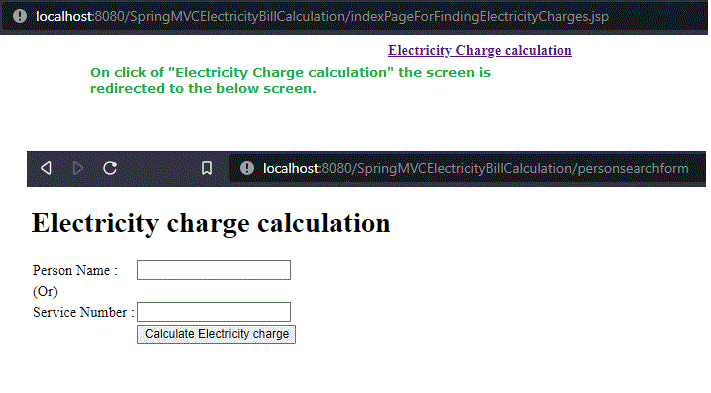
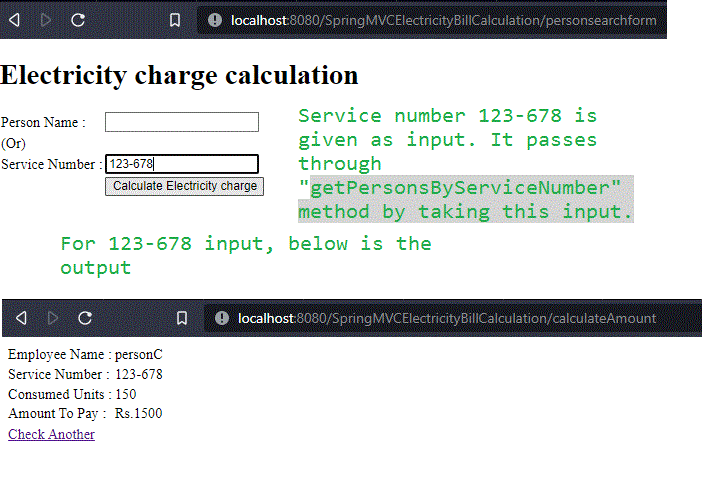
We can search either by Person Name or Service Number
SearchBy PersonName

SearchBy Service Number
Step 12: Test the Application Using MockMvc and JUnit
To verify that the application works correctly, we can write unit test cases using JUnit and Spring MockMvc. These tests validate the controller behavior and ensure that data is correctly retrieved from the MySQL database.
PersonControllerTest.java
import static org.springframework.test.web.servlet.request.MockMvcRequestBuilders.get;
import static org.springframework.test.web.servlet.result.MockMvcResultMatchers.status;

import org.junit.Assert;
import org.junit.Before;
import org.junit.Test;
import org.junit.runner.RunWith;
import org.mockito.InjectMocks;
import org.mockito.MockitoAnnotations;
import org.springframework.beans.factory.annotation.Autowired;
import org.springframework.test.context.ContextConfiguration;
import org.springframework.test.context.junit4.SpringJUnit4ClassRunner;
import org.springframework.test.context.web.WebAppConfiguration;
import org.springframework.test.web.servlet.MockMvc;
import org.springframework.test.web.servlet.setup.MockMvcBuilders;
import org.springframework.web.context.WebApplicationContext;

import com.persons.beans.Person;
import com.persons.controllers.PersonController;
import com.persons.dao.PersonDao;

@ContextConfiguration(locations = { "file:src/main/webapp/WEB-INF/spring-servlet.xml" })
@RunWith(SpringJUnit4ClassRunner.class)
@WebAppConfiguration
public class PersonControllerTest {

    @InjectMocks
    private PersonController personController;

    private MockMvc mockMvc;

    @Autowired
    private PersonDao dao;

    @Autowired
    WebApplicationContext webApplicationContext;

    @Before
    public void setup() {
        MockitoAnnotations.initMocks(this);
        this.mockMvc = MockMvcBuilders.standaloneSetup(personController).build();
    }

    @Test
    // 404 error thrown when coming from invalid resources
    public void testCreateSearchPersonsPageFormInvalidUser() throws Exception {
        this.mockMvc.perform(get("/"))
        .andExpect(status().isNotFound());
    }

      @Test
      // positive checks for Name
      public void testCheckConsumedUnitsByName() throws Exception {
          Person person = new Person();
          person.setName("personA");
          person = dao.getPersonsByName(person.getName());
          Assert.assertEquals(1, person.getId());
          Assert.assertEquals("123-456", person.getServiceNumber());
          Assert.assertEquals(250, person.getConsumedUnits());
      }

      @Test
      // Negative checks for Name
      public void testCheckConsumedUnitsByNameForNegative() throws Exception {
          Person person = new Person();
          person.setName("personA");
          person = dao.getPersonsByName(person.getName());
          Assert.assertNotEquals(2, person.getId());
          Assert.assertNotEquals("asd-123", person.getServiceNumber());
          Assert.assertNotEquals(1500, person.getConsumedUnits());
          Assert.assertNotEquals("Male", person.getGender());
      }

        @Test
      // Negative checks + Positive
      public void testCheckConsumedUnits() throws Exception {
          Person person = new Person();
          person.setConsumedUnits(250);
          person = dao.getPersonsByConsumedUnits(person.getConsumedUnits());
          Assert.assertNotEquals(10, person.getId());
          Assert.assertNotEquals("ST-123", person.getServiceNumber());
          Assert.assertEquals("Female", person.getGender());
      }

      @Test
      // Positive  checks for consumedunits
      public void testCheckConsumedUnitsPositive() throws Exception {
          Person person = new Person();
          person.setConsumedUnits(500);
          person = dao.getPersonsByConsumedUnits(person.getConsumedUnits());
          Assert.assertEquals(5, person.getId());
          Assert.assertEquals("146-189", person.getServiceNumber());
          Assert.assertEquals("personE", person.getName());
          Assert.assertEquals("female", person.getGender());
      }

      @Test
      // Negative + Positive checks
      public void testCheckConsumedUnitsById() throws Exception {
          Person person = new Person();
          person.setId(2);
          person = dao.getPersonsById(person.getId());
          Assert.assertEquals(350, person.getConsumedUnits());
          Assert.assertNotEquals("personZ", person.getName());
          Assert.assertNotEquals("Gen-123", person.getServiceNumber());
      }

      @Test
      // Positive checks for ID
      public void testCheckConsumedUnitsByIdPositiveCheck() throws Exception {
          Person person = new Person();
          person.setId(5);
          person = dao.getPersonsById(person.getId());
          Assert.assertEquals(500, person.getConsumedUnits());
          Assert.assertEquals("personE", person.getName());
          Assert.assertEquals("146-189", person.getServiceNumber());
          Assert.assertEquals("female", person.getGender());
      }

}
On execution of this, we will get the below output if MySQL data (actual data) matches with the expected data as given in the code. If there is something wrong, we need to check with the logic as well as the data

