

JavaScript (JS) is the language that adds logic and interactivity to the web. It turns static pages into apps—handling clicks, forms, data fetching, and real-time updates. Learning JS is essential for both frontend and backend work.
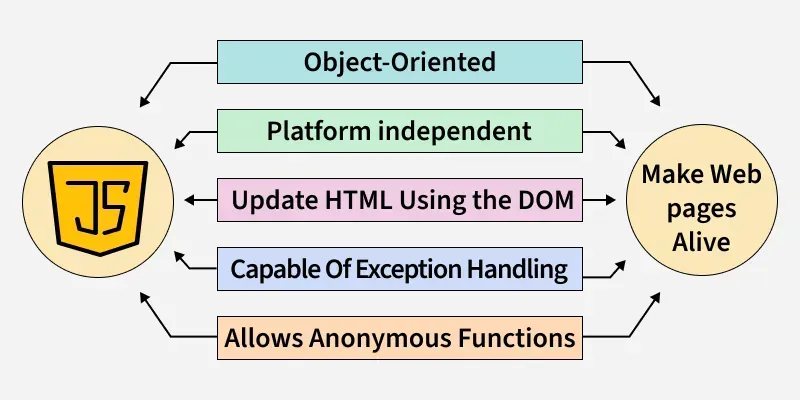
- Works Everywhere: Browsers, servers (Node.js), mobile, desktop.
- Saves Time: Huge ecosystem of libraries and frameworks (React, Vue, Express).
- Easy Updates: Change logic once and reuse it across components and pages.
- Fast & Responsive: Async features (Promises, async/await) keep UIs smooth.
Basics
1. What is the difference between == and === in JavaScript?
In JavaScript, == is the loose equality operator, which compares two values for equality after performing type coercion if necessary. This means it converts the operands to the same type before comparing.
=== is the strict equality operator, which compares both the values and their types, without performing type conversion.
2. What would be the result of 3+2+"7"?
let result = 3 + 2 + "7";
console.log(result);
Output
57
Output:
573 + 2is evaluated first, and since both are numbers, it results in5.- Then,
5 + "7"is calculated. Since one of the operands is a string ("7"), JavaScript converts the number5to a string and concatenates it with"7", resulting in"57".
3. What’s new in ECMAScript 2025 (ES2025)?
ECMAScript 2025 (ES2025) Key Features:
Promise.withResolvers()→ Returns a promise with itsresolveandreject, simplifying async control.- Immutable Array Methods → New methods like
findLast(),toReversed(), andtoSorted()return new arrays instead of mutating originals. - RegExp
vflag → Adds better Unicode handling in regular expressions. - Hashbang grammar → Officially allows
#!at the start of JS files for CLI scripts.
4. Is JavaScript compiled or interpreted?
JavaScript is mostly interpreted, but modern browsers also compile it just-in-time (JIT) to make it faster.
- The browser reads your JavaScript code line by line and runs it directly.
- Modern browsers (like Chrome’s V8 engine) first translate parts of your code into machine code while running it, so the computer can execute it much faster.
5. Are JavaScript and Java related?
No, their names sound similar but they are not related in any terms, below are some key differences:
| Java | JavaScript |
|---|---|
| Java is a strongly typed language and variables must be declared first to use in the program. In Java, the type of a variable is checked at compile-time. | JavaScript is a loosely typed language and has a more relaxed syntax and rules. |
| Java is an object-oriented programming language primarily used for developing complex enterprise applications. | JavaScript is a scripting language used for creating interactive and dynamic web pages. |
| Java applications can run in any virtual machine(JVM) or browser. | JavaScript code used to run only in the browser, but now it can run on the server via Node.js. |
| Objects of Java are class-based even we can't make any program in java without creating a class. | JavaScript Objects are prototype-based. |
6. How many ways an HTML element can be accessed in JavaScript code?
There are four possible ways to access HTML elements in JavaScript which are:
- getElementById() Method: It is used to get the element by its id name.
- getElementsByClass() Method: It is used to get all the elements that have the given classname.
- getElementsByTagName() Method: It is used to get all the elements that have the given tag name.
- querySelector() Method: This function takes CSS style selector and returns the first selected element.
7. What’s the return-value difference between x++ and ++x?
Both increment, but return different values.
x++: post-increment → returns the old value, then increments.++x: pre-increment → increments first, then returns the new value.
8. What’s the difference between var, let, and const and what is the Temporal Dead Zone?
JavaScript provides three ways to declare variables: var, let, and const, but they differ in scope, hoisting behaviour, and re-assignment rules.
- var: Declares variables with function or global scope and allows re-declaration and updates within the same scope.
- let: Declares variables with block scope, allowing updates but not re-declaration within the same block.
- const: Declares block-scoped variables that cannot be reassigned after their initial assignment.
// var: function or global scope, can be re-declared and updated
var x = 10;
var x = 20; // re-declaration allowed
console.log("var:", x); // 20

// let: block scope, can be updated but not re-declared in same block
let y = 30;
// let y = 40; Error (can't re-declare in same block)
y = 40; // update allowed
console.log("let:", y); // 40

// const: block scope, cannot be reassigned
const z = 50;
// z = 60; Error (can't reassign)
console.log("const:", z); // 50
Temporal Dead Zone (TDZ): It’s the period between entering a scope and the point where a let or const variable is declared. During this time, accessing the variable causes a ReferenceError, because the variable exists but hasn’t been initialized yet.
// TDZ example
console.log(x);            // ReferenceError (x in TDZ)
let x = 10;

console.log(y);            // undefined (var is initialized at hoist time)
var y = 10;
9. What is a Variable Scope in JavaScript?
In JavaScript, we have each variable can be accessed and modified through either one of the given scope:
- Global Scope: Outermost level (accessible everywhere).
- Local Scope: Inner functions can access variables from their parent functions due to lexical scoping.
- Function Scope: Variables are confined to the function they are declared in.
- Block Scope: Variables declared with
letorconstare confined to the nearest block (loops, conditionals, etc.).
10. What the difference between Lexical and Dynamic Scoping?
Lexical Scoping (Static Scoping)
- The scope of a variable is determined by its position in the source code at the time of writing.
- JavaScript uses lexical scoping.
- The inner function looks up variables in the outer function where it was defined, not where it was called.
Dynamic Scoping (Not in JS)
- The scope is determined by the call stack at runtime, not where the function is written.
- Languages like older versions of Lisp or Bash use dynamic scoping.
- The function uses variables from the function that called it, even if it was defined else.
11. What is the use of isNaN, and how is it different from Number.isNaN?
The number isNan function determines whether the passed value is NaN (Not a number) and is of the type "Number". In JavaScript, the value NaN is considered a type of number. It returns true if the argument is not a number, else it returns false.
Number.isNaN(x)→ returnstrueonly ifxis theNaNvalue. No coercion.isNaN(x)→ convertsxto a number then checks if that result isNaN.
Number.isNaN(NaN)             // true
Number.isNaN("foo")           // false  (string, not NaN)
isNaN("foo")                 // true   (coerces "foo" → NaN)

Number.isNaN(undefined)     // false
isNaN(undefined)             // true   (undefined → NaN)

Number.isNaN("")             // false
isNaN("")                    // false  ("" → 0)

Number.isNaN(0/0)            // true   (is NaN)
isNaN(0/0)                   // true
Output
12. What does this code log?
const arr = [1, 2, 3];
arr[10] = 99;
console.log(arr.length);
Output
11
Output:
11Explanation: When you assign to arr[10] you create empty slots from index 3 to 9, making the new length one more than the highest index: 10 + 1 = 11.
13. What is negative infinity?
The negative infinity is a constant value represents the lowest available value. It means that no other number is lesser than this value. It can be generated using a self-made function or by an arithmetic operation. JavaScript shows the NEGATIVE_INFINITY value as -Infinity.
14. Why is typeof null === "object"?
It’s a long-standing historical bug in the original typeof tag encoding that can’t be fixed without breaking the web.
nullis a primitive, buttypeof nullreturns"object".- Practical tip: check for
nullusingvalue === nullorvalue == null(to matchnullorundefinedintentionally).
15. Is it possible to break JavaScript Code into several lines?
Yes, it is possible to break the JavaScript code into several lines in a string statement. It can be broken by using the '\n' (backslash n).
Example:
console.log("A Online Computer Science Portal\n for Geeks")Line breaks are avoided by JavaScript, which is not preferable.
let gfg= 10, GFG = 5,
Geeks =
gfg + GFG;
console.log(Geeks)
Output
15
16. What are "truthy" and "falsy" values in JavaScript
- Falsy: false, 0, "" (empty string), null, undefined, NaN.
- Truthy: Everything else (e.g., any non-empty string, any non-zero number, objects, arrays).
17. What are undeclared and undefined variables?
- Undefined: It occurs when a variable is declare but not assign any value. Undefined is not a keyword.
- Undeclared: It occurs when we try to access any variable which is not initialize or declare earlier using the var or const keyword. If we use 'typeof' operator to get the value of an undeclare variable, we will face the runtime error with the return value as "undefined". The scope of the undeclare variables is always global.
18. What will be theresult of this expression?
console.log(null ?? 'default');
console.log(undefined ?? 'default');
console.log(false ?? 'default');
Output
default
default
false
Output:
default
default
false
Explanation:
The nullish coalescing operator ?? returns the right-hand side only if the left is null or undefined. So:
null ?? 'default'→'default'undefined ?? 'default'→'default'false ?? 'default'→false(becausefalseis neithernullnorundefined)
19. Write a JavaScript code for adding newelements dynamically.
<html>
<head>
</head>
<body>
    <button onclick="create()">
        Click Here!
    </button>

    <script>
        function create() {
            let geeks = document.createElement('geeks');
            geeks.textContent = "Geeksforgeeks";
            geeks.setAttribute('class', 'note');
            document.body.appendChild(geeks);
        }
    </script>
</body>
</html>
20. What are global variables? How are these variables declared, and what are the problems associated with them?
In contrast, global variables are the variables that define outside of functions. These variables have a global scope, so they can be used by any function without passing them to the function as parameters.
Example:
let petName = "Rocky"; // Global Variable
myFunction();

function myFunction() {
    console.log("Inside myFunction - Type of petName:", typeof petName);
    console.log("Inside myFunction - petName:", petName);
}

console.log("Outside myFunction - Type of petName:", typeof petName);
console.log("Outside myFunction - petName:", petName);
Output
Inside myFunction - Type of petName: string
Inside myFunction - petName: Rocky
Outside myFunction - Type of petName: string
Outside myFunction - petName: Rocky
It is difficult to debug and test the code that relies on global variables.
21. What do you mean by Null in JavaScript?
The null value represents that no value or no object. It is known as empty value/object.
22. How to delete property-specific values?
The delete keyword deletes the whole property and all the values at once like
let gfg={Course: "DSA", Duration:30};
delete gfg.Course;
23. What will be the output of this code?
let x = 0;
console.log(x++);
console.log(++x);
Output
0
2
Output:
0
2
Explanation:
x++returns the current value (0), then increments →xbecomes 1.++xincrements first (1 → 2), then returns the new value (2).
24. What is the difference between null and undefined in JavaScript?
undefined:
- A primitive value automatically assigned to:
- Uninitialized variables
- Missing function arguments
- Missing object properties
It means: "value not assigned yet"
let x;
console.log(x); // undefined

function foo(a) {
  console.log(a); // undefined if no argument is passed
}
foo();
null:
- A primitive value that you assign intentionally to represent:
- "no value", "empty", or "non-existent"
- It means: "value is deliberately empty"
let user = null; // explicit assignment
console.log(user); // null
25. What are template literals and when do you use them?
Backtick strings that support interpolation, multi-line text, and tagged processing.
${expr}interpolation without manual concatenation.- Preserve newlines/indentation as written.
- Tagged templates for advanced parsing (e.g., sanitization, i18n).
const name = "Geeks";
const msg = `Hello, ${name}!
Your total is $${(19.99 * 2).toFixed(2)}.`;
Output
26. What is the output of this snippet?
const a = [1, 2, 3];
const b = [1, 2, 3];
console.log(a == b, a === b);
Output
false
false
Output:
false
false
Explanation: Arrays are objects and compared by reference. a and b are distinct objects, so both loose (==) and strict (===) comparisons yield false.
27. Can closures leak memory?
JavaScript closures capture variables from their outer scope, but if not managed properly, they can sometimes lead to memory leaks.
Memory Leak Possibility: Closures can leak memory when they unintentionally keep references to variables or objects that are no longer needed. This prevents the garbage collector from freeing that memory.
28. Does JavaScript allow multiple inheritance?
JavaScript does not support multiple inheritance in the traditional sense, but it provides ways to reuse and combine functionality.
- Classes: JavaScript classes only allow single inheritance, meaning a class can extend only one parent class.
- Prototypes: Objects can inherit from one prototype at a time, not multiple.
- Mixins: To achieve similar behavior to multiple inheritance, JavaScript uses mixins—functions or objects that copy properties and methods into a class or object.
29. Is JavaScript statically typed or dynamically typed?
JavaScript is dynamically typed because we don’t have to tell JavaScript what kind of data (number, text, true/false, etc.) a variable will hold when you create it. The type is decided automatically when the program runs.
30. Explain the working of timers in JavaScript. Also explain the drawbacks of using the timer, if any.
JavaScript provides timers to schedule tasks after a delay or at regular intervals. These are not part of the JS engine itself, but come from the browser (Web APIs) or Node.js environment.
1. setTimeout:
Executes a function once after a specified delay (in milliseconds).
setTimeout(() => {
  console.log("Runs after 2 seconds");
}, 2000);
2. setInterval:
Executes a function repeatedly at a specified interval until cleared.
let count = 0;
const intervalId = setInterval(() => {
  count++;
  console.log("Runs every 1 second");
  if (count === 3) clearInterval(intervalId); // stop after 3 runs
}, 1000);
3. clearTimeout / clearInterval:
Used to stop a scheduled timer.
const id = setTimeout(() => console.log("Won't run"), 3000);
clearTimeout(id); // cancels the timer
Timers in JS (setTimeout, setInterval) let you schedule tasks asynchronously. But they are not precise (due to event loop delays), can waste resources if misused, and should be cleared properly to avoid leaks.
31. What will be logged by this code?
for (let i = 0; i < 3; i++) {
  setTimeout(() => console.log(i), i * 100);
}
Output
0
1
2
Output:
0 1 2Explanation: Using let i in the loop gives each callback its own i binding. The timeouts fire after 0ms, 100ms, and 200ms, logging 0, then 1, then 2.
32. What is the difference between ViewState and SessionState?
- ViewState: It is specific to a single page in a session.
- SessionState: It is user specific that can access all the data on the web pages.
33. How to submit a form using JavaScript?
You can use document.form[0].submit() method to submit the form in JavaScript.
34. Does JavaScript support automatic type conversion?
Yes, JavaScript supports automatic type conversion.
35. What is a template literal in JavaScript?
A template literal in JavaScript is a way to define strings that allow embedded expressions and multi-line formatting. It uses backticks (`) instead of quotes and supports ${} for embedding variables or expressions inside the string.
36. What is a higher-order function in JavaScript?
A higher-order function in JavaScript is a function that either takes one or more functions as arguments, or returns a function as its result. These functions allow for more abstract and reusable code, enabling functional programming patterns
For example, map() and filter() are higher-order functions because they take callback functions as arguments.
37. What is the difference between call() and apply() methods ?
Both methods are used in a different situation
- call() Method: It calls the method, taking the owner object as argument. The keyword this refers to the ‘owner’ of the function or the object it belongs to. We can call a method that can be used on different objects.
- apply() Method: The apply() method is used to write methods, which can be used on different objects. It is different from the function call() because it takes arguments as an array.
38. Is JavaScript single-threaded or multi-threaded
JavaScript is single-threaded, but it uses asynchronous features to handle multiple tasks efficiently.
- JavaScript runs on a single main thread, meaning it executes one command at a time in a sequence.
- It was designed this way to simplify programming for the browser and avoid issues like race conditions when accessing the DOM.
39. What is lexical scope in JavaScript?
Lexical scope in JavaScript refers to the way variables are resolved based on their location in the source code. A variable's scope is determined by the position of the code where it is defined, and it is accessible to any nested functions or blocks. This means that functions have access to variables in their own scope and the outer (lexical) scopes, but not to variables in inner scopes.
let outer = "I am outside!";
function inner() {
    console.log(outer);
}
inner();
Output
I am outside!
In this example, inner() can access the outer variable because of lexical scoping.
40. What is the this keyword, and how does the call-site affect it?
JavaScript uses the this keyword as a reference to the object that is currently executing the code, but its value depends on the call-site (how and where the function is invoked).
- Global/Function context: In non–strict mode,
thisrefers to the global object (windowin browsers). In strict mode, it isundefined. - Object method: When a function is called as a method of an object,
thisrefers to that object. - Constructor function / class: When used inside a constructor or class,
thisrefers to the newly created instance. - Explicit binding: Using
call(),apply(), orbind(), you can explicitly set whatthisrefers to. - Arrow functions: Unlike normal functions, arrow functions don’t have their own
this; instead, they capturethisfrom their surrounding (lexical) scope.
41. How does lexical scoping work with the this keyword in JavaScript?
In JavaScript, lexical scoping primarily applies to variable resolution, while the behavior of the this keyword is determined by how a function is called, not by its position in the code. The value of this is dynamically determined at runtime based on the function’s context (e.g., whether it’s called as a method, in a global context, or with call, apply, or bind).
const obj = {
    name: "JavaScript",
    greet: function () {
        console.log(this.name);
    }
};
obj.greet(); // "JavaScript"
Output
JavaScript
Here, this refers to obj because the function is called as a method of the object. Lexical scoping affects variable lookups but doesn’t alter how this behaves.
42. What is hoisting in JavaScript?
Hoisting in JavaScript is the behavior where variable and function declarations are moved to the top of their containing scope during compilation, before the code is executed.

This means you can reference variables and functions before they are declared in the code. However, only declarations are hoisted, not initializations.
console.log(a); // undefined
var a = 5;
Output
undefined
In this case, the declaration of a is hoisted, but its value (5) is not assigned until the code execution reaches that line. Hoisting applies differently for var, let, const, and function declarations.
43. What are JavaScript modules, and how do you import/export them?
JavaScript modules allow you to split your code into smaller, reusable pieces. They enable the export of variables, functions, or objects from one file and the import of them into another. To export an element, you use export (either named or default). To import it, you use import.
// In file1.js
export const greet = () => "Hello";

// In file2.js
import { greet } from './file1';
console.log(greet());
Modules help organize code and avoid global namespace pollution. They are natively supported in modern JavaScript through import and export statements.
44. Explain the concept of memoization in JavaScript?
Memoization in JavaScript is an optimization technique that stores the results of expensive function calls and reuses them when the same inputs occur again. This reduces the number of computations by caching the results.
Memoization is typically implemented using an object or a map to store function arguments and their corresponding results. When the function is called with the same arguments, the cached result is returned instead of recalculating it. This improves performance, especially for functions with repeated calls and expensive computations.
45. How do call, apply, and bind change this?
JavaScript lets you control this using call, apply, and bind. They set what this points to when a function runs, and differ in when they run and how they accept arguments.
call: Invokes the function immediately, settingthisto the first argument; remaining arguments are passed one-by-one.apply: Invokes the function immediately, likecall, but takes the arguments as a single array.bind: Does not run immediately; returns a new function withthispermanently set (and optionally some arguments pre-filled).JavaScript lets you controlthisusingcall,apply, andbind. They set whatthispoints to when a function runs, and differ in when they run and how they accept arguments.
46. What is the ‘Strict’ mode in JavaScript and how can it be enabled?
Strict Mode is a new feature in ECMAScript 5 that allows you to place a program or a function in a “strict” operating context. This strict context prevents certain actions from being taken and throws more exceptions. The statement “use strict” instructs the browser to use the Strict mode, which is a reduced and safer feature set of JavaScript.
47. Explain the concept of promises and how they work.
A Promise in JavaScript is an object that represents the result of an asynchronous operation. It can be in one of three states: pending, fulfilled (resolved), or rejected.
You create a promise using new Promise(), passing an executor function with resolve and reject callbacks. When the operation succeeds, resolve() is called; if it fails, reject() is used. Promises are handled with .then() for success and .catch() for failure. They can be chained to handle sequences of asynchronous tasks in a more readable way.
48. How to explain closures in JavaScript and when to use it?
The closure is created when a child functions to keep the environment of the parent’s scope even after the parent’s function has already executed. The Closure is a locally declared variable related to a function. The closure will provide better control over the code when using them.
function foo() {
    let b = 1;
    function inner() {
        return b;
    }
    return inner;
}
let get_func_inner = foo();

console.log(get_func_inner());
console.log(get_func_inner());
console.log(get_func_inner());
Output
1
1
1
49. What is the unshift method in JavaScript?
The unshift() method adds one or more elements to the beginning of an array and returns the new array length. It modifies the original array.
For example:
let array = [2, 3, 4];array.unshift(0, 1); // Adds 0 and 1console.log(array); // Output: [0, 1, 2, 3, 4]console.log(array.length); // Output: 5Unlike push() (adds to the end), unshift() shifts existing elements to higher indices. It’s less performant for large arrays due to this shifting.
50. What is the difference between substring() and substr() in JavaScript?
substring() takes a start and end index to grab a piece of a string, while substr() takes a start index and how many characters to take. substring() is more common; substr() is older and less used now.
Example:
letstr='Hello World';
console.log(str.substring(6, 11));
console.log(str.substr(6, 5
51. How do you count the number of words in a string?
To count words, use match() with a pattern that finds sequences of letters or numbers, ignoring spaces and punctuation. The length of the resulting array is the word count. This works well for sentences.
Example:
letsentence='Hello world, welcome to JavaScript!';
letwordCount=sentence.match(/\b\w+\b/g).length;
console.log(wordCount);
52. How do you find the longest word in a string?
Split the string into words with split(), then use reduce() to keep track of the word with the most letters. This is useful for analyzing text, like finding the biggest word in a sentence.
Example:
letsentence='JavaScript is awesome';
letlongest=sentence.split(' ').reduce((longest, word) =>word.length>longest.length?word : longest, '');
console.log(longest);
53. What is the default value of this in the global context?
console.log(this); // Window (browser) or global object (Node.js)
Output
{}
54. How does this behave inside a simple function?
functionshow() {
console.log(this); // Global object or undefined in strict mode
}
show();
Output
<ref *1> Object [global] {
  global: [Circular *1],
  clearInterval: [Function: clearInterval],
  clearTimeout: [Function: clearTimeout],
  setInterval: [Function: setInterval],
  setTimeout: [Functio...
55. What is the value of this in strict mode?
"use strict";
functiontest() {
console.log(this);
}
test();
Output
undefined
56. How does 'this' work in an object method?
constobj= {
name: "GeeksforGeeks",
greet() {
console.log(this.name);
    }
};
obj.greet();
Output
GeeksforGeeks
57. How does 'this' work with nested functions?
constobj= {
name: "GeeksforGeeks",
greet() {
functioninner() {
console.log(this);
        }
inner();
    }
};
obj.greet();
Output
<ref *1> Object [global] {
  global: [Circular *1],
  clearInterval: [Function: clearInterval],
  clearTimeout: [Function: clearTimeout],
  setInterval: [Function: setInterval],
setTimeout: [Functio...- In strict mode, this inside a regular function is undefined because regular functions do not automatically bind this to their enclosing object.
- To fix this, use an arrow function inside greet() as arrow functions inherit this from their outer context, ensuring this refers to obj.
58. How does this behave in an arrow function?
constobj= {
name: "Geeks",
greet: () => {
console.log(this.name); // undefined, as `this` refers to the enclosing scope
    }
};
obj.greet();
Output
undefined
59. What is the value of this inside a class?
classPerson {
constructor(name) {
this.name=name;
    }
greet() {
console.log(this.name); // Refers to the instance of the class
    }
}
constp=newPerson("GeeksforGeeks");
p.greet(); // "GeeksforGeeks"
Output
GeeksforGeeks
60. What happens to 'this' in an IIFE?
(function () {
console.log(this); // Global object or undefined in strict mode
})();
Output
<ref *1> Object [global] {
  global: [Circular *1],
  clearImmediate: [Function: clearImmediate],
  setImmediate: [Function: setImmediate] {
    [Symbol(nodejs.util.promisify.custom)]: [Getter]
  },
 ...
The output of the code depends on whether you are running it in strict mode or non-strict mode.
Non-strict mode (default in regular JavaScript): In non-strict mode, when a function is called without an object context (like in your case), this refers to the global object (in the browser, it’s window).
// In a browser:
Window { ... } // Represents the global window object in a browser
Strict mode: In strict mode ('use strict';), this inside a function call refers to undefined instead of the global object.
61. What happens when "this" is used in a constructor function?
functionPerson(name) {
this.name=name;
}
constp=newPerson("GeeksforGeeks");
console.log(p.name);
Output
GeeksforGeeks
In this code
- In a constructor function, this refers to the new object being created during the invocation of the function with the new keyword.
- When new Person("GeeksforGeeks") is called, this.name = name sets the name property of the new object to "GeeksforGeeks". The new object is returned and assigned to p, so p.name outputs "GeeksforGeeks".
62. How does " this " work with new and constructor functions in JavaScript?
function Animal(name)
{
    this.name = name;
    this.speak = function() {
        console.log(`${this.name} makes a sound`);
    };
}
const dog = new Animal("Dog");
dog.speak();
In this code
- Animal(name): This is a constructor function. It creates a new object with a name property and a speak method.
- dog.speak(): After creating the dog object, we call the speak() method. It prints "Dog makes a sound", because the name property of dog is "Dog".
Output
Dog makes a sound63. How can you concatenate two strings in JavaScript?
letstr1='Hello';
letstr2='World';
letresult1=str1+' '+str2; // Using +
letresult2=str1.concat(' ', str2); // Using concat()
letresult3=`${str1}${str2}`;
console.log(result1);
Concatenation means joining two strings together, like combining "Hello" and "World" to make "Hello World". You can use the + operator to glue strings, the concat() method to merge them, or template literals with backticks for a modern way to combine with variables.
Example:
letstr1='Hello';
letstr2='World';
letresult1=str1+' '+str2; // Using +
letresult2=str1.concat(' ', str2); // Using concat()
letresult3=`${str1}${str2}`;
console.log(result1);
64. What is the difference between == and === when comparing strings in JavaScript?
The == operator checks if two values are equal after converting them to the same type, like turning a string "5" into the number 5. The === operator is stricter and checks both value and type, so "5" and 5 are different. For strings, use === to avoid surprises from type changes.
Example:
console.log('5'==5);
console.log('5'===5);
console.log('hello'==='hello');
Output
true
false
true
document.getElementById("myText").style.fontSize = "16px";
document.getElementById("myText").style.color = "blue";
65. How do you convert a string to uppercase or lowercase in JavaScript?
To make all letters in a string uppercase (like shouting "HELLO"), use toUpperCase(). For lowercase (like whispering "hello"), use toLowerCase(). These methods create a new string and don’t change the original, great for making text uniform or comparing without caring about case.
Example:
letstr='Hello World';
console.log(str.toUpperCase());
console.log(str.toLowerCase());
console.log(str);
66. How do you extract a part of a string in JavaScript?
You can grab a piece of a string using slice(), substring(), or substr(). These methods let you pick a section by specifying start and end positions. slice() is the most flexible because it can use negative numbers to count from the end, while substring() is simpler but doesn’t allow negatives.
Example:
letstr='Hello World';
console.log(str.slice(0, 5));
console.log(str.substring(0, 5));
console.log(str.slice(-5));
67. How do you check if a string contains a specific substring in JavaScript?
The includes() method checks if a smaller string (substring) exists inside a bigger string, returning true or false. It’s case-sensitive, meaning "World" and "world" are different. This is handy for searching text, like checking if a word is in a sentence.
Example:
letstr='Hello World';
console.log(str.includes('World'));
console.log(str.includes('world'));
68. How do you replace a substring within a string in JavaScript?
The replace() method swaps the first occurrence of a substring with a new string. For example, you can change "World" to "JavaScript" in "Hello World". It’s case-sensitive and only changes the first match unless you use a special pattern (we’ll cover that later).
Example:
letstr="Hello World";
letnewStr=str.replace("World", "JavaScript");
console.log(newStr);
69. How do you split a string into an array in JavaScript?
The split() method breaks a string into an array of smaller strings based on a separator, like a comma or space. For example, splitting "Hello,World" by a comma gives ['Hello', 'World']. It’s great for turning a list or sentence into pieces you can work with.
Example:
letstr='Hello,World,JavaScript';
letarr=str.split(','); // Split by comma
console.log(arr);
70. What is the purpose of the charAt() method in JavaScript?
The charAt() method gives you the character at a specific position (index) in a string, starting from 0. For example, in "Hello", charAt(1) returns "e". If the position doesn’t exist, it returns an empty string.
Example:
letstr='Hello';
console.log(str.charAt(1));
console.log(str.charAt(10));
71. How do you pad a string to a certain length in JavaScript?
The padStart() method adds characters (like zeros) to the start of a string until it reaches a desired length, and padEnd() adds them to the end. This is useful for formatting numbers, like making "5" into "005".
Example:
letstr='5';
console.log(str.padStart(3, '0'));
console.log(str.padEnd(3, '0'));
72. How do you find the index of a substring in a string in JavaScript?
The indexOf() method finds where a substring starts in a string, giving you its position (index). If it’s not found, it returns -1. It’s case-sensitive and starts looking from the beginning.
Example:
letstr='Hello World';
console.log(str.indexOf('World'));
console.log(str.indexOf('world'));
73. How do you convert a string to an array of characters in JavaScript?
Use split('') to break a string into an array where each letter is an item. For example, "Hello" becomes ['H', 'e', 'l', 'l', 'o']. You can also use the spread operator (...) to do the same thing.
Example:
letstr='Hello';
letarr1=str.split('');
letarr2= [...str];
console.log(arr1);
74. How do you check if a string starts with a specific substring in JavaScript?
The startsWith() method checks if a string begins with a certain substring, like seeing if "Hello World" starts with "Hello". It returns true or false and is case-sensitive.
Example:
letstr='Hello World';
console.log(str.startsWith('Hello'));
console.log(str.startsWith('World'));
75. How do you use template literals in JavaScript?
Template literals use backticks ( ) instead of quotes, letting you add variables with ${} and write strings across multiple lines. They make it easier to create dynamic text, like greetings with someone’s name.
Example:
letname='World';
letgreeting=`Hello, ${name}!
This is multi-line.`;
console.log(greeting);
76. How do you access characters in a string using bracket notation?
Bracket notation (str[index]) lets you pick a character from a string by its position, starting at 0. For example, str[1] gets the second character. If the position is invalid, it returns undefined.
Example:
letstr='Hello';
console.log(str[1]);
console.log(str[10]);
77. How do you find the last occurrence of a substring in a string in JavaScript?
The lastIndexOf() method finds the position of the last time a substring appears in a string. If it’s not found, it returns -1. It’s like searching backward.
Example:
letstr='Hello World Hello';
console.log(str.lastIndexOf('Hello'));
78. How do you convert a string to a number and vice versa?
To turn a string like "123" into a number, use parseInt() for whole numbers, parseFloat() for decimals, or the + operator. To turn a number back into a string, use toString() or add it to an empty string.
Example:
letstr='123.45';
letnum=parseFloat(str);
letstrBack=num.toString();
console.log(num, strBack);
79. How can you add elements to an array?
You can add items to an array using push() to add to the end or unshift() to add to the beginning. Imagine a line of people: push() adds someone to the back, like joining a queue, and unshift() adds someone to the front, like cutting in line. Both methods change the original array.
Example:
letfruits= ['apple', 'banana'];
fruits.push('cherry');
console.log(fruits);
fruits.unshift('mango');
console.log(fruits);
80. How can you remove elements from an array?
You can remove items using pop() to take off the last item or shift() to remove the first one. Think of an array as a stack of plates: pop() takes the top plate (last item), and shift() takes the bottom one (first item). Both methods modify the array and return the removed item.
Example:
letfruits= ['apple', 'banana', 'cherry'];
fruits.pop();
console.log(fruits);
fruits.shift();
console.log(fruits);
81. How do you check if a variable is an array?
Use Array.isArray() to confirm if something is an array. It returns true if it’s an array and false if it’s something else, like a string or number. This is helpful to avoid errors when you’re expecting an array but might get another type.
Example:
letfruits= ['apple', 'banana'];
lettext='apple';
console.log(Array.isArray(fruits));
console.log(Array.isArray(text));
82. What is the difference between for...of and for...in loops in arrays?
The for...of loop gives you the actual items in an array, like picking each fruit from a basket. The for...in loop gives you the indices (positions), like getting the numbers of the basket’s slots. For arrays, for...of is usually better because you want the items, while for...in is more for objects with named properties.
Example:
letfruits= ['apple', 'banana', 'cherry'];

for (letfruitoffruits) {
console.log(fruit);
}
for (letindexinfruits) {
console.log(index);
}
83. How do you concatenate two arrays?
To combine two arrays, use the concat() method or the spread operator (...). It’s like merging two lists into one big list. Both methods create a new array without changing the original ones, so you get a fresh combined list.
Example:
letfruits= ['apple', 'banana'];
letmoreFruits= ['cherry', 'mango'];
letallFruits1=fruits.concat(moreFruits); // Using concat
letallFruits2= [...fruits, ...moreFruits]; // Using spread
console.log(allFruits1);
84. How do you use the forEach method?
The forEach method is a simpler way to loop through an array. It runs a function for each item, giving you the item, its index, and the whole array. It’s like asking a helper to process each item in a list one by one. It doesn’t create a new array or change the original unless you modify it inside the function.
Example:
letfruits= ['apple', 'banana', 'cherry'];
fruits.forEach((fruit, index) => {
console.log(`Fruit ${index+1}: ${fruit}`);
});
85. Explain the map method and provide an example.
The map method creates a new array by applying a function to every item in the original array. It’s like taking each item, transforming it (e.g., doubling a number or capitalizing a word), and putting the result in a new list. The original array stays unchanged, and the new array has the same number of items.
Example:
letnumbers= [1, 2, 3];
letdoubled=numbers.map(num=>num*2);
console.log(doubled); // Output: [2, 4, 6]
console.log(numbers); // Output: [1, 2, 3] (original unchanged)
86. How does the filter method work?
The filter method creates a new array with only the items that pass a test you define in a function. The function returns true to keep an item or false to skip it. For example, you can pick only numbers greater than 3. It’s like sorting through a pile to keep only what you want, without touching the original pile.
Example:
letnumbers= [1, 2, 3, 4, 5];
letevenNumbers=numbers.filter(num=>num%2===0);
console.log(evenNumbers); // Output: [2, 4]
console.log(numbers); // Output: [1, 2, 3, 4, 5]
87. How do you use the some method?
The some method checks if at least one item in an array passes a test (returns true in a function). It returns true if any item passes and false if none do. It’s like asking, “Is there at least one thing in this list that fits my rule?” without checking the rest once one is found.
Example:
letnumbers= [1, 2, 3, 4, 5];
lethasEven=numbers.some(num=>num%2===0);
console.log(hasEven); // Output: true (2 is even)
88. Explain the every method with an example.
The every method checks if all items in an array pass a test (return true in a function). It returns true only if every item passes; if even one fails, it returns false. It’s like making sure everything in a list meets a standard, such as all numbers being positive.
Example:
letnumbers= [1, 2, 3, 4, 5];
letallPositive=numbers.every(num=>num>0);
console.log(allPositive); // Output: true
letallEven=numbers.every(num=>num%2===0);
console.log(allEven); // Output: false (not all are even)
89. What does the includes method do?
The includes method checks if an array has a specific item and returns true if it does, false if it doesn’t. You can also tell it where to start looking with a second argument. It’s like searching a list to see if something specific is there.
Example:
letfruits= ['apple', 'banana', 'cherry'];
console.log(fruits.includes('banana')); // Output: true
console.log(fruits.includes('mango')); // Output: false
90. How do you use the indexOf method?
The indexOf method finds the first position (index) of an item in an array. If the item isn’t there, it returns -1. You can also set a starting index to skip earlier parts. It’s like finding where a specific book is on a shelf.
Example:
letfruits= ['apple', 'banana', 'cherry'];
console.log(fruits.indexOf('banana')); // Output: 1
console.log(fruits.indexOf('mango')); // Output: -1
91. How do you use the join method?
The join method turns an array into a string, combining all items with a separator (like a comma or space). It’s like gluing all the items together into one line of text, useful for creating sentences or lists.
Example:
letfruits= ['apple', 'banana', 'cherry'];
letfruitString=fruits.join(', ');
console.log(fruitString); // Output: 'apple, banana, cherry'
92. How do you copy an array?
To copy an array, use the spread operator (...) or Array.from. Both create a new array with the same items, like photocopying a list. This is a “shallow” copy, meaning it copies the items but not any objects inside them.
Example:
letfruits= ['apple', 'banana', 'cherry'];
letcopy1= [...fruits]; // Spread operator
letcopy2=Array.from(fruits); // Array.from
console.log(copy1); // Output: ['apple', 'banana', 'cherry']
console.log(copy2); // Output: ['apple', 'banana', 'cherry']
93. What is the reverse method and how is it used?
The reverse method flips the order of an array’s items, so the first becomes the last and vice versa. It changes the original array. It’s like turning a stack upside down, useful for reversing lists like scores or names.
Example:
letfruits= ['apple', 'banana', 'cherry'];
fruits.reverse();
console.log(fruits); // Output: ['cherry', 'banana', 'apple']
94. How do you remove duplicates from an array?
To remove duplicates, use a Set, which only stores unique values, and spread it back into an array. It’s like taking a list with repeated names and keeping only one of each.
Example:
letnumbers= [1, 2, 2, 3, 4, 4, 5];
letuniqueNumbers= [...newSet(numbers)];
console.log(uniqueNumbers); // Output: [1, 2, 3, 4, 5]
95. How do you fill an array with a specific value?
The fill method sets all items in an array (or a specific range) to one value, like filling a list with zeros. It changes the original array. You can specify start and end indices to fill only part of it, like painting a section of a wall.
Example:
let arr=newArray(5).fill(0); // Create array with five 0s
console.log(arr); // Output: [0, 0, 0, 0, 0]
letnumbers= [1, 2, 3, 4];
numbers.fill(9, 1, 3); // Fill from index 1 to 2 with 9
console.log(numbers); // Output: [1, 9, 9, 4]
96. How do you add dynamic key values in an object?
You can add a key-value pair to an object dynamically using bracket notation (object[key] = value) or dot notation if the key is known. Bracket notation is especially useful when the key is stored in a variable, like when you don’t know the key name until runtime. Think of it like labeling a box with a name you decide on the spot and putting something inside it.
Example:
letdynamicKey='age';
letdynamicValue=25;
letuser= {};
user[dynamicKey] =dynamicValue; // Adds key 'age' with value 25
console.log(user);
Explanation: The empty object user is created. The variable dynamicKey holds the string 'age', and dynamicValue holds 25. Using bracket notation (user[dynamicKey]), the key 'age' is added to user with the value 25. This is dynamic because the key comes from a variable, not a fixed name.
97. What will be the output of an object with duplicate keys?
constobj= {
a: 1,
b: 2,
a: 3
};
console.log(obj);
Output:
{ a: 3, b: 2 }Explanation: In JavaScript, an object can’t have duplicate keys. If you try to add the same key multiple times, the last value overwrites the earlier ones. It’s like writing a name on a label and then sticking a new value over it. Here, the key a is defined twice: first with 1, then with 3. The second value (3) replaces the first, so the final object has a: 3 and b: 2.
98. What are JSON.stringify() and JSON.parse(), and where do we use them?
JSON.stringify() turns a JavaScript object into a JSON string, like packing an object into a text format for sending or storing. JSON.parse() converts a JSON string back into a JavaScript object, like unpacking the text to use it again. They’re used when sending data to a server (e.g., in APIs), saving data in local storage, or reading data from files, because JSON is a universal text format that works across systems.
Example:
constsettings= { theme: 'dark', notifications: true };
localStorage.setItem('userSettings', JSON.stringify(settings)); // Save as string
conststoredSettings=JSON.parse(localStorage.getItem('userSettings')); // Retrieve as object
console.log(storedSettings);
Explanation: The settings object is converted to a JSON string with JSON.stringify() and stored in localStorage. Later, JSON.parse() converts the string back into an object for use. This is like saving a file as text and then reopening it to get the original data.
99. What’s the difference between objects created with {} vs new Object()?
JavaScript provides two ways to create objects: using {} (object literal) and new Object(), but they differ in readability and usage style.
- {} (object literal): Creates an object directly in a shorter and cleaner way. It’s the most common and preferred method because it’s concise and easier to read.
- new Object(): Creates an object using the built-in
Objectconstructor. It’s longer, less commonly used, and generally avoided unless you specifically need to use the constructor form.
100. How do Object.keys(), Object.values(), and Object.entries() differ?
JavaScript provides three useful methods to work with objects: Object.keys(), Object.values(), and Object.entries(), but they differ in what they return.
- Object.keys(obj): Returns an array of the object’s own enumerable property keys (property names).
- Object.values(obj): Returns an array of the object’s own enumerable property values.
- Object.entries(obj): Returns an array of key–value pairs (
[key, value]) from the object’s own enumerable properties.
101. What will be the output when spreading a string into an array?
console.log([...'GFG']);
Output
[ 'G', 'F', 'G' ]
Output:
['G', 'F', 'G']Explanation: The spread operator (...) breaks an iterable, like a string, into individual items. A string like 'GFG' is iterable, so ...'GFG' splits it into its characters: 'G', 'F', 'G'. These are placed into a new array using square brackets [...]. It’s like taking a word and putting each letter into a separate box in a list, resulting in ['G', 'F', 'G'].
102. What will be the output when using the spread operator with an object?
constobj1= { name: 'GFG', age: 14 };
constobj2= { alpha: 'rule', ...obj1 };
console.log(obj2);
Output:
{ alpha: 'rule', name: 'GFG', age: 14 }Explanation: The spread operator (...) copies all properties from obj1 into obj2. It’s like taking all the labels and items from one box and adding them to another. Here, obj2 starts with alpha: 'rule', then adds name: 'GFG' and age: 14 from obj1. The result is a new object combining all properties. If there were duplicate keys, the later value would overwrite the earlier one.
103. What is object destructuring?
Object destructuring is a shorthand syntax to unpack properties from an object into distinct variables. You use curly braces {} with property names to directly assign values from the object. You use curly braces {} with property names to directly assign values from the object
constuser= { name: "Alice", age: 25 };
const { name, age } =user;
console.log(name); // "Alice"
console.log(age);  // 25
104. What will be the output when comparing two objects?
console.log({ name: 'GFG' } == { name: 'GFG' });
console.log({ name: 'GFG' } === { name: 'GFG' });
Output
false
false
Output:
false
false
Explanation: In JavaScript, comparing objects with == or === checks their memory references, not their contents. Each { name: 'GFG' } creates a new object in a different memory location, even if they look identical. It’s like comparing two identical boxes stored in different places—they’re not the same box. Both comparisons return false because the objects are different references.
105. How do you merge two objects in JavaScript?
JavaScript provides multiple ways to merge two objects, but the most common are using the spread operator and Object.assign().
- Spread Operator (
...): Creates a shallow copy and merges properties into a new object. If keys overlap, the later object’s values overwrite the earlier ones. - Object.assign(): Copies properties from one or more source objects into a target object. Like spread, overlapping keys get overwritten by the last source.
Intermediate
106. How does 'this' behave in setTimeout?
constobj= {
name: "GeeksforGeeks",
greet() {
setTimeout(function () {
console.log(this.name); // undefined in strict mode
        }, 1000);
    }
};
obj.greet();
107. How to fix 'this' in setTimeout using arrow functions?
constobj= {
name: "GeeksforGeeks",
greet() {
setTimeout(() => {
console.log(this.name); // "GeeksforGeeks"
        }, 1000);
    }
};
obj.greet();
In this code:
- When setTimeout is used with an arrow function, this inside the arrow function refers to the outer scope's this, which is the object (obj).
- As a result, the arrow function correctly accesses the name property of obj, and the output will be "GeeksforGeeks".
Output
GeeksforGeeks
108. What is 'this' when a function is bound?
constobj= { name: "GeeksforGeeks" };
functiongreet() {
console.log(this.name);
}
constboundGreet=greet.bind(obj);
boundGreet();
Output
GeeksforGeeks
In this code:
- greet() is a regular function where this would normally depend on how it's called.
- greet.bind(obj) creates a new function (boundGreet) where the value of this is permanently set to the object obj.
- When boundGreet() is called, this inside the function refers to obj, so this.name outputs "GeeksforGeeks".
109. How does 'this' behave in call and apply?
constobj= { name: "GeeksforGeeks" };
functiongreet() {
console.log(this.name);
}
greet.call(obj);
greet.apply(obj);
Output
GeeksforGeeks
GeeksforGeeks
In this code:
- This method calls the function immediately and sets this to obj. It then prints "GeeksforGeeks" because this.name refers to o obj.name.
- Like call(), apply() also calls the function immediately and sets this to obj. The difference is that apply() expects arguments to be passed as an array, but in this case, no arguments are needed, so the result is the same: "GeeksforGeeks".
110. How does "this" behave in chaining methods?
constobj= {
count: 0,
increment() {
this.count++;
returnthis;
    },
show() {
console.log(this.count);
returnthis;
    }
};
obj.increment().increment().show();
Output
2
In this code
- In this example, obj has two methods: increment and show. The increment method increases the count by 1 and returns the object itself (this), allowing method chaining.
- The show method prints the current count and also returns the object. Calling obj.increment().increment().show() increases count to 2 and prints 2 because the methods are chained together.
111. What is " this " inside the an object returned by the function?
functioncreateObject() {
return {
name: "GeeksforGeeks",
greet() {
console.log(this.name);
        }
    };
}
constobj=createObject();
obj.greet();
Output
GeeksforGeeks
In this example, the createObject function returns an object with a name property and a greet method. When obj.greet() is called, this refers to the obj itself, so it accesses obj.name and prints "GeeksforGeeks".
112 . How does "this" behave in a factory function when used inside a method of the returned object?
functioncreate(name) {
return {
name,
greet() {
console.log(this.name);
        }
    };
}
constperson=create("GeeksforGeeks");
person.greet();
Output
GeeksforGeeks
In this code
- The createPerson function creates an object with a name property and a greet method.
- When person.greet() is called, this inside the greet method refers to the person object, allowing it to access person.name and print "GeeksforGeeks".
113 . How does "this" behave in a forEach callback?
[1, 2, 3].forEach(function () {
console.log(this);
}, { name: "GeeksforGeeks" });
Output
{ name: 'GeeksforGeeks' }
{ name: 'GeeksforGeeks' }
{ name: 'GeeksforGeeks' }
In this code
- The forEach method iterates over the array [1, 2, 3], with the second argument { name: "GeeksforGeeks" } explicitly set as this inside the loop.
- During each iteration, this refers to { name: "GeeksforGeeks" }, so the object is printed for every element in the array.
114. How can you pass "this" explicitly in a Promise chain?
constobj= {
name: "GeeksforGeeks",
greet() {
returnPromise.resolve(this.name).then(name=> {
console.log(name);
        });
    }
};
obj.greet();
Output
GeeksforGeeks
- In this example, obj.greet() returns a promise that resolves with this.name (which is "GeeksforGeeks").
- Once the promise is resolved, the .then() method prints the value of name, which is "". So, the output is Alice.
115. How does "this" behave with getters and setters?
constobj= {
name: "Geeks",
getgreet() {
return`Hello, ${this.name}`;
    },
setgreet(newName) {
this.name=newName;
    }
};
console.log(obj.greet); // Output: Hello, Geeks
obj.greet="forGeeks";
console.log(obj.greet); // Output: Hello, forGeeks
Output
Hello, Geeks
Hello, forGeeks
In this example, obj has a getter and setter for the greet property. The getter returns a greeting message with this.name, and the setter updates this.name. Initially, obj.greet prints "Hello, Geeks". After setting obj.greet = "forGeeks", it updates name and prints "Hello, forGeeks".
116. What is the value of " this " in an event handler in a DOM element?
const obj = {
  name: "GeeksforGeeks",
  greet() {
    document.getElementById("btn").addEventListener("click", function () {
      console.log(this.name); // Output: undefined
    });
  },
};

obj.greet();
117. What is the difference between slice() and substring()?
Both slice() and substring() cut out a piece of a string, but slice() can use negative numbers to count from the end, like getting the last few letters. substring() treats negatives as 0 and can swap start and end if they’re in the wrong order.
Example:
letstr='Hello World';
console.log(str.slice(-5));
console.log(str.substring(6));
console.log(str.substring(11, 6));
118. How do you compare two strings in JavaScript?
Use localeCompare() to compare strings in a way that respects language sorting rules, like putting "apple" before "banana". It returns -1, 0, or 1 based on their order. You can also use === for exact matches.
Example:
letstr1='apple';
letstr2='banana';
console.log(str1.localeCompare(str2));
console.log(str1===str2);
119. How do you check if a string matches a regular expression in JavaScript?
The match() method checks if a string fits a pattern (regular expression) and returns the matching parts in an array. If there’s no match, it returns null. This is useful for finding specific text patterns.
Example:
letstr='Hello World';
console.log(str.match(/World/));
console.log(str.match(/xyz/));
120. How can you reverse a string in JavaScript?
JavaScript provides multiple ways to reverse a string, but the most common method is by converting the string into an array, reversing it, and then joining it back into a string.
- Step 1 (split): Convert the string into an array of characters using
split(""). - Step 2 (reverse): Use the
reverse()method to reverse the array. - Step 3 (join): Use
join("")to combine the reversed characters back into a string.
letstr="hello";
letreversed=str.split("").reverse().join("");
console.log(reversed);
121. How do you search for a match in a string using a regular expression in JavaScript?
The search() method looks for a pattern (regular expression) in a string and returns the index where it starts. If not found, it returns -1. It’s like finding where a word begins.
Example:
letstr='Hello World';
console.log(str.search(/World/)); // Output: 6
console.log(str.search(/xyz/)); // Output: -1
122. How do you replace all occurrences of a substring in a string in JavaScript?
Use replace() with a global pattern (/substring/g) or replaceAll() to change every instance of a substring. For example, change all "Hello"s to "Hi"s in a string.
Example:
letstr='Hello World Hello';
letnewStr=str.replace(/Hello/g, 'Hi');
console.log(newStr);
123. What is the difference between substring() and substr() in JavaScript?
substring() takes a start and end index to grab a piece of a string, while substr() takes a start index and how many characters to take. substring() is more common; substr() is older and less used now.
Example:
letstr='Hello World';
console.log(str.substring(6, 11));
console.log(str.substr(6, 5));
124. How can you count the occurrence of a specific character in a string?
Count how many times a character appears by splitting the string at that character with split() and subtracting 1 from the array length. Or use match() with a pattern to find all matches. Both work, but split() is simpler for single characters.
Example:
letstr='Hello';
letcount=str.split('l').length-1;
console.log(count);
125. How do you convert a string into a URL slug?
A URL slug is a web-friendly string, like "javascript-tips" instead of "JavaScript Tips!". To make one, lowercase the string, replace spaces and special characters with hyphens, and remove anything that’s not a letter, number, or hyphen.
Example:
lettitle='JavaScript Advanced String Handling!';
letslug=title.toLowerCase().replace(/[^a-z0-9]+/g, '-').replace(/^-|-$/g, '');
console.log(slug);
126. How do you count the number of words in a string?
To count words, use match() with a pattern that finds sequences of letters or numbers, ignoring spaces and punctuation. The length of the resulting array is the word count. This works well for sentences.
Example:
letsentence='Hello world, welcome to JavaScript!';
letwordCount=sentence.match(/\b\w+\b/g).length;
console.log(wordCount);
127. How do you remove all non-alphanumeric characters from a string?
To keep only letters and numbers, use replace() with a pattern that targets anything that’s not a letter or number ([^a-zA-Z0-9]) and replace it with nothing. This cleans up messy strings.
Example:
letstr='Hello, World! 123.';
letcleaned=str.replace(/[^a-zA-Z0-9]/g, '');
console.log(cleaned);
128. How do you find the longest word in a string?
Split the string into words with split(), then use reduce() to keep track of the word with the most letters. This is useful for analyzing text, like finding the biggest word in a sentence.
Example:
letsentence='JavaScript is awesome';
letlongest=sentence.split(' ').reduce((longest, word) =>word.length>longest.length?word : longest, '');
console.log(longest);
129. How does find() differ from filter()?
JavaScript provides array methods like find() and filter(), but they differ in purpose and return values.
- find(): Returns the first element in the array that matches the given condition (or
undefinedif none match). It stops searching once a match is found. - filter(): Returns a new array containing all elements that match the given condition. If no matches are found, it returns an empty array.
130. Why does [1, 2] == [1, 2] return false in JavaScript?
in JavaScript, arrays are objects, and objects are compared by reference, not by value.
- Each
[1, 2]creates a new array in memory. - Even though the contents are the same, they are stored at different memory locations.
- So,
==or===checks if both references point to the same object, which they don’t.
Example:
console.log([1, 2] == [1, 2]);  // false
console.log([1, 2] === [1, 2]); // false
Output
false
false
131. Explain the splice method with an example.
The splice method changes an array by removing, replacing, or adding items at a specific index. You specify where to start, how many items to remove, and what (if anything) to add. It’s like editing a list by taking out or adding items in the middle, and it changes the original array.
Example:
letfruits= ['apple', 'banana', 'cherry'];
fruits.splice(1, 1, 'mango', 'grape'); // Remove 1 item at index 1, add 'mango' and 'grape'
console.log(fruits); // Output: ['apple', 'mango', 'grape', 'cherry']
132. What are array-like objects and how do you convert them to arrays?
Array-like objects have a length property and numbered items (like 0, 1, etc.) but lack array methods like push. Examples include the arguments object in functions or lists from web pages (NodeList). Convert them to arrays using Array.from or the spread operator (...) to use array methods.
Example:
functionexample() {
letargs=Array.from(arguments); // Convert arguments to array
console.log(args); // Output: [1, 2, 3]
}
example(1, 2, 3);
letnodeList=document.querySelectorAll('div');
letdivArray= [...nodeList]; // Convert NodeList to array
133. How does the flatMap method work?
The flatMap method combines map and flat into one step. It runs a function on each item (like map), which can return an array, and then flattens the result one level. It’s like transforming each item into a list and then squashing those lists into one array.
Example:
letnumbers= [1, 2, 3];
letresult=numbers.flatMap(num=> [num, num*2]);
console.log(result); // Output: [1, 2, 2, 4, 3, 6]
134. What does the sort method do and how can you customize it?
The sort method arranges an array’s items in order, changing the original array. By default, it treats items as strings, which can mess up numbers (e.g., 10 comes before 2). To sort numbers or customize the order, use a compare function that returns a negative, zero, or positive number to decide the order. It’s like organizing a bookshelf by title or size.
Example:
letnumbers= [10, 2, 30, 4];
numbers.sort(); // Wrong for numbers
console.log(numbers); // Output: [10, 2, 30, 4]
numbers.sort((a, b) =>a-b); // Correct for numbers
console.log(numbers); // Output: [2, 4, 10, 30]
135. How do you merge two arrays and remove duplicates?
To combine two arrays and remove duplicates, use a Set with the spread operator (...). A Set automatically removes duplicates, and the spread operator turns it back into an array. It’s like merging two lists and keeping only one copy of each item.
Example:
letarray1= [1, 2, 3];
letarray2= [2, 3, 4];
letmergedArray= [...newSet([...array1, ...array2])];
console.log(mergedArray); // Output: [1, 2, 3, 4]
136. How do you sort an array of objects by a property value?
To sort an array of objects, use the sort method with a compare function that looks at a specific property, like age or name. The function compares two objects and decides their order. It’s like sorting a list of people by their age or name.
Example:
letusers= [
  { name: 'John', age: 30 },
  { name: 'Jane', age: 25 },
  { name: 'Peter', age: 35 }
];
users.sort((a, b) =>a.age-b.age);
console.log(users);
// Output: [{ name: 'Jane', age: 25 }, { name: 'John', age: 30 }, { name: 'Peter', age: 35 }]
137. What is the difference between deep copy and shallow copy of an array?
A shallow copy copies the array but not objects inside it, so changes to those objects affect both arrays. A deep copy copies everything, including nested objects, so the new array is completely independent. Think of shallow as copying a list of references and deep as copying the actual items. Use JSON.parse(JSON.stringify()) for a simple deep copy, but it has limitations with complex objects.
Example:
letoriginal= [{ a: 1 }, { b: 2 }];
letshallowCopy= [...original];
letdeepCopy=JSON.parse(JSON.stringify(original));
original[0].a=10;
console.log(shallowCopy[0].a); // Output: 10 (affected)
console.log(deepCopy[0].a); // Output: 1 (not affected)
138. Create a function multiplyByTwo(obj) that multiplies all numeric values in an object by 2?
letnums= {
a: 100,
b: 200,
title: 'My nums'
};
functionmultiplyByTwo(obj) {
for (letkeyinobj) {
if (typeofobj[key] ==='number') {
obj[key] *=2; // Multiply numeric values by 2
}
}
}
multiplyByTwo(nums);
console.log(nums);
Output:
{ a: 200, b: 400, title: 'My nums' }Explanation: The multiplyByTwo function loops through each key in the object using a for...in loop, like checking every label on a box. It uses typeof to check if the value is a number. If it is, the value is multiplied by 2 (e.g., 100 * 2 = 200). Non-numeric values, like the string 'My nums', are left unchanged. The object is modified directly because objects are passed by reference, so nums ends up with a: 200, b: 400, and title: 'My nums'.
139. What will be the output when using JSON.stringify() with a replacer array?
constobj= {
name: 'GFG',
level: 4,
company: true
};
constres=JSON.stringify(obj, ['name', 'level']);
console.log(res);
Output:
{"name":"GFG","level":4}Explanation: JSON.stringify() converts an object to a JSON string. The second argument, an array ['name', 'level'], acts as a filter, telling it to include only the listed properties. It’s like packing only specific items from a box into a package. Here, only name and level are included, so company is left out. The output is a JSON string with just those properties: {"name":"GFG","level":4}.
140. What will be the output of methods using this in regular vs. arrow functions?
constoperation= {
value: 20,
multi() {
returnthis.value*10;
  },
divide: () =>this.value/10
};
console.log(operation.multi());
console.log(operation.divide());
Output:
200
NaN
Explanation: The multi method is a regular function, so this refers to the operation object, accessing value: 20 and returning 20 * 10 = 200. The divide method is an arrow function, which doesn’t have its own this. Instead, it uses the this from the surrounding scope (often the global object, like window in browsers), where value is undefined. So, undefined / 10 results in NaN. It’s like multi knowing it’s part of the object, but divide looking somewhere else and finding nothing.
141. What will be the output when assigning an object to another variable?
letobj1= { name: 'GFG' };
letobj2=obj1;
obj1.name='GeeksForGeeks';
console.log(obj2.name);
Output:
GeeksForGeeksExplanation: Assigning obj1 to obj2 doesn’t create a new object; both variables point to the same object in memory. It’s like two people holding the same box—changing the contents affects both. When obj1.name changes to 'GeeksForGeeks', obj2.name sees the same change because they refer to the same object.
142. What is a shallow copy and deep copy?
A shallow copy creates a new object but copies references to nested objects, so changes to nested objects affect both the original and the copy. It’s like copying a list of addresses but not the houses themselves. A deep copy creates a completely independent object, duplicating all nested objects, so changes to the copy don’t affect the original. It’s like building a new house for each address.
143. When would you use Object.freeze, Object.seal, or Object.preventExtensions?
JavaScript provides three methods to control object mutability: Object.freeze, Object.seal, and Object.preventExtensions, but they differ in how strictly they restrict modifications.
- Object.freeze: Makes an object completely immutable—no adding, deleting, or changing properties. Use when you want a read-only object that must stay fixed.
- Object.seal: Prevents adding or removing properties but allows updating existing property values. Use when the object structure should stay the same but values may change.
- Object.preventExtensions: Prevents adding new properties but allows deleting and updating existing ones. Use when you want to stop growth of an object but still allow modifications to what’s already there.
Advance
144. What are all the looping structures in JavaScript?
JavaScript provides several looping structures to execute a block of code repeatedly based on a condition. The main looping structures are:
- while loop: This loop executes a block of code as long as a specified condition evaluates to
true. It checks the condition before executing the code, making it an entry-controlled loop. If the condition is false initially, the loop body may never execute.
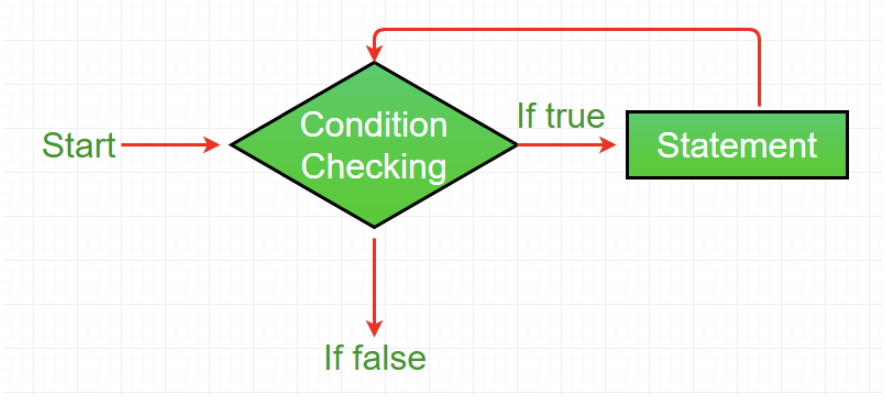
let i = 0;
while (i < 5) {
  console.log(i); // Outputs: 0, 1, 2, 3, 4
  i++;
}
Output
0
1
2
3
4
- for loop: The
forloop is a concise way to iterate, combining initialization, condition, and increment/decrement in a single line. It’s ideal for scenarios where the number of iterations is known.
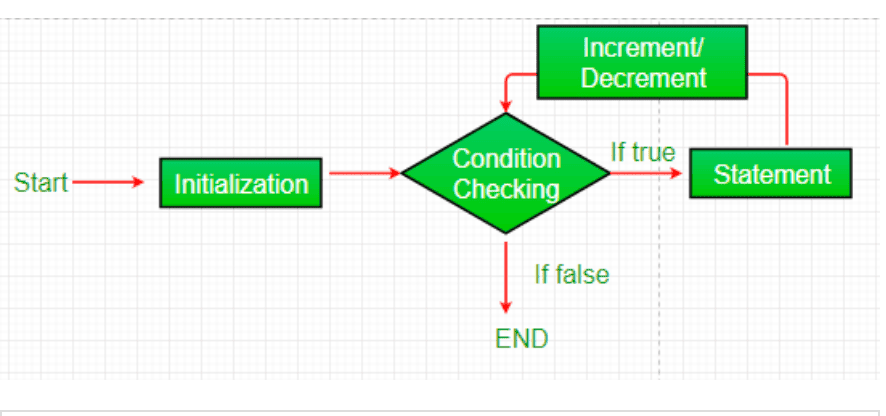
for (let i = 0; i < 5; i++) {
  console.log(i); // Outputs: 0, 1, 2, 3, 4
}
Output
0
1
2
3
4
- do-while loop: Similar to the
whileloop, but it checks the condition after executing the code block, ensuring the loop body runs at least once. It’s an exit-controlled loop.
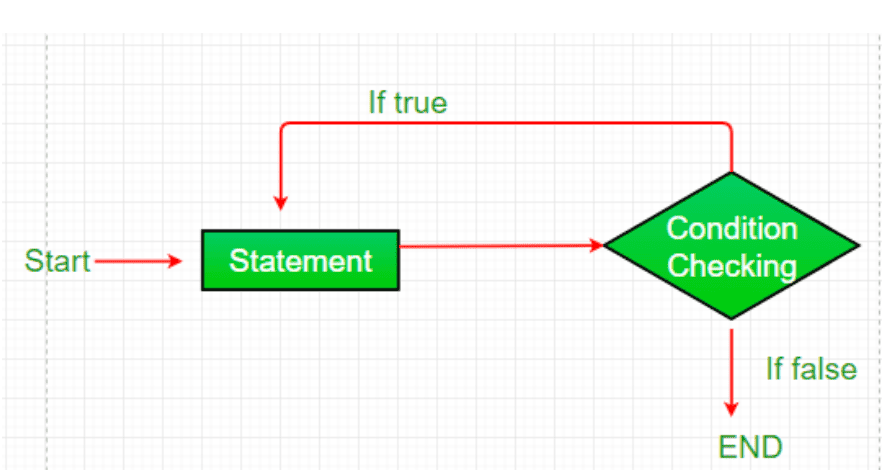
let i = 0;
do {
  console.log(i); // Outputs: 0, 1, 2, 3, 4
  i++;
} while (i < 5);
Output
0
1
2
3
4
Additionally, JavaScript supports for...in (for iterating over object properties) and for...of (for iterating over iterable objects like arrays) loops, though they are specialized for specific use cases.
145. How can the style/class of an element be changed?
To modify the style or class of an HTML element in JavaScript, you can use the document.getElementById() method to select the element and then update its style or className properties.
- Changing Style: The
styleproperty allows you to directly modify inline CSS properties of an element. For example: - This approach applies inline styles, which override external CSS unless
!importantis used. - Changing Class: The
classNameproperty replaces the entire class attribute of an element with a new class.
document.getElementById("myText").className = "newClass";
- To add or remove classes without overwriting existing ones, use the
classListAPI:
document.getElementById("myText").classList.add("newClass");
document.getElementById("myText").classList.remove("oldClass");
document.getElementById("myText").classList.toggle("active");
Using classList is preferred for class manipulation as it’s safer and more flexible.
146. How to convert the string of any base to an integer in JavaScript?
The parseInt() function converts a string to an integer in a specified base (radix). It takes two arguments: the string to parse and the base (2 to 36).
For example:
console.log(parseInt("1010", 2)); // Outputs: 10 (binary to decimal)
console.log(parseInt("FF", 16)); // Outputs: 255 (hexadecimal to decimal)
console.log(parseInt("123", 10)); // Outputs: 123 (decimal)
If the string is invalid or doesn’t match the base, parseInt() returns NaN:
console.log(parseInt("hello", 10)); // Outputs: NaN
Always specify the radix to avoid inconsistent behavior across browsers, especially for strings like "08" (which older browsers might interpret as octal).
147. What is the difference between an alert box and a confirmation box?
- Alert Box: Displays a message with a single OK button. It’s used to inform the user without requiring a decision.
alert("Operation completed successfully!");
- Confirmation Box: Displays a message with OK and Cancel buttons, allowing the user to make a choice. It returns a boolean (
truefor OK,falsefor Cancel).
let result = confirm("Are you sure you want to delete?");
console.log(result ? "Deleted" : "Canceled");
The key difference is that alert is for notifications, while confirm is for decision-making.
148. What is the disadvantage of using innerHTML in JavaScript?
Using innerHTML to manipulate the DOM has several disadvantages:
- Security Risks: Setting
innerHTMLwith user input can lead to Cross-Site Scripting (XSS) attacks if the input isn’t sanitized. Malicious scripts can be injected and executed.
// Unsafe usage
document.getElementById("myDiv").innerHTML = userInput;
// Risky if userInput contains <script>alert('XSS');</script>
- Performance: Replacing
innerHTMLre-parses and re-renders the entire DOM subtree, which can be slower than using specific DOM methods likeappendChild()ortextContentfor simple updates
- Event Handlers: Setting
innerHTMLoverwrites existing event handlers attached to elements unless they’re managed externally (e.g., via event delegation).
document.getElementById("myDiv").innerHTML = "<p>New content</p>";
// Removes existing event listeners
- Unintended Overwrites: Using
innerHTML +=to append content re-parses the existing content, causing performance issues and potentially breaking dynamic behavior.
document.getElementById("myDiv").innerHTML += "<p>More</p>";
// Inefficient re-parsing
For safer alternatives, use textContent for plain text or DOM methods like createElement(), appendChild() for structured content.
149. What is the use of void(0)?
The void(0) expression evaluates to undefined and is often used in href attributes to prevent the browser from navigating to a new page when a link is clicked. It’s commonly seen in JavaScript-driven links that trigger functions instead of loading a new URL.
For example:
<a href="javascript:void(0);" onclick="myFunction()">Click me</a>

<script>
function myFunction() {
  alert("Function triggered!");
}
</script>
Here, void(0) ensures the link navigation doesn’t occur. However, modern practices favor:
- Using
event.preventDefault()in event handlers:
<a href="#" onclick="event.preventDefault(); myFunction()">
  Click me
</a>
- Or using
addEventListener:
document.querySelector("a").addEventListener("click", (e) => {
  e.preventDefault();
  myFunction();
});
void(0) is still used but is considered less readable and outdated compared to modern event handling.
150. What are JavaScript Cookies?
Cookies are small key-value pairs stored on a user’s browser by a website. They are used to store user-specific data, such as preferences, authentication tokens, or tracking information. Cookies are sent with HTTP requests to the server, allowing websites to maintain state across sessions.
Key points:
- Purpose: Store data like language preferences, shopping cart items, or session IDs.
- Size Limit: Typically ~4KB per cookie.
- Expiration: Cookies can be set to expire at a specific date or persist until the browser is cleared.
- Access: Accessible by the server (via HTTP headers) and client (via
document.cookie).
Example use case: Remembering a user’s theme preference (e.g., dark/light mode).
151. How to create a cookie using JavaScript?
To create a cookie, assign a string to document.cookie with the format name=value; expires=date; path=/.
For example:
function setCookie(name, value, days) {
  let expires = "";

  if (days) {
    let date = new Date();
    date.setTime(date.getTime() + (days * 24 * 60 * 60 * 1000));
    expires = "; expires=" + date.toUTCString();
  }

  document.cookie = name + "=" + value + expires + "; path=/";
}

setCookie("username", "JohnDoe", 7); // Sets cookie for 7 days
The expires attribute sets the cookie’s lifespan, and path=/ makes it accessible across the site.
152. How to read a cookie using JavaScript?
To read cookies, access document.cookie, which returns a semicolon-separated string of all cookies. Parse the string to extract specific cookies.
For example:
function getCookie(name) {
  let nameEQ = name + "=";
  let cookies = document.cookie.split(";");

  for (let cookie of cookies) {
    cookie = cookie.trim();

    if (cookie.startsWith(nameEQ)) {
      return cookie.substring(nameEQ.length, cookie.length);
    }
  }

  return null;
}

console.log(getCookie("username")); // Outputs: "JohnDoe" if exists
Libraries like js-cookie simplify cookie management for complex scenarios.
153. How to delete a cookie using JavaScript?
To delete a cookie, set its expires date to a past time, effectively marking it for removal. Ensure the same path and domain are used as when the cookie was created.
For example:
function deleteCookie(name) {
  document.cookie =
    name + "=; expires=Thu, 01 Jan 1970 00:00:01 GMT; path=/";
}

deleteCookie("username");
Setting max-age=0 is another alternative to expire the cookie immediately. Verify the path matches to avoid issues with undeleted cookies, as explained in JavaScript Cookies.
154. What are escape characters and escape() function?
- Escape Characters: These are special characters preceded by a backslash (
\) to treat them as literals, ignoring their special meaning. They’re used to include characters like quotes or backslashes in strings, as described in JavaScript Strings. For example:
console.log("GeeksforGeeks: \"A Computer Science Portal\"");
// Outputs: GeeksforGeeks: "A Computer Science Portal"

console.log("Path: C:\\folder\\");
// Outputs: Path: C:\folder\
Common escape sequences include:
\": Double quote\': Single quote\\: Backslash\n: Newline\t: Tab- escape() function: This function encodes a string into ASCII-compatible format for transmission across networks. It’s deprecated and rarely used in modern JavaScript, replaced by
encodeURIComponent()for URI-safe encoding.
console.log(escape("Hello World!"));
// Outputs: Hello%20World%21

console.log(encodeURIComponent("Hello World!"));
// Outputs: Hello%20World%21

// Use encodeURIComponent() or encodeURI() for modern URL encoding needs.
155. How can generic objects be created in JavaScript?
Generic objects can be created in several ways:
1. Object Constructor:
let obj = new Object();obj.name = "John";obj.age = 25;2. Object Literal (preferred):
let obj = { name: "John", age: 25};3. Object.create:
let obj = Object.create(null); // No prototypeobj.name = "John";obj.age = 25;Object literals are the most concise and commonly used method. Object.create is useful for custom prototyping.
156. Which keywords are used to handle exceptions?
JavaScript uses exception handling to manage runtime errors with the following keywords:
try: Wraps code that might throw an error.catch: Handles the error if one occurs.finally: Executes code aftertry/catch, regardless of the outcome.throw: Creates custom errors.
For example:
try {
  let result = riskyFunction();
  console.log(result);
} catch (error) {
  console.error("Error:", error.message);
} finally {
  console.log("Cleanup done");
}

function riskyFunction() {
  throw new Error("Something went wrong");
}
This structure ensures graceful error handling and cleanup.
157. What is the use of the blur function?
The blur() method removes focus from an element, triggering a blur event. It’s useful for programmatically shifting focus or validating input fields.
For example:
document.getElementById("myInput").focus();

setTimeout(() => {
  document.getElementById("myInput").blur(); // Removes focus after 2s
}, 2000);
You can also listen for blur events:
document.getElementById("myInput").addEventListener("blur", () => {
  console.log("Input lost focus");
});
Use blur() for form validation or UI interactions.
158. Explain how to read and write a file using JavaScript?
The readFile() functions is used for reading operation.
readFile( Path, Options, Callback)The writeFile() functions is used for writing operation.
writeFile( Path, Data, Callback)159. What is called Variable typing in JavaScript?
The variable typing is the type of variable used to store a number and using that same variable to assign a “string”.
Geeks = 42;
Geeks = "GeeksforGeeks";
160. Explain how to detect the operating system on the client machine?
To detect the operating system on the client machine, one can simply use navigator.appVersion or navigator.userAgent property. The Navigator appVersion property is a read-only property and it returns the string that represents the version information of the browser.
161. What are the types of Pop up boxes available in JavaScript?
There are three types of pop boxes available in JavaScript.
162. What is "this" in an ES module?
In an ES module, this is undefined at the top level because ES modules run in strict mode by default
console.log(this); // Undefined in Es modules
Output
{}
163. When is matchAll() preferable to repeated exec loops?
Both matchAll() and repeated exec loops can find all regex matches, but matchAll() is often clearer, safer, and more ergonomic.
- Cleaner access to groups:
matchAll()yields an iterator of full match objects (with capturing and named groups) directly, making code shorter and easier to read. - No
lastIndexpitfalls: It doesn’t mutate or depend on the regex’slastIndex, so you avoid hard-to-debug bugs when reusing the same regex or mixing async code. - Lazy iteration: Results are produced on demand with
for...of/spread, which is memory-friendly for long strings. - Stable snapshot: It works off an internal copy of the regex with
g, so external changes to the regex don’t affect iteration mid-loop.
164. When are findLast / findLastIndex better than find / indexOf?
JavaScript provides four methods to search arrays: find, indexOf, findLast, and findLastIndex, but they differ in direction and flexibility of the search.
- find: Returns the first element in the array that satisfies a testing function, searching from start to end.
- indexOf: Returns the index of the first exact match of a value, also searching from start to end.
- findLast: Returns the first element that satisfies a testing function, but searches from end to start.
- findLastIndex: Returns the index of the first element that satisfies a testing function, but searches from end to start.
165. How do you implement a binary search in an array?
A binary search finds an item in a sorted array by repeatedly splitting the search range in half. If the middle item is the target, you’re done; if it’s too low, search the right half; if too high, search the left half. It’s like guessing a number by narrowing down the range with each try, but the array must be sorted first.
Example:
function binarySearch(arr, target) {
  let left = 0;
  let right = arr.length - 1;
  while (left <= right) {
    let mid = Math.floor((left + right) / 2);
    if (arr[mid] === target) return mid;
    if (arr[mid] < target) left = mid + 1;
    else right = mid - 1;
  }
  return -1;
}
let sortedArray = [1, 2, 3, 4, 5, 6, 7];
console.log(binarySearch(sortedArray, 5)); // Output: 4
166. What will be the output when using objects as keys in another object?
constobj1= {};
constobj2= { key: 'b' };
constobj3= { key: 'c' };
obj1[obj2] =123;
obj1[obj3] =234;
console.log(obj1[obj2]);
Output:
234Explanation: When you use an object as a key in another object, JavaScript converts it to a string using its toString() method. For most objects, this returns '[object Object]'. So, both obj2 and obj3 become the key '[object Object]' in obj1. The second assignment (obj1[obj3] = 234) overwrites the first (obj1[obj2] = 123) because they use the same key. It’s like labeling two boxes with the same name; the latest one wins. Thus, obj1[obj2] returns 234, and obj1 is { '[object Object]': 234 }.
167. Why does this function result in a syntax error?
functionItems(list, ...param, list2) {
return [list, ...param, list2];
}
Items(['a', 'b'], 'c', 'd');
Explanation: This code causes a syntax error because the rest parameter (...param) must be the last parameter in a function definition. Here, list2 comes after ...param, which is invalid. The rest parameter is like a bucket that collects all remaining arguments, so nothing can come after it. To fix it, you could remove list2 or restructure the function.
Corrected Example:
functionItems(list, ...param) {
return [list, ...param];
}
console.log(Items(['a', 'b'], 'c', 'd')); // Output: [['a', 'b'], 'c', 'd']
168. What will be the output when setting an object to null after storing it in an array?
letobj1= { name: 'GFG' };
letobj2= [obj1];
obj1=null;
console.log(obj2);
Output:
[{ name: 'GFG' }]Explanation: When obj1 is added to the array obj2, the array stores a reference to the object { name: 'GFG' }. Setting obj1 to null only changes the obj1 variable, not the object it pointed to. The array obj2 still holds a reference to the original object, so it remains unchanged. It’s like putting a box in a bag and then throwing away the box’s label—the box is still in the bag.
169. What will be the output when using a default parameter with the spread operator?
let obj = { num: 2 };
const fun = (x = { ...obj }) => {
  console.log((x.num /= 2));
};
fun();
fun();
fun(obj);
fun(obj);
Output
1
1
1
0.5
Output:
1
1
1
0.5
Explanation: The function fun has a default parameter x that creates a new object by spreading obj ({ ...obj }). For the first two calls (fun()), a new copy of { num: 2 } is created each time, and x.num /= 2 divides num by 2, logging 1. These don’t affect obj. For the third call (fun(obj)), obj is passed directly, so x refers to obj, and num becomes 1. The fourth call (fun(obj)) uses the same obj, now { num: 1 }, so num becomes 0.5. It’s like making copies of a box for the first two calls but editing the original box for the last two.
