

Web development refers to the creating, building, and maintaining of websites. It includes aspects such as web design, web publishing, web programming, and database management. It is the creation of an application that works over the internet i.e. websites.
The word Web Development is made up of two words, that is:
- Web: It refers to websites, web pages, or anything that works over the internet.
- Development: It refers to building the application from scratch.
Table of Content
Web Development can be classified into two ways
Frontend Development
Front-end Development is the development or creation of a user interface using some markup languages and other tools. It is basically the development of the user side where only user interaction will be counted. It consists of the interface where buttons, texts, alignments, etc are involved and used by the user.
Popular Frontend Technologies
- HTML: HTML stands for HyperText Markup Language. It is used to design the front end portion of web pages using markup language. It acts as a skeleton for a website since it is used to make the structure of a website.
- CSS: Cascading Style Sheets fondly referred to as CSS is a simply designed language intended to simplify the process of making web pages presentable. It is used to style our website.
- JavaScript: JavaScript is a scripting language used to provide a dynamic behavior to our website.
What is HTML?
HTML stands for HyperText Markup Language. It is the standard language used to create and design web pages on the internet. It was introduced by Tim Berners-Lee in 1991 at CERN as a simple markup language. Since then, it has evolved through versions from HTML 2.0 to HTML5 (the latest 2024 version).
HTML is a combination of Hypertext and Markup language. Hypertext defines the link between the web pages and Markup language defines the text document within the tag.
Example: This example shows the basic use of HTML on the web browser.
<!DOCTYPE html>
<html>

<head>
    <title>HTML Tutorial</title>
</head>

<body>
    <h2>Welcome To GFG</h2>
    <p>Hello World! Hello from GFG </p>
</body>

</html>
What is CSS?
CSS or Cascading Style Sheets is a stylesheet language used to add styles to the HTML document. It describes how HTML elements should be displayed on the web page.
CSS was first proposed by Håkon Wium Lie in 1994 and later developed by Lie and Bert Bos, who published the CSS1 specification in 1996.
Basic CSS Example
CSS has 3 ways to style your HTML:
- Inline: Add styles directly to HTML elements (limited use).
- Internal: Put styles inside the HTML file in a <style> tag.
- External: Create a separate CSS file (.css) and link it to your HTML.
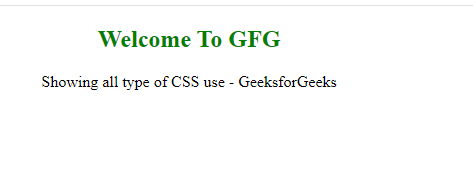
Example: This example shows the use of external, internal and inline CSS into HTML file.
<!-- File name: index.html -->
<!DOCTYPE html>
<html>

<head>
    <!-- Importing External CSS -->
    <link rel="stylesheet" href="style.css" />
    <!-- Using Internal CSS -->
    <style>
        h2 {
            color: green;
        }
    </style>
</head>

<body>
    <!-- Using Inline CSS -->
    <h2 style="text-align: center;">Welcome To GFG</h2>
    <p>Showing all type of CSS use - GeeksforGeeks</p>
</body>

</html>
/* External CSS */
/* File name: style.css */
p {
    text-align: center;
}
Output:
What is JavaScript ?
JavaScript is a lightweight, cross-platform, single-threaded, and interpreted compiled programming language. It is also known as the scripting language for webpages. It is well-known for the development of web pages, and many non-browser environments also use it.
JavaScript is a weakly typed language (dynamically typed). JavaScript can be used for Client-side developments as well as Server-side developments. JavaScript is both an imperative and declarative type of language. JavaScript contains a standard library of objects, like Array, Date, and Math, and a core set of language elements like operators, control structures, and statements.
Example: This example shows the alert by the use of alert method provided by JavaScript.
<!DOCTYPE html>
<html lang="en">

<head>
    <meta charset="UTF-8">
    <meta name="viewport" content="width=device-width,
                                   initial-scale=1.0">
    <title>Custom Alert Box</title>
    <style>
        body {
            display: flex;
            justify-content: center;
            width: 100vw;
            margin-top: 20px;
        }

        .alert {
            position: absolute;
            top: 50%;
            left: 50%;
            transform: translate(-50%, -50%);
            background-color: #f8d7da;
            color: #721c24;
            padding: 15px 20px;
            border: 1px solid #f5c6cb;
            border-radius: 5px;
        }
    </style>
</head>

<body>

    <button onclick="showAlert()">Show Alert</button>

    <script>
        function showAlert() {
            const alertBox = document.createElement('div');
            alertBox.className = 'alert';
            alertBox.textContent = 'This is a custom alert box.';
            document.body.appendChild(alertBox);
        }
    </script>

</body>

</html>
Output:

There are others frontend frameworks are used to create a website so that the UI can be more better and it could be fast running website.
