

Ettercap is an open-source network analysis framework designed to intercept, inspect and manipulate network traffic. It primarily targets Local Area Networks (LANs) by placing the attacker's system between communicating devices using techniques such as ARP spoofing.
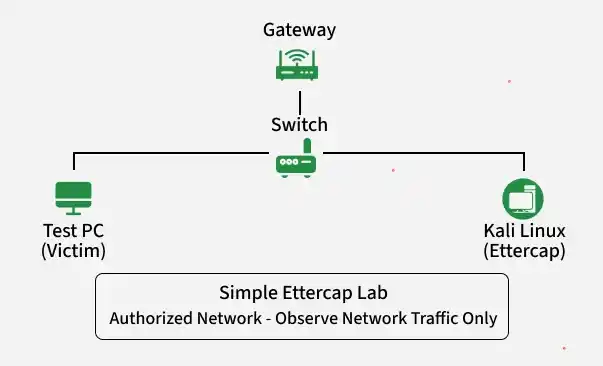
Core Features of Ettercap
Ettercap features a comprehensive suite of capabilities for network security analysis:
- Real-Time Traffic Sniffing: Captures live data traversing the network, supporting multiple sniffing methods (MAC-based, IP-based, ARP-based full-duplex and PublicARP-based half-duplex).
- MITM and ARP Spoofing: Manipulates Address Resolution Protocol (ARP) tables on a local area network (LAN) to transparently redirect traffic through the testing machine.
- Network & Host Discovery: Scans the network geometry, detects active hosts on a switched LAN and can even utilize OS fingerprinting.
- Protocol Dissection: Actively and passively dissects a wide variety of network protocols, interpreting both unencrypted data and ciphered streams.
- Credential & Data Capture: Sniffs and extracts sensitive login credentials and data transmitted over insecure, cleartext protocols.
- Live Packet Filtering: Drops, alters or injects content into packets in real-time, allowing for on-the-fly manipulation of data streams.
- SSL/TLS Stripping: Strips away encryption on secure traffic (via plugins), downgrading connections to standard HTTP to reveal sensitive payload data.
- Plugin Support: Extends core functionalities by allowing custom plugins for specialized tasks like VoIP interception, DNS spoofing and customized password collection.
- Multiple User Interfaces: Offers flexible operational modes including a curses-based Text GUI, GTK Graphical User Interface (GUI) and a Command-Line Interface (CLI) for scripting and automation.
Working of Ettercap
Ettercap executes this man-in-the-middle (MITM) workflow through a precise sequence of network-level maneuvers. By manipulating how switches and devices route traffic, it forces network data to flow through the attacker's machine before reaching its final destination. Step-by-Step Technical Execution:
- Host Discovery: Ettercap maps the local network by sending ARP requests or monitoring passive network traffic to build a list of active IP and MAC addresses.
- Target Selection: The operator defines Target 1 (e.g., the victim's workstation) and Target 2 (e.g., the network gateway/router) to isolate their specific communication channel.
- ARP Spoofing: Ettercap sends forged ARP replies to Target 1 claiming its own MAC address belongs to Target 2 and vice versa.
- Traffic Redirection: Both targets update their local ARP caches with the fraudulent MAC address mappings.
- Interception: The switch, relying on these updated MAC addresses, now routes all traffic between the two targets directly to the Ettercap machine.
- Packet Forwarding: Ettercap enables kernel-level IP forwarding to seamlessly pass the packets along to the real destinations, preventing network disruption.
- Inspection & Mutation: While forwarding, Ettercap runs live filters to read plain-text credentials, strip SSL or modify packet payloads on the fly.
- Network Remediation: Upon termination, Ettercap sends correct ARP packets to both targets to restore their original ARP caches and fix network routing.
Sniffing in Ettercap
Ettercap categorizes its sniffing operations into two distinct modalities, depending on the architecture of the network infrastructure being analyzed.
Sniffing Mechanisms
- Passive Sniffing: Used on shared media (hubs, open Wi-Fi). Ettercap sets the network card to promiscuous mode to quietly collect all broadcasted traffic without injecting data.
- Active Sniffing: Used on switched networks. Because switches isolate traffic to specific ports, Ettercap uses ARP poisoning to trick the switch into routing target traffic through its machine.
Traffic Capture Capabilities
When traffic flows through Ettercap, it processes the packets through specialized decoders to extract specific plaintext data types:
- Cleartext Protocols: Automatically extracts login credentials, session tokens and data fields from insecure protocols like HTTP, FTP, Telnet, POP3, IMAP and SMTP.
- Network Infrastructure: Monitors DNS queries and replies to map user browsing activity and internal network naming schemes.
- Network Metadata: Logs connection states, active ports, IP pairings and traffic volume for baseline architectural analysis.
Spoofing in Ettercap
ARP spoofing is the mechanism that transitions Ettercap from a passive listener into an active intermediary. By exploiting the trust-based design of the Address Resolution Protocol, it re-routes data paths at the Link Layer of the OSI model. Key Aspects of Ettercap Spoofing:
- The Security Flaw: ARP lacks authentication, meaning devices accept ARP responses even if they never sent a matching request.
- The Forgery: Ettercap broadcasts or unicasts falsified ARP packets to the target and the gateway, mapping the attacker’s MAC address to the target's IP address.
- The Cache Poisoning: Targets store these fake mappings in their local ARP caches, blinding them to the true physical location of the destination.
- The MITM Pipeline: Traffic flows through Ettercap, where the engine dissects, logs or alters the packets before forwarding them to their actual destinations using the correct hardware addresses.
Common Ettercap Commands
Installing Ettercap on Kali Linux
Ettercap is pre-installed in most Kali Linux releases. To verify its installation, run:
ettercap --version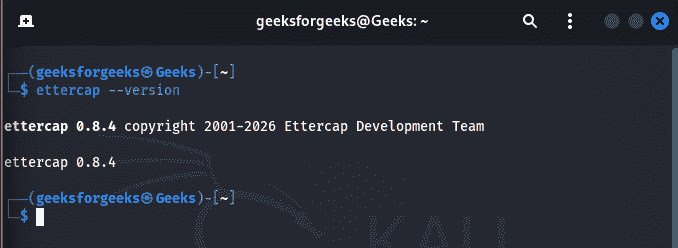
If Ettercap is not installed or you want the latest package from the Kali repositories, update the package list and install it:
sudo apt update
sudo apt install ettercap-graphical
Start graphical interface:
sudo ettercap -GStart text interface:
sudo ettercap -TDisplay available interfaces:
sudo ettercap --help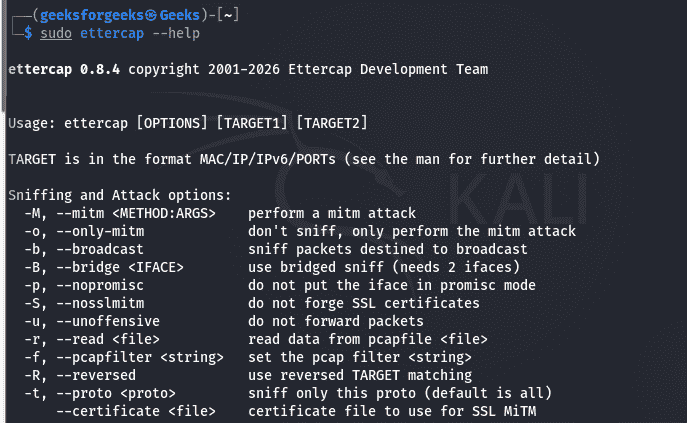
Start unified sniffing:
sudo ettercap -T -M arp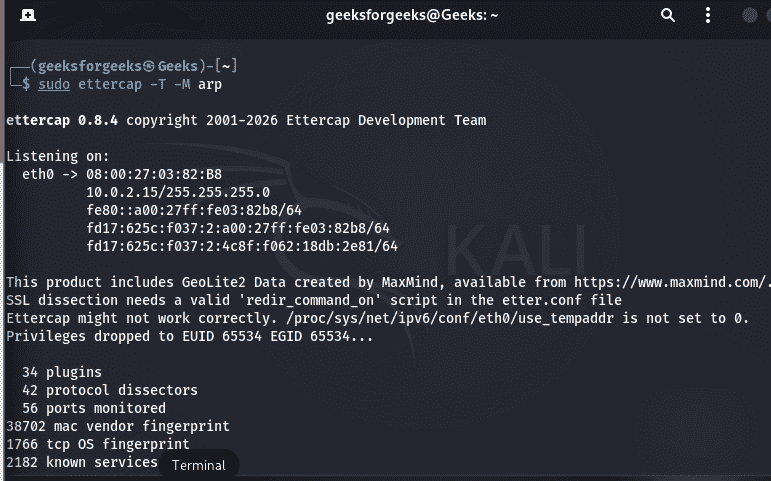
Scan hosts on the network:
Hosts ->Scan for HostsDisplay discovered hosts:
Hosts->Hosts ListSimple Ettercap Lab
- Objective: Observe network traffic during an authorized Man-in-the-Middle (MITM) assessment in a controlled lab environment.
- Requirements: Kali Linux with Ettercap installed, Two test systems connected to the same Local Area Network (LAN), Administrator privileges on the Kali machine, Written authorization to perform the assessment.
Lab Steps
- Step 1(Start Ettercap): Launch Ettercap with administrative privileges using either the graphical or text interface.
- Step 2(Select the Network Interface): Choose the network interface connected to the target LAN (such as eth0 or wlan0) so Ettercap can monitor network traffic.
- Step 3(Enable Unified Sniffing): Start Unified Sniffing mode. This allows Ettercap to capture and analyze packets passing through the selected interface.
- Step 4(Scan the Network): Perform a host scan to discover active devices on the local network. Ettercap identifies hosts by their IP and MAC addresses.
- Step 5(Select the Target Hosts): Choose the devices to participate in the authorized MITM assessment, typically a client system and the network gateway.
- Step 6(Start ARP Spoofing): Enable ARP spoofing to redirect traffic between the selected hosts through the Kali system, allowing Ettercap to inspect the packets.
- Step 7(Observe Network Traffic): Monitor the intercepted packets to analyze protocols, requests, responses and other network communication. Only inspect traffic that is within the scope of the authorized assessment.
- Step 8(Stop the Assessment): End ARP spoofing, stop packet capture and close Ettercap. Verify that normal network communication has been restored and save any required logs or observations for reporting.
Implementation Barriers
- Network Scope: Restricted strictly to the local collision domain or Local Area Network (LAN); it cannot bypass layer 3 routers to attack remote networks.
- Access Requirements: Requires root or sudo administrative privileges to place network interfaces into promiscuous mode and forge raw network packets.
- Encryption Hurdles: Modern cryptographic protocols (HTTPS, SSH, WPA3) completely hide packet payloads unless complex, highly visible certificate-pinning bypasses are deployed.
- High Visibility: Active ARP poisoning generates a massive volume of anomalous network traffic, making it easily detectable by basic Intrusion Detection Systems (IDS).
- Defensive Controls: Completely neutralized by standard enterprise network configurations, such as Dynamic ARP Inspection (DAI), DHCP Snooping and port security.
