Searchsploit is a command-line tool in Kali Linux that provides a searchable, offline copy of the Exploit Database. It lets penetration testers quickly map software versions or CVEs to known exploits and proof-of-concept code without needing an active internet connection. common flags to refine your searches:
- searchsploit [term]: Searches the titles and file paths of the local exploit repository.
- searchsploit -t [term]: Performs a title-only search for cleaner, more sorted results.
- searchsploit -m [path]: Copies the selected exploit file to your current working directory for analysis or modification.
- searchsploit -j [CVE ID]: Searches using a specific CVE identifier to correlate vulnerability scan results with available exploits.
Working of Searchsploit
The core strength of this offline workflow is speed and privacy. Here is how a security analyst executes each step of the process using actual terminal commands:
Step 1 & 2: Identify Target & Version
- You run a network scan (like nmap -sV) against a target system.
- You discover an open port running an outdated web server: Apache 2.4.41.
Step 3: Search the Local Database
- Run a targeted search combining the software name and version: searchsploit apache 2.4.41.
- This scans the local index file (files_exploits.csv) and prints matching entries.
Step 4: Review the Results
- Searchsploit displays a table with the exploit title, platform and its unique ID (EDB-ID).
- You look for entries matching your target's specific operating system (e.g., Linux vs. Windows).
Step 5: Copy the Exploit Locally
- Instead of manually navigating to /usr/share/exploitdb/, use the mirror flag -m and the EDB-ID: searchsploit -m 48821.
- This safely copies the exploit file directly into your current working folder.
Step 6: Analyze the Proof-of-Concept
- Open the file in a text editor to verify what it does before running it: nano 48821.sh
- Read the code comments to find configuration variables, required arguments and payload types.
Key Searchsploit Commands
The general syntax is:
searchsploit [options] keywordExample:
searchsploit apacheSearch by Software Name
Searching by software name returns every exploit associated with that application. Example:
searchsploit opensshExample output:
OpenSSH 7.2 - Username Enumeration
OpenSSH 7.2p2 - Remote Code Execution
OpenSSH 8.1 - Information Disclosure
Search by Software Version
Including the version number reduces irrelevant results. Example
searchsploit openssh 7.2Search Using Multiple Keywords
Multiple keywords improve search precision. Example
searchsploit apache phpSearch by CVE Identifier
Searchsploit can locate exploits using known CVE IDs. Example
searchsploit CVE-2021-41773Search Case Insensitively
Searchsploit ignores capitalization automatically. The following commands produce identical results:
searchsploit nginxsearchsploit NGINXsearchsploit NgInXDisplay Exact Matches
To avoid broad search results, use exact matching. Example
searchsploit --exact apacheExclude Unwanted Keywords
Results can be filtered using the exclude option. Only non-DoS exploits will be displayed. Example
searchsploit apache --exclude="dos"View Full Exploit Path
Each result includes a path inside the local Exploit-DB repository. The path indicates where the exploit is stored. Example:
searchsploit sambaSample output:
Linux/remote/12345.pyCopy an Exploit Locally
Rather than editing the original exploit, create a local copy. The exploit is copied into the current working directory. Example
searchsploit -m 12345View Exploit Contents
Display the exploit source code directly in the terminal. This is useful for reviewing exploit logic before testing. Example
searchsploit -x 12345Search Using JSON Output
For automation and scripting, Searchsploit supports JSON output. JSON output can be integrated into custom security tools. Example
searchsploit apache --jsonSearch Nmap Scan Results
One of Searchsploit's most useful features is parsing Nmap service detection results. Searchsploit extracts detected software versions and searches the local database for matching exploits. After performing version detection:
nmap -sV target-ip -oX scan.xmlSearch the scan automatically:
searchsploit --nmap scan.xmlUpdate the Exploit Database
Keeping the local database updated ensures access to the latest public exploits. Regular updates improve search accuracy and coverage. Example
searchsploit -uPractical Lab: Finding Exploits Offline Using Searchsploit in Kali Linux
- Objective: Learn how to locate publicly available exploits for identified software using Searchsploit in an authorized lab environment.
- Requirements: Kali Linux, Searchsploit (pre-installed on Kali Linux), Terminal access, An authorized lab environment.
Step 1: Verify Searchsploit Installation
Open a terminal and verify that Searchsploit is available. If installed correctly, the help menu displaying available options will appear.
searchsploit -hYou can also check the installed version:
searchsploit --version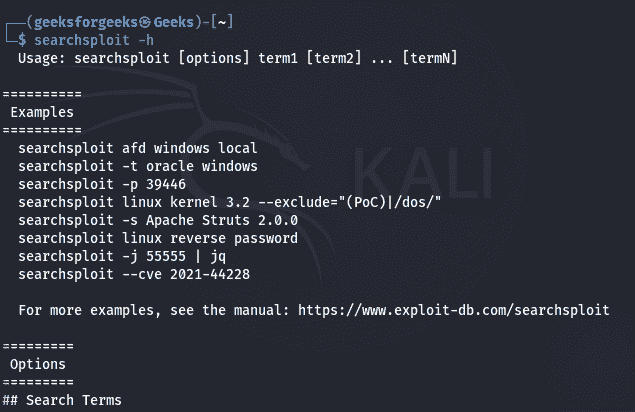
Step 2: Search for Software by Name
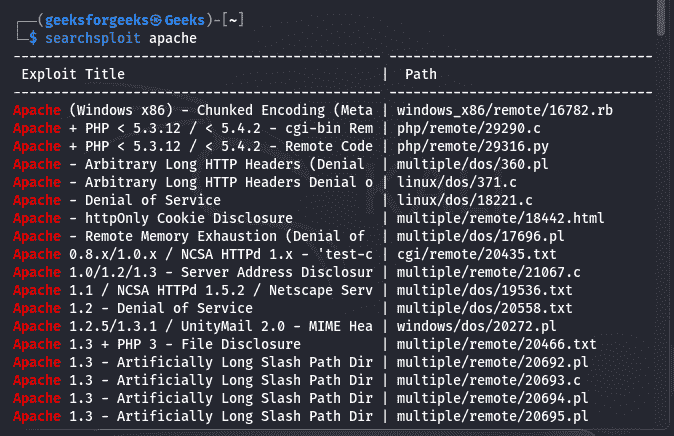
Suppose you have identified Apache HTTP Server running on a target system during reconnaissance. Search for all Apache-related exploits:
searchsploit apacheExample output: Review the results to identify exploits related to the software of interest.
Apache HTTP Server 2.4.49 - Path Traversal
Apache Tomcat - Remote Code Execution
Apache Struts - Remote Code Execution
...
Step 3: Refine the Search Using the Software Version
Broad searches may return many unrelated results. Narrow the search by including the software version. The output now contains only exploits associated with that version, making it easier to identify relevant proof-of-concept code. For example, if the target is running Apache 2.4.49:
searchsploit apache 2.4.49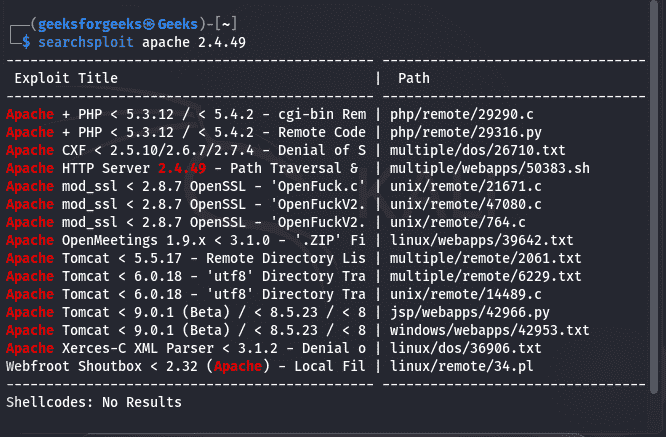
Step 4: Review the Matching Exploit Entries
Each result includes useful information such as: Exploit title, Platform, Exploit type, Exploit Database ID, Local file path. Read the exploit title carefully to understand the vulnerability it targets and confirm that it matches the identified software version. Example:
Apache HTTP Server 2.4.49 - Path Traversal
EDB-ID: 50383
Path: exploits/multiple/webapps/50383.sh
Step 5: Display the Exploit Source Code
Before using any proof-of-concept, inspect its contents. Searchsploit opens the exploit source code, allowing you to review: Vulnerability description, Supported software versions, Exploit logic, Usage instructions, Author information, Display the exploit directly in the terminal using its Exploit Database ID:
searchsploit -x 50383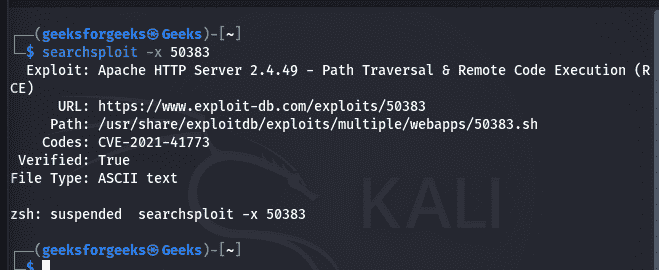
Step 6: Copy the Exploit to Your Working Directory
Instead of modifying the original file in the Exploit-DB repository, create a local copy. The exploit file is copied into the current working directory.
searchsploit -m 50383Verify that the file has been copied: You can now safely examine or modify the copied file without affecting the original database.
ls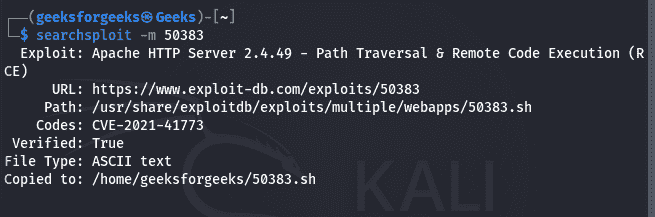
Step 7: Analyze the Proof-of-Concept
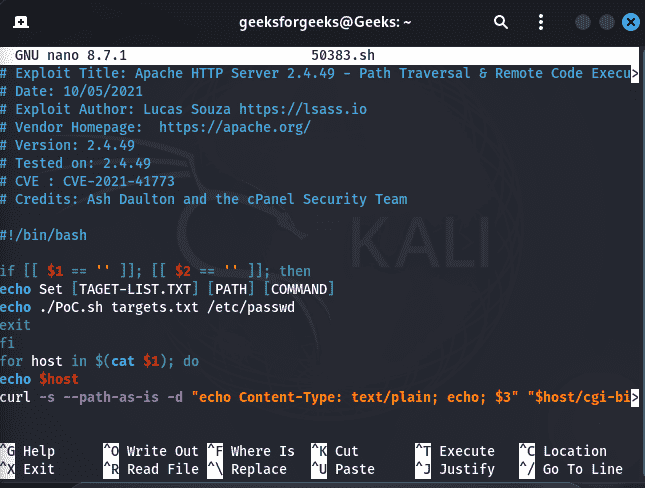
Open the copied exploit using a text editor. Carefully review: Target software version, Required parameters, Dependencies, Execution method, Expected behavior, For example:
nano 50383.sh
vim 50383.sh