

A key-value database is a type of NoSQL database that stores data as key-value pairs. Each key acts as a unique identifier and is associated with a single value.
- Uses simple data storage architecture.
- Handles large volumes of distributed data efficiently.
- Commonly used in high-performance applications.
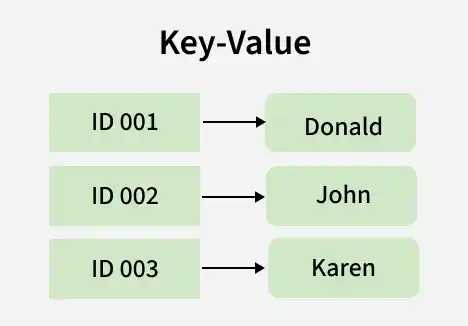
Components of a Key-Value Data Model
The Key-Value Data Model consists of the following components:
Key
A unique identifier used to access a specific piece of data. The database uses the key to quickly find the associated value without scanning all records.
Example:
Key: User101Value
The data associated with the key, which can be a string, number, JSON object, image or any other data type. The structure of the value is flexible, allowing applications to store data in various formats based on their requirements.
Example:
{
  "Name": "John",
  "Age": 25,
  "City": "Delhi"
}
Key-Value Pair
The combination of a key and its corresponding value. Data is inserted, updated and retrieved using these key-value pairs.
Example:
| Key | Value |
|---|---|
| User101 | {"Name":"John","Age":25,"City":"Delhi"} |
| User102 | {"Name":"Emma","Age":30,"City":"Mumbai"} |
Working of a Key-Value Database
The working of a key-value database is based on storing and retrieving data using unique keys. Each key is associated with a specific value, allowing fast and efficient data access.
Step 1: Store Data as Key-Value Pairs
The database stores data in the form of key-value pairs, where each key acts as a unique identifier for its corresponding value.
Example:
| Key | Value |
|---|---|
| 101 | John |
| 102 | Alice |
| 103 | Bob |
Step 2: Request Data Using a Key
When a user wants to retrieve data, they provide the key associated with the required value.
Example:
Search for key 102.Step 3: Locate the Key
The database uses its indexing mechanism to quickly locate the specified key without scanning the entire dataset.
Example:
When the user searches for key 102, the database quickly locates the corresponding key-value pair in its storage.Step 4: Return the Associated Value
Once the key is found, the database returns the corresponding value.
Output:
AliceStep 5: Update or Delete Data
The value associated with a key can be updated or the key-value pair can be removed whenever required.
Example (Update):
If the value associated with key 102 changes from Alice to Emma, the database updates the existing value while keeping the same key.
| Key | Old Value | New Value |
|---|---|---|
| 102 | Alice | Emma |
Example (Delete):
If the data associated with key 103 is no longer required, the database removes the entire key-value pair.
| Key | Value |
|---|---|
| 103 | Bob |
After deletion, key 103 and its value are no longer available in the database.
Uses of Key-Value Model
Key-value databases are widely used in applications that require fast data storage and retrieval.
Caching
Key-value databases are used to store frequently accessed data in memory, reducing the need to repeatedly query the main database.
Example:
Key: Product_101
Value: Laptop Details
Session Management
Web applications store user session information as key-value pairs to maintain login states and user preferences.
Example:
Key: Session_12345
Value: User Logged In
The application uses the session ID to identify the user during their visit.
User Profiles
User information can be stored and retrieved using a unique user ID as the key.
Example:
Key: User_101
Value: {
  "Name": "John",
  "Email": "john@example.com"
}
Shopping Carts
E-commerce websites use key-value databases to store products added to a user's shopping cart.
Example:
Key: Cart_101
Value: ["Laptop", "Mouse", "Keyboard"]
This allows quick access to cart details during checkout.
Configuration Management
Application settings and configuration data are often stored as key-value pairs.
Example:
| Key | Value |
|---|---|
| Theme | Dark Mode |
| Language | English |
| TimeZone | UTC+5:30 |
Applications can quickly retrieve these settings when they start.
IoT Applications
IoT systems store device information and sensor readings using unique device IDs.
Example:
Key: Sensor_001
Value: Temperature = 28°C
The latest sensor data can be accessed instantly using the device key.
Example of Key-Value Data Model
The following example stores user information using a key-value structure:
{
  "User101": {
    "Name": "John",
    "Age": 25,
    "City": "Delhi"
  },
  "User102": {
    "Name": "Alice",
    "Age": 30,
    "City": "Mumbai"
  },
  "User103": {
    "Name": "Bob",
    "Age": 28,
    "City": "Bangalore"
  }
}- User101, User102 and User103 are the keys.
- The corresponding user details are the values.
- Data is retrieved by specifying the required key, such as User102, which returns Alice's information.
Databases
- Couchbase: Supports SQL-like querying and text search.
- Amazon DynamoDB: Highly scalable and widely used cloud-based key-value database.
- Riak: Designed for building distributed applications.
- Aerospike: Open-source database optimized for real-time applications.
- Berkeley DB: High-performance database with scalability support.
Advantages of Key Value Model
- Efficient Key-Based Access: Enables rapid data retrieval through unique keys.
- Low-Latency Operations: Provides high-performance read and write operations.
- Horizontal Scalability: Supports data distribution across multiple nodes.
- Schema Flexibility: Allows storage of diverse data types without a predefined schema.
- High Availability: Ensures continuous access to data in distributed environments.
Limitations of Key Value Model
- Limited Query Capabilities: Efficiently supports only key-based lookups, making complex queries difficult.
- No Relationship Support: Does not provide native support for relationships between data entities.
- Data Redundancy: May require duplication of related data across multiple key-value pairs.
