

In this article we will see how we can get the speeded up robust features of image in mahotas. In computer vision, speeded up robust features (SURF) is a patented local feature detector and descriptor. It can be used for tasks such as object recognition, image registration, classification, or 3D reconstruction. It is partly inspired by the scale-invariant feature transform (SIFT) descriptor. For this we are going to use the fluorescent microscopy image from a nuclear segmentation benchmark. We can get the image with the help of command given below
mahotas.demos.nuclear_image()
Below is the nuclear_image
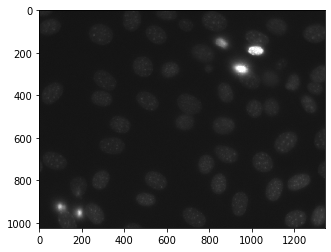
In order to do this we will use surf.surf method
Syntax : surf.surf(img)
Argument : It takes image object as argument
Return : It returns numpy.ndarray
Example 1 :
# importing various libraries
import mahotas
import mahotas.demos
import mahotas as mh
import numpy as np
from pylab import imshow, show
from mahotas.features import surf

# loading nuclear image
nuclear = mahotas.demos.nuclear_image()

# filtering image
nuclear = nuclear[:, :, 0]

# adding gaussian filter
nuclear = mahotas.gaussian_filter(nuclear, 4)

# showing image
print("Image")
imshow(nuclear)
show()


# getting Speeded-Up Robust Features
spoints = surf.surf(nuclear)
print("No of  points: {}".format(len(spoints)))
Output :

No of points: 217
Example 2 :
# importing required libraries
import numpy as np
import mahotas
from pylab import imshow, show
from mahotas.features import surf

# loading image
img = mahotas.imread('dog_image.png')


# filtering the image
img = img[:, :, 0]

# setting gaussian filter
gaussian = mahotas.gaussian_filter(img, 5)

# showing image
print("Image")
imshow(gaussian)
show()


# getting Speeded-Up Robust Features
spoints = surf.surf(gaussian)
print("No of  points: {}".format(len(spoints)))
Output :

No of points: 364
