

WireMock is an API mocking tool that simulates REST APIs without requiring a real backend service. It enables developers and testers to create mock endpoints with predefined responses, allowing API development and testing to continue even when the actual backend is unavailable.
- Creates mock REST API endpoints without a live backend.
- Returns predefined responses for API requests.
- Supports API development, testing, and integration.
Mocked API Endpoint
A mocked API endpoint is a simulated API that behaves like a real endpoint by returning predefined responses instead of communicating with an actual backend service. It allows applications to be developed and tested independently of backend availability.
- Simulates the behavior of a real API.
- Returns predefined responses based on configured requests.
- Enables early testing before the actual API is available.
WireMock Server Setup
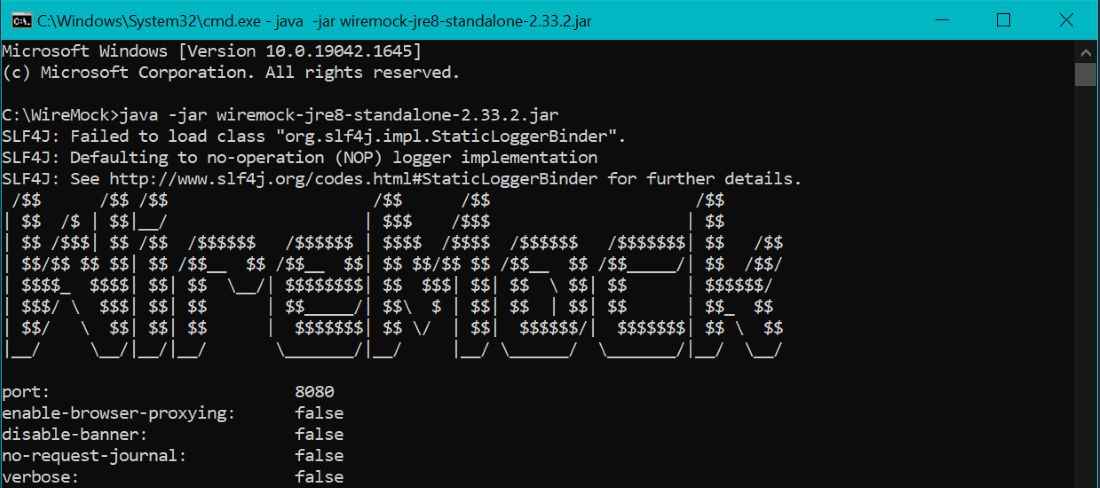
Before creating mocked API endpoints, start the WireMock server so it can receive requests and return mock responses.
- Download the WireMock standalone JAR file.
- Open a terminal or command prompt.
- Navigate to the folder containing the JAR file.
- Run the following command:
java -jar wiremock-standalone-3.x.x.jar --port 8080
- Once the server starts successfully, it listens on port 8080 and is ready to accept API requests and stub mapping requests.
Creating a Mock API Endpoint Using Postman
Postman can be used with WireMock to create and manage mocked API endpoints by sending stub mapping requests to the WireMock Admin API.
Step 1: Verify the Initial API Request
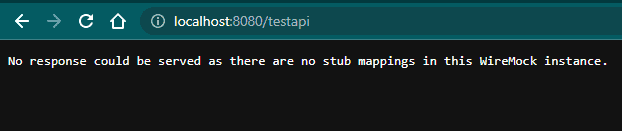
Before creating a mock endpoint, send the request you want to simulate.
GET http://localhost:8080/testapi
Since no stub mapping exists yet, WireMock cannot find a matching response and returns:
No response could be served as there are no stub mappings in this WireMock instance.
This confirms that no mock response has been configured for the requested endpoint.
Step 2: Create a WireMock Stub Mapping Request
Open Postman and create a POST request to the WireMock Admin API
POST http://localhost:8080/__admin/mappings
Select Body -> Raw -> JSON before adding the stub mapping configuration.
Step 3: Configure Request and Response Details
Add the following JSON in the request body.
{
"request": {
"method": "GET",
"url": "/testapi"
},
"response": {
"status": 200,
"body": "Welcome to WireMock!"
}
}
This configuration tells WireMock to:
- Match requests sent to /testapi.
- Accept only the GET method.
- Return an HTTP 200 OK response.
- Send "Welcome to GeeksforGeeks!" as the response body.
Step 4: Submit the Mapping Through Postman
Click Send to create the stub mapping.
A successful request returns an HTTP 201 Created response containing:
- Generated mapping ID
- Request configuration
- Response configuration
- UUID of the created stub
This confirms that the stub mapping has been created successfully.
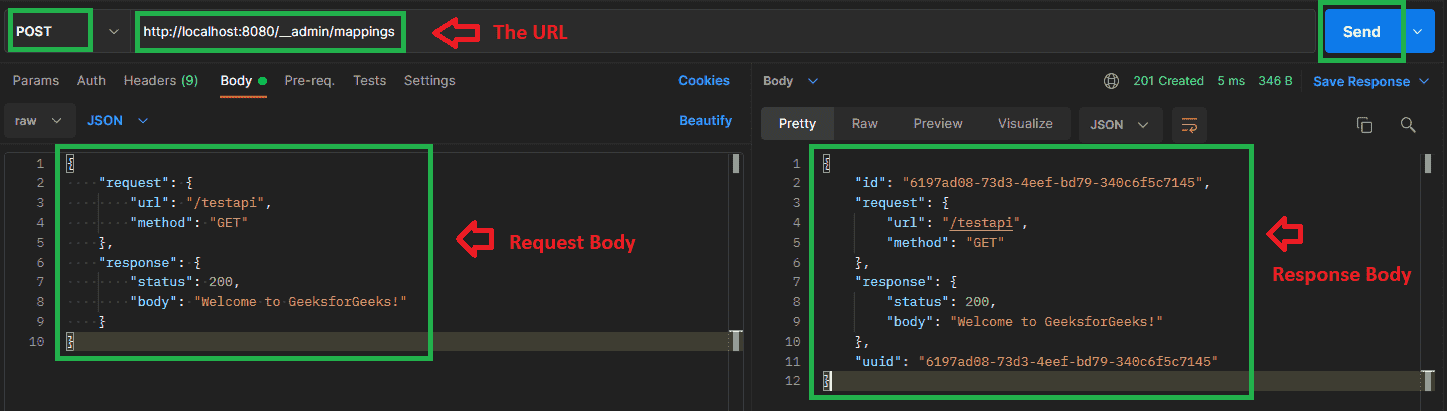
and response; the response body on the right shows WireMock's stored mapping, including its generated id and uuid.
Step 5: Validate the Mock API Endpoint
Send the same request again.
GET http://localhost:8080/testapi
This time, WireMock matches the request with the configured stub mapping and returns:
Welcome to GeeksforGeeks!
The successful response confirms that the mocked API endpoint has been created and is working correctly.
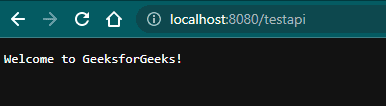
The successful response confirms that the mocked API endpoint has been created and is working correctly.
WireMock Request-Response Workflow
WireMock receives an incoming API request, compares it with the configured stub mappings, and returns the corresponding mock response..
- Client Sends API Request: The client application or testing tool (such as Postman) sends an HTTP request to the WireMock server.
- WireMock Receives the Request: WireMock captures the incoming request and checks the available stub mappings.
- Request Matching Process: WireMock compares request details such as HTTP method, URL path, query parameters, headers, cookies, and request body with the configured stub mappings.
- Stub Mapping Match Found: If a matching stub mapping is found, WireMock retrieves the predefined response configuration.
- Return Mock Response:WireMock sends the configured mock response, including status code, headers, and response body, back to the client.
- No Matching Stub Found: If no stub mapping matches the request, WireMock returns an error response indicating that no matching stub was found.
Common Issues and Troubleshooting
While creating mocked API endpoints with WireMock, you may encounter configuration or request-matching issues. The following are some common problems and their solutions:
- Ensure the WireMock server is running before sending requests.
- Verify that the request URL and HTTP method match the configured stub mapping.
- Use the correct Admin API endpoint (
/__admin/mappings). - Check the JSON request body for syntax errors.
- Ensure port 8080 is available.
- Confirm that the stub mapping was created successfully.
- Resend the request after updating the stub mapping.
- Review the WireMock console logs for request-matching errors.
Advantages of Using WireMock with Postman
- Enables API testing without relying on a live backend service.
- Simulates different response scenarios for comprehensive testing.
- Simplifies frontend and backend development in parallel.
- Supports quick creation and management of mock API endpoints.
- Reduces dependency on external systems during testing.
