

Nessus is one of the most popular Vulnerability Assessment tools used in security testing. Developed by Tenable, it scans computers, servers, networks, web applications, and cloud environments to identify security vulnerabilities, misconfigurations, and compliance issues before attackers can exploit them.
- Identifies security vulnerabilities across systems and networks.
- Helps improve an organization's overall security posture.
- Supports compliance with industry security standards.
Nessus Architecture
The Nessus architecture consists of several components that work together to perform vulnerability assessments. It scans target systems using an updated plugin database and generates reports with remediation recommendations.
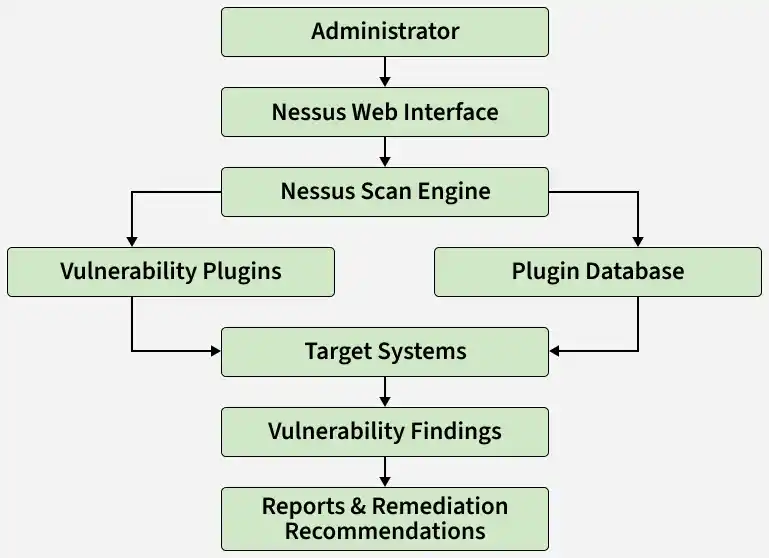
Components of Nessus Architecture
- Nessus Web Interface: A web-based dashboard used to configure scans, manage scan policies, monitor scan progress, and view reports.
- Nessus Scan Engine: Performs vulnerability assessments by executing security checks on target systems.
- Vulnerability Plugins: A collection of plugins used to detect known vulnerabilities, missing patches, and security misconfigurations.
- Plugin Database: Stores regularly updated vulnerability checks, security advisories, and compliance policies.
- Target Systems: Servers, workstations, network devices, web applications, databases, and cloud resources being scanned.
- Reports & Remediation: Generates reports containing vulnerability details, severity ratings, and recommended fixes.
Nessus Scanning Process
The Nessus scanning process involves configuring a scan, assessing target systems, analyzing findings, and generating a report. After remediation, a verification scan confirms that vulnerabilities have been resolved.
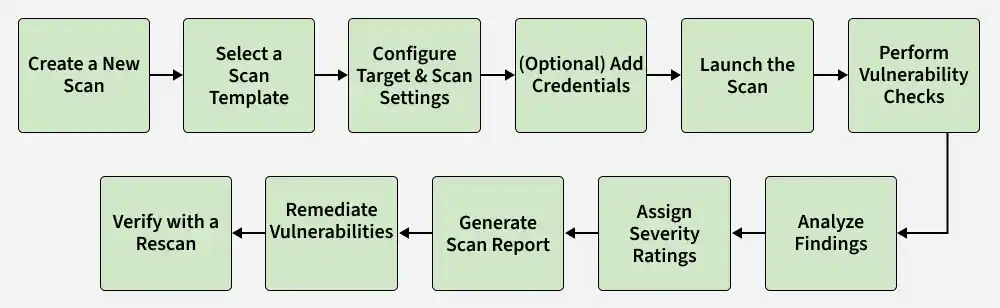
- Create a New Scan: Create a new scan from the Nessus dashboard.
- Select a Scan Template: Choose a suitable template, such as Basic Network Scan, Advanced Scan, or Web Application Tests.
- Configure Target & Scan Settings: Specify the target IP address, hostname, or network range, and configure the required scan options.
- Add Credentials (Optional): Provide system credentials to perform an authenticated (credentialed) scan for more comprehensive results.
- Launch the Scan: Nessus begins scanning the target using its vulnerability plugins and security checks.
- Perform Vulnerability Checks: Nessus compares the target against its vulnerability database to identify security weaknesses, missing patches, outdated software, and configuration issues.
- Analyze Findings: The detected vulnerabilities are analyzed to determine their potential impact.
- Assign Severity Ratings: Each finding is categorized as Critical, High, Medium, Low, or Informational.
- Generate Scan Report: Nessus generates a detailed report that includes vulnerability details, risk levels, and remediation recommendations.
- Remediate Vulnerabilities: Apply the recommended fixes, such as installing patches or correcting configurations.
- Verify with a Rescan: Run another scan to ensure that the identified vulnerabilities have been successfully resolved.
Severity Levels
Nessus classifies detected vulnerabilities based on their potential impact, helping security teams prioritize remediation.
| Severity | Description |
|---|---|
| Critical | Requires immediate remediation due to severe security risk. |
| High | Serious vulnerability that should be fixed as soon as possible. |
| Medium | Moderate security issue that should be addressed. |
| Low | Minor security issue with limited impact. |
| Informational | General security information that does not represent a vulnerability. |
Types of Nessus Scans
Nessus provides different scan types for assessing networks, systems, applications, and compliance requirements.
- Network Scan: Identifies vulnerabilities in network devices, servers, and services by detecting open ports, running services, and known security issues.
- Web Application Scan: Scans web applications for vulnerabilities such as SQL Injection (SQLi), Cross-Site Scripting (XSS), insecure configurations, and other web security flaws.
- Credentialed Scan: Uses valid credentials to perform authenticated scans, providing deeper visibility into system configurations, missing patches, and software vulnerabilities.
- Host Discovery Scan: Identifies active hosts and devices on a network before performing detailed vulnerability assessments.
- Compliance Scan: Checks systems against security policies and industry standards to identify configuration issues and compliance violations.
- Malware Scan: Detects malware indicators, suspicious files, and signs of system compromise.
- Patch Audit: Identifies missing security patches and outdated software versions that require updates to reduce security risks.
Common Vulnerabilities Detected by Nessus
Nessus identifies a wide range of security weaknesses across operating systems, applications, and network infrastructure.
- Missing security patches
- Outdated software versions
- Weak SSL/TLS configurations
- Open network ports
- Weak or default credentials
- Operating system misconfigurations
- SQL Injection (SQLi)
- Cross-Site Scripting (XSS)
- Remote Code Execution (RCE)
- Insecure protocols such as FTP, Telnet, and SSLv3
Reasons to Use Nessus
Nessus is trusted by organizations because it provides accurate vulnerability assessments and actionable security insights.
- Performs comprehensive vulnerability assessments.
- Uses credentialed scanning for deeper system analysis.
- Detects web application and network security issues.
- Prioritizes vulnerabilities based on severity.
- Supports regulatory compliance requirements.
- Provides detailed remediation guidance.
Advantages of Nessus
- Easy to install and use.
- Large and frequently updated vulnerability database.
- Accurate vulnerability detection with low false positives.
- Supports authenticated and unauthenticated scanning.
- Generates detailed remediation reports.
- Supports compliance and regulatory audits.
- Suitable for small businesses and large enterprises.
Limitations of Nessus
- Primarily identifies vulnerabilities but does not exploit them.
- Some advanced features require a commercial license.
- Large network scans may take considerable time.
- Requires regular plugin updates for the latest vulnerability detection.
