

Retesting is a software testing technique used to verify that a specific defect has been fixed after it has been resolved by the developer. The tester executes the same test case using the same test data and environment (whenever possible) to ensure the defect no longer exists.
- Confirms that reported defects have been fixed successfully.
- Executes the original failed test case using the same test data.
- Performed only for defects that have been fixed by the developer.
Why Retesting is Important
Retesting ensures that defect fixes work as expected before software is released. It helps validate bug fixes and improves the overall quality of the application.
- Verifies that defects have been resolved correctly.
- Ensures the application behaves as expected after the fix.
- Increases confidence in software quality.
- Reduces the risk of releasing unresolved defects.
Retesting Process
The retesting process verifies that a reported defect has been fixed correctly before it is closed. The tester executes the original failed test case to validate the defect fix.
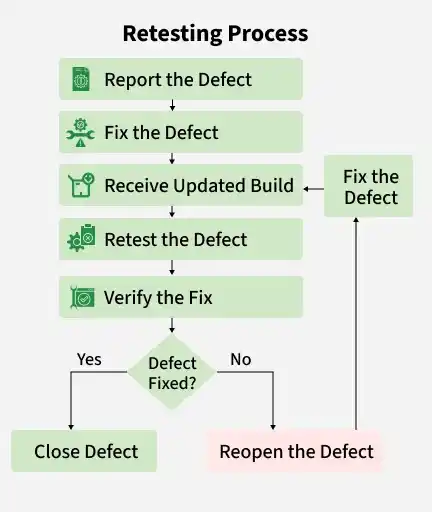
- Report the Defect: The tester identifies a defect and reports it with complete details in the defect tracking tool.
- Fix the Defect: The developer analyzes the reported defect and implements the required fix.
- Receive Updated Build: The tester receives the updated application build containing the defect fix.
- Retest the Defect: The tester executes the original failed test case using the same test data and environment whenever possible.
- Verify the Fix: The tester confirms that the defect has been resolved and the application behaves as expected.
- Defect Fixed?: The tester determines whether the defect has been fixed successfully after retesting.
- Close Defect: If the defect is fixed, its status is updated to Closed in the defect tracking system.
- Reopen the Defect: If the defect still exists, it is Reopened and assigned back to the developer for further fixing.
Example: A login defect is fixed by the developer, and the tester reruns the same login test case using the same credentials. If the login is successful, the defect is Closed; otherwise, it is Reopened.
Common Mistakes in Retesting
Avoiding common mistakes helps ensure that defect fixes are verified accurately and reliably.
- Using different test data than the original failed test case.
- Verifying the defect without the updated application build.
- Closing a defect without confirming that it has been completely resolved.
- Ignoring related scenarios that may be affected by the defect fix.
- Performing retesting in an unverified test environment.
- Skipping regression testing after successful retesting.
Advantages of Retesting
Retesting ensures that reported defects have been fixed correctly before the software is released. It improves confidence in bug fixes and helps maintain software quality.
- Confirms that reported defects have been fixed successfully.
- Ensures the application behaves as expected after the fix.
- Improves software quality and reliability.
- Prevents unresolved defects from reaching production.
- Increases confidence in the stability of bug fixes.
Limitations of Retesting
Retesting focuses only on verifying fixed defects and does not ensure the overall stability of the application. It is often combined with regression testing for complete validation.
- Verifies only the specific defects that have been fixed.
- Does not identify defects in unaffected or unrelated features.
- Can be time-consuming when many defects require retesting.
- Depends on the availability of a stable build containing the fixes.
- Requires the same test data and environment for accurate verification.
