

Designing Instagram is a commonly asked problem in system design interviews, as it involves building a scalable and highly available system. It focuses on handling millions of users performing actions like posting content, interacting with posts, and consuming personalized feeds in real time.
- Understand how users upload photos and videos efficiently
- Learn how follow/unfollow and like/dislike features are managed
- Explore how search functionality and personalized news feeds are generated
1. Instagram
Instagram is an American photo and video-sharing social networking service owned by Meta Platforms. It allows users to upload media that can be edited with filters, be organized by hashtags, and be associated with a location via geographical tagging. Posts can be shared publicly or with preapproved followers.
2. System Requirements
This section outlines the key functional and non-functional requirements of the system.
1. Functional Requirements
In functional Requirements, we will not discuss the login or signup page of Instagram. Login and Signup architecture is the same for everyone. We will look for further like posting photos, etc.
- Post photos and videos: The users can post photos and videos on Instagram.
- Follow and unfollow users: The users can follow and unfollow other users on Instagram.
- Like or dislike posts: The users can like or dislike posts of the accounts they follow.
- Search photos and videos: The users can search photos and videos based on captions and location.
- Generate news feed: The users can view the news feed consisting of the photos and videos (in chronological order) from all the users they follow.
2. Non-Functional requirements
This section describes the system qualities required for performance, scalability, and reliability.
- Scalability: The system should be scalable to handle millions of users in terms of computational resources and storage.
- Latency: The latency to generate a news feed should be low.
- Availability: The system should be highly available.
- Durability: Any uploaded content (photos and videos) should never get lost.
- Consistency: We can compromise a little on consistency. It is acceptable if the content (photos or videos) takes time to show in followers’ feeds located in a distant region.
- Reliability: The system must be able to tolerate hardware and software failures.
3. Capacity Estimation
We have 1 billion users, with 500 million as daily active users. Assume 60 million photos and 35 million videos are shared on Instagram per day. We can consider 3 MB as the maximum size of each photo and 150 MB as the maximum size of each video uploaded on Instagram. On average, each user sends 20 requests (of any type) per day to our service.
1. Storage Per Day
Photos: 60 million photos/day * 3 MB = 180 TeraBytes / day
Videos: 35 million videos/day * 150 MB = 5250 TB / day
Total content size = 180 + 5250 = 5430 TB
The Total Space required for a Year:
5430 TB/day * 365 (days a year) = 1981950 TB = 1981.95 PetaBytes
2. Bandwidth Estimation
5430 TB/(24 * 60* 60) = 5430 TB/86400 sec ~= 62.84 GB/s ~= 502.8 Gbps
Incoming bandwidth ~= 502.8 Gbps
Let’s say the ratio of readers to writers is 100:1.
Required outgoing bandwidth ~= 100 * 502.8 Gbps ~= 50.28 Tbps
4. Use Case Diagram
This diagram illustrates how different users interact with the system and the various actions they can perform.
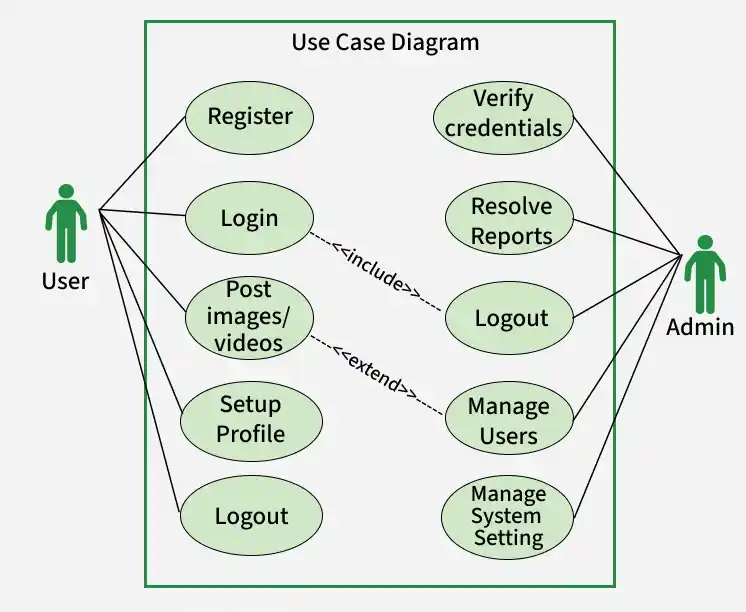
In the above Diagram we have discussed about the use case diagram of Instagram:
- If the user is new, they will register firstly it will be store in database, they will verifiy the profile.
- If user is already signup, they will provide the email-Id and Password.
- On the home page they will get the photos and videos, as well as the story page.
- The post which is posted now, it will come at the top. User can follow or unfollow the person. User can get live. It's all depend on them.
- There will be setting, in which user can see there past story or the post which has been archive. User can unblock the person they can get verified account, after paying.
5. Low-Level Design(LLD)
This section describes the detailed internal components, data models, APIs, and interactions between different services in the system.
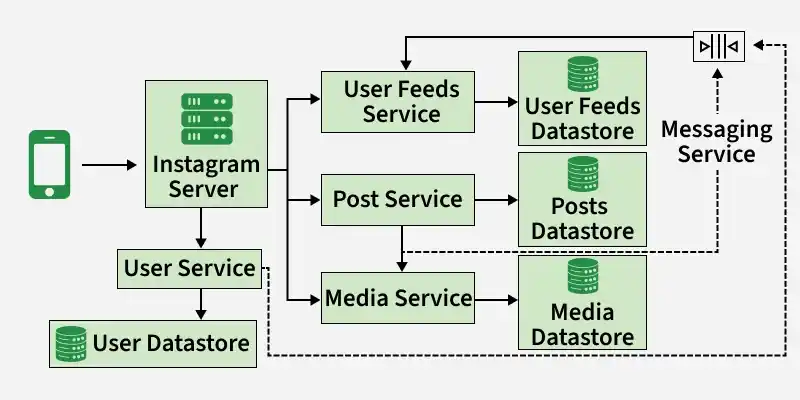
Here's a breakdown of the key components and interactions for Instagram's low-level design:
User Service
This service manages user-related operations such as authentication and profile handling.
- Handles user registration, login, authentication, and profile management.
- Stores user data like username, email, bio, profile picture, and integrates with social login providers.
Post Service
This service manages creation and processing of user posts.
- Handles photo/video uploads, editing, deletion, and stores metadata like caption, hashtags, and location.
- Processes media for resizing, filtering, thumbnail generation, and supports transcoding for different devices.
Feed Service
This service is responsible for generating and delivering user feeds.
- Generates personalized feeds based on follows, likes, and user activity.
- Uses systems like Kafka/RabbitMQ and Redis cache for real-time updates and fast retrieval.
Storage Service
This service ensures reliable storage of media content.
- Stores photos and videos using scalable object storage like S3 or similar solutions.
- Implements redundancy and disaster recovery for data safety.
Search Service
This service enables efficient searching across the platform.
- Supports searching users, hashtags, and locations.
- Uses indexing and optimized search algorithms for fast and accurate results.
Comment Service
This service manages user interactions through comments.
- Handles adding, editing, and deleting comments on posts.
- Maintains comment threads and notifies users about new interactions.
Notification Service
This service delivers real-time updates to users.
- Sends notifications for likes, comments, mentions, and follows.
- Uses push services and queues for asynchronous and reliable delivery.
Analytics Service
This service tracks and analyzes platform usage and engagement.
- Collects data on views, likes, comments, shares, and clicks.
- Provides insights for improving user experience and content recommendations.
Need of caching for storing the data
- Cache the data to handle millions of reads. It improves the user experience by making the fetching process fast. We’ll also opt for lazy loading, which minimizes the client’s waiting time.
- It allows us to load the content when the user scrolls and therefore save the bandwidth and focus on loading the content the user is currently viewing. It improves the latency to view or search a particular photo or video on Instagram.
6. High-Level Design(HLD)
Our system should allow us to upload, view, and search images and videos at a high level. To upload images and videos, we need to store them, and upon fetching, we need to retrieve the data from the storage. Moreover, the users should also be allowed to follow each other.
At a high level, Instagram can be viewed as a system with the following key components and interactions:
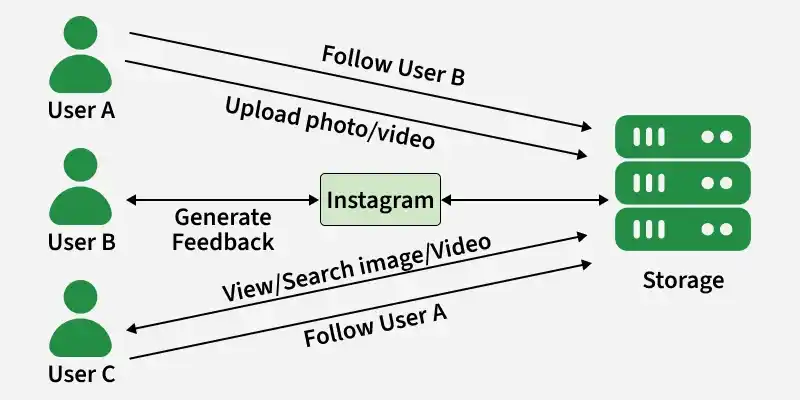
Components
This section describes the major building blocks of the system.
- Client: Mobile apps, web app, and APIs that provide an interface for users to interact with the system.
- Authentication & Authorization: Handles user login, registration, and access control.
- Content Management: Manages user-generated content like photos, videos, live streams, stories, and messages.
- Feed Generation: Personalizes news feeds based on user activity, follows, and engagement.
- Social Graph: Tracks relationships between users such as follows, followers, and connections.
- Discovery & Search: Enables searching for users, hashtags, locations, and content.
- Notifications: Informs users about events like likes, comments, mentions, and follows.
- Analytics & Reporting: Tracks engagement, content performance, and overall platform usage.
Interactions
This section describes how different components interact during user activities.
User Creates Content
This flow explains how new content is created and distributed.
- Client uploads photo/video and Content Management stores media and metadata.
- Feed Generation updates feeds and Notifications inform relevant users.
User Interacts with Content
This flow shows how user actions like likes and comments are processed.
- Client sends like/comment/share actions and Content Management with Social Graph updates data.
- Feed Generation updates feeds and Notifications inform interested users.
User Discovers New Content
This flow explains how users search and explore content.
- Client sends search request and Discovery & Search finds relevant content.
- Client displays the search results to the user.
User Manages Connections
This flow describes how user relationships are handled.
- Client sends follow/unfollow requests and Social Graph updates connections.
- Feed Generation adjusts feeds based on updated relationships.
User Monitors Activity
This flow shows how users stay updated with platform events.
- Client checks notifications feed.
- Notifications service provides updates on relevant events.
Design Considerations:
- Scalability: System should handle millions of users and massive data volumes.
- Performance: Deliver fast response times for user interactions and content delivery.
- Reliability: Ensure high availability and prevent data loss.
- Security: Protect user data and privacy.
- Engagement: Design features that encourage user interaction and content creation.
7. API Design
1. Post photos and videos
Here's a potential API design for uploading photos and videos to Instagram:
Endpoints:
- POST /media: Submits a new photo or video.
- PUT /media/{media_id}: Updates existing metadata for a media item.
- DELETE /media/{media_id}: Deletes a media item.
import requests

url = 'https://www.instagram.com/accounts/login/?next=https%3A%2F%2Fwww.instagram.com%2Fmedia%2F&is_from_rle'  # Replace with the actual API endpoint URL
access_token = 'your_access_token'  # Replace with the user's valid access token

# Define file path, caption, hashtags, and location (adjust as needed)
file_path = 'path/to/your/photo_or_video.jpg'  # Or .mp4 for videos
caption = 'Your caption for the media'
hashtags = 'photography,nature,beautiful'
location = {"latitude": 37.421998, "longitude": -122.084269}

# Prepare headers and files for the request
headers = {
    'Authorization': f'Bearer {access_token}',
    'Content-Type': 'multipart/form-data'
}
files = {
    'file': open(file_path, 'rb'),
    'caption': caption,
    'hashtags': hashtags,
    'location': str(location)  # Location needs to be serialized as a string
}

# Send the POST request
response = requests.post(url, headers=headers, files=files)

# Handle the response
if response.status_code == 201:
    data = response.json()
    print('Media uploaded successfully!')
    print('Media ID:', data['media_id'])
    print('URL:', data['url'])
else:
    print('Upload failed:', response.text)
    print('Error details:', response.json())  # Display any error details
{
  "media_id": "1234567890abcdef",
  "url": "https://www.instagram.com/p/12345678/",
  "created_at": "2024-01-09T18:34:00Z",
  "updated_at": "2024-01-09T18:34:00Z"
}
2. Follow and unfollow users
Here's a potential API design for following and unfollowing users on Instagram:
Endpoints:
- POST /users/{user_id}/follow: Follows the specified user.
- DELETE /users/{user_id}/follow: Unfollows the specified user.
- GET /users/{user_id}/following: Retrieves a list of users followed by the specified user (paginated).
- GET /users/{user_id}/followers: Retrieves a list of users following the specified user (paginated).
{
   "message": "User followed successfully"
}
import requests

# Replace with actual values
access_token = 'your_access_token'  # Your valid Instagram access token
user_id_to_follow = 'target_user_id'  # User ID of the person you want to follow

# URL to follow a user (POST request to follow)
url = f'https://api.instagram.com/users/%7Buser_id_to_follow%7D/follow'

# Prepare headers with authorization token
headers = {
    'Authorization': f'Bearer {access_token}'
}

# Make the POST request to follow the user
response = requests.post(url, headers=headers)

# Check if the follow request was successful
if response.status_code == 200:
    print('User followed successfully!')
else:
    print('Follow failed:', response.text)
    print('Error details:', response.json())
3. Like or Dislike posts
Designing an API for liking and disliking posts involves multiple considerations. Here's a breakdown of key aspects to think about:
API Endpoints:
- GET /posts/{post_id}: Retrieves details of a post, including the number of likes/dislikes.
- POST /posts/{post_id}/like: Registers a like for the post by the authenticated user.
- POST /posts/{post_id}/dislike: Registers a dislike for the post by the authenticated user.
- DELETE /posts/{post_id}/like: Removes the like for the post by the authenticated user (if previously done).
- DELETE /posts/{post_id}/dislike: Removes the dislike for the post by the authenticated user (if previously done).
import requests

# Define the URL for liking a post
post_id = 123
url_like = f"https://api.example.com/posts/{post_id}/like"
access_token = 'your_access_token'  # Replace with your actual access token

# Prepare headers with Authorization
headers = {'Authorization': f'Bearer {access_token}', 'Content-Type': 'application/json'}

# Data to send in the request
data = {
    "user_id": 456  # The user ID of the person liking the post
}

# Send POST request to like the post
response_like = requests.post(url_like, json=data, headers=headers)

# Handle the response for liking a post
if response_like.status_code == 200:
    print("Post liked successfully!")
elif response_like.status_code == 400:
    error_data = response_like.json()
    print(f"Error: {error_data.get('error', 'Unknown error')}")
else:
    print(f"Request failed with status code {response_like.status_code}")
import requests

# Define the URL for unliking a post
post_id = 123
url_unlike = f"https://api.example.com/posts/{post_id}/like"
access_token = 'your_access_token'  # Replace with your actual access token

# Prepare headers with Authorization
headers = {'Authorization': f'Bearer {access_token}', 'Content-Type': 'application/json'}

# Data to send in the request
data = {
    "user_id": 456  # The user ID of the person unliking the post
}

# Send DELETE request to unlike the post
response_unlike = requests.delete(url_unlike, json=data, headers=headers)

# Handle the response for unliking a post
if response_unlike.status_code == 200:
    print("Post like removed successfully!")
elif response_unlike.status_code == 400:
    error_data = response_unlike.json()
    print(f"Error: {error_data.get('error', 'Unknown error')}")
else:
    print(f"Request failed with status code {response_unlike.status_code}")
4. Search photos and videos
Search Endpoint:
- Typically a POST request to a
/searchendpoint. - Query parameters include:
query: The search term(s), media_type: Filters results by photo, video, or both, Additional filters: date range, location, people, etc. (if supported)
import requests

# Define the search URL (example: Google Photos API URL)
url = "https://photoslibrary.googleapis.com/v1/mediaItems:search"
access_token = 'YOUR_ACCESS_TOKEN'  # Replace with your actual access token

# Define the headers with Authorization token
headers = {
    "Authorization": f"Bearer {access_token}"
}

# Prepare the data payload (filters: media types like photo/video, date range, etc.)
data = {
    "filters": {
        "mediaTypes": ["PHOTO", "VIDEO"],  # Search for both photos and videos
        # Optionally, you can include other filters here like:
        # "dateFilter": { "ranges": [{"startDate": {"year": 2024, "month": 1, "day": 1}, "endDate": {"year": 2024, "month": 1, "day": 31}}]}
    }
}

# Send the POST request to search for media
response = requests.post(url, headers=headers, json=data)

# Handle the response
if response.status_code == 200:
    results = response.json()
    # Process the search results (example: print each media URL and caption)
    for item in results.get('data', []):
        print(f"Media Type: {item['media_type']}")
        print(f"Media URL: {item['media_url']}")
        print(f"Thumbnail URL: {item['thumbnail_url']}")
        print(f"Caption: {item['caption']}")
        print(f"Timestamp: {item['timestamp']}")
else:
    print("Error:", response.status_code, response.text)
{
  "data": [
    {
      "media_type": "IMAGE",
      "media_url": "https://www.instagram.com/p/abc123/",
      "thumbnail_url": "https://scontent-amt2-1.cdninstagram.com/v/t51.2885-15/e35/s1080x1080/275469546_546545454546_54554655465654654.jpg?_nc_ht=scontent-amt2-1.cdninstagram.com&_nc_cat=100&_nc_ohc=xyz123&edm=ABfd0MgBAAAA&ccb=7-4&oh=00_AT854x5465465465454654465546554656546545&oe=62BD5465&_nc_sid=7bff83",
      "caption": "My adorable cat!",
      "timestamp": "2024-01-10T13:40:00+0000"
    },
    {
      "media_type": "VIDEO",
      "media_url": "https://www.instagram.com/tv/xyz987/",
      "thumbnail_url": "https://scontent-amt2-1.cdninstagram.com/v/t51.2885-15/e35/s1080x1080/246545465546544546454654465454655465.jpg?_nc_ht=scontent-amt2-1.cdninstagram.com&_nc_cat=101&_nc_ohc=abc123&edm=ABfd0MgBAAAA&ccb=7-4&oh=00_AT854x546546546544654465546554656546554&oe=62BD5465&_nc_sid=7bff83",
      "caption": "Amazing sunset timelapse!",
      "timestamp": "2024-01-09T20:30:00+0000"
    }
  ]
}
8. Database Design
We need the following tables to store our data:
1. User:
Table to store user data - Users
{
userId: string[HashKey]
name: string
emailId: string
creationDateInUtc: long
}
2. User_Follows:
Table to store follower data - User_follows
{
followingUserId_followerUserId: string [HashKey]
followingUserId: string [RangeKey]
followerUserId: string
creationDateInUtc: long
}
3. User Uploads
Table to store user uploads - User_uploads
{
uploadId: string[Hashkey]
userId: string[RangeKey]
imageLocation: string
uploadDateInUtc: long
caption: string
}
4. User Feed
Table to store the user feed data - User_feed
{
userId: string[Hashkey]
uploadId: string
creationDateInUtc: long[RangeKey]
}
5. Which Database we should select for Data storing?
It is essential to choose the right kind of database for our Instagram system, but which is the right choice — SQL or NoSQL? Our data is inherently relational, and we need an order for the data (posts should appear in chronological order) and no data loss even in case of failures (data durability). Moreover, in our case, we would benefit from relational queries like fetching the followers or images based on a user ID. Hence, SQL-based databases fulfill these requirements.
Image and Feed generation service used as microservice architecture.
9. Microservices
Image and Feed generation service used as microservice architecture.
Microservices - also known as the microservice architecture - is an architectural style that structures an application as a collection of services that are:
- Independently deployable
- Loosely coupled
- Organized around business capabilities
- Owned by a small team
The microservice architecture enables an organization to deliver large, complex applications rapidly, frequently, reliably and sustainably - a necessity for competing and winning in today’s world.
10. Scalability
Scalability refers to the ability of an organization (or a system, such as a computer network) to perform well under an increased or expanding workload. A system that scales well will be able to maintain or increase its level of performance even as it is tested by larger and larger operational demands.
We can add more servers to application service layers to make the scalability better and handle numerous requests from the clients. We can also increase the number of databases to store the growing users’ data.
These requirements has been covered:
- Scalability: We can add more servers to application service layers to make the scalability better and handle numerous requests from the clients. We can also increase the number of databases to store the growing users’ data.
- Latency: The use of cache and CDNs have reduced the content fetching time.
- Availability: We have made the system available to the users by using the storage and databases that are replicated across the globe.
- Durability: We have persistent storage that maintains the backup of the data so any uploaded content (photos and videos) never gets lost.
- Consistency: We have used storage like blob stores and databases to keep our data consistent globally.
- Reliability: Our databases handle replication and redundancy, so our system stays reliable and data is not lost. The load balancing layer routes requests around failed servers.
