Methodox Lightning Download

A clean, modern browser without all the usual hassles.

Back to the origin of web browsing concepts: clean tabs, comprehensive navigation history, master-key protected passwords, functional PDF annotation with a built-in epub reader. Local, no cloud, no AI, no ads, no extensions, small install. Lightning is at your command!

Methodox Lightning showing a Wikipedia article, with its tabs in a tree down the left side.
History

Travel back and find your way.

In most browsers, going back or clicking somewhere new quietly erases the history on the page. Lightning keeps full navigation history on a tab. Each tab's history is a trail you can follow, and tabs you opened from a page branch off from it, so you can always see how you got where you are.

  • Every child page from a tab, shown in order
  • Navigating back and forward never throws anything away
  • Browsing session is restored when reopening browser
The history page, with each tab's trail drawn as a coloured line and the tabs opened from a page branching off from it.
Passwords

Locally controlled password manager.

Lightning remembers sign-ins, addresses and cards, and fills them in when you need them. Everything is kept in a single encrypted file, locked with a password only you know. It's a standard KeePass file, so you can open it with other password managers and back it up however you like.

  • Fills sign-in, address and card forms
  • Locks itself when you step away
  • Brings in passwords exported from other browsers
The passwords page listing five saved sign-ins with their passwords hidden.
New tab

Clean non-distracting browsing

A blank page is truly blank: a search box, the sites you visit most, and the tabs you closed moments ago. No news feed, no sponsored tiles, nothing competing for your attention.

A new tab with a search box, seven favourite sites and a recently closed tab.
Private windows

Private when you feel like it

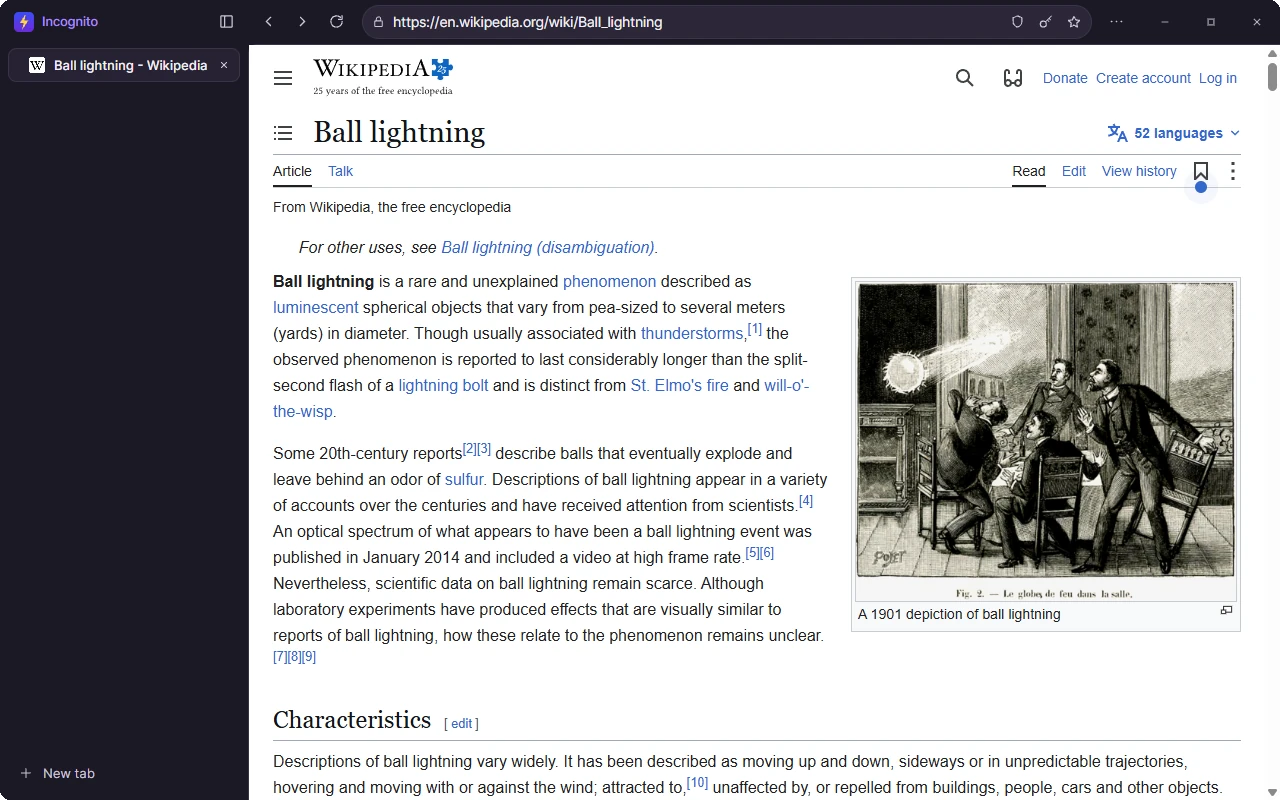
An incognito window works in its own session, with a unique accent color, so you know which window you're in. It records no history, and all the usual shortcuts still work (e.g. bring back a closed tab). Cookies are deleted when the private session is closed.

An incognito window in its own violet colours, showing a Wikipedia article.
Languages

Lightning speaks your language.

The Lightning browser follows your system's language or the one you pick in Settings.

English简体中文繁體中文日本語한국어
Methodox Lightning in Japanese: its tabs, address bar and history page.
The Concept

Back to a pure essential browsing experience.

Lightning does its job and stays out of your way. What it knows about you stays on your computer. Enjoy browsing without hassles.

No account needed

Nothing to sign up for and nothing to sign in to. It works the moment it opens.

No assistant in your way

No chatbot in the sidebar and no pop-ups offering help you didn't ask for.

Ads and trackers blocked

Built in and on from the start. A shield in the address bar shows what was stopped and turns it off for a site in one click.

No sponsored anything

No promoted sites, no shopping suggestions, no news you didn't go looking for.

Nothing phoning home

No usage reports and no background chatter. It talks to the sites you visit, and that's all.

Tabs that rest

Tabs you haven't looked at for a while go to sleep and hand back their memory, then pick up where they left off.

Chromium insideThe engine behind Chrome and Edge, sandboxed the same way.
Bookmarks that keep upFolders, tags and notes, full-text search, and import from other browsers.
Made for developers tooDevTools docked under the page, and view source in a tab.
Light and darkFollows your system, with a private-window look of its own.

Get Lightning.

Try Methodox Lightning from itch.io. Read the documentation for everything it can do, or check out what's new from the release notes.