Methodox™ Lightning (Browser)
A downloadable web browser for Windows
Overview
Experimental custom lightweight web browser.
Methodox Lightning is a web browser built on Chromium, the engine behind Chrome and Edge. It keeps your tabs tidy, never loses a page from your history, and keeps your passwords in a file you own. There is no account to make, no assistant to dismiss and no ads following you around.
The focus of Lightning is to provide a modern, clean, custom browser that provides a unique navigation experience - albeit currently comes with its own serious drawback when it comes to video playback (mp4 and some online streaming services are not supported, but YouTube works).
Main Features:
- Chromium based
- Clean GUI
- Tree browsing tabs (drag to re-order between siblings)
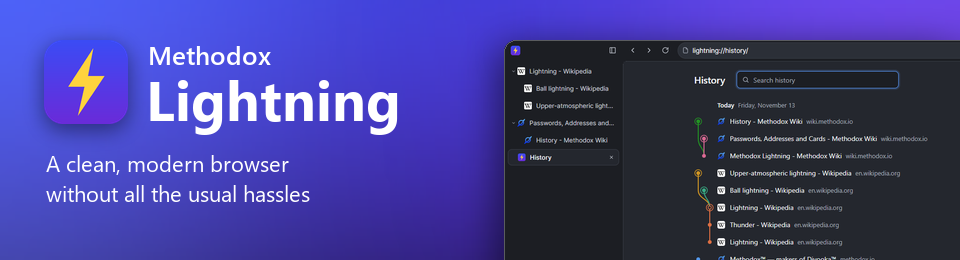
- Tree browsing history, fully retained navigation history for easy search
- Offline password manager with notes (using a master password)
- Open many document types: PDF, etc.
- PDF annotation
- (Since v0.6.2) All supported media types open in preview tab by default irrelevant of server side request
Other goodies:
- No annoying url auto-complete
- Does NOT support Chrome extensions
Limitations:
- No Mp4 playback support (H.264/AAC video)
- No DRM contents (Netflix, Disney+, Spotify web)
- Mouse capture is not supported at this moment (so games like this online FPSwon't work)
Features
- History kept as a graph. Going back and then clicking somewhere new doesn't erase the page you were on. Each tab's history is a trail you can follow, and tabs you opened from a page branch off from it, so you can always see how you got where you are.
- Tabs in a tree. Tabs run down the side, each under the page that opened it. Branches fold away, and a tab can be dragged up or down with the tabs opened from it.
- Ads and trackers blocked. Built in and on from the start. A shield in the address bar shows what was stopped and turns blocking off for a site in one click.
- PDF markup in the browser. A PDF opens right in its tab, ready to highlight, annotate, draw on, type into and fill in, then save wherever you like. EPUB books, Word documents and PowerPoint decks from your computer open there too.
- Passwords in a file you own. Sign-ins, addresses and cards are kept in one encrypted KeePass file, locked with a password only you know. Other password managers such as KeePassXC open it too, so you can back it up however you like.
- Tabs that rest. Tabs you haven't looked at for a while go to sleep and hand back their memory, then pick up where they left off.
- Sandboxed like Chrome. Web pages run with almost no access to the rest of your computer.
- Private windows. An incognito window has a look of its own, so you always know which kind you're in, and it forgets everything when you close it.
- Five languages. English, 简体中文, 繁體中文, 日本語 and 한국어, following your system or your choice in Settings.
- Light and dark. Follows your system.
Changelog
v0.6.6
- Fix opening programs from links, e.g. Open with GitHub Desktop.
- Bookmarks no longer have no keyboard shortcuts - it was annoying and useless for the most part and occupies a shortcut slot unnecessarily.
v0.6.5
- Video playback improvements (e.g. YouTube, Bilibili).
- Fix issue with mouse capture (e.g. for fullscreen games).
v0.6.4
- Fix F11 for full screen mode.
- Fix issue with bringing browser window to front when opening urls.
v0.6.3
- Fix issue with "Save password" popup
- UI updates
v0.6.2
- Preview all open media in tab by default.
- Save media files from tabs.
- Fix issue with Ctrl+F focus.
- Fix issue with Save link as... and Save image as..
v0.6.1
- Play videos and music using the same audio engine as Methodox Foundation.
v0.6.0
- Play videos, music and more directly in the tab.
- Open TIFF and QOI pictures in the tab.
- Update Settings's GUI to give site permissions dedicated page.
- Allow managed passwords import and export. (Notice Chrome and other browser passwords can already be imported as CSV)
- Fix issue with lost changes on PDF tabs when going to sleep. Tabs showing a document or a video no longer sleep.
v0.5.3
- Fix issue with "Unlock Passwords" under a sign-in field.
- Fix issue with Chromium's builtin "Use passkey from another device".
v0.5.2
- Fix issue with username/password form entry when password manager is locked.
v0.5.1
- Show download progress.
- Fix display issue with DevTools.
- Fix issue with navigation through url.
- Fix issue with Alt+D focusing on address bar.
v0.5.0
- Improved PDF reading with annotations.
- Open many different documents (same capacity as Methodox Tiffin!)
v0.4.1
- Fix issue with confirmation dialogue when closing a tab with unsaved work.
- Clearer tab name for untrusted sites: A tab stopped by a certificate warning is named after the site, instead of "Privacy error".
v0.4.0
- Show better details on crashes pages.
- Show clear certificate warnings when a site's certificate can't be trusted.
- Provide site permission controls: A site may ask for your camera, microphone, location or send notifications and is asked once then answer is saved. Settings lists every site with what it's allowed, and you can change or forget.
- Click the icon at the start of the address bar to see whether the connection is secure, who issued the site's certificate, and what the site may do.
- Save any page as a PDF from the menu.
- PDFs open right in the browser, and printing uses system's print dialog.
v0.3.4
- Fix issues with opening links from other programs.
v0.3.3
- Selections are easy to see in the dark theme.
v0.3.2
- Notes on saved sign-ins.
- Move the window from the tab panel: Drag the window by any empty part of the tab panel (not only by the top bar).
v0.3.1
- Five languages: English, 简体中文, 繁體中文, 日本語 and 한국어. The browser follows your system's language by default.
- Selections are easier to see in the light theme.
- Clearer installer options for file association.
v0.3.0
A safer, lighter browser.
- Block ads and trackers.
- Sandboxed like Chrome.
- Unused tabs go to sleep.
- Quick launch.
- A speaker icon in the tab list shows which tab is playing sound.
v0.2.1
- Save passwords and addresses.
- Fix url typing issue when opening new tab (auto focus)
- Form filling
- Rearrange tabs
v0.2
Better integration.
- Ctrl+LMB click
- Default browser association
- Fix issue with the first new tab when starting sometimes showed "New tab failed".
v0.1
Initial release.
- History as a graph.
- Tabs as a tree.
- Pick up where you left.
- Internal pages at lightning://
- Incognito (Private windows)
- DevTools
- No account, no sync, no AI
- lightning://pages and a default new tab with most visited sites
- History, bookmarks with folders, tags and notes (and import from Chrome, Edge and Brave), downloads and settings.
Resources
Download
Click download now to get access to the following files:
Development log
- Methodox Lightning (Browser): v0.6.6 Patch Update4 days ago
- Methodox Lightning (Browser): v0.6.5 Patch Update4 days ago
- Methodox Lightning (Browser): v0.6.4 Patch Update11 days ago
- Methodox Lightning (Browser): v0.6.3 Patch Update11 days ago
- Methodox Lightning (Browser): v0.6.2 Patch Update12 days ago
- Methodox Lightning (Browser): v0.5.3-v0.6.1 Updates12 days ago
- Methodox Lightning (Browser): v0.5.2 Patch Update13 days ago
- Methodox Lightning (Browser): v0.5.1 Patch Update14 days ago


Leave a comment
Log in with itch.io to leave a comment.