Last Updated on: 7th August 2026, 05:47 pm
Web site: github.com/burhanr13/Tanuki3DS
Category: Emulators
Platform: Linux, OS X, Windows
License: GNU GPL
Interface: GUI
Wikipedia:
First release: 2024
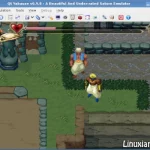
Tanuki3DS – a 3DS emulator for MacOS, Linux, and Windows written in C which aims to be simple, fast, and compatible.
Currently it can play a decent number of games with reasonable graphics and audio at full speed. It also supports some nice features like controller input, fast-forward, video upscaling, and free camera.
On launching the app you can use the UI to open a game or drop its file onto the window.
All games must be decrypted.
You can modify emulator settings by opening the settings menu or by manually editing the generated ctremu.ini file. The settings and save data are stored by default in the application data path of your OS, but you can optionally create a file called portable.txt in the same directory as the executable to have them be created there. You can open the directory containing the settings and savedata using the UI.
Many games work, but many will suffer from a range of bugs from graphical glitches to crashes. We are always looking to improve the emulator and would appreciate any bugs to reported as a github issue so they can be fixed. When reporting an issue, please always include the generated ctremu.log file which is located in the application data folder of your system.