For years the Raspberry Pi 5 won the home server argument on price. The board cost about half as much as an Intel mini PC, idled at a third of the power, and ran Pi-hole, Home Assistant and a few containers without complaint. That assumption no longer holds, because Raspberry Pi has raised board prices five times since December 2025 and every notice blames memory costs.
The latest round, on November 2, took the 16GB Pi 5 from $305 to $385, a month after the 2GB board went up. The N150 boxes we priced in October still sell for the same money or less. So the Raspberry Pi 5 vs N150 question now turns on power, software support and the jobs you want the box to do.
We re-checked every price below against the official notices, the PiShop.us reseller and live Amazon listings on November 20, 2026. Benchmarks and wattage figures belong to the reviewers who measured them, mostly Jeff Geerling, CNX Software and ServeTheHome, and each one is credited where it appears.
The short answer
For a general home server, buy the N150 box. The Beelink Mini S13 with 12GB, a 512GB SSD and 2.5GbE sells for about $329 complete, while a Pi 5 8GB costs about $344 on Amazon once you add a power supply, an NVMe case and a 512GB SSD. For that money the N150 is about 43% faster per core, has Quick Sync for Plex and Jellyfin, and runs Proxmox, TrueNAS and Unraid, none of which officially support the Pi.
Buy the Pi 5 when idle power or GPIO matters more than speed. It idles at about 3 W against 7 to 11 W for the N150 boxes reviewers have measured, and its 40-pin header takes sensors and HATs that no mini PC can. If you already own an SSD, or you’re fine starting from a microSD card, the CanaKit Pi 5 8GB Basic Kit at about $210 is still the cheapest way in.
How the options compare side by side
The table puts the four picks and the 16GB Pi next to each other on the things that decide a home server purchase. Prices are the Amazon listings on November 20 (the 16GB Pi row is the official board price), and the home-server jobs column says what each machine handles well rather than everything it can technically boot.
| Machine | Price | Idle at the wall | RAM | Storage | Home-server jobs it handles | Buy |
|---|---|---|---|---|---|---|
| Beelink Mini S13 (N150) | about $329 | 7 to 11 W (N150 class) | 12GB LPDDR5, soldered | 512GB M.2 SATA, spare M.2 slot | Docker stack, Plex or Jellyfin with Quick Sync, Home Assistant, light Proxmox | Mini S13 12GB, about $329 |
| Beelink Mini S13 16GB (N150) | about $349 | 7 to 11 W (N150 class) | 16GB DDR4 | 500GB SSD | Proxmox host with a few VMs, OPNsense or pfSense router, NAS duty | Mini S13 16GB, about $349 |
| MeLE Quieter DL (N150, fanless) | about $304 | 7 to 11 W (N150 class) | 8GB | 128GB eMMC | Silent firewall, DNS, Home Assistant, a few containers | Quieter DL, about $304 |
| Raspberry Pi 5 8GB build | about $344 built (kit about $210) | about 3 W | 8GB LPDDR4X | 512GB NVMe over PCIe 2.0 x1 | Pi-hole, Home Assistant OS, arm64 containers, GPIO and sensor gateway | CanaKit 8GB kit, about $210 |
| Raspberry Pi 5 16GB | $385 board only | about 3 W | 16GB LPDDR4X | none included | Same as the 8GB, with room for more containers | official resellers |
Two cells in that table need context. The N150 idle figure is a range from reviewers who measured other N150 boxes (a GMKtec G3 Plus, a ZimaBoard 2 and a CWWK NAS board), because nobody has published wall readings for these exact Beelink and MeLE units. The Pi 8GB row, on the other hand, already prices in what a home server needs, since a bare board ships without storage, a case or a power supply, while the 16GB row is the board alone.
What a working Pi 5 server costs after five price rises
Raspberry Pi has raised board prices five times in eleven months, and the bigger memory sizes took the largest hits, which are exactly the ones a home server wants. The April notice said LPDDR4 prices had gone up seven-fold in a year, and the November notice says there is no alternative supply of 16GB parts. Here are the official US prices through December, February, April, October and November. The PiShop.us reseller listings match the current column.
| RAM | Launch | Dec 2025 | Feb 2026 | Apr 2026 | Oct 2026 | Nov 2026 (now) |
|---|---|---|---|---|---|---|
| 2GB | $50 | $55 | $65 | $65 | $77.50 | $77.50 |
| 4GB | $60 | $70 | $85 | $110 | $110 | $110 |
| 8GB | $80 | $95 | $125 | $175 | $175 | $175 |
| 16GB | $120 | $145 | $205 | $305 | $305 | $385 |
The 16GB board now costs 3.2 times its launch price, and the 8GB more than doubled. Board price is still only part of the bill, and this is where most comparisons go wrong: a bare Pi 5 has no case, no power supply and no storage, while an N150 mini PC ships with all three. A home server also wants an NVMe drive rather than a microSD card, because cards wear out under database and log writes.
Price both machines with 512GB of storage and the Pi ends up the dearer of the two. The official-parts column got worse since October too, because the Raspberry Pi 512GB SSD at PiShop.us went from $120 to $165 and the Active Cooler from $10.95 to $12.95. The Beelink ships a slower M.2 SATA drive, which is the one real concession on its side:
| Item | Pi 5 8GB build (Amazon) | Pi 5 8GB build (official resellers) | Beelink Mini S13 |
|---|---|---|---|
| Board or PC | CanaKit Basic Kit with 45W PSU, $209.99 | Pi 5 8GB, $175 | Mini S13 12GB / 512GB, $329.00 |
| Power supply | in kit | 27W official PSU, $12.95 | included |
| Cooling and case | Argon ONE V5 M.2 case with fan, $49.99 | Active Cooler $12.95 + M.2 HAT+ $12 | included |
| 512GB SSD | Patriot P320 NVMe, $83.99 | Raspberry Pi SSD 512GB (NVMe), $165 | included (M.2 SATA, spare M.2 slot) |
| Total | $343.97 | $377.90 (no case) | $329.00 |
| Memory | 8GB | 8GB | 12GB |
| Ethernet | 1GbE | 1GbE | 2.5GbE |
So the Pi only stays cheaper if you skip the SSD. The 16GB board makes it much worse: $385 before anything is attached and roughly $588 with the official parts above, against about $349 for the Mini S13 with 16GB and dual 2.5GbE. On Amazon, 16GB Pi 5 kits from CanaKit, iRasptek and others ran from about $380 to $455 on the day we checked, and none of them include an SSD.
The N150 side has barely moved. Both Beelink listings sold for the same $329 and $349 they did in October, and the fanless MeLE is cheaper on its current listing. Amazon prices move daily, so treat every figure here as a snapshot and check the live price before you buy. Our mini PC price tracker follows the wider N150 market week by week.
How much faster the N150 actually is
Both chips have four cores and no hyper-threading, so the difference comes down to core design and clock speed. The BCM2712 inside the Pi 5 runs Arm Cortex-A76 cores at 2.4 GHz, a 2018 design. The Intel N150 uses Gracemont efficiency cores that turbo to 3.6 GHz on a 6 W base power budget, which mini PC makers are free to run past. That headroom shows up in every published benchmark we found for the pair:
| Benchmark | Raspberry Pi 5 | Intel N150 | Source |
|---|---|---|---|
| Geekbench 6 single-core | 904 | 1,294 | Geerling Pi 5, Geerling G3 Plus |
| Geekbench 6 multi-core | 2,164 | 3,169 | Same runs |
| Geekbench 6 single / multi | 789 / 1,523 | 1,201 / 2,364 | Geekbench browser result cited by CNX, CNX ZimaBoard 2 (fanless, throttled) |
| HPL (Linpack) | 37.9 Gflops | 62.1 Gflops (54.6 after cooling fixes) | Geerling |
| PassMark CPU Mark | 3,284 (only 6 samples) | 5,319 (2,314 samples) | PassMark |
Geerling took his Pi 5 numbers after the December 2024 Raspberry Pi OS updates, which lifted its Geekbench multi-core score from 1,805 to 2,164. Even with that boost, the N150 is about 43% ahead single-threaded and 46% ahead multi-threaded. The ZimaBoard 2 row trails the G3 Plus because it’s fanless and throttled during the multi-core run, and CNX Software’s Pi 5 vs N100 runs show the same pattern on the older chip, so this isn’t one outlier from one reviewer.
For a home server, the single-thread lead matters more than the multi-core one. Web dashboards, Home Assistant automations, package installs and most database queries in a small stack run on one core, so a 43% faster core is something you feel every time a page loads, while the multi-core gap only shows during backups or compiles.
Why idle power is the Pi’s real advantage
A home server spends most of its life waiting for requests, so idle draw matters more than the stress-test peak. Here the Pi 5 wins clearly, and three independent testers agree on it within half a watt:
| Machine | Idle at the wall | Full CPU load | Source |
|---|---|---|---|
| Raspberry Pi 5 8GB | 2.8 W | 9.7 W (stress-ng) | Geerling |
| Raspberry Pi 5, Active Cooler | 2.6 W | 6.8 W | Tom’s Hardware |
| Raspberry Pi 5, headless | 3.0 W | 8.8 W | CNX Software |
| GMKtec G3 Plus (N150) | 9.3 W | 25 W | Geerling |
| ZimaBoard 2 (N150) | 6.8 to 9 W (by mode) | 20 to 21 W | CNX Software |
| CWWK 4x SSD NAS (N150) | 10 to 11 W | 17 to 18 W | ServeTheHome |
In money, the gap is smaller than it looks. An N150 box that idles 6 W above a Pi burns about 53 kWh more a year, which comes to roughly $9.50 at 18 cents per kWh (a rate we picked for the arithmetic, so swap in your own). The Amazon Pi build costs about $15 more than the Mini S13 up front, so the Pi’s lower power bill pays that back after roughly a year and a half, and from then on the Pi is the cheaper machine to own.
None of the Pi figures include an NVMe drive, and no reviewer has isolated what one adds. Expect a Pi build with an SSD to idle a little above 3 W in practice, which narrows the yearly saving slightly without changing who wins.
Why transcoding decides it for Plex and Jellyfin
Transcoding is the biggest technical gap between these two machines, and it isn’t close. The only video hardware on the Pi 5 is a 4Kp60 HEVC decoder, and Raspberry Pi documents that every other codec runs in software, with H.264 1080p60 decode alone taking 50 to 60% of the CPU. There’s no hardware encoder at all, and the Jellyfin docs say the project has deprecated its Raspberry Pi V4L2 support for exactly that reason.
Intel Quick Sync on the N150 handles H.264 and HEVC encode, plus HEVC, VP9 and AV1 decode, according to the Intel media-driver feature tables for the Alder Lake-N family it belongs to. AV1 encode is missing. Community runs on the QuickSync benchmark tracker show a median 3.3x realtime for H.264 1080p and 1.2x for H.264 4K, with 4K HEVC 10-bit the weakest at 0.45x, and a separate concurrency test on the same tracker managed two to five 1080p streams at once.
Those tests re-encode at full resolution, and the H.264 runs decode in software. A Plex or Jellyfin downscale to 1080p with hardware decode should do better, so read them as a conservative floor rather than a stream count. If transcoding is the main job, the Core 3 304 vs N150 vs N355 comparison covers the faster Intel chips, and our Jellyfin and Plex transcoding hardware guide covers adding an Arc card to a bigger box.
What storage and networking each one gives you
The two platforms differ most in how many fast devices they can feed at once, and that decides whether a box can grow into a NAS or a router later:
- Raspberry Pi 5: one PCIe 2.0 lane through the FFC connector. Geerling measured 454 MB/s sequential NVMe reads at Gen 2 and 894 MB/s with Gen 3 forced on, which Raspberry Pi warns is not certified and might be unstable. Onboard Ethernet is Gigabit and reaches about 940 Mbps in iperf3.
- N150 mini PC: PCIe 3.0 to an M.2 slot, often a second M.2 slot, and Intel or Realtek 2.5GbE as standard. The GMKtec G3 Plus that Geerling tested read 1,572 MB/s from NVMe and pushed 2.35 Gbps through its Intel i226-V port.
On the Pi, everything shares that single lane. A 2.5GbE HAT uses the same connector as the NVMe adapter, so you choose between faster networking and fast storage unless you add a PCIe switch board. Intel ARK lists nine PCIe 3.0 lanes for the N150, which is why makers can wire two drives and two NICs without forcing that either-or choice.
Memory is the one hard limit on the Intel side. Intel caps the N150 at 16GB on a single channel, and several boxes solder their memory, so buy the size you’ll need in three years rather than the size you need today.
Which home server software runs where
Software support is where an x86 box quietly saves the most time, because the big home server platforms either target x86-64 only or treat Arm boards as unsupported. Here’s how they split:
| Software | Raspberry Pi 5 | N150 mini PC |
|---|---|---|
| Proxmox VE | Arm64 build is official since August 2026, but single-board computers like the Pi are explicitly not supported | Fully supported |
| TrueNAS | Not supported; needs x86-64 | Supported |
| Unraid | Not supported; x86_64 only | Supported |
| Home Assistant OS | Officially supported | Officially supported (generic x86-64) |
| Docker | arm64 images only, amd64 needs emulation | Every amd64 image |
Proxmox on arm64 is the row that catches people out. Geerling reports a user running it on a Pi 5 after a manual install, but Proxmox itself says device-tree boards like the Pi are not supported, so you’re on your own the day an update breaks it. If Proxmox is the plan, our Proxmox mini PC guide goes further up the range.
The Docker gap matters less than it used to. Most popular homelab images now publish arm64 builds, so a Pi runs Pi-hole, Vaultwarden, Uptime Kuma and the Home Assistant add-ons without trouble, but the odd amd64-only image still turns up, and on the Pi that means emulation or going without.
Which boxes we’d buy
Each pick below was checked against its live Amazon listing on November 20 for price and stock, and against the maker’s spec page where the maker still lists it. The MeLE pick replaces the listing we linked in October, which Amazon now shows as unavailable.
Best overall: Beelink Mini S13, 12GB and 2.5GbE
This is the box that settles the comparison for most readers, because it costs less than the Amazon Pi build and arrives ready to install an OS.

For about $329, the Mini S13 12GB ships with 12GB of LPDDR5, a 512GB SSD, a spare M.2 slot and 2.5GbE, which covers a Docker stack, Home Assistant, Plex or Jellyfin with Quick Sync, and a couple of light VMs. Beelink has dropped the S13 from its own web store, so these specs come from the Beelink-shop listing on Amazon, which was in stock when we checked.
Skip it if you want more than 12GB later. The memory is soldered, so 12GB is what you live with, and the included drive is M.2 SATA rather than NVMe, which caps it around SATA speeds until you add a drive of your own.
For Proxmox or a router: Mini S13 with 16GB and dual 2.5GbE
The 16GB Mini S13 from Beelink Direct trades LPDDR5 for 16GB of DDR4 and adds a second 2.5GbE port for about $349, according to its Amazon listing. Sixteen gigabytes is the ceiling for the N150, and the second port lets one box act as a firewall, or as a VM host with a separate management network. We moved this pick to the Beelink Direct listing because it carries the dual-port spec in its title and has far more reviews than the one we linked in October.
Skip it if you need it next week. The Beelink Direct listing showed only 16 left on November 20, and the other 16GB listing was down to two, so if it shows a delivery date weeks out, the 12GB model above is the safer order for anything that isn’t a router.
Silent and fanless: MeLE Quieter DL
For a box that lives in a bedroom or a media cabinet, no fan beats a quiet fan, and this is the closest x86 match to a silent Pi.

The MeLE Quieter DL has no fan at all, and the MeLE spec page confirms two Intel I226-V 2.5GbE ports and lists LPDDR4X memory, though the Amazon listing title says DDR4. The MeLE Direct listing pairs the N150 with 8GB and 128GB of eMMC for about $304, roughly $50 less than the listing we recommended in October, which suits a firewall, DNS or Home Assistant far better than a container host.
Skip it if you plan to run more than a few services. Eight gigabytes and 128GB of eMMC fill up fast once media or databases arrive, and a fanless chassis holds the N150 to lower sustained clocks than the fan-cooled Beelinks.
The Pi 5 build, if the Pi is the right fit
If the Pi’s low idle draw or its GPIO header is the reason you’re here, build it with an SSD from day one rather than trusting a microSD card with a database.
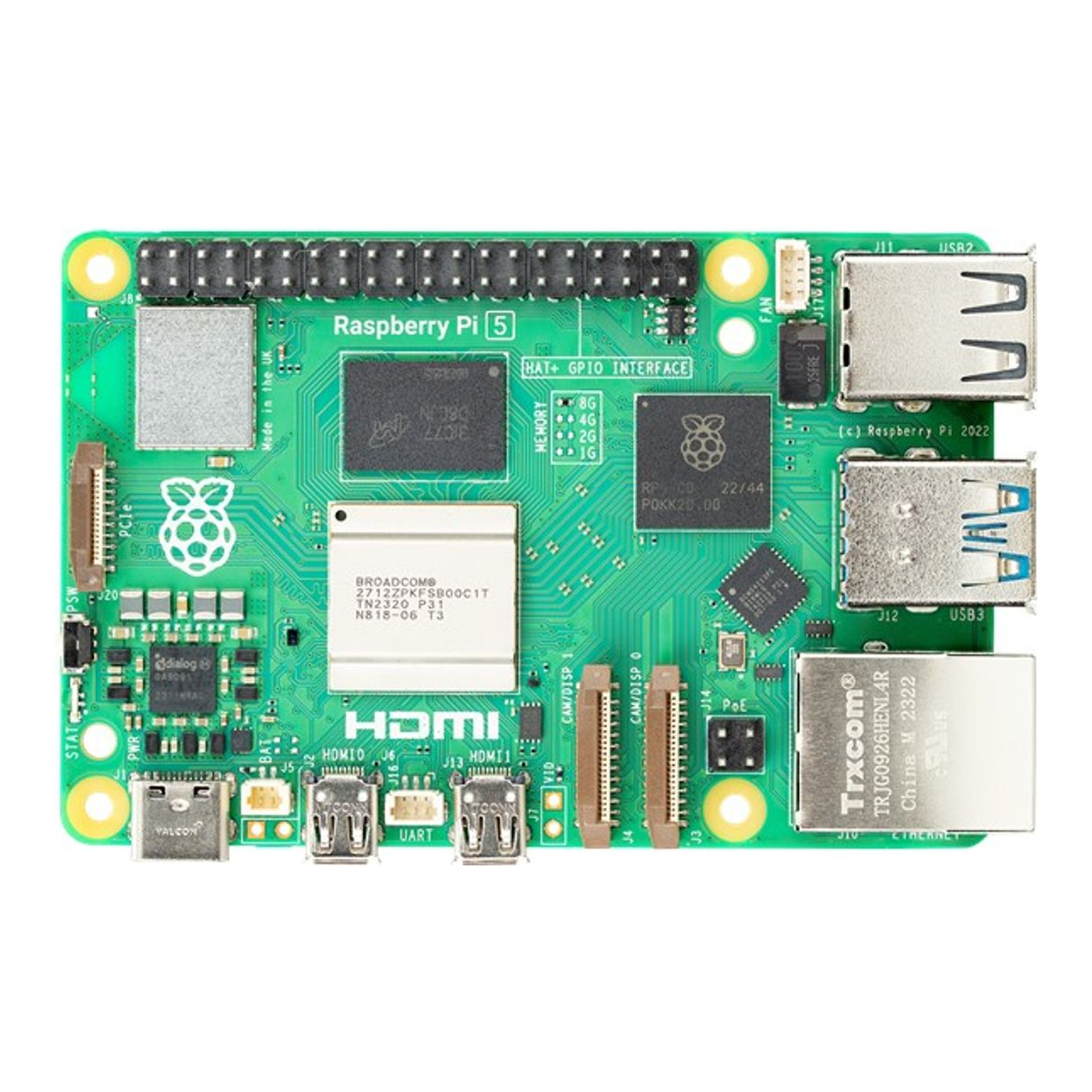
Start with the CanaKit Basic Kit at about $210, which bundles the 8GB board with a 45W power supply and heatsinks. Add the Argon ONE V5 M.2 case at about $50, an aluminium case with a 30mm fan and a built-in NVMe slot, then fit a 2280 drive such as the Patriot P320 512GB at about $84. Our Raspberry Pi 5 kits guide covers the other kits and the Arm alternatives.
Skip it if Plex or Jellyfin transcoding is on the list, or if you want Proxmox or TrueNAS. The Pi can’t do the first in hardware and isn’t supported for the other two, and the three parts together cost more than the Mini S13 that can.
Where the Pi 5 still wins
After five price rises, the Pi no longer wins on price once it has an SSD and a case. It still wins in three situations, and none of them is about the purchase price:
- Battery or solar power: 3 W against 7 to 11 W decides how long the box stays up on a fixed battery, and a small UPS or solar panel stretches about three times further on a Pi.
- Physical computing: a mini PC has nothing like the 40-pin header, the camera connectors or the HAT ecosystem, which includes AI boards. Our edge LLM comparison weighs the AI HAT+ 2 against a Jetson Orin Nano Super.
- A fleet of single-purpose nodes: a Pi-hole, a print server and a sensor gateway each need little CPU, and the tiny idle draw adds up across several boards.
The common misconception is that the Pi is still the budget option. After the November notice, that only holds for the 4GB and smaller boards running from a microSD card. Once a home server needs 8GB, an SSD and a case, an N150 box costs about the same or less, runs faster, and takes every x86 server OS, and the gap only widens at 16GB, where the Pi board alone now costs more than a complete Mini S13.
For a full NAS build around the same chip class, see our DIY NAS mini PC guide. For a dedicated Home Assistant box, the Home Assistant mini PC picks compare boxes built for HAOS.