Open source item tracking for all geocaching platforms

Open source item tracking for all geocaching platforms
GeoKrety (singular: GeoKret) (From Greek geo = 'earth', and Polish krety = 'moles') is a service similar to TravelBug(TM) or GeoLutins, aiming at tracking objects you leave in geocache containers.
People move these registered objects (called GeoKrety) from cache to cache and register each move with this service. The trip of each GeoKret is then presented on a map.
GeoKrety are not a trade item, you do not have to put something in the cache to take a GeoKret, and you do not need to take something from a cache in trade for a GeoKret. If you want to take something from a cache, you should make a trade, you can place a GeoKret in addition.
Please see (and edit, if necessary) the article about GeoKrety at Wikipedia .


A small puppet with a tag.

When you want to track books dropped in cache containers. Just stick a GeoKret number and short instructions on the back side of a cover.

When you want to track yourself and write something like a GeoBlog (Not collectible).

Regular GeoKret but in form of a coin.

Regular GeoKret but in form of a postcard/mail. Check the rules below.

A painted small rock.

Stickers for vehicles. (Not collectible)

A playing card, for some Geo-Poker games.

A dog tag on your favorite pet. (Not collectible).

A part of a jigsaw puzzle.

Special GeoKrety hidden throughout the website. Can you discover them all?
Then you have to:
Examples of GeoKrety
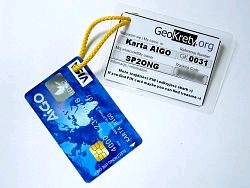
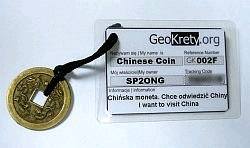

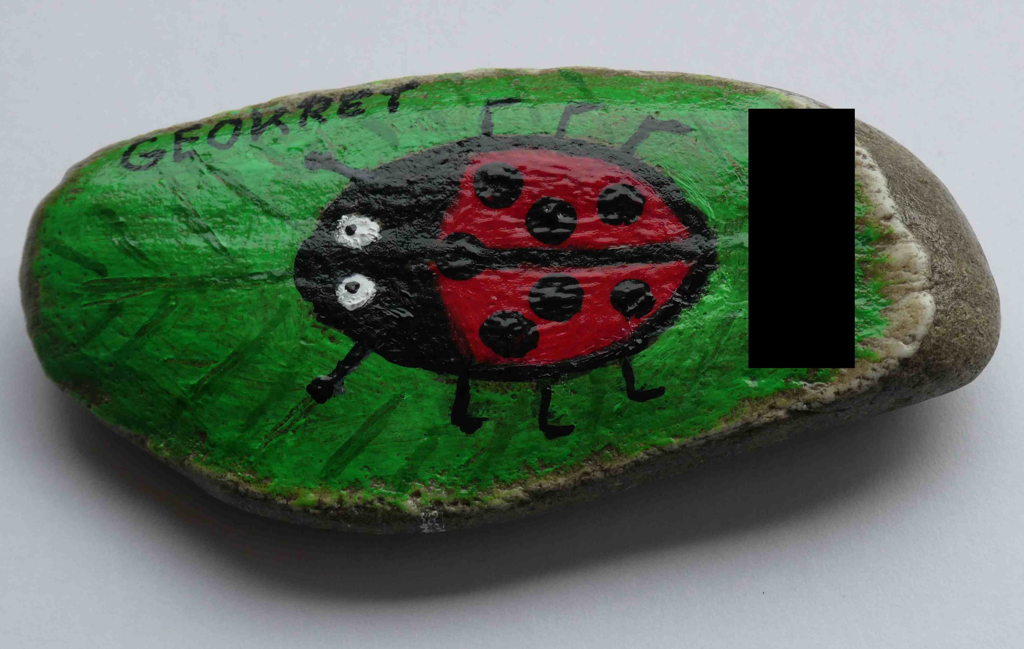
Watch an instructional screencast about registering and making your own GeoKrety.
| Icon | Description |
|---|---|
 or
or

|
I've dropped a GeoKret When you've left a GeoKret in a cache. |
 or
or

|
I've grabbed a GeoKret When you've taken a GeoKret from a cache and are not going to put it to another cache soon. |
 or
or

|
I've met a GeoKret When you've encountered a GeoKret in a cache but haven't taken it with you. |
 or
or

|
I've dipped a GeoKret When you take a GeoKret for a cache-tour; this is the same as dropping and then immediately grabbing the GeoKret again - the visited location is logged but the GeoKret remains in your inventory. |

|
Comment When you just want to write a comment :) |

|
Hibernation / archiving When a GeoKret has been missing for a long time. |
You can easily use GeoKrety with caches from geocaching.com. The separate waypoints from multicaches are not fully supported: (Licensee shall not remarket, resell, and/or redistribute the Data or any derived portion(s) of the Data in its digital form to any third party whatsoever… from their waypoint license agreement ). But this is no real obstacle.
There are three options:
c:geo is an excellent open-source Android app with support for all known geocaching websites, as well as GeoKrety!
Rather than repeating information, take a look at their excellent user guide on this topic here. Using c:geo, you can automatically Dip the GeoKrety you have with you in all Geocaches you log!
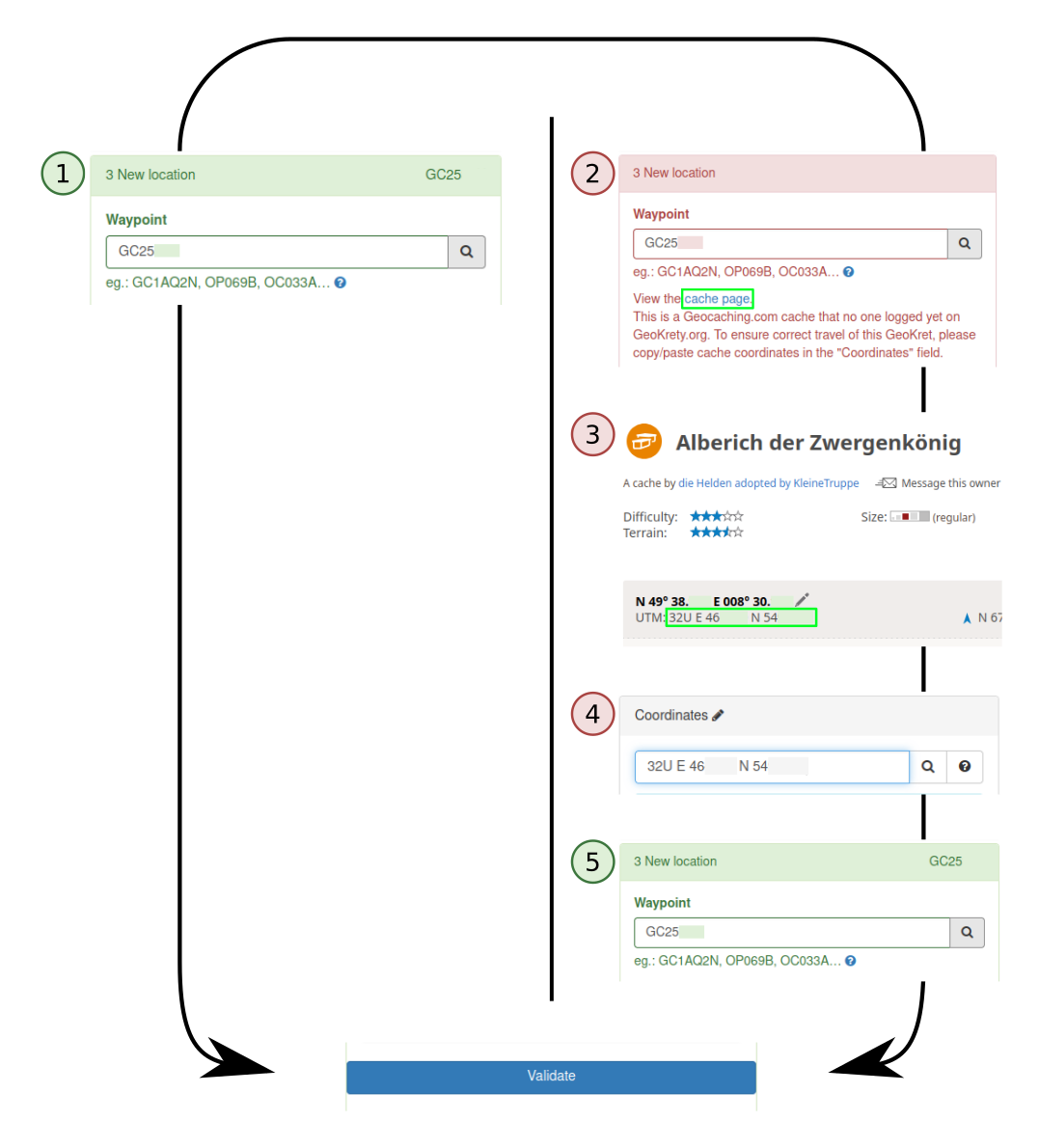
Go to the Log a GeoKret page. Fill in the Tracking Code of the GeoKret you wish to log, and under the section New location enter the following:
1
Enter the GC code of the cache in the Waypoint field (e.g. GC25XXX).
Note: according to groundspeak,
geocaching.com users may use and log geokrety ;)
I have checked with Brian, and his definitive answer is that
these 'rogue' TBs are not of concern to us - reviewers and
GS staff. We cannot govern their usage, and Geocachers are
allowed to give out GC codes.
This is a greasemonkey script (written and maintained by simor).
You will also need an account on geokrety.org.
After installing the GKT script you will see an extra panel on the right hand side of every cache page on geocaching.com with the header GeoKrety.org . This is located underneath the "Inventory" panel.
Then click "Log any GeoKret here" and you will be you will be redirected to the standard GeoKrety logging page with both the GC Code and coordinates already filled in. Check the date, add a comment and you're done.
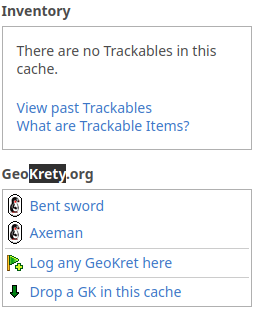
You can enter latitude/longitude coordinates in different formats:
52.205205 21.190891
52.205205/21.190891
N 52.205205 E 21.190891
+52.205205 -21.190891
52 12.3123 -21 11.45345
N52 12.3123 W21 11.45345
+52 12.3123 -21 11.45345
N 52° 10.369' W 021° 01.542'
52 12 18.74 -21 11 27.21
N52° 12' 18.74", W21° 11' 27.21"
52° 12' 18.74", -21° 11' 27.21"
32T E 327620 N 4840069
You can easily indicate the location of GeoKrety by entering either a waypoint or the name of a cache.
| Icon | Type | Url | Comments |
|---|---|---|---|
| OP | OpenCaching | Polish database | |
| OC | OpenCaching | German database | |
| OK | OpenCaching | UK database | |
| OB | OpenCaching | BeNeLux database | |
| GA | GeoCaching Australia | Updated daily (lat, lon, cache name, link). | |
| TR/VI/MS/EX | GeoCaching Russia | Updated every two hours (lat, lon, cache name, link, owner). | |
| unique name | geopeitus.ee | Estonian database | Updated daily (lat, lon, cache name, link). |
| GC | Geocaching Hungary | hungarian database | Updated daily. |


From waypoints listed below we can generate a proper link to the cache:
| Icon | Type | Url | Comments |
|---|---|---|---|
| GC | Geocaching | geocaching.com |
But maybe in the future we will be able to do more. So enter the waypoint anyway.
| Icon | Action | Description |
|---|---|---|
 |
Edit | Change an email address, description, log entry... |
 |
Delete | Delete a log entry, photo or comment. |
 |
Upload photo | Attach a photo to a log entry or your profile. |
 |
Known GeoKret | You already logged this GeoKret before. This means you can now log it without its Tracking Code (it is provided for you automatically) |
 |
Avatar | Move your mouse cursor over this icon to see this GeoKret's avatar. |
 |
Comment | Place a comment, a log entry or a news post. |
 |
Report missing | Report a GeoKret missing if you have visited the cache where the GeoKret should be but it wasn't there. |
This is a public number that may be used to refer a GeoKret. It consists of the 'GK' prefix and 4 to 5 digits in the hexadecimal system. You can use it to search for a specific GeoKret or to link to a GeoKret. It is visible to everyone.
This is a secret identification code which is required to post logs such as "Grab", "Drop" and others for a GeoKret. Only the owner and geocachers who found the GeoKret should know this code. This way, you need to have physically found the GeoKret in order to log it.
It is not recommended to post this code anywhere. Of course, this code must be written on a GeoKret's tag to allow finders to log it.
For easy logging dropping or grabbing during your trip, I've added the possibility of attaching QR code on the GK label. QR Code is a kind of bar code, which can be "scanned" by your mobile phone, which will redirect you to the proper page at geokrety.org ; you will not have to enter the Tracking Code, everything will be encrypted in the QR. Read more about QR Code.

The QR code with encrypted address of geokrety.org page.
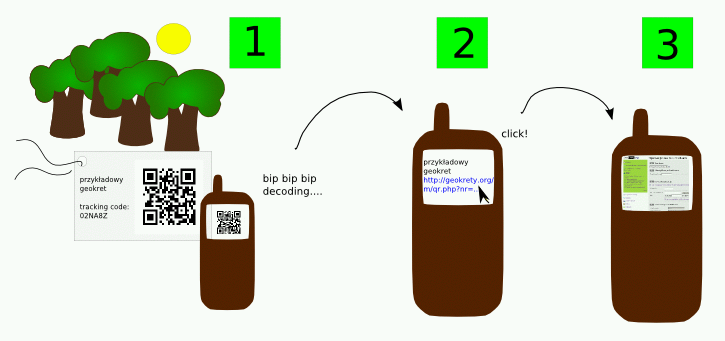
You can use the free software for your mobile phone, eg: Barcode Scanner
Registered users can express appreciation for a GeoKret by clicking the heart button (❤️) shown on the GeoKret details page. This works as a simple "like" system — one love per user per GeoKret.
There are others trackable items systems:
Your e-mail address will be not transferred to third parties. Your password is one-way encrypted, so it can not be revealed.
We use cookies only to ensure you can correctly navigate our website. This cookie will stay on your computer for:
It's absolutely harmless. That's it! 😀
Cookies is automatically destroyed when you explicitly logout. However, if you would like to, you can change your cookie settings at any time in your browser.
The connection to our server is secured using TLS encryption. You should see a green lock in your navigator address bar. It indicate that the communication between you and the server cannot be read by anyone else and it's fine for your credentials!
Our server is using IPv6, meaning we are ready for the future! IPv6: The Future is Now More than Ever
Keep in touch with the GeoKrety community by following @GeoKrety on social.opencaching.earth. Any Fediverse user can subscribe for news, release notes, and events straight from their favourite client.
To get more help on GeoKrety contact us or visit the forums:
| languages | platform | group name |
|---|---|---|
| Français | GeoKret en France | |
| Nederlands | GeoCaching met GeoKrety.Org | |
| Polski | Opencaching Poland | GeoKrety |
| Deutsch | geoclub.de forum | Geokrety |
| Nederlands | Opencaching Benelux | GeoKrety |

