You signed in with another tab or window. Reload to refresh your session.You signed out in another tab or window. Reload to refresh your session.You switched accounts on another tab or window. Reload to refresh your session.Dismiss alert
{{ message }}
Repository navigation
How to implement drag & drop with CefSharp WinForms #1593
I'm currently intercepting the OnDragEnter event that CefSharp provides, but I want to handle the OnDragDrop event which does not exist. I am already handling the form's drop drop event and I've set form.AllowDrop = true, but since CEF intercepts the drag, I cannot handle it in the form!
In IDragHandler.OnDragEnter:
If I return true, then the user cannot drag anything on the browser (and I don't get the event);
If I return false, then the user can drag a file, but CefSharp handles it internally! (and I don't get the event)
So either ways I'm jammed. Is there any way to properly implement drag & drop in CefSharp, such that CefSharp/CEF does NOT do its default behaviour, and such that I get the DROP event handler. (or similar)
Alternatively, if CefSharp can use RevokeDragDrop (also here) in the OnDragEnter event, (in response to AllowDrop = false) then I can handle the drop event on the form itself.
Alternatively, If I can get access to these CEF flags then I can disable the internal drag/drop entirely and so fallback to the form's handling. Edit: Not possible in CEF3.
I'm posting my current workaround for whoever may need similar functionality. This works, as in, we are able to override the CefSharp drag event and do whatever we want, while preventing CEF from loading the dragged content as an HTML file. However, since we are responding to the DragOver event, even if the user cancels the drag (ie. hovers over the browser without releasing the mouse button) the event will fire.
public class BrowserWrapperClass, IDragHandler {
public ChromiumWebBrowser Browser;
// call this code anywhere
public void Init(){
Browser = new ChromiumWebBrowser(startURL);
Browser.DragHandler = this;
}
// drag enter handler .. DONT CHANGE THE NAME!
public bool OnDragEnter(IWebBrowser browserControl, IBrowser browser, IDragData dragData, DragOperationsMask mask) {
// if any filenames dragged into browser
if (dragData.FileNames.Exists()) {
string path = dragData.FileNames[0];
// 1000 ms means the user has 1 sec to release the mouse;
// if he does NOT, the callback will be executed anyways!
// this is a crude workaround; the `OnDragRelease` event
// cannot be accessed in CefSharp!
ExecuteDelegate(1000, delegate{
// do whatever you want here
// file name is in the `path` var
// if you want to access UI, you'll have to use Form.BeginInvoke()
});
}
// false to prevent CefSharp from handling the event
return false;
}
private static void ExecuteDelegate(int delay, Action handler) {
System.Timers.Timer timer = new System.Timers.Timer(delay);
timer.AutoReset = false;
timer.Elapsed += delegate {
timer.Enabled = false;
timer.Stop();
timer.Dispose();
handler();
};
timer.Start();
}
}
@hgupta9 I went with using the WPF implementation. If I have time after my project, I will explore your workaround and let you know. Thanks for posting it!
I was wondering if anyone would be willing to help me figure out how I can allow CefSharp to upload Outlook Items (Attachments, Mail Items) as files into a Drop area on a website? It doesn't seem the IDragHandler responds when dragging a file onto a web page, or even the BrowserTab. I'm using the WPF Example for my testing.
usingSystem.Collections.Generic;usingGma.System.MouseKeyHook;usingSystem.Windows.Forms;usingCefSharp;publicpartialclassMainForm:Form{privateIList<string>dropFiles;privateChromiumWebBrowserBrowser;publicclassDragDropHandler:IDragHandler{publicboolOnDragEnter(IWebBrowserbrowserControl,IBrowserbrowser,IDragDatadragData,DragOperationsMaskmask){this.dropFiles=dragData.FileNames;/* Gotcha !! */returnfalse;}publicvoidOnDraggableRegionsChanged(IWebBrowserbrowserControl,IBrowserbrowser,IList<DraggableRegion>regions){}}publicMainForm(){InitializeComponent();Subscribe();Browser=newChromiumWebBrowser("URL");Browser.Dock=DockStyle.Fill;Browser.DragHandler=newDragDropHandler();this.Controls.Add(Browser);}/* global mouse Drag hook */publicvoidSubscribe(){m_GlobalHook=Hook.GlobalEvents();m_GlobalHook.MouseDragFinished+=GlobalHookDragFinished;}privatevoidGlobalHookDragFinished(objectsender,MouseEventArgsargs){/* Detect if cursor is within the bounds of a control, so we are actually listening for any Drag Finished event and if cursor is inside our window then this event belongs to our program this.DesktopBounds.Contains(Cursor.Position) */if(this.DesktopBounds.Contains(Cursor.Position)&&this.dropFiles!=null){this.OnDragDrop();/* You have to clear the results to prevent endless loop */this.dropFiles=null;}elseif(!this.DesktopBounds.Contains(Cursor.Position)&&this.dropFiles!=null){/* also avoid using MessageBox becasue it will interrupt this hook and cause endless loop */this.Text="drop in canceld";this.dropFiles=null;}}privatevoidUnsubscribe(){m_GlobalHook.MouseUpExt-=GlobalHookDragFinished;m_GlobalHook.Dispose();}privatevoidMainForm_FormClosing(objectsender,FormClosingEventArgse){Unsubscribe();}/* now you can do whaterver you want */privatevoidOnDragDrop(){/* Your code here */}}
Gotcha
it only catch your files wherever a draggable region is defined in your html. otherwise default drag handling behavior fiers watch this demo
but you have two choice:
either return True from OnDragEnter to prevent default handling behavior. (it will set the DragOperationsMask to none but still you can do whatever you want.)
OR
define your <body> or .wrapper as a draggable region. this way the entire window is draggable and you can prevent the default handling behavior from javascript. something like
another gotcha is that you have to clean The obtained result in GlobalHookDragFinished function to prevent endless loops. also you are not allowed to use MessageBox in this function for same reason.
Reacted by joe-williams-cccu, Steven Lagou, 俞正东, Uwe Keim, Chad Robinson, ymingbc and root
Instead of using GlobalHooks, i am using javascript drop event where I am looking if the user is dropping a file list. If the user is dropping file list, I am invoking javascript -> CEF method to notify CEF host that it should do something with the file list captured in OnDragEnter event.
class HostCommands {
constructor(logger) {
this._logger = logger;
cefSharp.bindObjectAsync("hostCommands");
}
execute(command, commandParameter) {
if (window.hostCommands) {
window.hostCommands.execute(JSON.stringify({
name: command,
parameter: commandParameter
}));
}
else {
this._logger.log("error: hostCommands not bound");
}
}
}
$('body').on('drop', function (e) {
let ev = e.originalEvent;
if (_draggableContainsFile(ev)) {
ev.preventDefault();
app._hostCommands.execute("fileListDropped");
}
});
function _draggableContainsFile(ev) {
if (ev.dataTransfer.items) {
// Use DataTransferItemList interface to access the file(s)
for (var i = 0; i < ev.dataTransfer.items.length; i++) {
// if we are dropping a file, notify host and
if (ev.dataTransfer.items[i].kind === 'file') {
return true;
}
}
}
return false;
}
Instead of using GlobalHooks, i am using javascript drop event where I am looking if the user is dropping a file list. If the user is dropping file list, I am invoking javascript -> CEF method to notify CEF host that it should do something with the file list captured in OnDragEnter event.
@ekalchev
This sounds like a nice solution. Taking your example and adding this
...i was able to actually get the body drop event working and can pass it to the csharp part.
But i can only access the file "names" instead of the full path, just as in any normal browser/webpage.
Were you able to get full paths using this js method?
Edit: forget it, i see you store the original filelist in the OnDragEnter event... That is also why you don't pass the file list in app._hostCommands.execute("fileListDropped");
But is there a safe way to connect the ondragenter with the actual drop event or do we have to guess/hope that they belong together?
I am not aware of any.
Edit: I implemented that before Chromium allowed to see the file names of the dropped file list in javascript. I know that this is now supported in latest versions. You can send the dropped filename from javascript to C# host and compare the list with what you captured in OnDragEnter. if they match, do your stuff..
Activity
amaitland commentedon Feb 15, 2016
Try searching
ceforume.g. http://magpcss.org/ceforum/search.php?keywords=OnDragEnterWe're moving towards using Gitter Chat. Please ask followup questions there.
robinrodricks commentedon Feb 16, 2016
amaitland commentedon Feb 16, 2016
robinrodricks commentedon Feb 16, 2016
amaitland commentedon Feb 16, 2016
robinrodricks commentedon Mar 22, 2016
I'm posting my current workaround for whoever may need similar functionality. This works, as in, we are able to override the CefSharp drag event and do whatever we want, while preventing CEF from loading the dragged content as an HTML file. However, since we are responding to the DragOver event, even if the user cancels the drag (ie. hovers over the browser without releasing the mouse button) the event will fire.
robinrodricks commentedon Mar 25, 2016
@annevu - Can you check this?
annevu commentedon Mar 25, 2016
@hgupta9 I went with using the WPF implementation. If I have time after my project, I will explore your workaround and let you know. Thanks for posting it!
krptodr commentedon Feb 23, 2017
I was wondering if anyone would be willing to help me figure out how I can allow CefSharp to upload Outlook Items (Attachments, Mail Items) as files into a Drop area on a website? It doesn't seem the IDragHandler responds when dragging a file onto a web page, or even the BrowserTab. I'm using the WPF Example for my testing.
I have looked into https://www.codeproject.com/Articles/28209/Outlook-Drag-and-Drop-in-C
and
(https://outlook2web.com/)
I asked on Gitter, but haven't received any responses.
I understand everyone's time is valuable, but I would forever be thankful for anyones help on this issue.
itshaadi commentedon May 27, 2017
here is my workaround using globalmousekeyhook to simulate
OnDragDropDemo:
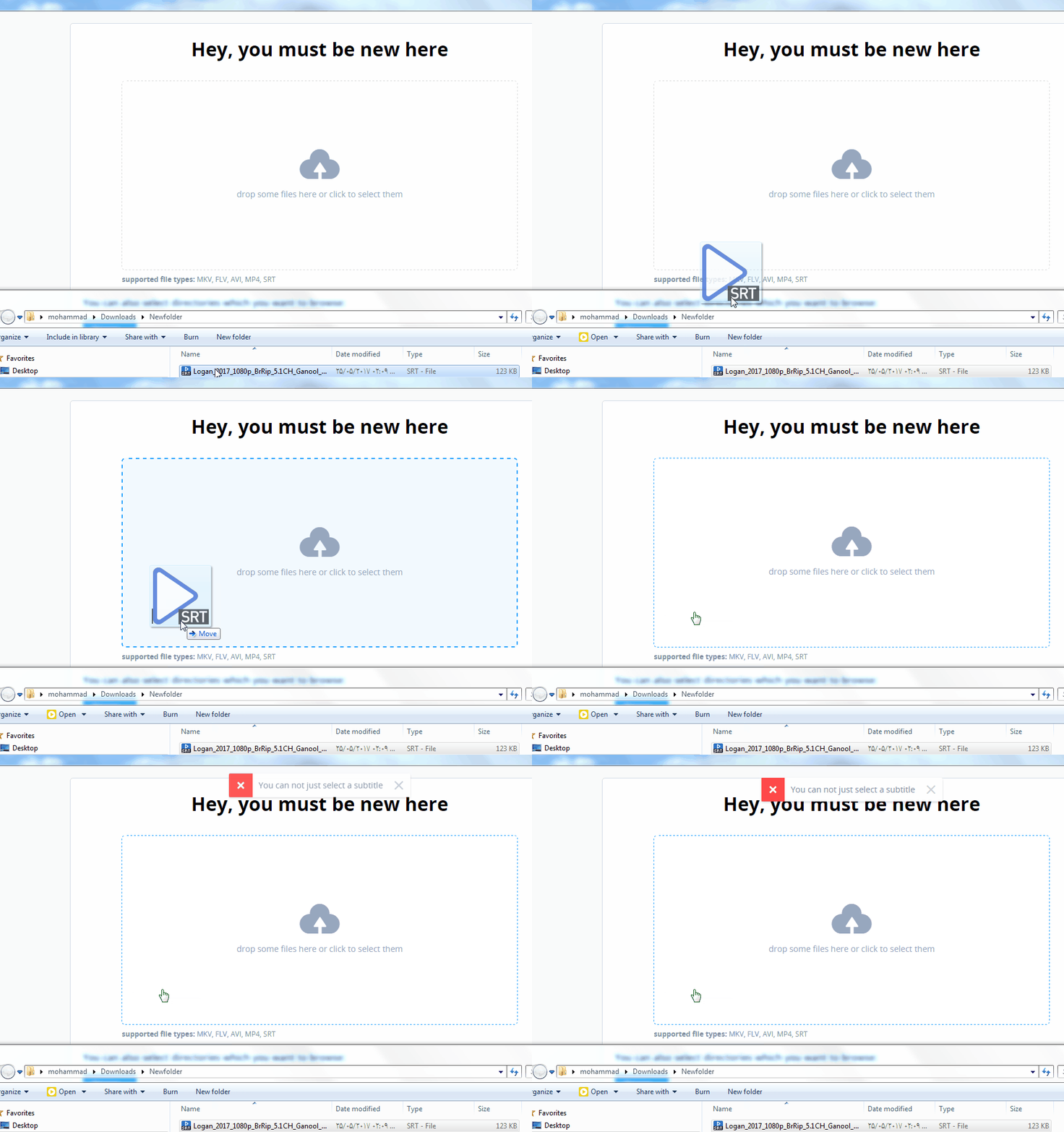
Gotcha
it only catch your files wherever a draggable region is defined in your html. otherwise default drag handling behavior fiers watch this demo
but you have two choice:
either return
TruefromOnDragEnterto prevent default handling behavior. (it will set the DragOperationsMask tononebut still you can do whatever you want.)OR
define your
<body>or.wrapperas a draggable region. this way the entire window is draggable and you can prevent the default handling behavior from javascript. something likei suggest using Vue.js simply because it's easier to handle everything.
another gotcha is that you have to clean The obtained result in
GlobalHookDragFinishedfunction to prevent endless loops. also you are not allowed to useMessageBoxin this function for same reason.ekalchev commentedon May 13, 2019
@itshaadi
Instead of using GlobalHooks, i am using javascript drop event where I am looking if the user is dropping a file list. If the user is dropping file list, I am invoking javascript -> CEF method to notify CEF host that it should do something with the file list captured in OnDragEnter event.
emcodem commentedon Jan 8, 2023
@ekalchev
This sounds like a nice solution. Taking your example and adding this
...i was able to actually get the body drop event working and can pass it to the csharp part.
But i can only access the file "names" instead of the full path, just as in any normal browser/webpage.
Were you able to get full paths using this js method?
Edit: forget it, i see you store the original filelist in the OnDragEnter event... That is also why you don't pass the file list in app._hostCommands.execute("fileListDropped");
But is there a safe way to connect the ondragenter with the actual drop event or do we have to guess/hope that they belong together?
ekalchev commentedon Jan 8, 2023
I am not aware of any.
Edit: I implemented that before Chromium allowed to see the file names of the dropped file list in javascript. I know that this is now supported in latest versions. You can send the dropped filename from javascript to C# host and compare the list with what you captured in OnDragEnter. if they match, do your stuff..