Repository navigation
Attachments not rendered, lost upon saving draft #954

Description

Version 5.007 on Android 5.0.2:
Some types of message content cause existing message attachments to not be rendered while editing messages. If edits are saved, attachments are permanently lost.
From another client
- Open Thunderbird* and launch Help > Troubleshooting Information, then choose 'Copy text to clipboard'.
- Paste into draft message.
- Add file attachment.
- Save in drafts.
*It's not clear exactly what HTML content causes this error. Basic entities like bold, tables, & text coloring don't trigger it but the Thunderbird troubleshooting dump does so consistently.
From K9 mail
- Locate saved message in Drafts folder view
- Observe paperclip icon on draft, indicating an attachment
- Open message to resume editing
- Observe message apparently has no attachments
- Save as draft
- Observe paperclip icon is now missing, indicating attachment was lost outright
It's probably worth noting that all HTML is stripped out of the message body when you resume editing with K9 mail.
Reacted by Chris Rapson, Martin, Leiaz and gabriel klawitter
Metadata
Metadata
Assignees
Type
Fields
Estimate
None yet
Priority
None yet

Activity
cketti commentedon Dec 15, 2015
K-9 Mail can't edit HTML, so there's no point in keeping the original HTML from Thunderbird.
The missing attachment sounds like a bug.
Currently K-9 Mail's draft handling code kind of assumes that you're only editing drafts generated by K-9 Mail. So my advice would be to avoid editing drafts created by other clients for now.
swapsmagic commentedon Jan 1, 2016
When i create a draft with an attachment and saves it using k-9 client, attachment gets saved. But when i open the draft again and add/update text to it and saves it again, the attachment was lost. So seems like an issue for drafts created by k-9 client as well.
swapsmagic commentedon Jan 7, 2016
@cketti This seems to a legit issue, i provided the reproducible steps in my previous comment. Can you confirm the behavior?
cketti commentedon Jan 8, 2016
@swapsmagic I don't have time to look into this issue right now. If you're able to reproduce it please consider submitting a pull request fixing the bug.
tuliogit commentedon Mar 2, 2017
This seems to be identical to #2164 and it affects me too. I have version 5.203
chrisrapson commentedon Feb 24, 2018
Is this a duplicate of #1566 and #2547?
I would also say it is related to #2485, which is a duplicate of #3110.
efelon commentedon Jun 5, 2019
I wanted to add that for me it is not related to HTML. It happens to plain text mails as well. Here is what I see/have:
Steps to reproduce
Environment
K-9 Mail version: 5.600
Android version: 8.1.0
Account type (IMAP, POP3, WebDAV/Exchange): IMAP
It confused my wife and me in several occasions until I decided now to look for issues about this.
plan3d commentedon Aug 17, 2021
@efelon I can't reproduce the bug in version 5.803 with your steps. Can you please check if the bug still exists?
efelon commentedon Sep 10, 2021
@plan3d I still can. Let me show some screenshots:
Existing draft with attachement:

Opened draft within K9 already without any attachement
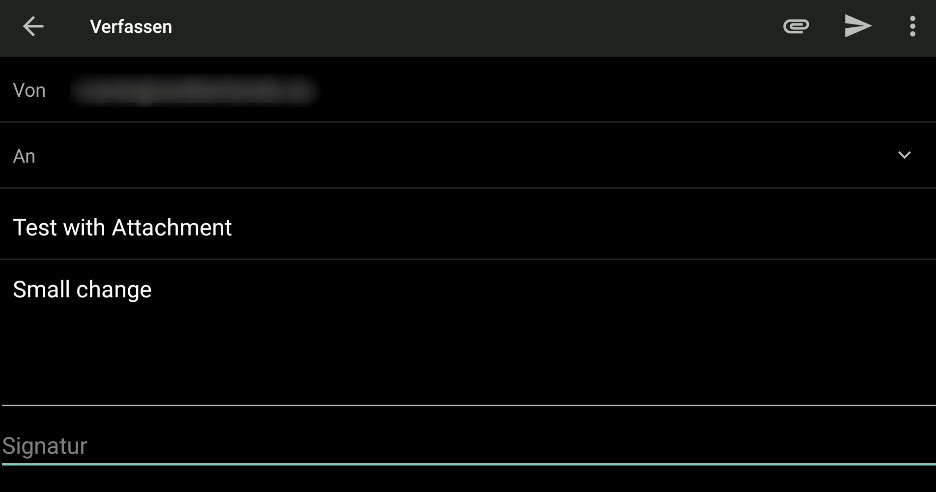
...Then make some changes in text...
"Back" on Android asks for saving or discard
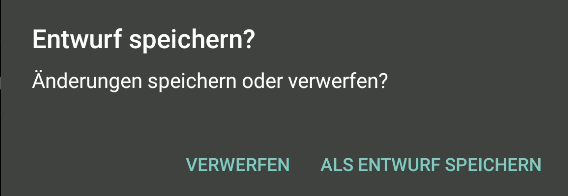
After "Saving..." the attachment is gone

Discarding leaves the attachment in place
Version from F-Droid
lke15 commentedon Jan 14, 2022
I have the same issue.
I write a message on roundcube, attach a file, and save it as draft.
In K9Mail E-Mail List view, it shows a mail with an paper-clip. When I open it, no attachment was visible.
Version 5.806 from playstore
Ptitg commentedon Sep 8, 2023
I have the same issue for a long time now.
I write a draft on Thunderbird (currently 115.2.0) and attach a file. In K-9 Mail (currently 6.602) E-Mail List view, it shows a mail with an paper-clip. When I open it, no attachment was visible.
Cyril-Bo commentedon Jan 30, 2024
Hello,
same issue for me.
opening a draft lose the attachment.
writing a email with an attachment, saving the draft and opening with the email box website (mailbox.org), the attachment are there. If re-opening fro; K-9 android app., only text is there in the draft but no more attachment.
K-9 Mail app : 6.603
Android : 13
Hope it will be fixed.
driehle commentedon Apr 4, 2024
@cketti @wmontwe Is there any chance to bring some attention to this issue, which is more than eight years old now?
KlipperKyle commentedon Apr 10, 2024
I was about to file a bug on this, but I found someone already filed it, and the issue is still a problem.
An attachment that I had added to a draft message was quietly dropped when I opened the draft message to send it. Also, my messages are plain text and not HTML, so you can eliminate the HTML variable.
17 remaining items
khaledhaltam commentedon Sep 9, 2026
I'd like to work on this. Starting by reproducing both paths described
in the thread on current main: a draft created in another client
(@efelon's Roundcube case from 2019) and a draft created and re-edited
in the app (@swapsmagic's case from 2016). I'll report back with what I
find before touching any code.
khaledhaltam commentedon Sep 10, 2026
I tested this on current main (86b7a5e) with an IMAP account. Here is what I found.
The trigger is the "Fetch messages up to" account setting. I put six drafts with different attachment sizes into the drafts folder from another client and opened each one in the app:
The default for that setting is 128 KiB, so 131072 B. What matters is the size of the whole message, not the attachment. Base64 adds about a third, so it already breaks at roughly 90 KB of attachment. That matches what A4Git-cmd reported in #8817.
Setting it to "any size (no limit)" fixes it for new drafts, as redtrumpet wrote there. But drafts that were synced before stay broken even after changing it, they are not fetched again.
About the actual data loss, I checked the server over IMAP before and after each action:
Drafts written in the app itself keep their attachment, so A4Git-cmd is right about that. But that is only because the local copy is complete. On a second device or after a reinstall the same draft would be affected.
The app already handles this case in two other places. Same message, not a draft:
@driehle asked in March 2025 where the draft gets loaded. It is
processDraftMessage()inMessageCompose.java, which callsAttachmentPresenter.loadAllAvailableAttachments(). That method skips attachments whose content is not available locally and returns false when it did.processMessageToForward()checks that return value and shows the toast,processDraftMessage()ignores it.Thanks for the assignment. Before I write any code, which behaviour would you prefer?
Option 1 would override the size limit the user set on purpose, so I did not want to decide that on my own.
driehle commentedon Sep 10, 2026
Oh, we have a bot here 👋
To my opinion, the whole message should be loaded, of course. What would be the purpose of having a message in the draft folder and getting a warning, when opening it? A draft message is one that you should be able to open, optionally edit, and send. And during that process, not data must get lost.
khaledhaltam commentedon Sep 10, 2026
Not a bot 🙂 I'm a student, this is part of a university project, and I use AI to help me with the English and to find my way around the code. The testing and the numbers are mine.
Agreed on loading the whole message, that was my preference too. I would still like a maintainer to confirm, since it means going past the size limit the user set on purpose. @rafaeltonholo you assigned this to me, is option 1 the way you want it?
driehle commentedon Sep 10, 2026
The user setting we are talking about here is beneath the section "fetching mail" for the respective account and it is right next to the fetching amount limit and sync settings.
In my understanding, the setting limiting the fetch size should only play a role when a list of messages is automatically loaded, either in the background, or when viewing a folder or an individual mail.
As soon as I, the user, click on either a draft to edit it or on the forward button of a mail I am viewing, the whole mail should always be loaded. I think breaking a mail in either of these two scenarios is something this setting never was intended for!
fix(message-composer): skip quote on draft reload
fix(message-composer): wait for draft download
driehle commentedon Sep 28, 2026
So glad to see this finally being fixed and merged!
Thank you for your effort @khaledhaltam and @wmontwe! 👏
fix(message-composer): fetch complete message when editing a draft