C64-ENGINE V1.4.8
Make real Commodore 64 games. No code needed.
C64 Engine is a game studio for the Commodore 64 that runs on your PC. Paint your sprites and tiles, draw your levels, write your rules in plain English, and press Play. Out comes a real C64 program: a .prg you can run in an emulator, put on a disk, or play on a real C64 or a C64 Ultimate.
No BASIC. No assembler. No setup. Everything the engine builds is fast, hand-tuned 6502 machine code, and it fits in the C64's 64K.
See it in action: C64 games made with C64 Engine and C64 Dev Machine (YouTube).
Start from a game that already works
Nine complete games come in the box. Open one, change it, play it:
- Gem Hunter: collect the gems, avoid the ghosts
- Side Blaster: a side-scrolling space shooter
- Sky Strike: a vertical shoot 'em up
- Jump Quest: a platformer with coins, pits and enemies
- Castle Rooms: flip-screen room-to-room adventure
- Dynamite Mine: dig, blast and collect in a scrolling mine
- Maze Raider: a scrolling maze crawl
- Gem Hills: hills, gems and a title screen
- Locked Vault: find the halves, make the key, open the vault
Everything in one place
- Sprite editor: hi-res and multicolour sprites, with animation
- Tile editor and screen painter: build your look from C64 characters
- Level and scrolling map editors: single screens, flip-screen rooms or big scrolling maps
- Rules in plain English: "When the player touches a gem, add 10 to the score". No code to type.
- Enemies and actors: pick a behaviour, set the speed, drop them in
- Items and recipes: keys, pickups, and things that combine into other things
- SID music and sound effects: compose tunes and make effects for the real SID chip; import .mod files
- Custom HUD: score, lives, gems and your own counters
- Bitmap title screens: a full picture before the game starts
- Cycle budget: see how much of the C64's time each frame uses, so your game never slows down
- Step-by-step tutorials that walk you through making your first game
Play it anywhere a C64 runs
- Press Play to build and run your game in the VICE emulator straight away
- Save a .prg or .d64 disk to share
- C64 Ultimate: send your game straight to a C64 Ultimate or Ultimate 64 on your network and play it on real hardware (Pro)
- Export your music as a .SID file (Pro)
Lite and Pro
C64 Engine Lite (free)
- Gem Hunter and Jump Quest templates
- 12 sprites, 25 rules, 2 levels (or 1 map level), 24 tiles, 4 enemy types
- 8 sound effects and 1 song
- 2 items
- A bitmap title screen
- Games start with a short "Made with C64 Engine Light" screen
C64 Engine Pro: $7.50 or more (suggested $12.50)
- All nine templates
- 32 sprites, 100 rules, 8 levels and 8 map levels, 64 tiles, 16 enemy types
- 32 sound effects and 4 songs
- 8 items and 8 recipes
- 8 bitmaps, plus loading, game over and "you win" screens
- Your own HUD, .mod import and .SID export
- Build and run on the C64 Ultimate
- No credit screen: your game, your name
- Free updates for 1.x
Everything you make with either edition is yours to share or sell.
Requirements
- Windows 10 or 11 (64-bit)
- macOS (Apple Silicon or Intel): a native Mac version of Lite and Pro, as a .dmg or an .app.zip
- Linux: no native version, but the Windows version runs under Wine, Proton or CrossOver (tested by users).
- The free VICE emulator to play your games on your computer
- Optional: a C64 Ultimate or Ultimate 64 on your network, or any real C64 with an SD2IEC or disk drive
Getting started
- Unzip the download anywhere and run C64Engine.exe
- Pick a template on the Home page, or follow a tutorial
- Change something, then press Play
GETTING_STARTED.md in the download has the full guide. The studio checks for new versions when it starts and shows an Update button when one is out; your projects and settings carry over.
Purchase
In order to download this tool you must purchase it at or above the minimum price of $5.02 USD. You will get access to the following files:
Download demo
Development log
- C64 Engine 1.4.8: random way enemies, two fixes11 hours ago
- HOLD BUG reports - V1.4.8 on the way11 hours ago
- C64 Engine 1.4.7: tile sets pick their own dynamite, true tile colours14 hours ago
- C64 Engine 1.4.6: tile set fixes18 hours ago
- C64 Engine 1.4.5: crushers, collision boxes and sprites behind the scenery1 day ago
- C64 Engine 1.4.4: up to 256 tiles in every tile set1 day ago
- C64 Engine 1.4.3: enemies that wait for you, new moving blocks and tidier panels2 days ago
- C64 Engine 1.4.2: D64 disks, level briefings and a play area for shooters2 days ago


Comments
Log in with itch.io to leave a comment.
Thanks for the fast pace development and taking feature requests onboard. Would it be possible to add keyboard shortcuts for pause and restart? They could be configurable or default to what most games use (P and Run Stop if I am not mistaken).
Thanks for version 1.4.5, and especially for your responsiveness. Impressive!👍
Minor bug? It looks like enemies are not hindered by one way tiles, they can cross them in any direction.
Another idea/request: multiple teleporters. It would be cool if pairs of teleporters could be linked together.
Moving blocks are great. They work fine as traps. What do you think of making them push enemies away or harming them?
For the death animation, any chance the fire animation could be applied in place, without the player's sprite jumping off the screen?
Is it also possible to have sprites displayed behind or in front of the character layer, like in games such as Ducks Ahoy! and Who Dares Wins? Also, would it be possible to adjust the sprites' collision boxes as well?
Thanks, and keep up the great work.
Ah, good idea, forgot about that feature, I will see what I can do towards the next version in the next week.
EDIT:
I can add both a Behind background option for sprites/actors and an In front of sprites option for tiles in map games.
.. Adjustable collision boxes: Right now hitboxes are fitted automatically from your drawn pixels, and adding an editable hitbox overlay on the Sprites page (for both sprite-to-sprite and wall/tile collisions) is very straightforward.
I'll put both on the list for next week.
Would it be possible to optionally not show nor track enemies behind solid walls, until they are encountered? This would allow for a fog of war type effect.
So really a F.O.W feature... ok, let me look into it.
The having them not show/then show looks like glitchy sprites unfortunately, best I can do is have them not move (as if they don't see you). What I found in testing is that they moved at you too fast, so giving them some range before they do that is better... or at least some waiting time before they attack you if you are in range.
Got a few questions, sorry if they've been asked before
in a shoot em up solid and deadly blocks both kill you, should solid just stop you moving past it?
how do you change the death animations?
in the horizontal shoot em up, even on an empty screen you die if you reach top or bottom edge of the windowed area, shouldn't the sprite just stop?
in a vertical shooter, sprites are still displayed when they exit the playing area (both start in the middle then move, map is 12 tiles wide), how can I stop this?
tia
Hi ZXBiNMaN128K,
1. Solid tiles kill in a shoot-em-up.
That's on purpose: in shooters any scenery destroys the ship, like the classic scrolling shooters. A "Solid tiles stop the ship" option is a good idea though, I'll add it.
2. Changing the death animations.
At the moment shooters use a fixed built-in explosion. The next version adds a "Losing a life" choice for platform, top-down and cave games, where the player catches fire, jumps and falls off the screen in your own pictures. I'll look at letting you draw your own explosion for shooters too.
3. Dying at the top or bottom edge on an empty screen.
Thanks, that's a bug, and I've reproduced it: it happens when the map is fewer rows than the play window. Until the fix, make the map as tall as the window (or the window shorter) and the ship will stop at the edges as it should.
4. Sprites showing outside a narrow vertical-shooter window.
Good catch: sprites are only hidden when they leave the whole screen, not a narrower window. I'll fix it so anything past the window's sides is hidden, and enemies that leave the map sideways are removed. I will also make the players ship stop, so you can set the left/right boundary
Many thanks,
Robert
The overlay for the main player is great, but could you also apply it to some enemies? It’s fantastic to be able to create games for the C64. Thanks!
With enemies you quickly use up the 8 sprite budget unless you mutilplex which means sprites need to be in different vertical positions on the screen. Remember the C64 has only 8 hardware sprites, 1 sprite + an overlay is 2, and a 2-tall sprite = 3 sprites considering Y-expansion on the multicolour sprite. There is a limit to C64 engine, a line I have to draw that says, if you want more, learn more and go to C64 Dev Machine.
I can't keep pushing scope of C64 Engine, it's just not reasonable, sorry.
Thank you, Polytricity, for your clear and precise response; I hadn't actually taken into account the C64's 8-sprite limit.
The teleporters can be used several times but the sound attached to them only plays the very first time they are used. If the player moves into them again, the sound doesn't play.
Fixed in 1.4.1.
Another feature request: apply the characters from the Charset tab to text written onto Bitmaps.
Possible but would mean either the bitmap is Hi-Res or Multicolour, in most cases the characters from the character set are hi-res and with Bitmaps its one mode or the other unless raster split (which is more work and explaining that I'd possibly want).
Thanks for the reply. That's alright; I can probably workaround this by copying the character letters and using them to draw the bitmaps outside C64 Engine.
Actually, the UI>Level Screens are close to what I am after. If there was the ability to attach level specific text (ie mission briefing for story building) this would be it. The ability to have the same bitmap as background across all level screens would be a nice plus.
Thanks Fabbie, good idea!
Both will be in for the next update:
Each level's own text. Under UI > Level screens, the Lines panel now has a "This level's own lines" part.
Pick a level and give it up to 6 lines of its own: a mission briefing before it, or a debrief on the After screen. They show after the shared lines (GET READY and so on), only on that level's screen, and the text block re-centres to fit. Values like {NAME} and {SCORE} work in them too.
A bigger picture. The bitmap strip at the top can now be up to 12 rows, half the screen, instead of 3.
Pick the same bitmap for Before and After and every level screen gets the same picture, with the text underneath.
I didn't go as far as a full-screen picture with the text on top of it. On the C64, text can't sit over a bitmap: the game would have to draw every letter into the picture, and a full bitmap takes about 8–10 KB that most games need for levels.
Half a screen gets most of the look and keeps the memory for your levels. If you find you really need the full-screen version, let me know and I'll look at it again.
Cheers
That sounds awesome. Thanks a lot!
With a custom HUD, is there any way to show messages tiles emit when taken?
Can you give an example?
like "Relic collected 1/6" ?
I am referring to the "Message when taken" string one can set on collectible tiles. Custom HUDs leave them out, or my own custom HUD does? :-) I am not clear.
I see, I will test it to see what needs fixing.
Cheers
Done in 1.4.1.
A feature request: currently, only tiles that can be collected count towards the level's goal. How about extending that to enemies? This would allow for "destroy N enemies" type levels.
Available in 1.4.1.
Thanks for 1.4.0! In cave digger games, I am not clear how the amount of TNT is configured, how each item's TNT worth is set or how one can override how it's triggered. Can you clarify?
For the game I am working on, it would be useful if I could configure how many bombs the player starts with, how many bomb units each picked up item provides, and how these bombs are triggered (by hitting the space bar ideally).
Thanks, will sort these in the next update as well as the other comment about number of enemies killed etc.
I am no coder so I don`t know if that work or make sense for the c64 too. But the NES-Maker have the option to put invisible tiles to give the graphical tiles his specifications. At example; you build the walls, grounds, spikes etc. and after that you give the graphics his behaviour. I think it`s much lesser work instead to give every tiles own specifications.
So it would be possible to make maybe invisible walls or blocks which the player can pass but the enemys can`t. It would be an good solution for Buxtejor suggestion to control the enemy behavior a bit better. It would have teh same effect but would be a bit more flexible.
Thanks again for the tool. I think a lot of C64-users who can`t code waited an very long time for such an game creator. :)
Yeah, I have been considering this lately, invisible blockers or triggers potentially can fit and yes assigning graphics can then be optional. The feedback is helping shape these tools much better so it is greatly appreciated, thank you.
This tool is growing great!
I have a couple more suggestions for enemies:
-Change direction each X secs/frames. So they can go back and forth without having to collide a wall or encounter an edge. This would be very useful for flying enemies.
-Fire in the same direction they are moving/facings
Thanks again!
Yeah, those are good to add. Thank you, next update soon.
An video how you make a game from the scratch would be great. :)
When I try to start an new project beyond the templates some options like "World" or "tiles" aren`t available.
The engine seems to be an really promising project but I think it`s very complicated to build an game from the scratch.
Thanks for the project. I think it`s an very promising engine. :)
There will be more full game tutorials added. Simple and more complex ones. Expect these in future updates.
Any particular game themes you had in mind?
Can you give some more information about the other issue you were having with the world and tiles options?.. A screenshot would be really helpful.
Thanks
Ah, regarding the issue you were having.. I think I know what happened: New starts a *single-screen* game, which uses the Levels / Actors / Logic pages instead. World and Tiles belong to *map games* (the scrolling ones). You can switch on the Home page under Project type. For now the easiest way to make your own map game is to load a template and change it.
Making a new map game from nothing will get easier, along with the step-by-step and possibly video tutorials if I get the time.
Thanks for the very fast replay. :)
And I saw that you made an new version. WOW, you are fast. :)
Linux version?
On Mac, the Build Log is not scrollable, always shows the top 8 lines?
Feature requests for the Bitmaps page: show a grid, snap to grid, add/move/remove a C64 Engine logo.
Taking them all on board for next update which, all going well will be by Thursday or Friday this week.
Thanks again for the input!
It would be cool if the characters drawn under UI/Custom HUD/Font could be treated the same way as the characters in the Font page, ie copied and pasted between these two locations.
For enemies that have multiple hit points, would it be possible to play the flash animation/change of color that normally happens when they are destroyed every time they are hit?
Would it be possible for enemies to fire only at the player when they have a line of sight/when there's no solid wall between them and the player?
Great engine. So far I'm really enjoying it and it improves a lot with each update!
A couple of questions/suggestions:
Could the 32-sprite limit be increased? If you make directional animations, you run out of them right away with just the player. I like having a limit to keep projects manageable, but I'd love to have a few more sprites.
Would it be possible to configure jump-on damage (or stomping) per enemy instead of globally?
The only thing I'm not convinced about is the isometric mode controls, the 8 directions feel confusing to me. Could a 4-direction option be added? For example, using the up arrow to move up-right, like in Head over Heels.
Thanks a lot!
Hey Buxtejor,
To be honest, the 32-sprite limit was only meant for Lite users. I overlooked raising it for Pro, which should be 80, so that's coming in the next update.
Your other suggestions are great: stomping set per enemy, and a 4-direction option for the iso controls (up moves up-right, like Head over Heels). I'll look into them and get back to you during the week. I have a lot to get through tomorrow, but these could well be covered.
Many thanks, Robert
Wow, that was fast! Thank you so much for considering my suggestions!
If I can suggest a few more:
Would it be possible to change back walls and shared colors per room in the isometric module?
Perhaps more iso rooms? Or are they limited by memory?
Yeah, those can be done. Thank you
There may be a bug related to the positioning of the custom HUD. If set to show at the bottom, enemy sprites are shifted down within their box. The player's sprite isn't affected.
Fixed in 1.3.9!
AFAICT there can only be one enemy shot for all shooting enemies. Could this be changed, so that each enemy may have a different weapon type?
Done in 1.3.9, thanks!
Still in a Map type game: enemies disappear altogether once they are off screen. Even static turrets. Any chance they could stay and in the case of wall crawlers keep roaming around?
Working on it, thanks for reporting these issues.
I see new behavior in 1.3.8 but I am not sure where the new settings live. I don't see anything related on Spawners or Enemies. What am I missing?
OK I found them on the World tab. I need new glasses. "Stay where they were" seems to take a second or two for enemies to reappear. It's with a Cave Digger, rows 0/16, "smooth 50fps scrolling" according to the budget. Beside that, would it be possible to make this a per enemy/spawner property? I am thinking turrets should stay in place, while other enemy types may leave the screen or go back to their spawner.
I also see that enemies going in the same direction may end up overlapping each other when they reappear.
Got it. Looking into a few of them now.
Thanks for this feedback, and the other bugs and requests, I will make sure to address them tomorrow. Keep them coming.
Thanks for implementing the above. I think the current options work well for enemies that have not been destroyed yet and for enemies meant to respawn, but may not cover cases where the enemy was destroyed and should not reappear. Am I right? My case is a block type enemy that should be destroyed to clear the way and should not reappear on that level, even when the player loses a life. Does it make sense?
Will do my best to address these and the other requests soon.
Appreciate all the feedback.
On a Map type game, I notice that enemies set to fire at the player start firing before they are visible, when player and the enemy are not yet on the same screen. It would be great if enemies could be made to wait for the player to enter the same screen.
Yep, good shout, I will sort that.
Thanks for 1.3.8. I found that setting on the World tab!
No probs, let me know if you like it should be in both places.
For the player's shots, have you considered having horizontal and vertical shots?
Looking into it now, will implement a Robocop style system where to shoot up, you must first aim diagonal up first then up, since up alone may be jump. Will allow downwards firing if in-air too.
Thanks for this great tool! Some feedback on the UI. The build target (the PRG name file) doesn't seem to be attached to the project, i.e. if I load another game, it remains as is. Also, on Mac, the text fields can't be scrolled inside, the left/right arrow keys just add garbage characters to the field.
Ah, yes, good old mac arrow keys do that, will sort it for the next build. Thanks for the report!
Thanks.
Its possible but it may be these are in the open border and sprite based, or its a portion of the screen (using a few rows) which is safer, I will see about both options.
That would be great!
After all these fast and great updates i was able to finish a small 4 level platformer game, and it only took about two weeks. Just wanted to say thanks for this great engine!
Thank you for using it! Please share your game on social media and let folk know about it. Looking forwards to playing it.
Is it possible for you to develop a system that allows us to create our own rules using simplified code, so that we have more personal customization options? Thanks
It already does this with the Logic system... not sure what you mean otherwise.
For example, in a platformer game, if I want the player to be able to swim in water—with collision detection for a specific tile (water)—and simultaneously change the gravity and the animation(to simulate swimming), is that possible?
I see, since the controls are outset based on the game type, exposing extra control changes depending on things like that is tricky... This is why C64 Dev Machine gives more power, and, in the next update I am introducing the ability to import your C64 Engine game to Dev Machine where you do have more control.
👍
It's there now and will also work in LITE versions, PRO version of dev machine just means you can edit the code, but you can also interviene with ORG set at an address and use OPCODE nodes, as long as the data lines up, although most will go pro and just edit the code macros directly by that point hehe.!
That is intriguing though I do still want to try and get a bit more use out of C64 Engine.
Started looking into this for the next version, will be a PRO feature though as I want to keep things simple for new users.
hi ! how can I purchase "C64 Engine Pro" ?
by purchasing $12.50 from the beginning ?
or there is an upgrade function later ?
thx
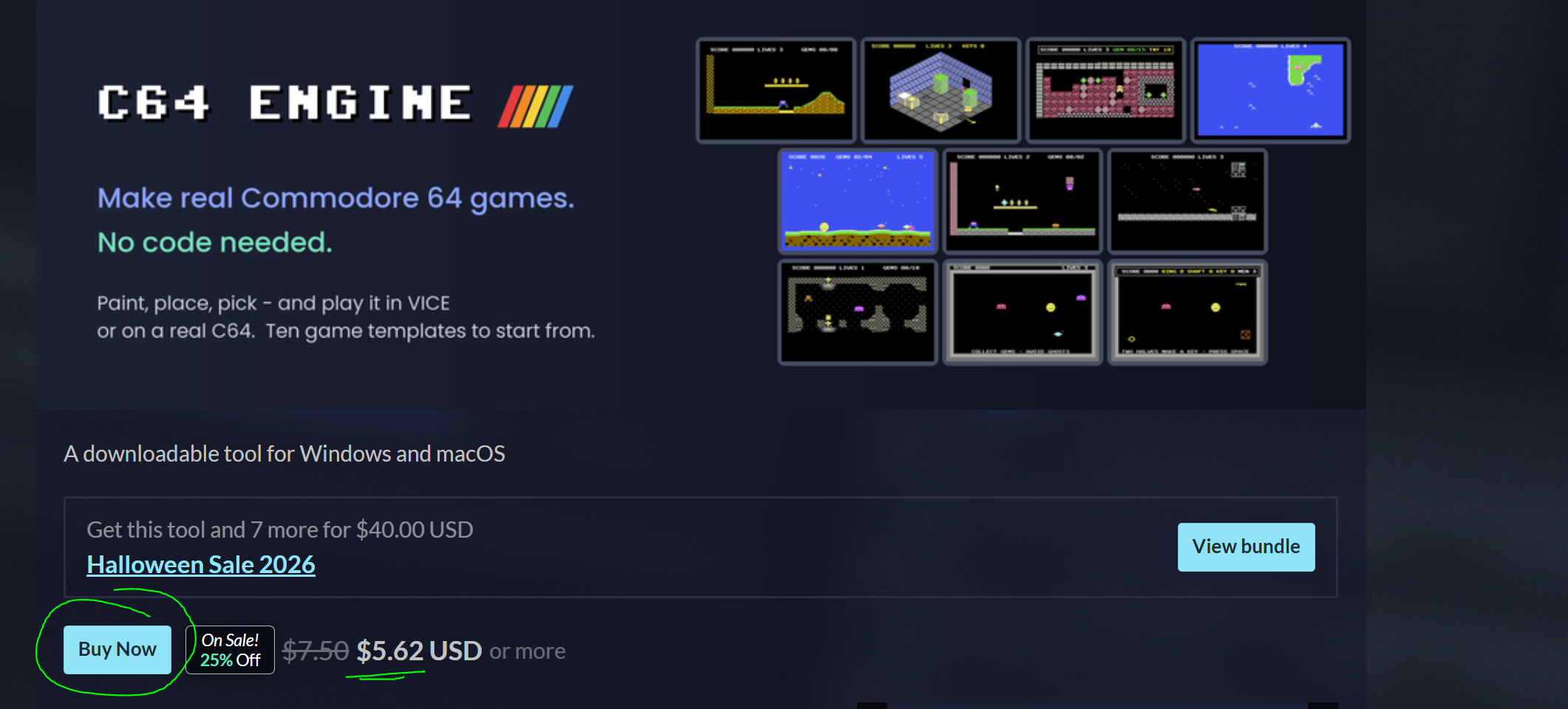
Hi, you just go to the main page and click here, it's not $12.50 though... not sure where you see that price... it's $5.62 while on sale until the end of today then goes back to $7.50. You buy it once here on itch. https://polytricity.itch.io/c64-engine In regards to updates, you will see an update is available and you re-download the newer version also from here.
thx
Can "Shot" sprites be given a limited range or time before they disappear instead of being required to hit another actor or screen edge? Also is it possible to make Shots bounce off of wall edges or blocking tiles?
Also if one wanted to do a racing game is it possible to make moving in a direction start slow and gradually speed up? Turning being harder at high speeds but would also start to slow you down.
Will look into shot options, racing car template in progress, will be ready soon.
on the Sky Strike template, the ship animates in all positions in the editor, but doesn't when idle on the compiled game
it only animates when pushing forward or bacvkwards
I will look into it, some animations are designed to play once then hold, not loop. I will check over it today.
Thanks.
Hi! Thanks for another great update! 😊
I have a few suggestions for another potential Field: a timer. It could be used to quicken the player's pace in a puzzle or, indeed, a platformer game environment. Either all levels or certain levels could have this option. If the timer reaches zero, then it could be game over, or you lose a life. There could be room in the UI section for this?
Could there be a possibility of having a partial bitmap image at the top of the screen with hires at the bottom? Here is an example screenshot from CJ in the USA:
I was trying to think of a way this could be done in the current bitmap editor or from an imported image. You could limit the size of the area.
A SID playing on the title screen is great now. 😊Could there be an option to stop the title screen music from playing when the game starts and play another tune, like tune 2 from the SID, during the game? Or perhaps just sound effects during the game?
Many thanks! 👍
Great minds think alike, I was intending on having a bitmap 'part' so basically having the VIC do an auto split between modes. Should be do-able. And timer is a good shout, I already have the code done for another title so I can use that, and sub-tune I just added recently so will add some control to that. These will be in the next version all going well.
Many thanks - Robert
Trying to mess with shooting in the single-screen template. Sprites are unable to change so if I try to fire from different angles it always uses the same sprite.
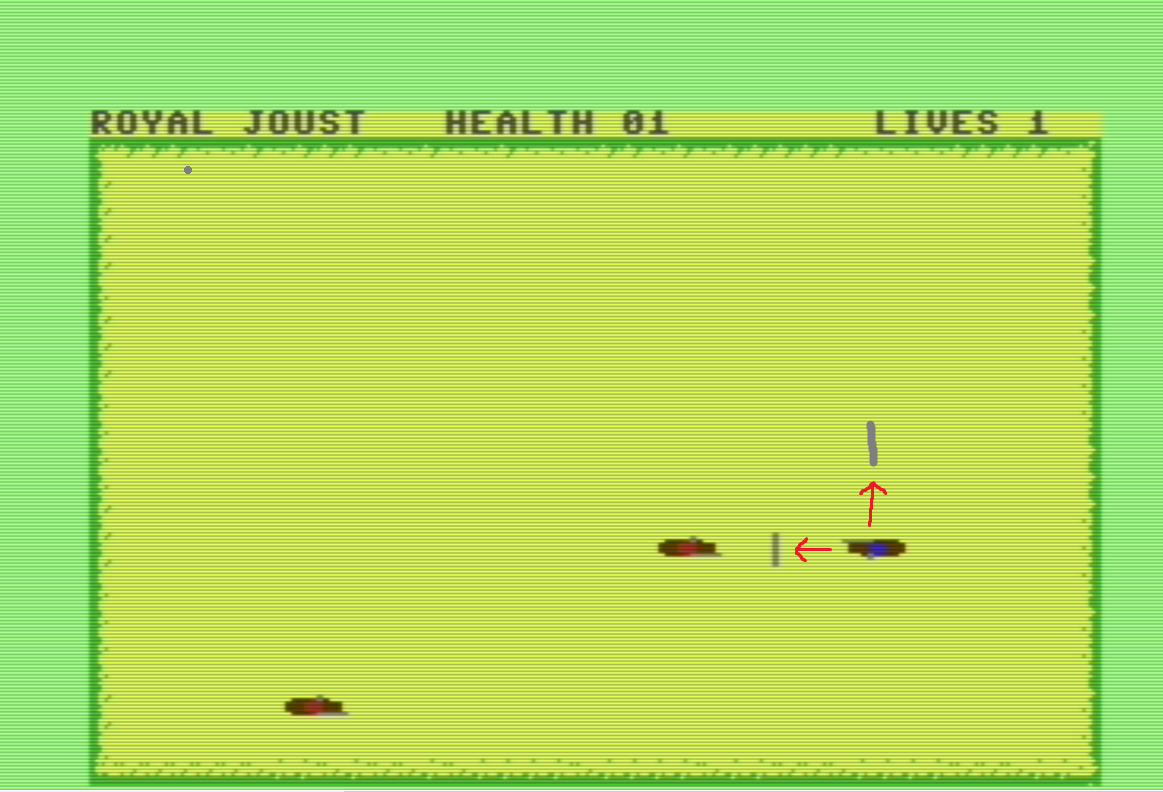
Also whenever an enemy is hit the game stops, displays the current 2 player score in a 0 - 0 format and interrupts game flow. Haven't checked the 1.3.0 update yet but hoping to limit these "shots" to only appear briefly as if they were thrusts of a lance to destroy enemies.
Is it also possible to change sprite when an enemy is "hit" like an explosion for a ship being hit or to show a dehorsed knight on the ground?
There seems to be another color problem. Looks like the Window color is overwriting some tile colors.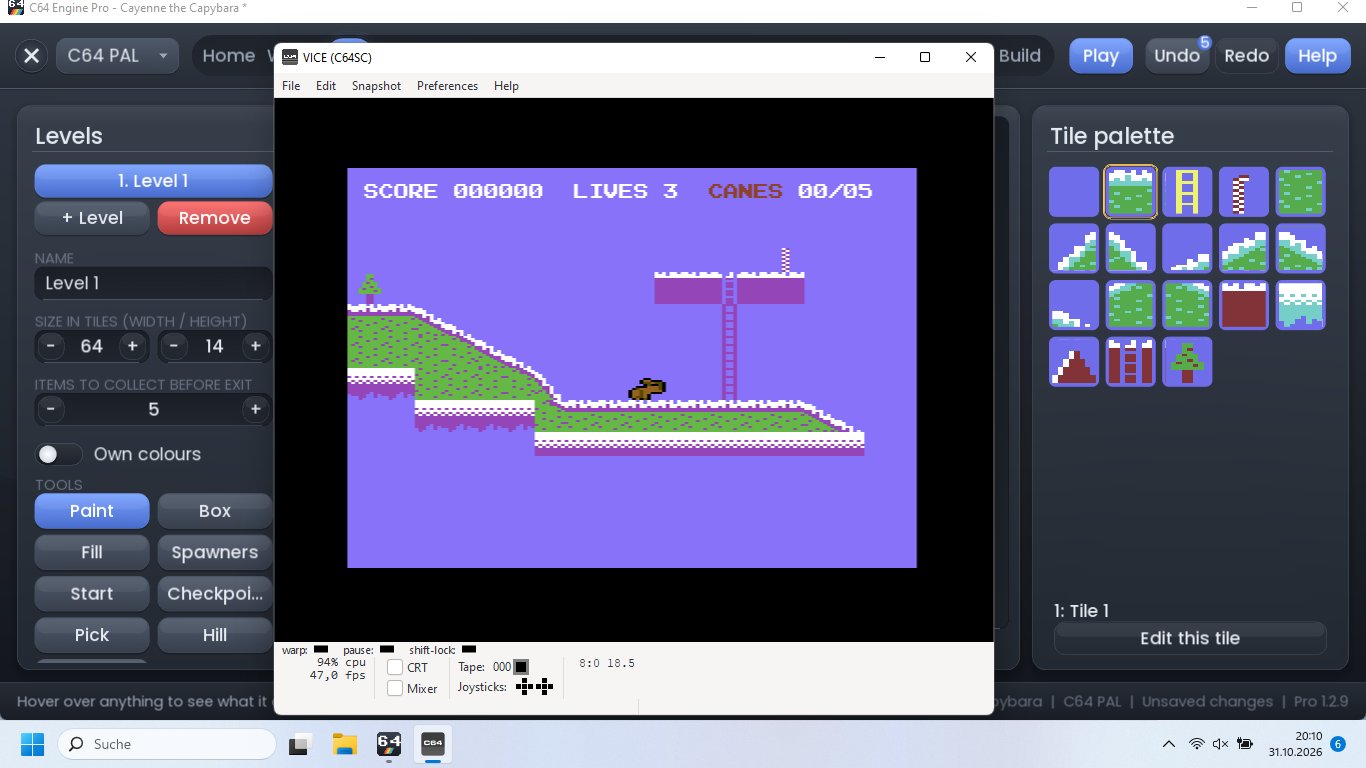
I see, yes, looking into that now. Will be sorted in the next update along with other fixes.