

Who doesn't know about AI in our modern world? AI with its distinct functionality is all the rage at the moment. The modern world is making use of AI for different purposes like generation, automation, analysis, or forecasting in various fields like education, finance, medicine, and even retail. Given its popularity, many companies are setting foot in the AI industry, coming up with different products with a variety of features.
One such development is the Claude 3 AI model that was recently launched by Anthropic. This model is very hyped at the moment as it introduced many improved aspects of AI functionality. In this article, we will go through its features and different models to understand what Claude 3 is and what it offers.
What is Claude 3?
Claude 3 is a recently launched AI model by Anthropic on March 4, 2024. This AI platform has three main parts: Claude 3 Haiku, Claude 3 Sonnet, and Claude 3 Opus. The platform is well-curated and is a benchmark against many of its competitors as it can handle complex cognitive tasks accurately. Claude 3 with its three models is used for many purposes like chatbots which can be done in real-time, extraction of data, and automation. At the moment, Claude 3 Haiku is yet to be released but Sonnet and Opus are already in the market.
Complex commands or requests are easily followed by this newly developed model and the request can have outputs in JSON format as well for better understanding. The model is developed in such a way that it can understand requests much better than models developed before, thus the output is much more accurate and contextual.
Three Models of Claude 3
There are three models in Claude 3, let's take a deeper look at these models to understand them better.
1. Claude 3 Opus
This model is used to solve problems that don't have definite answers or have many answers to them, thus any highly complicated request. This means the model is very intelligent as that is the only way such a problem can be solved accurately. For any complex research, forming strategy, or automation that deals with complex topics, users can make use of Opus to take care of it. Compared to the other two models, this model takes care of more complex issues and this is reflected in its pricing as it is much costlier.
Pricing: The inputs and Outputs are priced at $15 and $75 per one million tokens respectively.
2. Claude 3 Sonnet
If you are someone who has huge workloads like data processing jobs and deals with fields like optimization of sales, trend recognition, etc., then this model may be the best choice for you. Sonnet mainly takes care of processes like automation of simpler tasks, thus it is great at taking off workloads that can be easily automated, resulting in accurate outputs. This model is cheaper than Opus as it performs simpler tasks, balancing functions and costs efficiently.
But the simplicity of the tasks performed does not take away anything from the model, and it even has a huge context window of 200,000.
Pricing: The input and Output are priced at $3 and $15 per one million tokens respectively.
3. Claude 3 Haiku
The importance of Claude 3 Haiku is undeniable even though it is the smallest among the three models. The Claude 3 Haiku shines for its efficiency and speed; therefore, it is used for tasks like real-time response and consumer communication, content moderation for social media, and other cost-saving tasks. Compared to the two other models, the Claude 3 Haiku is made for simpler tasks and is more cost-friendly and affordable.
Pricing: The input and output are priced at $0.25 and $1.25 per one million tokens respectively.
The Functionality of Claude 3
Let us go through the functionality and usefulness of the Claude 3 model. The model is a leading platform in the AI industry for many of its functions. Let's take a look at some of these functions that make Claude 3 a great platform.
Firstly, for any cognitive task, Claude 3 is very suitable as it can take care of complex requests. This AI model is also great at coding and generating codes for different purposes. Additionally, its visual block feature, which enables Claude 3 to process images both single and multiple, makes this model a distinct platform. Lastly, this model is meant for global use, and the translation of languages by processing a variety of different languages is another strong feature of Claude 3.
What is Claude 3 API
Claude 3 API is an AI platform for building and deploying AI applications. This application is built in such a way that it lines up with human values and is ethical, thus belonging to the constitutional AI. The application is very transparent with its operation, and users will be able to understand why it performs the way it does and the decisions it makes.
Claude 3 API is a language model and was trained through huge data of text to understand and generate results in human language.
Key Features of Claude 3 API
- The AI model can understand not only text input but audio, images, and videos as well.
- Another key feature is few-shot learning which means the model can learn with only a few examples without extensive training.
- With new data, the AI model can update itself as it learns more and more.
- Features such as fine-tuning and customization are also available.
Benefits of Claude 3 API
- The application is great for the process of translating, summarizing, or any form of natural language processing tasks.
- This is an AI system that was designed with ethical principal considerations which is vital for an AI system.
- It has set a benchmark in the AI industry right after its deployment proving its credibility.
Different Types of Claude 3 API
One main thing to note while using Claude 3 API is Claude 3 does not use the Completion API. Rather, there are three other main APIs which we will discuss in brief.
1. Messages API
Messages API is similar to the Completion API of Claude 2. However, the way it works is different. Messages API operates by adding a message argument that acts as a list of dictionaries with roles and contents. The outputs or results can be formatted differently, such as in markdown format if IPython Markdown is used.
You can also utilize a system prompt provided by Claude 3 for customized results. For example, if you need an output in your mother tongue, you can use this prompt to achieve it.
Another feature is the vision block, which indicates its visual capabilities. The model can process multiple images or a single image to fulfill user requests involving images. Processing multiple images may be more complex, but it can handle it smoothly.
2. Claude 3 Streaming API
By understanding what streaming means, we can grasp the concept of an API; streaming can be easily termed as the continuous generation of output text instead of producing one output after the whole process of generation is done. This process minimizes the latency perceived, and in this process, the output generation is done token by token.
3. Claude 3 Async API
Synchronous API and Asynchronous API are the two forms of API. Synchronous API does not take any other calls before a response is received as it works on requests in a sequence. However, Asynchronous API can handle or receive multiple requests or calls simultaneously without blocking any requests, making it more efficient and scalable for users. Hence, we can say that Async is an efficient and scalable API.
Examples of Using the Claude 3 API
One example of using Claude 3 API will be in content creation where you can use it for automation.
- For example, if you are writing a report or an essay, you can automatically generate the content. Users can summarize, extract content like the outline of certain topics, and can also categorize and classify the content. Moreover, you can also do a plagiarism test with Claude 3 API.
Another instance will be using it for customer services or support.
- By using Claude 3 API, a chatbot can be created that can run automatically. FAQs can also be curated, and users can analyze the feedback received on the applications using Claude 3..
The Combination of API
Another feature of Claude 3 is the ability to combine different APIs according to the needs of the user. Let's take an example of Streaming API and Async API; these two functions can be combined when the Async client's stream function is used. This means multiple requests can be received at a time with the responses streamed.
Best Practices for Using Claude 3 and its API
Claude 3 API provides many applications and features, but the best practice to ensure that users can get the finest experience with all the features will be to thoroughly understand the application. Go through the functions of Claude 3 API thoroughly while at the same time understanding its limitations. This way, you can decide when and where to use the application to maximize its benefits and know when not to rely on it based on its limitations.
Privacy is another critical concern for any user, and ensuring that all information used is secured and properly protected is key. Thus, to have the best experience, one should ensure all necessary precautions are taken when security is concerned.
How do you Access Claude 3?
Claude 3 can be accessed in three ways, which are Claud Chat, Workbench, and API and SDK.
1. Workbench:
If you want to access Claude 3 Opus, you can sign in to Anthropic API and then click on the Workbench tap where you can select the Claude 3 Opus model.
2. Claud Chat:
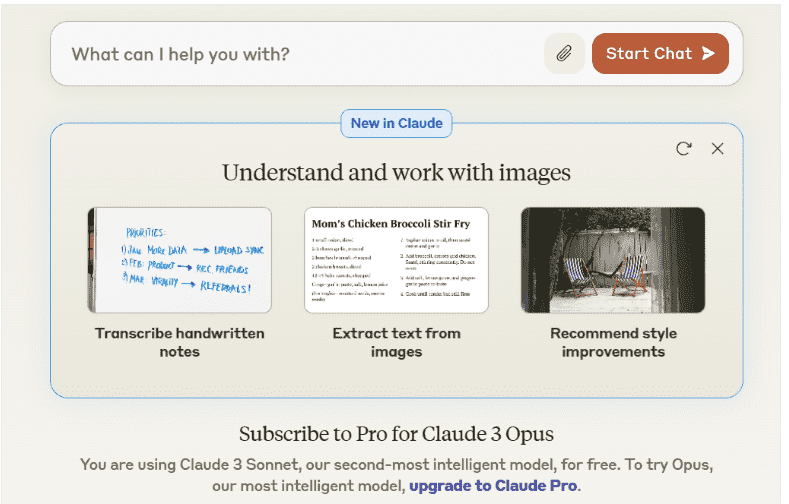
This is a very responsive chat interface that can be easily accessed by signing in the claude.ai/chat. This is one of the most simple and free ways to access Claude's AI model.
3. API and SDK
API are some of the most common ways to access Claude 3. Software Development Kits (SDK) are provided by Claude 3 for Typescript and Python. At the same time, Rest API with the curl command can be used to access the model.
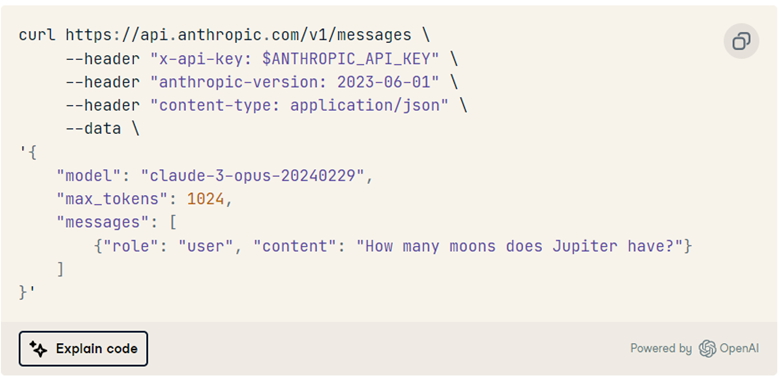
Claude 3 Python Software Development Kit(SDK)
Let's further discuss the SDK provided by Claude 3 to understand it better. Claude 3 Python SDK can be used to generate customized responses. Here's how one can use the Python SDK:
- Get the API Key: First, obtain the API key provided by Anthropic.
- Install the Anthropic Python Package: Install the Python package provided by Anthropic, which includes the SDK.
- Set up the API Key Environment Variable: Set up the API key as an environment variable. This can typically be done using tools like DataLab or by directly setting it in your environment configuration.
- Create a Client Object: Use the API key to instantiate a client object in Python. This client object will allow you to interact with Claude 3 API programmatically, making requests and receiving responses as needed.
This setup allows users to leverage Claude 3's capabilities through Python, enabling customized responses and integrating AI functionalities into their applications or workflows seamlessly.
Benchmark of The Model
The model right after its deployment set multiple records with many improvements in AI’s functionality. It has outperformed both GPT-4 and Gemini 1.0 Ultra with its record-setting ability in math solving, undergraduate and graduate level reasoning, coding, reasoning over text, and so on.
It serves as a standard against many high-performing large language models and is highly intelligent performing many complex tasks efficiently making it a landmark in going toward the achievement of general intelligence.
Claude 3 Opus in particular has a benchmark against GPT-4 and Gemini 1.0 Ultra mainly in evaluation for MMLU, GSM8K, and GPQA. This model has improved in many fields, for instance, generating responses, analysis, coding, forecasting, and so on, marking a huge development in the AI industry.
Also Read: Top 20 LLM (Large Language Models)
Steps to Use Claude 3
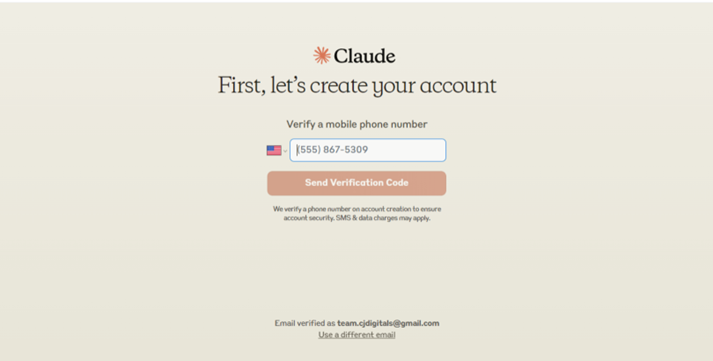
1. Create an account:
First, go to the Claude 3 website and create an account using your email and phone number.
2. Write the prompt:
The next step is to write a prompt that you are satisfied with and then hit send. Claude will then generate an output with a retry button as an option if you are unhappy with the output.
3. Copy or report:
After the output generation, you can either copy the generated output and give a thumbs up as positive feedback or you can also report the output if it's not to your liking.
Must Check:
Conclusion
In this article, we have done a deep dive into the Claude 3 AI model which was recently launched. We have gone through the different models of the Claude 3 family while at the same time discussing all the different APIs it features. We have also discussed briefly the Python SDK Claude 3 provides and how to use the different methods and features to access the AI model.
While going through every point provided, we can understand that this model is a development and a benchmark in the AI industry with many new features added. It is a development that has made AI more intelligent and enabled it to perform many more functions smoothly and smartly.
