

Next.js is a framework built on top of React that makes it easier to create fast and modern websites. It handles things like page rendering, routing, and performance automatically, so developers can focus on building features.
- Next.js can be used for both frontend (UI) and backend (API routes), making it a full-stack framework.
- Server-Side Rendering (SSR) Pages are generated on the server at request time, giving better SEO and performance.
- Static Site Generation (SSG) Pages can be pre-built at build time for faster loading and scalability.
- It simplifies routing, styling, and performance so beginners can build modern apps without extra setup.
"Hello, World!" Program in Next.js
// app/page.js
export default function Home() {
  return <h1>Hello, World!</h1>;
}
Output

- The code resides in app/page.js, defining the home page for the root route (/).
- Declares a functional component named Home that renders the page content.
- Outputs JSX, displaying "Hello, World!" inside an <h1> tag.
- Exports the Home component, enabling Next.js to render it as the default page.
Before starting to learn Next.js we need to install Next.js on our system
Working of Next.js
Next.js works by receiving a user's request, rendering the page using the appropriate rendering strategy, and delivering an optimized page to the browser. It combines React with built-in features such as routing, rendering, and performance optimizations to provide fast, SEO-friendly web applications.
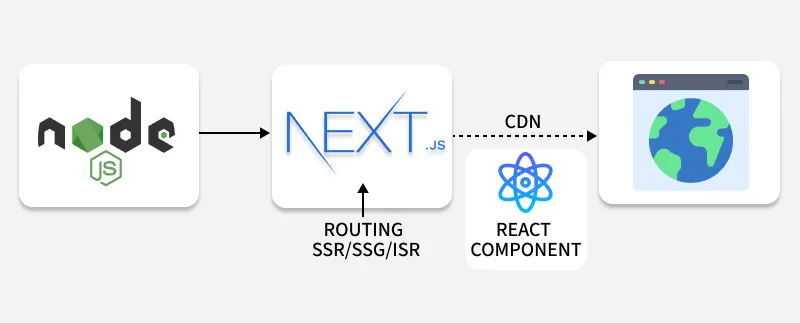
- Receiving the Request: When a user requests a page, the request is handled by Node.js, where the Next.js application is running.
- Rendering the Page: Next.js determines how the page should be rendered using Server-Side Rendering (SSR), Static Site Generation (SSG), or Incremental Static Regeneration (ISR), and generates the required HTML from React components.
- Delivering the Page: The generated HTML, CSS, and JavaScript are sent to the browser, where the page becomes interactive, providing a fast and optimized user experience.
