

An operating system acts as an intermediary between the computer hardware and the user. It provides a controlled interface between users/applications and computer hardware and manages system resources.
- It provides an environment in which users can execute programs conveniently and efficiently.
- The operating system's kernel remains active when the computer is running and manages system resources and provides essential services to programs.
- It assigns resources such as memory, processors, and input/output devices to processes that need them.
Operating System and User Interaction
Every general-purpose computer consists of hardware, an operating system, system programs and application programs.
- The hardware includes the CPU, main memory, storage devices, and I/O and peripheral devices.
- System programs include compilers, assemblers, loaders, editors, utilities, and command interpreters.
- Application programs are user-level software that perform specific tasks.
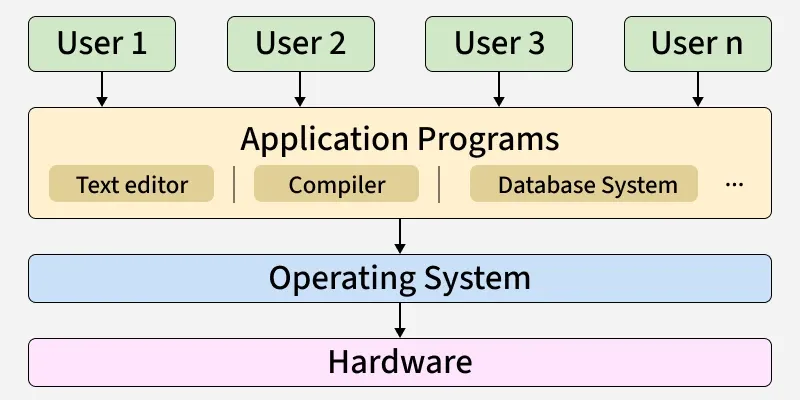
The OS kernel remains active while the computer is running and manages hardware resources and provides services to system and application programs. The OS itself is not only a user interface. Instead, it provides an interface for user interaction, typically through:
- Command-Line Interface (CLI), (e.g., Bash, PowerShell)
- Graphical User Interface (GUI), (e.g., Windows desktop, macOS Finder)
Note: At the core of the OS lies the kernel, which provides the core interface between hardware and software and handles low-level operations such as process management, memory management, file system management, and device management.
Goals of Operating System
The goals of an operating system are:
Primary Goals
The primary goals of an operating system (OS) are to provide an easy-to-use and convenient environment for executing user programs.
- User Convenience: It should be easy to use, providing a user-friendly interface and making it simple to interact with the system.
- Program Execution: It facilitates the execution of user programs by providing the necessary environment and services for them to run.
- Resource Management: The OS manages and allocates the computer's resources, including the CPU, memory, disk storage and input/output devices, to ensure fair utilization.
- Security: The OS protects the system and user data from unauthorized access, ensuring confidentiality, integrity and availability of information.
Secondary Goals
Secondary goals of an operating system focus on improving overall system performance and stability. They ensure efficient use of resources and make the system reliable and robust.
- Efficient Resource Utilization: It should aim to maximize the performance and utilization of computer resources like CPU, Memory and I/O devices, ensuring that the system runs smoothly and efficiently.
- Reliability: The OS should be robust and reliable, able to handle errors and exceptions gracefully and maintain stable system operation.
Components of Operating System
Two commonly discussed parts of an operating system are the kernel and the shell.
- Shell is a command interpreter that provides an interface for users to interact with the operating system. It accepts user commands, interprets them, and invokes the appropriate programs or system services.
- Kernel is the core component of the operating system. It provides the interface between software and hardware and manages resources such as the CPU, memory, and I/O devices.
List of Common Operating Systems
There are multiple types of operating systems each having its own unique features:
- Windows OS: Developed by Microsoft. Used in personal computing, business environment, gaming.
- macOS: Developed by Apple. Used for creative industries (design, video editing, music production), Personal computing and Professional environments.
- Linux: Initially created by Linus Torvalds and now developed collaboratively by a global open-source community. It is widely used in servers and data centers, development environments, embedded systems, and personal computers.
- Unix: Originally developed at AT&T Bell Labs. Various commercial and open-source Unix and Unix-like systems are used in servers, workstations, development environments, research, and academic settings.
Functions
- Platform for Application Programs: It provides a platform, on top of which, other programs, called application programs can run.
- Managing Input/Output (I/O): It manages system resources such as memory, monitors, keyboards, printers, and other I/O devices to ensure their efficient and fair utilization.
- Multitasking: It manages memory and allows multiple processes to execute concurrently in their own address spaces. Processes can communicate using mechanisms such as shared memory and message passing.
- Memory and File Management: It manages the computer’s main memory and secondary storage. Additionally, it allocates and deallocates memory for tasks and applications.
- Provides Security: It helps protect the system and applications through mechanisms such as authentication, authorization, access control, and isolation.
For more, refer to Need of Operating Systems.
Factors to Consider When Choosing an Operating System
There are so many factors to be considered while choosing the best Operating System for our use. These factors are mentioned below.
- Price Factor: Cost is an important factor when choosing an operating system. Some operating systems, such as Linux distributions, are available free of charge, and others may involve licensing costs or require specific hardware.
- Ease of Use: Some operating systems are designed to be more user-friendly, while others may require more technical knowledge. Users should choose an operating system that matches their level of expertise and requirements.
- Compatibility Factor: Some operating systems support a wider range of applications and hardware than others. Users should choose an operating system that supports the applications and hardware they need.
- Security Factor: Security is an important factor when choosing an operating system. Modern operating systems such as Windows, macOS, and Linux provide various security features, and the overall security of a system also depends on proper configuration, regular updates, and responsible usage.
Related Posts
- 32 vs 64-bit Operating Systems
- Functions of OS for more details
- History of Operating Systems for more about history.
