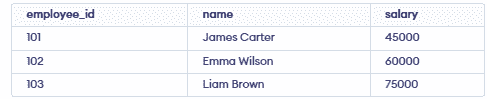
SQL operators are symbols or keywords used to perform operations on data in SQL queries.
- Perform operations like calculations, comparisons and logical checks.
- Enable filtering, calculating and updating data in databases.
- Essential for query optimization and accurate data management.
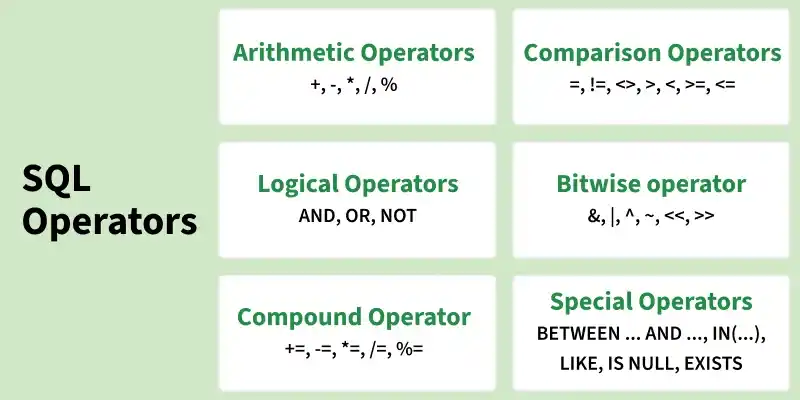
Arithmetic Operators
Arithmetic operators are used to perform mathematical operations on numeric values.
| Operator | Description | Example |
|---|---|---|
+ | Addition | 10 + 20 |
- | Subtraction | 20 - 10 |
* | Multiplication | 10 * 20 |
/ | Division | 20 / 10 |
% | Modulus | 10 % 3 |
Example
SELECT10 + 20 AS addition,20 - 10 AS subtraction,10 * 20 AS multiplication,20 / 10 AS division,10 % 3 AS modulus;
Output:

- Arithmetic operators are useful for calculations such as salaries, prices, quantities, discounts and totals.
Comparison Operators
Comparison operators are used to compare two values or expressions. They are commonly used with the WHERE clause to filter records.
| Operator | Description | Example |
|---|---|---|
= | Equal to | 10 = 10 |
!= | Not equal to | 10 != 20 |
<> | Not equal to | 10 <> 20 |
> | Greater than | 20 > 10 |
< | Less than | 10 < 20 |
>= | Greater than or equal to | 20 >= 20 |
<= | Less than or equal to | 10 <= 20 |
Example:
Consider an employees table:
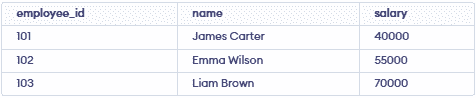
The following query uses the greater-than operator:
SELECTname,salaryFROM employeesWHERE salary > 50000;
Output:

The query returns employees whose salary is greater than 50000.
Logical Operators
Logical operators are used to combine or modify multiple conditions.
| Operator | Description |
|---|---|
| AND | Returns TRUE when all conditions are true |
| OR | Returns TRUE when at least one condition is true |
| NOT | Reverses the result of a condition |
Example:
SELECTname,salaryFROM employeesWHERE salary > 50000AND salary < 70000;
Output:

- Both conditions must be satisfied for a row to be returned.
Example:
SELECTname,salaryFROM employeesWHERE salary = 40000OR salary = 70000;
Output:

- The
ORoperator returns rows that satisfy at least one condition.
Special Operators
SQL also provides operators for specific filtering and conditional operations.
BETWEEN
The BETWEEN operator checks whether a value falls within a specified range.
SELECTname,salaryFROM employeesWHERE salary BETWEEN 40000 AND 60000;
Output:
- BETWEEN includes both boundary values.
IN
The IN operator checks whether a value matches any value in a specified list.
SELECTname,salaryFROM employeesWHERE salary IN (40000, 70000);
Output:
LIKE
The LIKE operator is used to search for a specific pattern in text values.
SELECTnameFROM employeesWHERE name LIKE 'A%';
Output:

- Here,
%represents zero or more characters.
EXISTS
The EXISTS operator checks whether a subquery returns at least one row.
SELECT *
FROM employees e
WHERE EXISTS (
    SELECT 1
    FROM employees
    WHERE salary > 50000
);
Output:
- The subquery checks whether at least one employee has a salary above 50000. If so, EXISTS returns TRUE and the query returns all employees.
IS NULL
The IS NULL operator checks whether a value is NULL.
SELECTnameFROM employeesWHERE manager_id IS NULL;
Output:

- This query returns employees whose manager_id is NULL, meaning they do not have a manager assigned.
IS NOT NULL
The IS NOT NULL operator checks whether a value is not NULL.
SELECTnameFROM employeesWHERE manager_id IS NOT NULL;
Output:
Bitwise Operators
SQL bitwise operators are used to perform operations on the individual bits of integer values. These operators work on the binary representation of numbers and are commonly used with flags, permissions and status values.
Types of Bitwise Operators
| Operator | Description |
|---|---|
& | Bitwise AND |
| ` | Bitwise OR |
^ | Bitwise XOR |
~ | Bitwise NOT |
<< | Left Shift |
>> | Right Shift |
Note: Bitwise operator support and syntax may vary between SQL database systems.
Example
Consider the following values:
SELECT12 & 10 AS bitwise_and,12 | 10 AS bitwise_or,12 ^ 10 AS bitwise_xor,~12 AS bitwise_not,12 << 2 AS left_shift,12 >> 2 AS right_shift;
Output
For a database system that supports these operators:

A bitwise AND operation can be used to check whether a particular permission is enabled:
SELECTemployee_id,name,permissionsFROM employeesWHERE permissions & 1 = 1;
Output:

The & operator checks whether the least significant bit of permissions is set to 1. This can be used to determine whether a particular permission flag is enabled
Compound Operators
Compound operators combine an arithmetic or bitwise operation with an assignment operation. They allow a value to be modified and assigned back to the same variable or column in a single statement.
Types of Compound Operators
| Operator | Description |
|---|---|
+= | Adds a value and assigns the result |
-= | Subtracts a value and assigns the result |
*= | Multiplies a value and assigns the result |
/= | Divides a value and assigns the result |
%= | Calculates modulus and assigns the result |
&= | Performs bitwise AND and assigns the result |
| ` | =` |
^= | Performs bitwise XOR and assigns the result |
Example
The += operator can be used to increase the salary of all employees by 5000.
UPDATE employeesSET salary += 5000;
Output: