

Type aliases allow you to create reusable names for existing types, making complex type definitions easier to read and maintain.
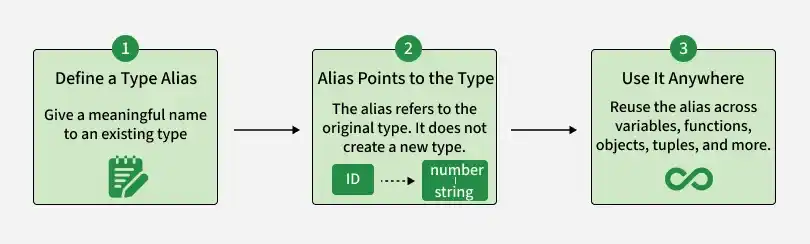
- Create reusable names for existing types.
- Work with primitives, objects, unions, tuples, and function types.
- Improve code readability and maintainability.
Note: Type aliases do not create new types; they simply provide an alternative name for an existing type.
Examples of Type Aliases
The following examples demonstrate how type aliases can simplify and reuse type definitions.
Example 1: Creating a Type Alias
A type alias can represent a union of multiple types, allowing variables to store values of any permitted type.
type Value = number | string | boolean;

let variable: Value;

variable = 1;
console.log(variable);

variable = "geeksforgeeks";
console.log(variable);

variable = true;
console.log(variable);
Output:
1
geeksforgeeks
true
- Value is a union of number, string, and boolean.
- Variables of this type can store any of these values.
- Assigning any other type results in a compile-time error.
type Value = number | string | boolean;

let variable: Value;

// Error
variable = () => {};
Output:
error TS2322: Type '() => void' is not assignable to type 'Value'.Example 2: Type Alias in a Function
Type aliases can simplify function parameters by defining reusable types.
type ID = number | string;

function displayId(id: ID): string {
    return `My ID is: ${id}`;
}

console.log(displayId("AF565"));
console.log(displayId(565));
Output:
My ID is: AF565
My ID is: 565
- ID allows both number and string.
- The function accepts either type while maintaining type safety.
Example 3: String Literal Type Alias
String literal type aliases restrict variables to a predefined set of string values.
type Answer = "yes" | "no";

let response: Answer;

response = "yes";
console.log(response);

// response = "neither"; // Error: Type '"neither"' is not assignable to type 'Answer'
Output:
yes
- Answer accepts only "yes" or "no".
- Any other value results in a compile-time error.
Example 4: Object Type Alias
Type aliases can define the structure of reusable object types.
type User = {
    name: string;
    age: number;
};

const user: User = {
    name: "Alen",
    age: 25
};

console.log(user);
Output:
{ name: 'Alen', age: 25 }- User defines the structure of an object.
- user must include both name and age with the specified types.
- Missing or incorrectly typed properties result in a compile-time error.
Example 5: Function Type Alias
Type aliases can define reusable function signatures.
type Add = (a: number, b: number) => number;

const add: Add = (a, b) => a + b;

console.log(add(5, 10));
Output:
15- Add defines a function that accepts two numbers and returns a number.
- add must match the defined function signature.
- TypeScript enforces the parameter and return types.
Example 6: Tuple Type Alias
Type aliases can also define reusable tuple types.
type Point = [number, number];

const coordinates: Point = [10, 20];

console.log(coordinates);
Output:
[10, 20]- Point defines a tuple containing exactly two numbers.
- coordinates must follow the specified tuple structure.
- TypeScript ensures the tuple contains the correct number and type of elements.
