AI Controls IPhone Via ESP32

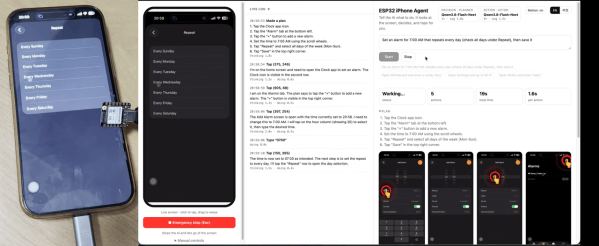
Do you want to get an AI agent to do something to an iPhone? You could try and jailbreak the device and do some heavy software hacking, or… you could grab a microcontroller off the shelf and have it do the hard work. [Henry Yuan] explains how to achieve this with an ESP32.

The first step is getting an AI agent access to the current state of the phone screen—which [Henry] achieves with AirPlay screen mirroring and UxPlay. A Gstreamer pipeline is then used to feed the screen as a JPEG stream to the AI agent of your choice. Then comes control, which is achieved by an ESP32-S3 acting as a USB-HID device, emulating both USB mouse and keyboard. With iOS AssistiveTouch enabled, this gives the agent control over inputs to the device. From there, it’s up to the AI agent to figure out the actions to make to achieve the desired behavior, which is obviously very use-case specific.

It might sound a little convoluted, but this approach has benefits. There’s no requirement to have an Apple Developer Account, or XCode, or a Macintosh at all. You can just get your agent tinkering away on the phone without any of that fussy overhead. We’ve featured some other great iPhone hacks of late, as well. Video after the break.

Continue reading “AI Controls IPhone Via ESP32” →

DIY Force Sensing Joysticks Are A Cheap Way To Go

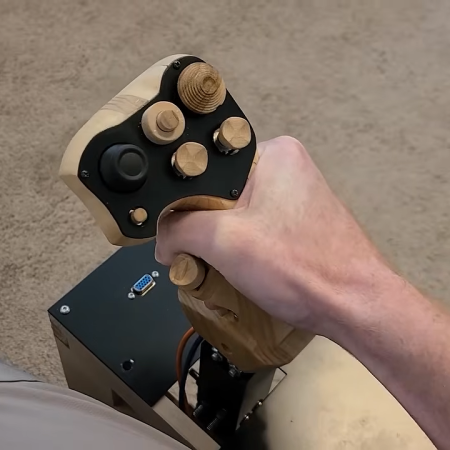
Traditional joysticks typically use potentiometers or hall effect sensors to determine the displacement of the stick itself when moved by the operator. Force-sensing joysticks are considered more desirable for certain purposes like side-stick flight simulators, because they measure the force applied instead, as per the name. They can be expensive to buy off-the-shelf, but you can build a cheap set on your own if you know what you’re doing, as [tekasza] demonstrates.

The build that [tekasza] put together is based around the Teensy 4.0 microcontroller. It’s set up to read a series of load cells that determine the force applied to the stick in the X and Y axes. The cells are wired up to HX711 load cell amplifiers so they can be easily read by the microcontroller. The Teensy does the work to take the load cell readings and convert them into axis outputs for a USB HID game controller, allowing the stick to be used with just about any game or simulator on the market. [tekasza] has the stick integrated with pedals as well as a whole bunch of buttons and switches to control other simulator features, built up into a full seated sim setup.

If you’ve ever wanted to use a force-sensitive stick like modern fighter pilots do, this build could be very relevant to your interests. We’ve also seen plenty of other great sim hardware builds in recent years, too.

Continue reading “DIY Force Sensing Joysticks Are A Cheap Way To Go” →

Rendering 3D Prints From G-Code

Your CAD software generally has some rudimentary tools for rending images of your parts, from simply-textured models to more photo-realistic options. However, those renders are of the geometry you created—not how that geometry would look after it was sent to a 3D printer. Extrudio is a tool that aims to create more realistic renders for 3D printed parts.

Rather than rendering from the geometry of your model, such as by using an STL file, Extrudio uses G-Code instead. It creates its render based on the instructions your 3D printer uses to produce your part, sweeping a virtual bead of plastic along the toolpaths in the code. In doing so, it can realistically display layer lines in a 3D print and other artifacts of the printing process, like stair-stepping on spheres and curves. It can display the render in various contexts, from blank studio backgrounds to a number of “sets” like a bench or kitchen.

The tool’s website notes that this could be useful for generating images for those selling 3D printed parts online, though obviously the realism of actually printing and photographing a part would still be superior. Still, it could prove a useful tool for quickly pitching realistic images of a 3D printed part, particularly if it’s desirable to model different colors or print techniques without putting in the hours to actually produce them.

We’ve featured some other great 3D printing hacks lately, like this nifty trick for doing overhangs without supports.

Continue reading “Rendering 3D Prints From G-Code” →

How A British Engineer Homebrewed The Quietest Carbine

Hollywood has a lot to answer for when it comes to “silencers” on firearms. On screen, a suppressed pistol makes a pinging thud, and the bad guy in the next room flops to the floor. Real life is rather less cinematic. A suppressor takes the edge off the report, but it’s by no means quiet or silent. Hence why the term “silencer” is more of a colloquialism, and why “suppressor” is more appropriate.

Every so often, though, someone gets remarkably close to the movie version. The best-known example is probably the De Lisle carbine. A British commando weapon from the Second World War, it was cobbled together from bits and pieces and ended up being a stellar performer in the world of clandestine operations.

Continue reading “How A British Engineer Homebrewed The Quietest Carbine” →

Elgato Key Lights Get Matter Upgrade

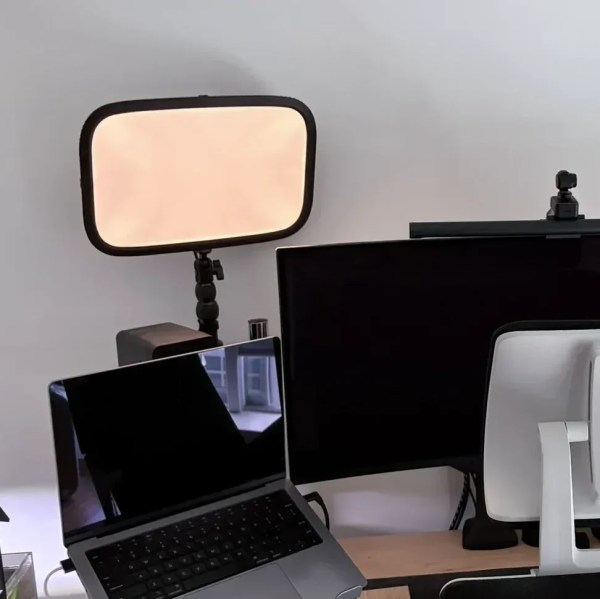
[Michael H Thiesen] had a couple of Elgato Key Lights in his home streaming setup. The only problem was that they would stop responding regularly, requiring a power cycle to get them going again. He never quite pinned down where the problem lay; instead, he set about replacing the light controllers wholesale to provide more reliable functionality.

In place of the original controllers, a pair of ESP32-C3 boards were substituted in. The original design simply had a Realtek controller chip wired into a PCA9635 LED controller, so the swap was as easy as plucking one out and wiring the new microcontroller in its place. The capable ESP32-C3 offers native Matter support, which enabled the new controllers to join [Michael’s] Apple Home setup natively. Running a firmware coded in Rust, the controllers offer power, brightness, and colour-temperature control right in Apple Home. As a bonus, there was no need to use Homebridge to get the lights hooked up to the smarthome setup anymore, eliminating a dependency and a possible source of occasional failures.

Design files are on Github for the curious. We’ve featured other great Elgato hacks before, too, like this nifty capture card firmware hack. If you’re tinkering with your own smarthome hacks, be sure to let us know on the tipsline.

Drum Machina Go! As A New Music Tool For The Game Boy

The Nintendo Game Boy is quite possibly the most popular console in the international chiptune community. You might have seen musicians cranking out tunes with LSDJ or Nanoloop, but now there’s a new option for writing bangers on the DMG. It’s Drum Machina Go!, put together by [audiowanderer].

The original Game Boy has a four-bit audio engine with two pulse channels, one waveform channel, and a noise channel. To that end, DMGo! gives you those four channels to play with, each with a 16-step sequencer. There’s also an FX section, ADSR controls, and various filtering options to make your sound juicier, richer, or grainier, depending on your taste.

There are also helpful sync options via the link port, such as for use with other Game Boys, or you can use PULSE OUT sync to hook up to your Teenage Engineering Pocket Operators or KORG Volcas if you have them. There are also fun features like the MANGLING FX which lets you decay and destroy your musical creations live by playing with the D-pad and buttons.

If you’re eager to try a new way to compose on the Game Boy, you can throw it on a flash cart or in an emulator and start tinkering away.  We’ve featured other fun Game Boy music hacks before, too, like this nifty project that turns it into a MIDI sequencer.

Continue reading “Drum Machina Go! As A New Music Tool For The Game Boy” →

Archiving The World’s Oldest Webcam Feed

FogCam is the oldest webcam feed that’s still up and running. Installed at San Francisco State University, it’s been slowly uploading a new image to the web every 20 to 60 seconds or so since September 30, 1994. Very few of those images have ever been saved, but [Justin Earl] has come along to fix that with Fog-Bank.

[Justin] was eager to have top-notch coverage of the FogCam, so set up four separate catchers across three separate networks to scrape images from the feed. He runs one on his own server, one on his home machine, and two small programs running on Cloudflare. Each catcher reports the time it grabbed a fresh image from the site. FogCam has never replaced an image within 19 seconds, so as long as one of the catchers grabs an image at least every 18 seconds, [Justin]’s system should be archiving everything that’s being captured.

Currently the archive hosts over 169,000 images across 377 days, though the majority of that content is from a 2019 archive effort when it was believed the camera would soon be shut down. More stats are available, too.

It’s not the most interesting view in the world, but it’s neat to see such a project continue running long enough to celebrate its 32nd birthday this week. We’ve featured other neat webcam-related content before, too. Meanwhile, you can go check out the live feed if you want to peer through FogCam yourself. Continue reading “Archiving The World’s Oldest Webcam Feed” →