Showing posts with label aerospace. Show all posts

Cores in space: The core memory module from a 1980 Spacelab computer

Spacelab was a reusable laboratory that could be carried in the Space Shuttle's cargo bay, providing lab space for astronauts and experiments.1 Because Spacelab was a European project, it used a French-built minicomputer, the Mitra 125 MS,2 rather than the Shuttle's main computers, IBM-built AP-101 systems. For storage, the Spacelab computer contained 128 kilobytes of RAM. Rather than silicon memory, the computer used magnetic core memory, with each bit stored in a tiny ferrite ring. In this article, I take a close look at this computer's core memory system.

The core stack from the Spacelab computer. I removed the top board to show the core planes.

The core stack from the Spacelab computer. I removed the top board to show the core planes.

The illustration below shows how Spacelab fit inside the Shuttle's cargo bay. The pressurized laboratory is the cylindrical module in the front of the cargo bay, connected to the Shuttle by a tunnel. Experiments were mounted on pallets behind the laboratory. The laboratory held three identical Mitra computers.3 One computer managed Spacelab itself, while the second computer managed the experiments. The third computer provided a backup in case of failures.

Spacelab was a pressurized cylinder in the Shuttle's cargo bay, connected to the Shuttle by a tunnel. It provided a laboratory for researchers to perform experiments. This illustration of Spacelab is from NASA, C-1976-4380.

Spacelab was a pressurized cylinder in the Shuttle's cargo bay, connected to the Shuttle by a tunnel. It provided a laboratory for researchers to perform experiments. This illustration of Spacelab is from NASA, C-1976-4380.

The photo below shows the core memory stack, removed from the computer. The core memory stack takes up roughly a third of the computer. The entire side panel of the computer detaches, and the core memory unit slides out. Since the computer is cooled by conduction, firmly attaching the core memory stack to the side panel kept it cool. The core memory stack consists of seven boards: a driver board, four core plane boards, a second driver board, and an interface board. Each board has two 160-pin connectors that plug into a large daughter board on each side, providing extensive connectivity between the boards. The daughter board on the right has another 160-pin connector that links the memory stack to the rest of the computer. (These connectors are the long blue connectors in the photo.)

The core memory stack in front of the Mitra computer. The circuit boards have been removed from the far side of the computer.

The core memory stack in front of the Mitra computer. The circuit boards have been removed from the far side of the computer.

How core memory works

One of the hardest problems for early computers was storage. Computers of the late 1940s and early 1950s stored data through techniques such as sound waves in mercury, spots on a CRT screen, or spinning magnetic drums, but these all had limitations. What computers needed was dense, inexpensive storage that was fast, reliable, and could be accessed randomly.

During World War II, Germany developed special magnetic alloys that could "flip" from one magnetic state to another. After the war, American researchers realized that these materials could be used for storing binary data: "It was completely obvious that you could make a memory with this material," in the words of Jan Rajchman. Different aspects of core memory were patented by various inventors (including independent inventor Frederick Viehe, An Wang at Harvard, Jan Rajchman at RCA, and Jay Forrester at MIT), leading to expensive patent battles. (IBM ended up paying $400,000 to Wang—who used the money to build the computer company Wang Laboratories—and $13,000,000 to MIT.) I view Jay Forester as the most important inventor, developing the design of practical core memory, researching magnetic materials, and building the first core memory in 1953 for the groundbreaking Whirlwind computer.

Core memory is based around a tiny toroidal magnetic core, one per bit.4 A core can be magnetized clockwise or counterclockwise to store a bit. The core can be magnetized by threading a wire through the core: running a current through the wire produces a magnetic field that magnetizes the core, while running a current in the opposite direction produces the opposite magnetization.

A key problem with core memory was how to wire the cores without an absurd number of wires: if each core had a separate wire, just 16 KB of storage would require over 100,000 wires. The solution was called "coincident current addressing". The cores are arranged in a grid, with horizontal and vertical wires, as shown below. By running a current through one horizontal wire and one vertical wire, the single core at the intersection was selected. But wouldn't that magnetize all the cores along the horizontal and vertical wires? The key was that the cores were constructed from special magnetic materials with a property called hysteresis: a small current leaves the core completely unchanged, while a larger current flips the core's magnetic state. The currents through the horizontal and vertical wires were carefully selected so each wire had half the current necessary to flip the core; where the wires intersected, the two currents provided sufficient magnetic field to flip the core.

Energizing an X drive wire and a Y drive wire selects one core, highlighted in yellow. Diagram adapted from Digital Computer Components and Circuits, R. K. Richards, p355

Energizing an X drive wire and a Y drive wire selects one core, highlighted in yellow. Diagram adapted from Digital Computer Components and Circuits, R. K. Richards, p355

The next step was reading the core. A sense wire was threaded through all the cores in the two-dimensional plane. To read a core, the X and Y select wires were driven to flip the desired core to the 0 state. If the core was already in the 0 state, nothing happened. But if the core was originally in the 1 state, the magnetic field changed as the core changed state. This induced a small current in the sense line, indicating that the core held a 1. Note that reading the value of a bit destroys that value. Thus, a core needs to be rewritten after reading, to restore the original data.

To access a word of memory at a time, core planes were combined into a three-dimensional stack (below). Since each plane held one bit of the word, a 16-bit word would have a stack of 16 planes. All the planes shared the signals to drive the X and Y lines, so a one-word column through the stack was accessed in parallel. Each plane had a separate sense line to read out the bit.

The core stack from the Saturn V LVDC (Launch Vehicle Digital Computer) consists of 14 core planes. This stack is at the US Space & Rocket Center. Photo from NCAR EOL. I retouched the photo to reduce distortion from the plastic case.

The core stack from the Saturn V LVDC (Launch Vehicle Digital Computer) consists of 14 core planes. This stack is at the US Space & Rocket Center. Photo from NCAR EOL. I retouched the photo to reduce distortion from the plastic case.

But how do you write different values to the different bits? The trick was to put an "inhibit" line through all the cores in a plane, running the inhibit line in the opposite direction to the X lines. Putting a current through the inhibit line would cancel out the current through the X line, preventing the core in that plane from being modified. To summarize, a read-write cycle consisted of first energizing a pair of X and Y lines to select a word and write a 0 to the column of cores in that word. The sense lines provided a readout of the bit values. Next, the X and Y lines were energized in the opposite direction to write a 1 to the cores. At the same time, the inhibit lines were energized for each plane with a 0 bit. Thus, the cores either flipped back to 1 or stayed at 0, as required. Many core memories, such as the one below, used a shared wire for sense and inhibit, so there were three wires through each core.

Closeup of an IBM 360 Model 50 core plane. The cores in this computer were called 19-32 because their inner diameter was 19 mils and their outer diameter was 32 mils (0.8 mm).

Closeup of an IBM 360 Model 50 core plane. The cores in this computer were called 19-32 because their inner diameter was 19 mils and their outer diameter was 32 mils (0.8 mm).

The final ingredient to make core memory practical was the diode matrix. The X and Y lines require driver circuits that can produce fast, bidirectional high-current (e.g. 600 mA) pulses. A core memory plane can have hundreds of these lines. Providing a separate driver for each wire would be very expensive, especially in the vacuum tube era. The solution was to put separate drivers at each end of the wire, with each driver supporting multiple wires. For a trivial example, suppose you have 9 vertical lines. Put three drivers (A, B, and C) on the top, each connected to three wires, and three drivers on the bottom (1, 2, and 3), each connected to three wires. By energizing a driver at the top and a driver at the bottom (e.g. B and 1), the corresponding wire will be energized. Now, N drivers on each side control N2 wires, supporting N4 cores in total.

Illustration of how "top" and "bottom" drivers work together to select a single line (red) through the core matrix. However, current can take alternate paths, such as the pink path.

Illustration of how "top" and "bottom" drivers work together to select a single line (red) through the core matrix. However, current can take alternate paths, such as the pink path.

Unfortunately, it's not quite that easy. Current can take "sneak paths" through the cores, such as the path in pink above. The solution is to add diodes to ensure that current can't take the wrong path. Since a wire needs to be driven with currents in both directions (to flip cores both ways), two diodes are required on each wire, as shown below, one in each direction. Each matrix input (A, B, etc.) is replaced with two inputs, one to drive each direction. (The horizontal wires also require diodes, not shown.)

Adding diodes ensures that current only takes the desired path.

Adding diodes ensures that current only takes the desired path.

Since each wire requires two diodes, core memories used many diodes. Fortunately, diodes were small and inexpensive, so a large quantity of diodes was manageable. The photo below shows the diode stack for the computer used in the Saturn V rocket, the Launch Vehicle Digital Computer.

Closeup of the diode matrix in the Saturn V LVDC. Diodes are mounted vertically using cordwood construction between two printed circuit boards.

Closeup of the diode matrix in the Saturn V LVDC. Diodes are mounted vertically using cordwood construction between two printed circuit boards.

Originally, core memories were tediously constructed by hand. For the Whirlwind computer, it took a full 40 hours to wire a 64×64 core plane. Companies such as IBM soon developed automated techniques to manufacture core memory, and the price dropped by a factor of two every two years, similar to Moore's Law.5 Core memories became fast, inexpensive, and reliable, and were the most popular form of main-memory storage until semiconductor memory took over in the 1970s.

The Spacelab computer's core memory

The Spacelab computer's memory was manufactured in 1980, a late date for core memory, so it is advanced and high density. The photo below shows one of the four core plane boards from the computer. Each board holds 16K of 18-bit words (32 KB), so the computer has 128 KB of RAM in total. The computer is a 16-bit computer, but each word also has a parity bit and a "storage protect" bit, bringing the total to 18 bits. (The storage protect bit provided write protection on a word-by-word basis, preventing programs from being accidentally overwritten. Because core memory is nonvolatile, a program could be loaded into memory once and would be immediately available every time the computer was powered on.)

One of the core memory boards from the Spacelab computer.

One of the core memory boards from the Spacelab computer.

The core memory board is arranged with 1024 vertical (Y) wires and 288 horizontal (X) wires, supporting 294,912 lithium ferrite cores. These very thin wires are soldered to tiny pads on the printed-circuit board. The board supports 18 bits, which is visible as 18 alternating stripes of green and copper because alternating sense lines have different colors. The board has 36 sense lines: the left and right halves of the board have independent sense lines to reduce noise, so the board has 36 sense lines for 18 bits. The sense wires pass through four holes in the board (green arrows) and are soldered on the back of the board.

The photo below shows a close-up of the cores. Each core is approximately 32 mils (0.8mm) in diameter, the same as the IBM System/360 cores shown earlier. However, the cores are stacked much closer, with only a small gap between cores. The X and Y select lines are copper-colored, while the sense lines are green. (The wires are all enameled to prevent short circuits.) The sense wires loop around at the left, forming a single circuit through each bit section. Half the Y lines form loops at the bottom; the other half form loops at the top. Thus, each Y line passes through the plane twice in a U-shaped path, which will turn out to be important.

A close-up of the cores. I think that some rows tilt left and some tilt right to ensure that the sense lines keep the same polarity when they switch direction. Photo courtesy of CuriousMarc.

A close-up of the cores. I think that some rows tilt left and some tilt right to ensure that the sense lines keep the same polarity when they switch direction. Photo courtesy of CuriousMarc.

The other side of each circuit board holds the sense amplifiers and the diode matrix for the core plane. The diode chips are the square black packages, each containing 16 diodes for 8 core lines.6 In the red-outlined regions, one end of each vertical U-loop is connected to a diode chip; the lines of diagonal holes are the vias that pass each signal through the board. The other end of each vertical U-loop is connected to one of the blue board connectors on the side; these vias are in the blue-outlined regions. The horizontal lines use the diode chips and vias in the green regions. One end of each line is connected to a diode chip, while the other end is connected to a board connector through traces on the other side. Note that some vertical lines connect to the diode chips at the top of the board, while others connect at the bottom. Similarly, some horizontal lines connect at the left while others connect at the right.

The back side of the core plane board holds the diode matrices and sense amplifiers.

The back side of the core plane board holds the diode matrices and sense amplifiers.

The central region (yellow) holds 18 sense amplifier chips, the black DIP integrated circuits, each containing two amplifiers.7 The white packages are resistor packages, holding multiple resistors to bias and terminate the sense amplifier lines. The wires from the sense amplifiers are connected as twisted pairs that are soldered to the board right next to the corresponding sense amplifier chips. Using twisted pairs for the whole distance prevents the wires from picking up electrical noise, which could overwhelm the tiny signals in the sense wires. The sense wires pass from one side of the board to the other through four holes in the board (yellow arrows), and then are glued down as they traverse a significant distance on the board. (It must have been difficult to manufacture the board without breaking the tiny, fragile wires.)

Each sense wire loop forms a twisted pair that is fed to the other side through a hole in the circuit board. Above the hole, you can see a gray blob where
sense wires were spliced for some reason.
Also note how alternating vertical wires are soldered to the
circuit board, with circular vias connected to the other side. The other vertical wires form loops.
are soldered to the circuit board

Each sense wire loop forms a twisted pair that is fed to the other side through a hole in the circuit board. Above the hole, you can see a gray blob where sense wires were spliced for some reason. Also note how alternating vertical wires are soldered to the circuit board, with circular vias connected to the other side. The other vertical wires form loops. are soldered to the circuit board

Detecting signals on the sense lines is tricky because the pulses are very small, a few millivolts. Because the sense lines run next to the X drive lines, they can easily pick up noise from the high-current pulses on the X lines. To minimize this noise, the sense lines cross each other between two plane sections, forming a "bow tie", as shown below. The result is that an X line runs next to the positive sense line for half the length and the negative sense line for the other half. Thus, the induced noise cancels out.

A close-up of the sense lines. The 16 sense lines in the middle are green, while the sense lines above and below (as well as the X lines) are copper. Note that the sense lines cross, while the X lines continue horizontally. The large circles are vias through the board.

A close-up of the sense lines. The 16 sense lines in the middle are green, while the sense lines above and below (as well as the X lines) are copper. Note that the sense lines cross, while the X lines continue horizontally. The large circles are vias through the board.

The core memory in the Spacelab computer used a different architecture from a typical core memory, improving performance by eliminating the inhibit line. This architecture was called a 2½D memory.8 If you're familiar with core memory, the lack of inhibit lines may seem puzzling: how do you write 1 to some bits and 0 to other bits? The trick is to have separate X driver circuitry for each bit.9 When writing data, the X lines are only energized for bits that receive a 1; the other lines are left unenergized, so the bits remain at 0. The disadvantage is that instead of one set of X driver circuits, you now need one set for each bit, a factor of 18 more for an 18-bit word. However, with the development of core drivers on integrated circuits, the cost of the additional driver circuitry became less significant.

The memory system used an technique called phase reversal to cut the number of vertical drivers in half. Recall that pairs of vertical wires are joined by a U-connection. By driving the wire in a particular direction, the left side or the right side of the pair can be selected. For example, the drawing below shows how the two wires select the left core, but not the right core. In the left core, both currents go through the core in the same direction, inducing a magnetic field in the toroid.10 But in the right core, the two currents cancel out, so there is no magnetic field created. But if the current in the vertical loop is reversed, the right core will be selected, rather than the left core. The point is that instead of using two drivers for the vertical wires, one driver is used, reversing the current to select the left or right core.

Connecting pairs of vertical wires into a U-shaped loop lets each driver control twice as many cores.

Connecting pairs of vertical wires into a U-shaped loop lets each driver control twice as many cores.

The diagram below shows the complex wiring for X drive wires. Each band of 16 wires corresponds to one bit in the 18-bit word, and has a separate sense wire. The top band of 16 X lines is connected to four contacts on the board connector; each contact is connected to four X lines through the curving PCB traces. The bottom band of 16 X lines is wired to diode modules on the other side of the board, connected through the round vias. (Each wire has the opposite connections—diode module or board connector—on the other end.)11 One group of four X wires is energized through the connector, while four wires are energized through the diode matrix, selecting one of the 16 X wires in the group.

The PCB wiring for the X lines.

The PCB wiring for the X lines.

Other boards in the memory stack

The memory stack has seven boards in total, arranged as a driver board, the four core planes, a second driver board, and an interface board. I haven't examined these boards in detail, but I'll give some preliminary information. The photo below shows one of the two driver boards. It provides the high-current pulses for the X and Y select lines. The board is crammed with specialized core memory driver chips12, along with a few logic chips to control the drivers. It has separate drivers for the two ends of the select lines, allowing the matrix selection described earlier.

One of the two memory driver boards. Click this image (or any other) for a larger version.

One of the two memory driver boards. Click this image (or any other) for a larger version.

Since there are two driver boards and four core memory boards, at first I thought that each driver board controlled two core memory boards. The configuration turns out to be more complicated, with one more layer of matrix selections to cut the number of drivers in half. To simplify slightly, consider the X lines on a core board to have left ends and right ends, both of which must be energized to activate a line. For the left ends, the first driver board powers core boards 1 and 2, while the second driver board powers core boards 3 and 4. The right ends are shuffled: the first driver board powers core boards 1 and 3, while the second driver board powers core boards 2 and 4. Now, if the first driver board powers the left and right ends, core board 1 is the only one with both ends active. If the first driver board powers the left ends while the second board powers the right ends, core board 2 is activated. Similarly, core board 3 or 4 can be activated. The point is that since each set of drivers is connected to two core boards, two sets of drivers are required instead of four.

The final board is the interface to the rest of the computer. It has many transistor arrays in DIP packages, along with many resistors. It seems that the board uses discrete transistors to drive the bus, rather than using interface chips, which is unexpected. The board has some wire-wrapped jumpers in the lower center region, presumably for configuration.

The interface board has some unused space in the lower left.

The interface board has some unused space in the lower left.

Conclusions

Core memory had a long life, surviving even as computers migrated from vacuum tubes to transistors and then integrated circuits, but eventually semiconductor memory made it obsolete.13 Core memories lasted even longer in aerospace applications since it had two key advantages over semiconductor memory: it retained data even without power, and it was resistant to radiation. The Spacelab computer, manufactured in 1980, was near the end of core memory's reign, so it is more advanced than a typical core memory system, with higher density, extensive use of integrated circuits, and the 2½D architecture. But eventually the high density, low cost, and low power consumption of semiconductor memory won out. In 1991, the Space Shuttle flew with upgraded main computers, the IBM AP-101S that used semiconductor memory instead of magnetic core. Spacelab's Mitra computers were also replaced, using the AP-101SL, which was based on the AP-101S but modified to support the instruction set and peripherals of the original Spacelab computer.14 Although core memory is now firmly in the past, it still lives on in the expression "core dump".

I plan to investigate the Spacelab computer some more. For updates, follow me on Bluesky (@righto.com), Mastodon (@[email protected]), or RSS. Credits: Thanks to Steve Jurvetson for providing the Spacelab computer. Thanks to CuriousMarc for photography and help disassembling the computer. AI statement: Despite the presence of the em dash, no AI was used in the writing of this article (details).

Notes and references

  1. It seems that 16 Shuttle flights used the Spacelab pressurized module, while 6 or 9 flights just used the unpressurized Spacelab pallets. (Why do sources never agree?) Originally, Spacelab was expected to be used for 30 flights every year (Status Of The Spacelab Program, 1974). ↩

  2. The Spacelab 125 MS computer was built by a French company called CIMSA, using the Mitra architecture created by CII. I explained the complex history of these companies in my previous Spacelab computer article, so I won't go into it here.

    On the ground, the Spacelab project used Mitra 125 S computers that were functionally identical to the Mitra 125 MS (details) computers that were used in space. A core memory board from a Mitra 125 S ground computer was described on EEVblog (video, video). The computers had identical architectures, but the 125 MS was militarized and designed for "severe environmental conditions" (details). The EEVblog memory board was manufactured by Ampex and has a different design from the board that I examined.
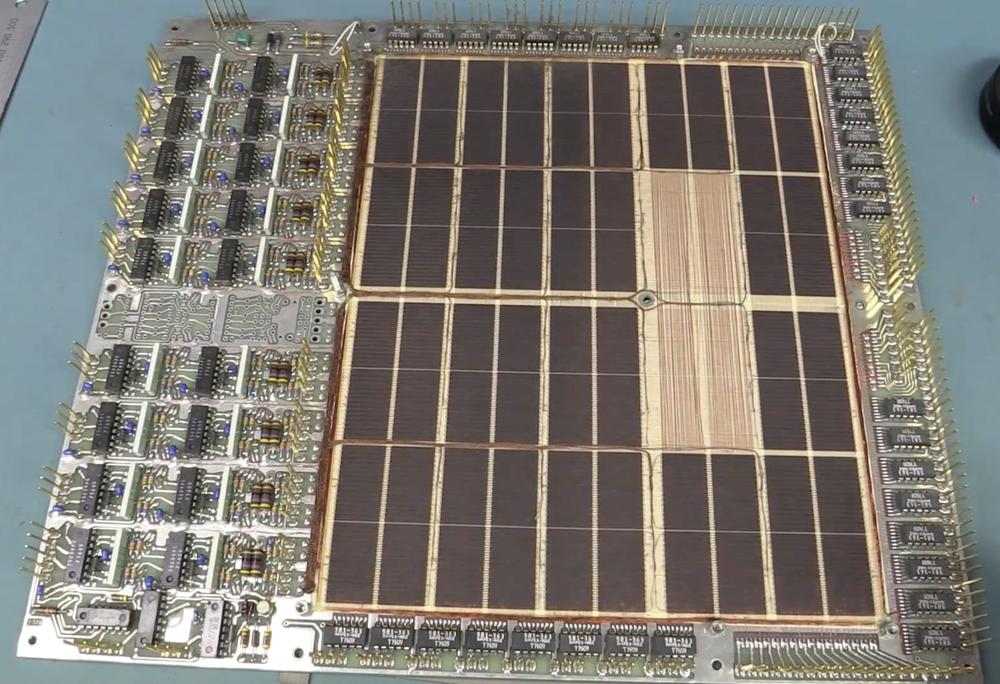
    The Mitra 125 S memory board, built by Ampex. Screenshot from EEVblog #668.

    The Mitra 125 S memory board, built by Ampex. Screenshot from EEVblog #668.

     ↩

  3. Spacelab was modular, so it could be be flown in different configurations. The habitable module could be flown in two different sizes, with experiment pallets mounted outside the module. Spacelab could also be flown without the habitable module, with experiments controlled from inside the Shuttle. In this case, the computers and other equipment were mounted in a smaller pressurized cylider called the "igloo". ↩

  4. I'm describing "standard" core memory, but there were many esoteric designs for core memory. One approach used two cores per bit. Another approach used cores with multiple holes, such as cubical BIAX cores, transfluxors with a large hole and a small hole, or IBM's three-hole design. Many of these approaches could read a core without erasing it (non-destructive readout), but almost all cores used standard toroids. ↩

  5. Later, companies discovered that it was cheaper to have core memories hand-manufactured in Asia and moved away from automated production. (See Memories that Shaped an Industry, p. 251. If you're interested in the history of core memory, this is the book to read.) ↩

  6. The diode array chip is marked FSA2977 and contains 16 diodes, 8 common-cathode and 8-common anode. Pins 2 through 9 are connected to eight core wires. Pin 1 is driven high, or pin 10 is driven low, depending on the desired current direction. I couldn't find a datasheet for this part, but it appears to be similar to the Motorola MAD1103 Core-Driver Diode Array or the Silicon General SG5772F.

    ↩A schematic matching the diode array, from the Motorola MC1103P datasheet.

    A schematic matching the diode array, from the Motorola MC1103P datasheet.

  7. The sense amplifiers are National Semiconductor DS5534 chips. Each IC contains two differential amplifiers, converting the tiny sense signals into logic signals. The strobe signals indicate when the amp should read a bit; the strobes come from the IC on the left side of the board, a 54150 dual 4-input NAND gate, 50Ω line driver.
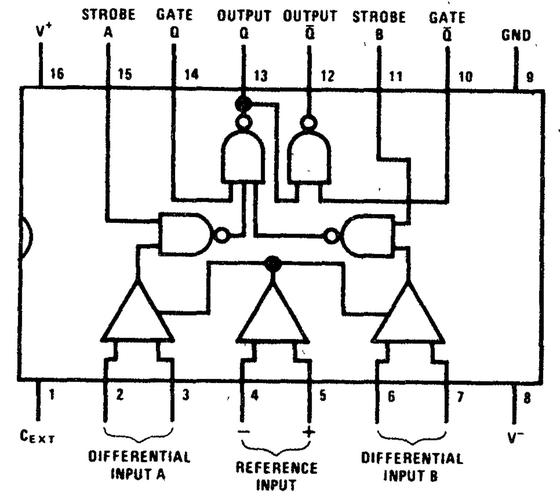
    Diagram of the sense amplifier, from the National Interface Integrated Circuits Databook.

    Diagram of the sense amplifier, from the National Interface Integrated Circuits Databook.

     ↩

  8. The 2½D memory architecture is described in detail in 2 1/2 D High Speed Memory Systems—Past, Present, and Future. Due to complicated factors and tradeoffs, the 2½D approach was attractive for systems of 16 Kword storage and above. In particular, eliminating the inhibit line boosted performance. IBM's Large Capacity Storage system used a 2½D architecture with just two wires per core to provide a megabyte of storage at a comparatively low cost, sharing the X line with the sense line. However, this approach turned out to be slow, so using three wires per core (as in the Spacelab computer) was more common. ↩

  9. Note that the 2½D architecture requires separate per-bit drivers along one axis, not both. Since cores require two currents to flip, inactivating one axis is enough to prevent the corresponding cores from flipping. ↩

  10. The direction of the magnetic field is given by the "right-hand rule": if you point the thumb of your right hand in the direction of the current, the magnetic field curves around the wire in the direction of your fingers.

    It may not be obvious how the currents add or cancel when the wires are in different directions. You can imagine moving the two wires until they are parallel, and then see if the currents are in the same direction or opposite. (This follows from Ampère's law, which states that the magnetic field around a curve (e.g. the core) is proportional to the net current through the corresponding surface.) ↩

  11. For reference, this footnote describes the details of the core plane wiring, probably in more detail than anyone wants. For the Y lines, there are 1024 vertical lines, forming 512 U-shaped loops. Half of these are connected at the top, and half at the bottom. One end of each loop is wired directly to a connector on the side, while the other end connects to a diode matrix. The connectors provide 32 lines that can act as a source or a sink. Each of the 32 lines is connected to 16 vertical wires, for 512 vertical wires in total. Each quadrant of the board has 8 of the 32 lines, connected to a group of 8 vertical wires, a second group of 8 vertical wires, and so forth for 16 groups.

    For the diode connections, the connectors provide 16 source lines and 16 sink lines. Each diode chip has one source line and one sink line, feeding 8 vertical wires. Each source and sink line is connected to four diode chips, one in each quadrant in a mirrored pattern. Thus, the 16 source lines and 16 sink lines are connected to 64 diode chips, feeding 512 vertical loops. (Since each quadrant of the board has unique direct connections and the diode connections within a quadrant are unique, a unique core is selected. Specifically, 32 direct connections times 16 diode connections gives 512 combinations to select a vertical loop. The polarity selects which half of the loop is active, uniquely selecting one of 1024 vertical wires.)

    For the horizontal wiring, the 288 wires are grouped into 18 bands (one for each bit), with 16 wires per band. Each band has four direct signals from the connector. Each one is connected to four horizontal lines, 16 in total. (The visible PCB traces (shown earlier) connect the 16 wires to four connector pins (A,B,C,D) in the pattern AABBCCDDDDCCBBAA.)

    For the horizontal diode connections, the connector provides 4 source wires and 4 sink wires, which feed the 16 horizontal wires in a pattern 1234123412341234. By energizing the appropriate direct and diode wires on either side, one of the 16 lines is selected. One complication is that each diode chip has 8 outputs, but each source/sink goes to 4 wires. The solution is that each bit group uses half of four diode chips (4 outputs from each). Thus, the four source and sink wires are shared across two bit groups. This is not a problem for selection because the direct connections control whether the bit is active or not.

    The horizontal diodes are arranged asymmetrically. The left side has 8 diode chips at the top and 8 at the bottom, supporting 8 groups of 16 wires. The right side has 20 diode chips (4 additional in the middle), supporting 10 groups of 16 wires. Thus, all 18 bit groups are supported, with some asymmetry in the board layout.

    The left and right sides of the core plane have separate sense lines, so there are 36 sense lines in total. These go to the 18 dual sense amplifiers. Each sense amplifier has two outputs connected, a wired-OR to combine the left-hand data with the right-hand data, providing 18 bits of output to the connector.
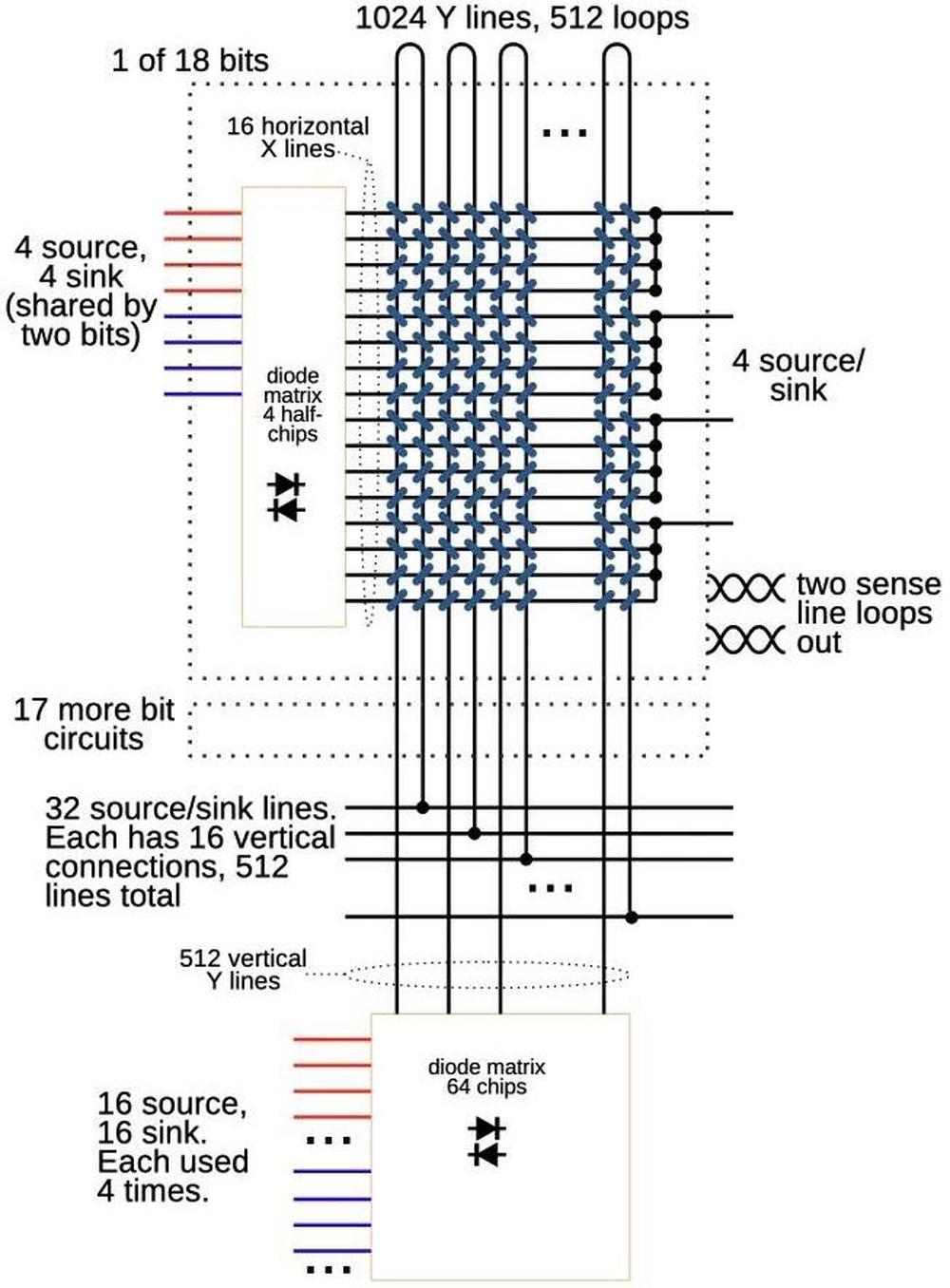
    A diagram showing the topology of a core board. Click this image (or any other) for a larger version.)

    A diagram showing the topology of a core board. Click this image (or any other) for a larger version.)

    The diagram above summarizes the structure, showing one of the 18 bits. It omits the details of which connections are at the top, bottom, left, or right. ↩

  12. Each driver board has 53 core driver chips of type SN55325.
    The SN55325 core driver chip, from the databook.

    The SN55325 core driver chip, from the databook.

    Each chip has two 600 mA "sources" and two 600 mA "sinks" connected to two outputs. By energizing a source on one end of a line and a sink on the other end, the line can be driven in the desired direction. The driver board also has 39 driver chips of type SN55327. These chips are similar, except they can be used as either four sources or two sinks. These chips are used for the diode matrix inputs, where an input is either a source or a sink. ↩

  13. I wrote about the Spacelab computer's CPU earlier. I've written about other core memory systems including the IBM 1401 core memory, IBM 360 core memory, Saturn V LVDC, and Apollo Guidance Computer. ↩

  14. The Space Shuttle's replacement AP-101S computer used semiconductor memory, so it needed to deal with volatility and radiation. The new computer used battery backup to preserve memory contents when powered off, a feature that core memory had provided automatically. To avoid data corruption from radiation, the new computer had six extra storage bits for each word to implement an error-correcting code. The computer constantly scanned for bit errors and corrected them. Radiation wasn't just a theoretical risk: a single Shuttle flight could encounter over 100 bit flips due to radiation (details).

    For more information on the AP-101S computer, see my previous article, The rise and fall of IBM's 4 Pi aerospace computers. I wrote about Spacelab's original computer and the upgraded AP-101SL computer in Reverse engineering circuitry in a Spacelab computer from 1980. ↩

Reverse engineering circuitry in a Spacelab computer from 1980

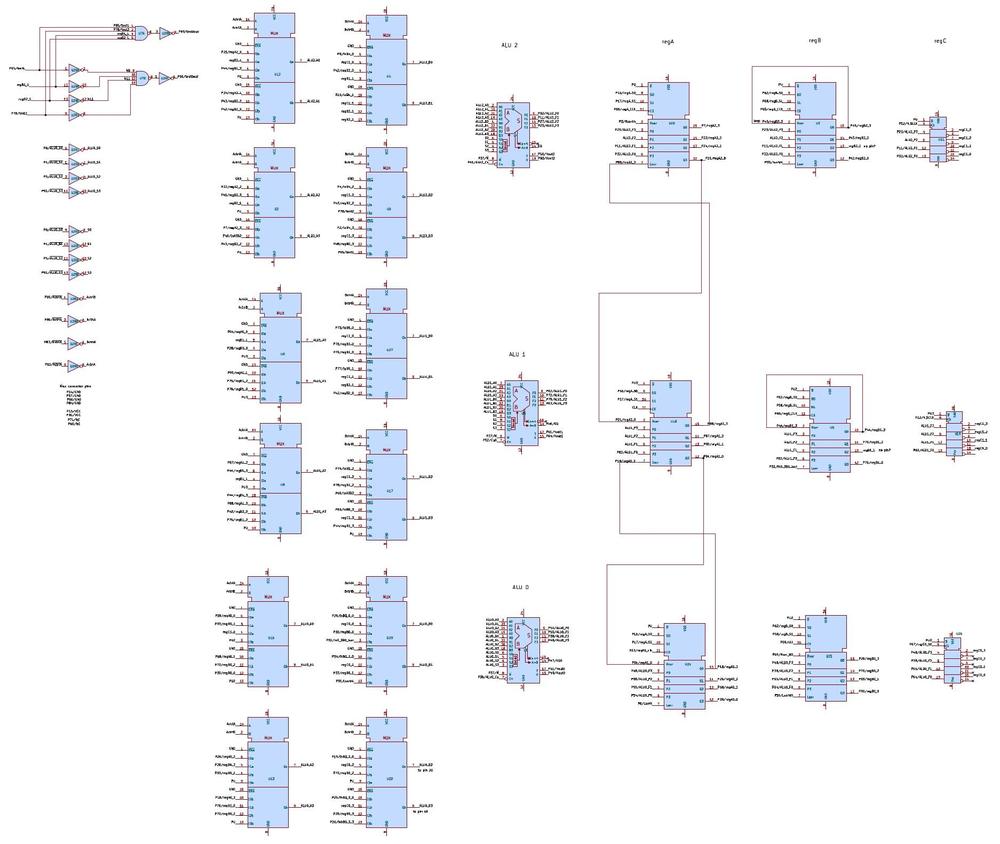
Spacelab was a reusable laboratory that could be carried in the cargo bay of the Space Shuttle, providing lab space for astronauts and experiments. Spacelab was controlled by a French-built minicomputer, called the Mitra 125 MS. Unlike modern computers, this computer didn't contain a microprocessor chip. Instead, its 16-bit processor was constructed from several boards of chips. In this article, I reverse-engineer one of the processor boards, shown below, part of the computer's Arithmetic/Logic Unit (ALU).

The Mitra 125 MS computer, built by CIMSA, with one of the ALU/register cards shown.

The Mitra 125 MS computer, built by CIMSA, with one of the ALU/register cards shown.

Spacelab consisted of a pressurized cylindrical laboratory that held experiments, computers, and work areas for researchers. A tunnel connected the laboratory to the Shuttle, allowing researchers to move between the Shuttle and Spacelab. Spacelab also supported up to five unpressurized "pallets" that were exposed to space, holding experiments such as telescopes and sensors. The illustration below shows the tunnel, the Spacelab laboratory, and a pallet installed in the Shuttle's cargo bay.1

Illustration of the Spacelab-3 mission. From NASA.

Illustration of the Spacelab-3 mission. From NASA.

Because Spacelab was a European project, it used a European computer, the Mitra 125 MS. The Mitra line started in 1971 when a French company called CII introduced the Mitra 15 minicomputer, a 16-bit computer that used magnetic core memory. Mitra is a French acronym2 that translates as "Mini-machine for Real-Time and Automatic Computing." As the name suggests, Mitra was both small and designed for real-time computing, making it suitable for controlling experiments. The Mitra 15 was a popular computer, with almost 8000 units sold.

In 1975, CII produced a successor called the Mitra 125. The Mitra 125 improved on the Mitra 15 by adding memory management, I/O processors, higher performance, and additional instructions. Spacelab used the Mitra 125 MS minicomputer,3 a militarized variant of the Mitra 125 that was produced by a company called CIMSA. A Spacelab mission had three of these computers: the Subsystem Computer controlled and managed Spacelab itself, while the Experiment Computer handled the experiments. A Backup Computer could take over if either computer failed.1 These computers were part of Spacelab's Command and Data Management Subsystem, which controlled experiments and collected data.4

The three computers were normally mounted in the Spacelab laboratory underneath the Work Bench Rack (details). The computers were controlled through a keyboard and a color CRT display, called the Data Display System (DDS). The computer installation and a DDS are visible in the photo below.

This photo shows astronauts inside Spacelab (but not in space). The Spacelab computers were mounted under the Work Bench (right arrow). The Data Display System (left arrow) provided the interface to the computers. Photo is STS-51B Crew Portrait, 1984.

This photo shows astronauts inside Spacelab (but not in space). The Spacelab computers were mounted under the Work Bench (right arrow). The Data Display System (left arrow) provided the interface to the computers. Photo is STS-51B Crew Portrait, 1984.

For some Spacelab missions, the laboratory was omitted entirely, providing more room for experiment pallets. In this case, the computers were mounted in a small pressurized cylinder called the igloo. The researchers remained in the Shuttle, controlling experiments through two Data Display Systems that were mounted in the Shuttle's rear flight deck (photo).

The 74181 ALU chip

The Spacelab computer didn't use a microprocessor chip. Instead, like most minicomputers at the time, it was built from simple integrated circuits that were combined to implement the computer's circuitry. Unlike modern CMOS integrated circuits, these chips contained bipolar transistors, which were fast, but large and power-hungry, a technology known as TTL (transistor-transistor logic). Electronics hobbyists of a certain age will recall the popular 7400 series of TTL chips. The Spacelab computer was built from the military grade of these chips, the 5400 series.

The most complex chip in the computer was probably the '181 Arithmetic/Logic Unit (ALU) chip, containing about 170 transistors. The arithmetic/logic unit is the heart of a computer, performing arithmetic operations as well as Boolean logic operations. In 1970, Texas Instruments put a complete 4-bit arithmetic/logic unit on a single chip, called the 74181. Since the chip was fast, compact, and inexpensive, it was widely used, providing the ALU in computers from the popular PDP-11 and Xerox Alto to the powerful VAX-11/780 "superminicomputer".

The 74181 provides a full set of binary logical operations, including AND, OR, XOR, and complement. For arithmetic, it includes addition, subtraction, incrementing, and decrementing.5 Inconveniently, the 74181 doesn't support shifting right. Moreover, multiplication and division were much too complicated to be included in the 74181. Instead, a processor implemented multiplication and division through repeated addition or subtraction, combined with shifting. Likewise, floating-point operations were way beyond the capability of the 74181, but a processor could use the 74181 when performing the steps of a floating-point operation.

Although the 74181 only handled four bits, multiple 74181 chips could be combined to handle larger words, such as 16 bits or 32 bits. To handle carries, the chips could be chained together, with the carry-out from one chip fed into the carry-in of the next chip. This approach was simple but slow, since the carry had to "ripple" through all the chips before the answer could be obtained. The carry process could be sped up by using a carry-lookahead chip called the 74182, which speeds up addition by computing the carries from four 74181 chips (i.e., 16 bits) in parallel.

The Mitra's ALU/register boards

The Spacelab computer used eight '181 ALU chips to implement a 32-bit adder.6 (Specifically, these chips are the 54S181, a variant of the 74181: "54" indicates that the chips handle the military temperature range, and "S" indicates that the chip is built from high-speed Schottky logic.) However, the ALU boards required numerous additional chips. Depending on the instruction, eight different inputs could be selected for the ALU. Chips called multiplexers selected the desired value, requiring 32 multiplexer chips. Three 32-bit registers provided storage for ALU inputs and outputs, requiring 24 chips. Two 54S182 carry-lookahead chips provided fast carry computation. Finally, some simple logic chips (inverters and NAND gates) tied things together.

Due to the number of chips required, the ALU/register circuitry was spread across three boards, as shown below. (I reverse-engineered the board on the right.7) The '181 chips are immediately visible as they are much larger than the other chips; they have 24 pins, compared to 14 or 16 pins for the other chips. The first board has two '181 chips, while the last two boards each have three '181 chips. The last two boards are similar, but not identical.

The three ALU/register boards from the Spacelab computer.
Click this image (or any other) for a larger version.

The three ALU/register boards from the Spacelab computer. Click this image (or any other) for a larger version.

Finding a 32-bit ALU was a surprise to me, since the computer is a 16-bit computer. The expanded ALU was probably implemented to improve performance. Multiplying two 16-bit numbers yields a 32-bit result, so a 32-bit ALU makes multiplication faster. Moreover, the computer supports 32-bit floating-point numbers, so the 32-bit ALU presumably makes floating-point operations faster.

The diagram below shows the architecture of the computer's 32-bit ALU system. In the middle is the ALU itself, operating on two 32-bit operands: A and B. At the left, multiplexers ("mux") select one of four values for A and one of four values for B. At the right, the output of the ALU can be stored in three 32-bit registers, or sent to the rest of the computer via the bus. The first two registers are shift registers, allowing the value to be shifted left or right, while the third register simply holds the value in flip-flops. The first two registers are connected by buses to the rest of the computer, while the value of the third register can only be accessed by using it for another arithmetic operation.8 I suspect that the shift registers are used for multiplication and division to shift the arguments at each step.

Block diagram of the ALU/register board.

Block diagram of the ALU/register board.

The inputs to the multiplexers provide flexibility. For instance, you can add register 1 to a number from the bus, or add register 2 shifted to the right to register 3. (Note that this shifting is implemented by wiring the inputs to the multiplexer shifted left or right, completely separate from the shift register's shifting.) The "all 1's" input is either a zero input (with negative logic), or -1 (in two's-complement). The B input can be taken from the bus, allowing the value to come from memory or from a general-purpose register. The mix input is a jumble of signal lines, register bits, a shift register input, and a pull-up with no apparent pattern. I describe a few more mysteries in the footnote;9 presumably, the mysteries would be resolved if I reverse-engineered the whole computer.

The functions of the multiplexers, ALU chips, and registers depend on what instruction is being executed. Specifically, the computer's microcode engine generates control signals for the computer, including the ALU/register boards. Some of these control signals select which multiplexer inputs are used. Other control signals select the ALU's function. Finally, control signals select which register receives the ALU's output.

The board that I reverse engineered implements 12 of the 32 bits of the ALU and registers. The image below shows the role of each chip on the board. The three 4-bit ALU chips are indicated 2, 1, and 0. Each ALU chip has two multiplexer chips to select the four A input bits and two multiplexer chips to select the four B input bits.10 Thus, there are 12 multiplexer chips on the board. The three 12-bit registers A, B, and C are each implemented with three 4-bit chips. Three hex inverter chips and a 4-input NAND chip complete the board.11

The ALU/register board with the chips labeled.

The ALU/register board with the chips labeled.

These printed-circuit boards (PCBs) have some interesting features. In most electronics, circuit boards have holes only where they are needed, but the Spacelab boards have holes in a fixed grid pattern. (IBM used similar boards in its System/360 computers in the 1960s.12) A hole can hold an IC pin or other component. Or a hole can be used as a via, connecting PCB traces on different layers. Another interesting feature of the boards is the vertical metal bars underneath the integrated circuits. These bars carry heat away from the integrated circuits.

The PCB traces are more visible on the back of the board (below). The traces are thin enough that two traces can pass between a pair of holes. Note the yellow "bodge" wires, correcting errors on the circuit board. I assume that these errors were fixed for the computers used in flight.

Back of an ALU/register board. This is a different board from the one I reverse engineered, since I wanted to show the yellow wires.

Back of an ALU/register board. This is a different board from the one I reverse engineered, since I wanted to show the yellow wires.

Each board has a 96-pin connector at the bottom, which plugs into the computer's motherboard. Note the three cylindrical pins sticking out of the connector. These pins are keyed to ensure that a board can only be plugged into the correct slot. That is, each pin has a metal tab oriented in one of six directions. On the motherboard, the connectors have corresponding notches. If the tabs and the notches don't match up, the board can't be plugged in.

A close-up of the connector, showing the keying. Also note that the zig-zag pin numbering on the left changes to an irregular number on the right. Unexpectedly, pin 52 is between pins 49 and 51, for example,

A close-up of the connector, showing the keying. Also note that the zig-zag pin numbering on the left changes to an irregular number on the right. Unexpectedly, pin 52 is between pins 49 and 51, for example,

The boards in the Spacelab computer are dense, tightly packing integrated circuits to minimize the size of the computer. However, the boards are considerably less dense than American aerospace computers. In particular, the Spacelab computer used the same integrated circuit packages that were used in consumer electronics: through-hole DIPs (dual in-line packages with two rows of pins). In contrast, IBM's line of 4 Pi aerospace computers used "flat-pack" integrated circuits that were considerably smaller and thinner (details). As a result, IBM's double-sided circuit boards could hold 156 integrated circuits compared to 30 on a single-sided Mitra board of roughly the same size.

A brief history of the French computer industry leading up to this computer

Bull is one of France's earliest computing companies, created in 1931. Bull initially sold punch-card equipment, competing with IBM. By the 1960s, Bull was a major computer company with products such as the transistorized Gamma 60 computer, a large-scale mainframe that was said to be the first system specifically designed for parallel and multiprogramming. Unfortunately, Bull had difficulty competing with IBM, its stock collapsed, and Bull was acquired by General Electric in 1964, forming Bull-GE. The collapse and controversial takeover were a blow to the French computer industry, and the incident was dubbed the Affaire Bull. To make things worse, GE soon canceled two of Bull's computers, focusing instead on GE's computer line.

The Affaire Bull was not only an affront to French pride, but an indication that France was largely dependent on the US for computer technology. A second incident revealed the critical military consequences of France's weakness. In the early 1960s, France was attempting to improve its nuclear strength by develop a hydrogen bomb. The mathematics of fusion is computationally intense, so France attempted to buy powerful American computers: the CDC 6600 supercomputer and the IBM 360/92.13 However, the US government blocked the export of these computers to France in an attempt to limit nuclear proliferation.

These problems led French president Charles de Gaulle to decide that France needed a strong computer industry of its own. In 1966, he developed a plan for computing (Plan Calcul)14, where the French government would reorganize the computer industry, picking companies to lead in each sector from minicomputers to semiconductors.

In the minicomputer sector, the government created a company called CII by combining three French computer companies: SEA, CAE, and SETI. CII was primarily owned by a large French company called Thomson-CSF (now Thales).15 CII played a key role in the Spacelab computer, since CII developed the Mitra line of computers. In the mid-1970s, CII and the American company Honeywell merged, with the computer division spun off to form a new company called SEMS, with majority shareholder Thomson. Another Thomson subsidiary, CIMSA, focused on military electronics and produced the militarized versions of the Mitra line. In particular, CIMSA produced the computer for Spacelab.16

France's Plan Calcul is generally viewed as a failure. Despite expensive subsidies, the French computer industry remained weak and unable to escape American dominance. When Giscard d'Estaing was elected president of France in 1974, he ended Plan Calcul. There are various interpretations, such as the failure of government planning versus the free market, but my view is that in the 1960s and 1970s, IBM crushed most challengers in the computer industry, both American and foreign, so Plan Calcul didn't have a chance. As for Bull, the company went through a dizzying sequence of American takeovers and nationaizations by France.17 Just two months ago (March 2026), the company was reacquired by the French government.

Replacement by the IBM AP-101SL computer

Since Spacelab was a European project, using a European computer was a point of pride. Unfortunately, the French computers were eventually replaced by IBM computers due to performance needs and undoubtedly political factors.

During the Space Shuttle program, the computers on the Shuttle and in Spacelab became obsolete as computer technology rapidly advanced. Although the computers were originally considered powerful, their performance and memory capacity became problems over time. The Space Shuttle's IBM AP-101 computers were upgraded to IBM AP-101S computers, first flying in 1991. The AP-101S was half the size, three times faster, and had more than twice the memory, using semiconductor memory instead of magnetic core memory.

The Spacelab computer system needed a similar upgrade, and in 1991, the CIMSA computers on Spacelab were replaced with IBM AP-101SL computers. The AP-101SL was based on the Shuttle's upgraded AP-101S computer, but modified to support the Mitra's hardware architecture, instruction set, and I/O capabilities. The packaging of IBM's computer was slightly changed to match the dimensions of the CIMSA computer and to use an external heat exchanger rather than an internal heat exchanger.

The IBM AP-101SL Spacelab computer. The circuit boards are much larger than the original Spacelab computer boards or the original AP-101B boards. Note the flat-pack ICs on the boards. Photo courtesy of Kyle Owen.

The IBM AP-101SL Spacelab computer. The circuit boards are much larger than the original Spacelab computer boards or the original AP-101B boards. Note the flat-pack ICs on the boards. Photo courtesy of Kyle Owen.

Changing the Shuttle's 32-bit AP-101S computer to run the 16-bit Mitra instruction set was easier than you might expect, since the AP-101S already supported multiple instruction sets: a 32-bit instruction set derived from the IBM System/360 and a 16-bit instruction set called 1750A that was an Air Force Standard. Because the AP-101S implemented its instructions in microcode—low-level software that specified the steps of a machine instruction—the instruction set could be modified by updating the microcode.

I compared the circuit boards in an AP-101S with the boards in an AP-101SL to quantify the changes. The semiconductor memory boards and power supplies were essentially identical. The CPU boards had minor changes. Unsurprisingly, the I/O boards were completely different, and the complex I/O Processor (IOP) in the Shuttle's AP-101S was omitted. For more on the IBM AP-101 line, see my History of IBM's 4 Pi computers.

Conclusions

The Spacelab computer provides an interesting look at how computers were built before microprocessors took over. The components of a computer, such as the ALU, registers, and control circuitry, were constructed from simple chips. Since each chip didn't do much, the computer required 36 boards full of chips. Even so, the computer was compact enough to go into space. By modern standards, these computers aren't much—each computer had a memory capacity of just 128 KB of magnetic core memory—but they played a critical part in the space program.

I'm not going to reverse-engineer the full computer, but I may write some more about it. For updates, follow me on Bluesky (@righto.com), Mastodon (@[email protected]), or RSS.

Credits: Thanks to Steve Jurvetson for providing the Spacelab computer for examination. Thanks to Poul-Henning Kamp for comments.

AI statement: Despite the presence of the em dash, no AI was used in the writing of this article (details).

Notes and references

  1. For details on Spacelab, see Spacelab News Reference. ↩↩

  2. To avoid cluttering the main article, I'll summarize the French acronyms and companies in this footnote.

    • CAE: Compagnie européenne d'automatisme électronique (European Electronic Automation Company). A French computer company founded in 1960, selling versions of American computers such as TRW's RW-300. Part of the 1966 merger that formed CII.
    • CII: Compagnie internationale d'informatique (International Computer Company): the company that created the Mitra line of minicomputers. CII also sold computers designed by the American company SDS (Scientific Systems), which was bought by Xerox in 1969 and became XDS (Xerox Data Systems). XDS was shut down in 1975, costing Xerox hundreds of millions of dollars.
    • CIMSA: Compagnie d'informatique militaire, spatiale et aéronautique (Military, Space, and Aeronautical Computing Company): the company that manufactured the Spacelab computer.
    • CSF: Compagnie Générale de Télégraphie Sans Fil (General Wireless Telegraphy Company). A radio company dating back to 1918. It merged with Thomson in 1968 to form Thomson-CSF.
    • MATRA: Mécanique Aviation Traction (Mechanics-Aviation-Traction). An electronics company that was the contractor for Spacelab's data systems.
    • Mitra: Mini-machine pour l'Informatique Temps Réel et Automatique ("Mini-machine for Real-Time and Automatic Computing"). A line of minicomputers.
    • SEA: Société d'électronique et d'automatisme (Electronics and Automation Company): a French computer manufacturer, started in 1947 and merged into CII in 1966.
    • SEMS: Société Européenne de Mini-informatique et de Systèmes (European Society for Minicomputers and Systems). A subsidiary of Thomson, created by the French government in 1976 during the merger of CII and Honeywell. SEMS took over the manufacturing of Mitra computers from CII.
    • SETI: Société européenne de traitement de l'information (European Information Processing Society). SETI was a French computer company formed in 1961. The American computer company Packard Bell owned a quarter of SETI, and SETI sold the desk-sized Packard Bell 250 computer.
     ↩

  3. On the ground, the Spacelab project used Mitra 125 S computers that were functionally identical to the Mitra 125 MS (details). ↩

  4. Spacelab's Command and Data Management Subsystem (CDMS) is surprisingly complicated because of the data communication paths between Spacelab, the Shuttle, and the ground. Moreover, multiple units store, encode, and decode data. In the CDMS block diagram below, I've highlighted the three computers; they are just a small part of the CDMS. See Section 3.5 of Spacelab News Reference or The Command and Data Management System of Spacelab for details on CDMS.

    A block diagram of Spacelab's Command and Data Management Subsystem. From The Command and Data Management System of Spacelab. Click for a larger version.

    A block diagram of Spacelab's Command and Data Management Subsystem. From The Command and Data Management System of Spacelab. Click for a larger version.

     ↩

  5. I reverse-engineered the 74181 ALU chip in this article and explained the motivation for its quirky set of operations in this article. ↩

  6. Another board in the Spacelab computer has four 74S181 chips implementing a 16-bit ALU. My guess is that this board is part of the I/O processor. The board has the cryptic label "HMSG". ↩

  7. My reverse-engineering process was straightforward but tedious. I used a multimeter to beep out the connections between the integrated circuits as well as the connections to the connector. (Unlike many systems that I look at, these boards didn't have conformal coating, which made beeping out the connections practical.) I created a schematic in KiCad from this data; this schematic was "physical", with the layout of the chips and pins matching their physical location on the board. Next, I converted the integrated circuit symbols from physical rectangles to logical symbols. Finally, I moved the symbols around on the schematic to make a reasonable schematic. (I had to go back and beep out more connections as I discovered errors or missing connections.) Theoretically, I could reverse-engineer the entire computer, but reverse-engineering one of the 36 boards is enough for me. ↩

  8. My full reverse-engineered schematic of the ALU/register board is below. Click for a larger version.

    Schematic of the ALU/register board.

    Schematic of the ALU/register board.

     ↩

  9. A few mysteries remain in the ALU/register board. The three registers probably act as an accumulator, a temporary register, and an extra register for multiplication/division, but it's not clear which register is which. I don't understand why the inputs are organized as they are; for instance, you can't add register 1 to register 2 shifted. The mix input seems very random; maybe these signals are part of a self test? On the board, I expected to see 12 bits out of a uniform 32-bit ALU. However, the top two 4-bit "nibbles" have different control lines and different zero-detection from the third. Perhaps this is because the Mitra floating-point numbers have 24 bits of mantissa and 8 bits of exponent. It would make sense for the ALU/register board to handle these parts separately. Another mystery is that the board has a circuit to test two hardwired bits and two external bits to see if they are all 0 or all 1, for some reason. ↩

  10. The multiplexer chips are dual 4-to-1 multiplexers. Thus, two multiplexer chips are required to support four bits. ↩

  11. The chips in the Spacelab computer use a variety of part number systems. A few chips have standard industry part numbers such as "SNJ5483" (equivalent to a 7483 adder). Most of the chips are labeled with military part numbers such as JM38510/07801 BJB, using the MIL-M-38510 standard. These part numbers can be cross-referenced using the MIL-HDBK-983 handbook. Other chips, like the ones below, have Fairchild part numbers that are a mystery to me. The first line is presumably the part number, "929 567" and "929 705", but I can't find these numbers anywhere. If you know what these numbers mean, please let me know! (07263 is the CAGE code for Fairchild, and the last line is the date code.)

    Two Fairchild ICs with mysterious part numbers.

    Two Fairchild ICs with mysterious part numbers.

    The ALU/register board that I examined uses the following JM38510 part numbers, which I have converted to standard parts:
    /01403 = 54153 dual 4-1 multiplexer
    /07003 = 54S04 hex inverter
    /07006 = 54S20 4-input NAND
    /07601 = 54S194 4-bit shift register
    /07801 = 54S1814-bit ALU
    /30107 = 54LS175 quad flip-flop ↩

  12. The photo below compares an IBM board (top) with a Spacelab board (bottom), both from the early 1980s. It's interesting how similar the boards are. Both use a 0.1" grid of holes, unlike most printed-circuit boards, which only use holes where needed. Both boards are multi-layer with integrated circuits on one side. The IBM board is denser; the chips are spaced 0.1" apart rather than 0.3" apart.

    An IBM computer board (top) and a board from the Spacelab computer (bottom).

    An IBM computer board (top) and a board from the Spacelab computer (bottom).

    I don't know which IBM system used this board, but it was a commercial system, not an aerospace system. This board is a bit unusual for IBM, since most of the chips are standard DIPs rather than the square metal cans that IBM typically used. ↩

  13. The US blocked computer exports to France with NSAM 294, a 1964 National Security Action Memorandum. The US later allowed sales of the CDC 6600 and IBM 360/91 computers to France on the condition that France not use the computers for atomic weapon development, a condition that France apparently violated. See A.E.C. Bids Industry Avoid Sales Aiding French Tests (1964) and Paris Promises Not to Use Equipment for Atomic Weapons (1966). The CDC 6600 supercomputer executed up to 10 million instructions per second (MIPS) while the IBM 360/91 executed about 17 MIPS. (In comparison, a 1995 Pentium Pro or a 2012 cell phone is faster than these computers.) In 1971, Henry Kissinger was still blocking computer exports to France, as shown in this transcript. (One confusing issue in these articles is that IBM announced the 360/92 computer in 1964, but renamed it as the 360/91 before it shipped in 1967.) ↩

  14. Some contemporary articles on Plan Calcul are France Entering Computer Battle: Starts All-French Company to Compete (New York Times, 1967) and France: First the Bomb, Then the "Plan Calcul" (Science, 1967). See History of Computing in France: A Brief Sketch for an overview of the French computer industry. ↩

  15. Thomson has a complicated history. In 1883, two Americans, Thomson and Houston, started the Thomson-Houston Electric Company. A decade later, this company became General Electric, with a French subsidiary: Thomson Houston International. After various mergers, the French subsidiary became Thomson-CSF, a major defense and electronics firm.

    In a sense, Thomson-Houston both created and destroyed GE. The Thomson-Houston Electrical Company became GE, but the French subsidiary of Thomson-Houston ended up being a key part of GE's collapse almost a century later. Specifically, the French rail transport company Alsthom (later Alstom) was formed from the French heavy engineering subsidiary of Thomson-Hudson in 1928; the "thom" in "Alsthom" comes from "Thomson". In 2014, General Electric acquired Alstom for $10.1 billion. The acquisition was a disaster, and in 2018, GE wrote off $23 billion. This loss, along with other financial problems, led to GE's announcement in 2021 that it would break up into three companies. ↩

  16. One more company should be mentioned: MATRA. MATRA was the contractor for Spacelab's data systems, so the Spacelab computer was produced under a contract from MATRA. People often confuse Mitra (the name of the computer line) with MATRA. ↩

  17. Due to financial difficulties, Bull was acquired by General Electric in 1964, then was acquired by Honeywell, nationalized by France, partnered with NEC, acquired Zenith, privatized by France, and acquired by Atos. Less than two months ago, France acquired Bull, continuing the series of reorganizations. ↩

The electromechanical angle computer inside the B-52 bomber's star tracker

Before GPS, how did aircraft navigate? One important technique was celestial navigation: navigating from the positions of the stars, planets, or the sun. While celestial navigation is accurate, cannot be jammed, and doesn't require any broadcast infrastructure, it is a difficult and time-consuming process to perform manually. In the early 1960s, an automated system was developed for the B-52 bomber to automatically track stars and compute navigation information. Digital computers weren't suitable at the time, so the star tracking system performed trigonometric calculations with an electromechanical analog computer called the Angle Computer.1

The Angle Computer contains complex electromechanical systems. Click this image (or any other) for a larger image.

The Angle Computer contains complex electromechanical systems. Click this image (or any other) for a larger image.

The photo above shows the mechanism inside the Angle Computer.2 Although it may look like a gyroscope or IMU (Inertial Measurement Unit), it is completely different and nothing is spinning. The Angle Computer physically models the "celestial sphere", with a complicated mechanism inside that moves a pointer that represents the position of a star. The corresponding angles (the azimuth and altitude) are read out electrically through devices called synchros, providing information to the navigation system through bundles of wires. In this article, I'll give an overview of how celestial navigation works and explain how the Angle Computer performs its calculations.

The Astro Compass system

The Angle Computer is one piece of the Astro Compass, a system that locked onto a star and produced a highly accurate heading (i.e., compass direction), accurate to a tenth of a degree. While the heading is the main output from the Astro Compass, the navigator can also use it to determine position, using the "lines of position" technique described later.

The Astro Tracker was mounted on top of the aircraft with the plastic bubble sticking out.

The Astro Tracker was mounted on top of the aircraft with the plastic bubble sticking out.

The Astro Compass navigation system was built around the "Astro Tracker" (above), the optical system that tracks a star. The Astro Tracker was mounted on the aircraft with the 4-inch glass dome protruding from the top of the fuselage. This unit contains a tracking telescope, which used a photomultiplier tube to detect the light from a star. A gyroscope and a complicated system of motors provided a "stable platform", keeping the telescope precisely vertical even as the aircraft tilted and moved. A prism rotated and tilted to aim the telescope at a particular star.3

Star tracker instruments in the B-52 navigator's instrument panel: Line of Position display, Master Control panel, Heading Display panel, and Indicator Display panel.  From Kollsman MD-1 Automatic Astro Compass Manual.

Star tracker instruments in the B-52 navigator's instrument panel: Line of Position display, Master Control panel, Heading Display panel, and Indicator Display panel. From Kollsman MD-1 Automatic Astro Compass Manual.

The Astro Compass system is bewilderingly complicated, consisting of 19 components (above) to support the Astro Tracker.4 On the right are the ten amplifier and computer components that controlled the system; the Angle Computer is in the lower right. On the left are the nine control and indicator panels that were used by the B-52's navigator. The photo below shows four of these panels in use in a B-52 in 1972.

The navigator's station in a B-52. Some of the Astro Compass controls are indicated with arrows: the Line of Position display and the Master Control on the left, and the Heading display and Indicator display to the right. The navigator in this photo is Carl Hanson-Carnethon. From Rob Bogash's B-52 photo album. This specific B-52 (#2584) is now at The Museum of Flight, Seattle, but the Astro Compass is no longer present.

The navigator's station in a B-52. Some of the Astro Compass controls are indicated with arrows: the Line of Position display and the Master Control on the left, and the Heading display and Indicator display to the right. The navigator in this photo is Carl Hanson-Carnethon. From Rob Bogash's B-52 photo album. This specific B-52 (#2584) is now at The Museum of Flight, Seattle, but the Astro Compass is no longer present.

Controlling the Astro Compass

The Astro Compass has an interesting user interface, letting you input one value at a time by rotating a knob. First, you use the Master Control Panel to select a data value such as the clock time, SHA (Sidereal Hour Angle) for star #1, or Declination for star #3. Then you turn the "Set Control" knob clockwise or counterclockwise to scroll through the data values until the proper value is reached. Each knob on the Master Control Panel has a different geometrical shape, allowing the user to distinguish the knobs by feel. The Master Control Panel is visible in the lower left corner of the photo above, within easy reach of the navigator.

The Master Control Panel is the main interface to the Astro Compass.

The Master Control Panel is the main interface to the Astro Compass.

Each data value has a separate electromechanical display. The photo below shows a Star Data display, indicating the sidereal hour angle and the declination for a star. I removed the cover so you can see how the digital display actually consists of analog dials rotated by motors under synchro control. The system has three Star Data displays, so it can hold the positions of three stars at a time. Getting fixes from three different stars is useful when computing lines of position. The system uses one star at a time, but you can quickly change stars by flipping the Star switch on the Master Control Panel.

A Star Data display with the cover removed.

A Star Data display with the cover removed.

But how did the navigator obtain the information to put into the Astro Compass, since the sun, moon, stars, and planets are in constant motion?5 The necessary celestial information is published in a book called the Air Almanac. The US Government started publishing the Air Almanac in 1941, issuing a new volume every four months. The Almanac had a sheet for each day, providing celestial data on 10-minute intervals. The first column has the time (GMT, Greenwich Mean Time)6 while the other columns give the position of the sun, an important value called the First Point of Aries (symbol ♈︎), the positions of the visible planets, and the position of the moon. A separate table and chart provided the locations of stars; the stars don't have daily updates since they are almost stationary.7 (The Air Almanac is now online; you can download the 2026 Air Almanac here.)

An excerpt from the 1960 Air Almanac. Photo used with permission from tanasa2022, who is selling the Almanac on eBay.

An excerpt from the 1960 Air Almanac. Photo used with permission from tanasa2022, who is selling the Almanac on eBay.

The navigational triangle: Computing a star's position

The Air Almanac provides star coordinates in a global coordinate system, but the Astro Compass needed to know star coordinates in the aircraft's local coordinate system. Determining the star's position requires changing the coordinate system by using spherical trigonometry and something called the navigational triangle. There's a fair bit of terminology involved, which I'll explain in this section.

The Astro Tracker, like many telescopes, is aimed by using azimuth and altitude. Suppose you go into your yard, point at the horizon, and turn 360° in a circle; the direction you're pointing is called the azimuth. The point directly overhead is called the zenith. Now swing your arm upwards 90° from the horizon to the zenith. That angle is called the altitude. (Confusingly, the term "altitude" is used both for the angle of a star and the height of an aircraft.) Thus, if you point at a particular star, you can describe its position with two angles: your horizontal rotation from north gives the azimuth, and the angle up from the horizon gives the altitude.8 This system is called the horizontal coordinate system, as it is based on the horizon. (The word "horizontal" comes from "horizon", by the way.) This is a local coordinate system since other locations will have a different azimuth and altitude for the star. The azimuth and altitude constantly vary with time because the Earth's rotation makes the star appear to move.

The equations for the altitude and azimuth are complicated, with sines, cosines, arcsine, and arctangent. To see why the equations are complicated, consider a time-exposure photo of star trails. As the Earth rotates, each star forms a circle around Polaris, the North Star. To trace out this circular path, the altitude and azimuth vary in a trigonometric way. This computation is performed electromechanically by the Angle Computer, as will be explained later.

Kitt Peak National Observatory beneath star trail. Credit: DESI Collaboration/DOE/KPNO/NOIRLab/NSF/AURA/L. Tyas, CC BY 4.0.

Kitt Peak National Observatory beneath star trail. Credit: DESI Collaboration/DOE/KPNO/NOIRLab/NSF/AURA/L. Tyas, CC BY 4.0.

Now let's switch to how the position of a star is defined in the Air Almanac (for example), independently of your local position. Pretend that the stars are on the surface of a large sphere that surrounds the Earth, called the celestial sphere. The stars are stationary on the surface of the celestial sphere, while the Earth rotates once a (sidereal)9 day in the middle. Thus, as you look up at the celestial sphere, you see the stars moving. You can extend the Earth's equator out to the celestial sphere, defining the celestial equator. Likewise, the celestial sphere has celestial poles, matching the Earth's poles. On the Earth, you specify a location (such as the airplane's location) with latitude and longitude (red). Latitude is measured from the equator, and longitude is measured from a fixed meridian (orange). The 0° meridian is arbitrarily defined to pass through Greenwich (England, not Connecticut). Similarly, the position of a star is specified by the angle from the celestial equator (called declination instead of latitude) and the angle from the meridian (called the sidereal hour angle or SHA instead of longitude).10

The celestial sphere, with the Earth at the center. The position of a star is described by Sidereal Hour Angle and declination, analogous to longitude and latitude describing the position of, say, an airplane on the Earth. The diagram is based on patent 2998529, "Automatic astrocompass".

The celestial sphere, with the Earth at the center. The position of a star is described by Sidereal Hour Angle and declination, analogous to longitude and latitude describing the position of, say, an airplane on the Earth. The diagram is based on patent 2998529, "Automatic astrocompass".

But what meridian is the starting point—0°—when measuring a star's Sidereal Hour Angle? The celestial equator matches the Earth's equator, but this won't work for the Greenwich meridian because it is constantly in motion. Instead, the 0° celestial meridian is arbitrarily defined as the position where the sun crosses the equator at the vernal equinox (the start of spring). If you consider the position of the sun on the celestial sphere, the sun will travel around the sphere once a year. Because the Earth's axis is tilted, the sun will be above the equator half the year and below the equator half the year, crossing the equator at the vernal equinox (March) and the autumnal equinox (September).

This reference point on the celestial sphere is called the First Point of Aries, represented by the symbol ♈︎ (horns of a ram); you might remember this symbol from the Air Almanac. At this point, the sun is in the constellation Pisces. So why is this point called the First Point of Aries and not Pisces? Back in 130 BCE, the ancient Greek astronomer Hipparchus defined the First Point of Aries as the starting point for the sun's motion. In that distant era, the sun was in the constellation Aries at the equinox, not in Pisces as it is today. It turns out that the direction of the Earth's axis isn't fixed, but moves in a 26,000-year cycle called the precession of the equinoxes.11 A 26,000-year cycle may seem irrelevant, but it's fast enough that the sun has moved from Aries to Pisces since Hipparchus's time. (And the equinox has moved 1° more since the B-52 was first produced!)

(All this talk of Aries and Pisces may sound like astrology, and, yes, there is a direct connection. Aries is the first zodiac sign, starting at the vernal equinox, typically March 21. The equinox's precession is "backwards", so the equinox has moved to Pisces, the last zodiac sign. Astronomically, the equinox will move into the constellation Aquarius around 2600 CE, but astrologers disagree on whether the Age of Aquarius has started; perhaps the 1960s was the dawning of the Age of Aquarius.)

How do you convert the star's fixed coordinate to the Earth's rotating coordinate? First, you look up the angle between the Greenwich meridian and the celestial meridian of Aries at a particular time. This angle (purple) is called the Greenwich Hour Angle of Aries (GHA ♈︎). Next, you look up the star's Sidereal Hour Angle (SHA). Adding them gives you the star's Greenwich Hour Angle (red), the angle between the Greenwich meridian and the star. Subtracting the aircraft's longitude gives you the Local Hour Angle (LHA, not shown), the angle between the aircraft's meridian and the star. (Note that these steps are simply addition and subtraction, so a mechanical system can easily do them with differential gears.)

Computing the Greenwich Hour Angle of the start on the sphere.

Computing the Greenwich Hour Angle of the start on the sphere.

The final step, obtaining the azimuth and altitude, requires tricky spherical trigonometry. The yellow triangle is the navigational triangle, a spherical triangle on the surface of the celestial sphere. The upper vertex is the North Pole, the red vertex is the airplane's zenith (i.e., directly above the airplane), and the final vertex is the star. Two sides of the triangle and an angle (purple) are known, so the remaining angles and sides can be solved with spherical trigonometry. Specifically, the first side (purple) is 90°-declination, the second side is 90°-latitude,12 and the angle between is the LHA (Local Hour Angle). Solving for the angle at the zenith gives the azimuth (blue), while solving for the third side gives 90°-altitude (green, the angle down from the zenith to the star).

By solving the navigational triangle, the altitude and azimuth can be obtained.

By solving the navigational triangle, the altitude and azimuth can be obtained.

Thus, the key problem is solving the navigational triangle. Navigators could solve the navigational triangle by looking up angles in a thick book of "sight reduction" tables and performing some math. But how could the process be automated? That was the purpose of the Angle Computer.

The Angle Computer

The job of the Angle Computer was to solve the navigational triangle mechanically. Its inputs were the star's declination, altitude, and local hour angle. From these, it computed the star's altitude and azimuth at the aircraft's current position.13

The concept behind the Angle Computer is that it physically modeled the celestial sphere with a half-sphere, 2 5/8" in radius. A star pointer was mechanically positioned on the surface of this sphere, using the star's declination and local hour angle, adjusted by the latitude of the viewer. The star pointer moved a readout mechanism that translated the star's position into the azimuth and altitude at the specified location. Thus, the Angle Computer mechanically converted between the coordinate systems by using a physical representation, solving the navigational triangle.

The diagram below shows how the star pointer is positioned on the two-dimensional surface of the sphere, using a complicated mechanism inside the sphere. The U-shaped declination arm swings up and down, corresponding to the star's declination (angle above the celestial equator). Meanwhile, the declination arm constantly rotates around the polar axis, as specified by the LHA (Local Hour Angle). In one (sidereal) day, the mechanism will make a full cycle, corresponding to the Earth's spin. Finally, the latitude arm moves the mechanism up or down, corresponding to the viewer's latitude. On the right, three gears provide the inputs for latitude, LHA, and declination.

The input mechanism for the Angle Computer. The photo has been rotated 90° to better match the
Earth's rotation. Rotation around the polar axis corresponds to the Earth's daily rotation. Note that the star pointer will hit the end of the semicircular azimuth arc at some point; this corresponds to the star moving to the horizon and setting.

The input mechanism for the Angle Computer. The photo has been rotated 90° to better match the Earth's rotation. Rotation around the polar axis corresponds to the Earth's daily rotation. Note that the star pointer will hit the end of the semicircular azimuth arc at some point; this corresponds to the star moving to the horizon and setting.

A separate mechanism provides the altitude and azimuth outputs, driven by the star pointer. The key is the semicircular azimuth arc, which represents the arc from the viewer's horizon to the zenith, oriented to a particular azimuth. The star pointer is attached to the azimuth arc through a slider, so as the star pointer moves, it moves the slider along the azimuth arc and also rotates the azimuth arc. Specifically, the azimuth arc represents the line from the horizon to the zenith at a particular azimuth. The position of the slider on the azimuth arc corresponds to the altitude, from 0° at the horizon to 90° at the zenith.14. The azimuth arc rotates around the zenith point, which is at the back of the azimuth arc; this rotation indicates the azimuth value. As the azimuth arc rotates, it turns a gear at the zenith, providing the azimuth output. The slider arc has teeth on it; as the slider moves, these teeth rotate a second gear, providing the altitude output.

The output mechanism for the Angle Computer. The mechanism is in a different position from the
previous diagram. In particular, the latitude arm has been raised to a near-polar latitude and the photograph is from
the other side of the latitude arm. At this latitude, the polar axis is almost lined up with the zenith. As the LHA changes, the star will move in a circle, rotating the azimuth arc but causing little change in altitude. This corresponds to the real world situation of stars moving in a cirle around the zenith, if you're near the pole.

The output mechanism for the Angle Computer. The mechanism is in a different position from the previous diagram. In particular, the latitude arm has been raised to a near-polar latitude and the photograph is from the other side of the latitude arm. At this latitude, the polar axis is almost lined up with the zenith. As the LHA changes, the star will move in a circle, rotating the azimuth arc but causing little change in altitude. This corresponds to the real world situation of stars moving in a cirle around the zenith, if you're near the pole.

From the back, the numerous synchro transmitters, synchro control transformers, and motors are visible. Even though the computation itself is mechanical, the Angle Computer has numerous electrical components. In the top half, the synchro transmitters provide electrical outputs of the azimuth and altitude. (A synchro transmitter uses fixed and moving coils to convert a shaft rotation angle into a three-wire electrical signal.) The large gear provides the altitude output. In the lower half, the longer cylinders are motors that move the Angle Computer's mechanisms. The motors are directed to rotate to a particular position through a feedback loop: synchro control transformers provide feedback to the external servo amplifiers that power the motors.

The back of the Angle Computer.

The back of the Angle Computer.

Partially disassembling the Angle Computer shows the complex gear trains inside, linking the synchros, motors, and the physical mechanism. The squat brass-colored units in the lower center are differential assemblies to add or subtract signals.15 One of the drive motors, a long cylinder, is visible in the lower right.

Gear trains inside the Angle Computer.

Gear trains inside the Angle Computer.

The Line of Position

Although the heading was the primary output from the Astro Compass, the Astro Compass could also help determine the location of the aircraft, using a technique called the celestial line of position. This technique was discovered in 1837 and became heavily used for navigating ships with a sextant. It could also be used onboard an aircraft.

To understand the line of position, suppose you go outside and find a star directly overhead. If you measure the altitude—the angle from the horizon to the star—with a sextant, the angle will be 90°, since it is overhead. Now, suppose you teleport 60 nautical miles away in any direction. The sextant will now show an altitude of 89° to the star, since a nautical mile is conveniently defined to match one minute of angle (one-sixtieth of a degree). Alternatively, if you measure an altitude of 89° to the star, you know you are 60 miles away from the original point under the star (called the sub-stellar point). Likewise, if you measure 88° to the star, you're on a circle with radius of 120 nautical miles around the sub-stellar point. If you measure, say, an altitude of 40°, you know you're on a very large circle with radius of 3000 miles around the sub-stellar point. So how does this help with navigation?

Suppose you're on a boat in the middle of the Pacific and you have a rough idea of where you are, say within 100 miles, but you want to find your exact position. Put a dot on the map where you think you are. Next, pick a star and work out what the angle to the star should be from your position. Measure the altitude with your sextant. Suppose you expected 50° but measured 51°. You now know that you're somewhere on a circle with radius of 2340 miles around the distant sub-stellar point. This doesn't seem very useful. However, since the angle was 1° more than expected, you know that the circle is 60 miles closer to that distant point than your estimated position. Moreover, since you have some idea of where you are, you know that you're on the part of this circle near your estimated location. And since you're looking at a small part of a big circle, you can approximate it by a line. So you can go back to your map, move 60 miles closer to the star from your estimated point, and draw a perpendicular line. This is your line of position, and you know that you're on this line (more or less).

Knowing that you're on a line isn't too useful, but you can repeat the process with a star in a different part of the sky. Maybe this time the angle is 2° smaller than expected, so you can draw a line of position 120 miles further away from your estimated position, in a different direction. The two lines cross, indicating a position where you (probably) are.16 Normally, you repeat the process with a third star, giving you three lines of position, providing a position and an idea of its accuracy.

The Line of Position display panel. Remember that the altitude here has nothing to do with the aircraft's altitude. From Kollsman MD-1 Automatic Astro Compass Manual.

The Line of Position display panel. Remember that the altitude here has nothing to do with the aircraft's altitude. From Kollsman MD-1 Automatic Astro Compass Manual.

The Astro Compass used the display above to show the star's azimuth and the distance in miles from the assumed location to the line of position, called the Altitude Intercept. With this information, the navigator could draw a line of position on the map. The navigator repeated the process with two more stars to get a location fix.17

Conclusion

The Angle Computer is a relic from a time when a mechanical analog computer was the best way to solve a problem, but the computer was also electrical. Although a mechanical apparatus solved the navigational triangle, it was moved into position by motors, and the output was transmitted electrically through wires. Moreover, the Angle Computer was driven by electronic amplifiers and feedback circuits that used both vacuum tubes and transistors.

The designers of the Astro Compass considered multiple approaches to computing the navigational triangle (details). The first was to use small electromechanical devices called resolvers that convert a physical rotation into sine and cosine values. By combining six resolvers with amplifiers, the altitude and azimuth could be obtained. The resolver solution was rejected as being too large and requiring a precision power supply. The second approach was to use a digital computer to determine the solution. This solution was rejected because in 1963, a digital computer was expensive, slow, and less reliable. The final approach, which was adopted, was to build a mechanical, physical model of the celestial sphere. Thus, the Angle Computer resided at the uneasy intersection of physical mechanisms, electrical circuits, vacuum tubes, and solid-state electronics, soon to be obsoleted by digital computers.

I plan to write more about the Astro Compass system. For updates, follow me on Bluesky (@righto.com), Mastodon (@[email protected]), or RSS. Thanks to Richard for supplying the Astro Compass hardware.

AI statement: I didn't use AI to write this article (details).

Notes and references

  1. The Angle computer is labeled "Computer, Altitude-Azimuth, Automatic Astro Compass Type MD-1" and also has an "MD-3" sticker. Presumably, MD-3 is an upgrade of the MD-1. The system is also known as the "Kollsman KS-50-03 Astro Tracking System" (or maybe 50-08).

    There are a few documents available on the system, including Operating Instructions Handbook, Operating Instructions Pocket Manual, a technical article The Celestial Tracker as an Astro Compass, and a patent Celestial Data Computer. The web page PRC68: Automatic Astro Compass Type MD-1 has an extensive collection of links. CuriousMarc has a YouTube series on the Astro Tracker, starting with part 1. If you want to learn more about celestial navigation, this World War II training film describes the process in detail. ↩

  2. From the outside, the Angle Computer is an uninteresting black cylinder with connectors on the end. The cylinder was sealed with a soldered metal band that we removed with a blowtorch. It was pressurized with dry nitrogen through the fill valve in the center, a Schrader valve just like you'd find on a tire.

    The Angle Computer is packaged in a nondescript black cylinder.

    The Angle Computer is packaged in a nondescript black cylinder.

     ↩

  3. The Astro Compass needed to know approximately where in the sky to find the star, in order to point its sensor in the right direction. The direction didn't need to be exact because the Astro Compass performed a spiral search pattern to find the star. This search pattern covered ±4° in bearing and ±2.5° in altitude. In comparison, the Moon is 0.5° wide, so it's a fairly large target area. ↩

  4. The diagram below shows the physical connections of the components of the Astro Compass.

    A physical diagram of the Astro Compass. The Angle Computer is called the Alt Az Computer in this diagram. Click this image (or any other) for a larger version.

    A physical diagram of the Astro Compass. The Angle Computer is called the Alt Az Computer in this diagram. Click this image (or any other) for a larger version.

    For a slightly different perspective, the diagram below shows the flow of data in the Astro Compass.

    A block diagram of the Astro Compass. The Angle Computer is called the Altitude Azimuth Computer in this diagram. From Automatic Astro Compass, Operating Instructions Handbook

    A block diagram of the Astro Compass. The Angle Computer is called the Altitude Azimuth Computer in this diagram. From Automatic Astro Compass, Operating Instructions Handbook

     ↩

  5. The Astro Compass normally gets the latitude and longitude from the bombing computer. It normally gets the approximate heading (called the BATH, Best Available True Heading) from the magnetic compass. These values can all be entered manually if necessary. ↩

  6. Greenwich Mean Time is now mostly obsolete, replaced by UTC (Coordinated Universal Time). Greenwich Mean Time is based on when the sun reaches its highest point over Greenwich, England (longitude 0°). In solar time, the sun reaches its highest point at exactly noon. Unfortunately, the Earth's orbit is elliptical, so the length of a solar day varies throughout the year, by almost a minute. Since it's nice to have a constant 24-hour day, Mean Time was introduced. The idea is to average out the length of the day throughout the year, so each day is exactly 24 hours, even though the sun is no longer overhead exactly at noon. UTC is essentially the same as GMT, but defined by atomic clocks rather than the position of the sun over Greenwich. They can vary by up to 0.9 seconds, with a leap second added to UTC to keep them in sync. ↩

  7. The stars are all moving in different directions, but for most stars, the visible change in position (the proper motion) is very small. However, comparing the 1960 Air Almanac with the 2026 Air Almanac shows many of the listed stars have moved a degree or more due to the precession of the equinox. The change varies from star to star, both because the angular change depends on the star's location and because the SHA is exaggerated as you get closer to the poles (details). ↩

  8. Note that the azimuth is discontinuous at the zenith. To see this, imagine a star passing directly overhead: point your arm at the horizon and then swing it up until it is pointing straight up. To continue, you need to instantaneously spin around 180° and then lower your arm.

    The discontinuity in azimuth is important for the Angle Tracker, since it can't instantaneously change the azimuth by 180°. To avoid this problem, the Angle Computer has cams and microswitches to keep the altitude below 85°. (Otherwise, the azimuth arc will jam up instead of rotating smoothly.) The Astro Tracker also has declination limits of +90° and -47° and a lower altitude limit of -6°. The latitude is limited to the range between -2° and +90°; the system automatically switches hemispheres so both the North and South latitudes are usable. ↩

  9. One annoyance is that the length of a day is slightly different if you look at the sun (a solar day) versus looking at the stars (a sidereal day). A solar day is the standard 24-hour day, where the Earth rotates once and the sun returns to its previous position (approximately). But if you look at the stars, it takes a bit less time (23 hours, 56 minutes, and 4 seconds) for the stars to return to their previous position. The problem is that during one year, the Earth swings from one side of the sun to the other side and then back to the first side. From the perspective of the stars, this is an "extra" revolution, so there are 366.25 sidereal days in a year, compared to 365.25 solar days in a year. (I.e., it's an "off-by-one" error.) This makes each sidereal day slightly shorter. You can also think of this as the sun moving around the celestial sphere once per year, with the sun's position against the stars constantly changing. ↩

  10. Celestial navigation usually uses the sidereal hour angle (SHA) to measure the star's position relative to the meridian. Astronomers often use the right ascension instead. The right ascension is measured in the opposite direction and is measured in hours instead of degrees. They are related by the formula RA = (360° - SHA) / 15°. ↩

  11. The Earth's axis also wobbles on a cycle of 18.6 years because the Earth isn't exactly spherical. For many purposes, this wobble is averaged out and the "mean equinox" is used. The physical equinox is called the "apparent equinox". Greenwich Mean Sidereal Time (GMST) is measured with respect to the mean equinox, while Greenwich Apparent Sidereal Time (GAST) is measured with respect to the apparent equinox. The difference between the mean equinox and the apparent equinox is called the "equation of the equinoxes". The difference between the two equinoxes is small, less than about 1.1 seconds. ↩

  12. The angle of 90°-declination is sometimes called co-declination, the complement of declination, i.e., the angle down from the pole. Similarly, 90°-latitude is sometimes called co-latitude.

    The triangle can be solved using the spherical law of sines and the spherical law of cosines. An alternative, which makes more sense to me, is to find the answer by applying rotation matrices to change the coordinate system. Details are here, and Wikipedia has a convenient summary. ↩

  13. It may seem like there is a chicken-and-egg situation with navigation since you need to know your position in order to compute the star's altitude and azimuth, and you need to know the aircraft's heading to know which direction to point the telescope. In fact, you just need to know the approximate latitude, longitude, and heading (within 4°), and then the system generates a more accurate latitude, longitude, and heading. The process can be repeated until the values converge.

    Moreover, the Astro Compass is just one of the instruments that the navigator uses. The magnetic compass can provide an approximate heading, and dead reckoning or inertial navigation can provide an approximate location. The Astro Compass can use these to generate more accurate information, which in turn can improve the accuracy of the dead reckoning or inertial navigation. ↩

  14. Since the azimuth arc is a semicircle (180°), it might seem that the star pointer could move 180° in altitude along the azimuth arc. This wouldn't make sense, since the altitude ranges from 0° (horizon) to 90° (zenith). The explanation is that the slider is a quarter-circle (90°). Thus, the star position can only move 90° before the other end of the slider hits the end of the azimuth arc. ↩

  15. The differential gears are necessary because the axes aren't mechanically independent. For instance, as the latitude arm swings up and down, it also moves the declination and LHA drive shafts, causing unwanted rotation along these axes. The differentials subtract out the latitude motion from the declination and LHA inputs, so the resulting movements on each axis are independent. ↩

  16. Technically, two different circles on a sphere can cross at 0, 1, or 2 points. In practice, there will be two intersections, but one intersection is very far away and can be ignored. ↩

  17. Several factors complicated the navigator's job. By the time the navigator completed a measurement, the aircraft could have moved dozens of miles, so the navigator needed to adjust the lines of position based on this movement. But the navigator didn't know exactly how much the aircraft had moved, due to wind and other factors. Thus, even with the Astro Compass, the navigator needed to deal with uncertainty, cross-checking between different measurements to try to get the best results despite constant sources of error. ↩