Showing posts with label electronics. Show all posts

Inside a 1980s filter chip that uses switched capacitors

Sometimes it's easier to identify an IC with a microscope. While sorting a box of old ICs, CuriousMarc came across some Harris ICs labeled "F1-10-5", a mysterious part number that didn't show up in any databooks. Since unidentifiable ICs are useless, he gave me one to analyze. Conveniently, it was in a ceramic package, so I could open it up with a quick tap from a chisel. Under the microscope, the chip's most striking feature was a grid of square capacitors. With all those capacitors, I guessed that it was a switched-capacitor filter. The die provided another clue: the part number HF-10. With this information, we quickly found that the chip was Harris's version of the standard MF10 switched-capacitor filter chip.1

The Harris integrated circuit, labeled F1-10-5 (or maybe FI-10-5), with a 1985 date code. Photo courtesy of CuriousMarc.

The Harris integrated circuit, labeled F1-10-5 (or maybe FI-10-5), with a 1985 date code. Photo courtesy of CuriousMarc.

Switched-capacitor filters were a popular way to implement analog filters in the 1980s. Rapidly switching capacitors in and out of a circuit enabled the construction of single-chip filters that were easy to use and performed well. The MF10, introduced by National Semiconductor in 1981, provides two flexible filters on a chip; each filter acts as a low-pass filter, band-pass filter, or a high-pass filter. The filter's characteristics are simple to control with a few external resistors.

The Harris HF-10 die under the microscope with the main functional blocks labeled. (Click for a larger image.)

The Harris HF-10 die under the microscope with the main functional blocks labeled. (Click for a larger image.)

Since I had the chip under the microscope, I took the opportunity to analyze it more closely. The white lines are the metal wiring that connects the chip's circuitry. Under the metal layer are two layers of polysilicon (reddish) and the underlying silicon (gray). The top and bottom halves of the chip are mostly mirror images, corresponding to the chip's two filters. The distinctive reddish squares in the middle of the chip are 72 tiny capacitors, constructed from polysilicon. Above the capacitors, CMOS switches turn on and off at the clock frequency, switching capacitors in and out of the circuit. Each filter uses three operational amplifiers (op amps), outlined in red. At the right are the three outputs from the three op amps: high pass, band pass, and low pass. The control circuitry is on the left: clock level shifting, clock shaping, frequency ratio handling, startup circuitry, and current sinks to provide fixed currents to other parts of the chip. Around the edges of the silicon die, 20 hair-thin bond wires connect the die to its 20 external pins.

The die has some interesting chip art: a Harris logo and an outline of Florida; Harris was headquartered in Melbourne, Florida. The initials on the die are presumably the engineers who designed the chip.

Some interesting images from the die.

Some interesting images from the die.

Switched capacitor circuits

The filter is based on switched-capacitor circuits. A switched capacitor can replace a resistor in certain circuits, as shown below. The switches are controlled by a clock signal; the switches alternately close in clock phase 1 and phase 2 (ϕ1 and ϕ2). In phase 1, the capacitor is charged to the input voltage. In phase 2, the capacitor passes charge to the output. By rapidly toggling the switches, charge is (almost) steadily passed to the output. The larger the capacitance, the more charge that is passed through. Likewise, a higher frequency passes more charge. It can be shown that the circuit matches a resistor with resistance of 1/(fC): a higher capacitance and frequency correspond to lower resistance.

A switched capacitor can replace a resistor.

A switched capacitor can replace a resistor.

Why would you replace a simple resistor with this complicated switching circuit? In an integrated circuit, resistors are inaccurate and inconveniently large, especially high-value resistors. Replacing a large resistor with a small capacitor saves space on the die. Moreover, it is easy to generate an extremely accurate clock frequency with an inexpensive quartz crystal, making the filter's frequency highly accurate. Finally, the equivalent resistance can be changed simply by changing the clock frequency, making it easy to tune or sweep the filter.

On-chip capacitors are fairly inaccurate, with the capacitance typically varying by 20% from chip to chip due to variations in manufacturing conditions. However, this isn't a problem in the MF10 because the circuitry was designed to depend on the ratio between capacitances, which is stable. Specifically, the MF10 uses 72 identical square capacitors, which will have almost identical capacitances. Careful examination shows that some of the capacitors are separate, while others are connected in groups of 8 to form larger capacitors.2 This yields a highly accurate ratio of 8:1 between the grouped capacitors and the individual capacitors, even though the absolute capacitance will vary from chip to chip. Each capacitor is constructed from two layers of polysilicon,3 forming the plates of the capacitor, separated by a thin layer of insulating oxide that acts as the dielectric. I estimate that each capacitor square is 5 picofarads.

The grid of capacitors in the MF10. I've added yellow lines to show how the capacitors are grouped. The switches are above and below the capacitors.

The grid of capacitors in the MF10. I've added yellow lines to show how the capacitors are grouped. The switches are above and below the capacitors.

This chip uses one more trick with switched capacitors: it inverts the voltage while acting as a resistor. In the switched-capacitor circuit below, there are four switches. The capacitor charges to the input voltage during phase 1, the same as before. But during phase 2, note that the top plate of the capacitor is grounded, while the output comes from the bottom plate. If the capacitor was charged to, say, 1 volt, the top plate is 1 volt above the bottom plate. So if the top plate is grounded, then the bottom plate must be at -1 V. (This is the same idea as a charge pump.) This circuit turns out to yield a more accurate filter because some parasitic capacitances cancel out.

By using four switches, the switched capacitor can invert the voltage.

By using four switches, the switched capacitor can invert the voltage.

The op-amp integrator

The heart of most analog circuits is the operational amplifier, or op-amp. An op-amp takes two inputs and amplifies the difference by many orders of magnitude. Normally, an op-amp is configured with negative feedback, which forces the two inputs to be essentially the same. Op-amps are useful not only for amplification, but for filtering, buffering, summing, and other tasks.

A basic op-amp integrator.

A basic op-amp integrator.

The filter chip uses op-amps as integrators, to integrate an input voltage over time. The circuit above shows a simple op-amp integrator. The input voltage produces a current that flows through the resistor and charges the capacitor, so the capacitor holds the integral of the input voltage over time. You might expect that the left side of the capacitor would become positive as it charges. However, the op-amp's feedback forces both inputs to ground, so instead the right side of the capacitor becomes negative. Thus, the output is the negative integral.4

The MF10 chip uses the circuit above, except the resistor is replaced with a switched capacitor. The capacitor across the op-amp is not switched, but consists of either 8 or 16 capacitors from the capacitor grid.

The CMOS switches

The CMOS switch is the technology that makes the switched-capacitor filter possible. A CMOS switch has a fairly low resistance (maybe tens of ohms) when closed and an enormously high resistance (hundreds of megohms) when open. This high resistance ensures that the charge doesn't leak out of the capacitors.

A CMOS switch is constructed by combining an NMOS transistor and a PMOS transistor. The NMOS transistor and PMOS transistor are opposites. An NMOS transistor is good at pulling the output low, while a PMOS transistor is good at pulling the output high, so in combination they provide an effective switch. An NMOS transistor is turned on by a high voltage on the gate, while a PMOS transistor is turned on by a low voltage on the gate. Thus, a CMOS switch requires two control signals of opposite polarity, which is a minor inconvenience.

A CMOS switch.

A CMOS switch.

The diagram above shows how a switch is implemented with an NMOS transistor and a PMOS transistor in parallel. When the control line is high, and the inverted control line is low, both transistors turn on, providing a path through the switch circuit. When the control line is low (and the inverted line high), the transistors turn off, opening the switch.

The chip uses CMOS switches in pairs, with one switch on and the other off. This forms the equivalent of a toggle switch that connects either A or B to the output. This circuit is simply two CMOS switches, with separate control lines for each switch, as shown below. In the MF10, the switch toggles at the clock frequency. During one clock phase, the switch is connected to A, while the switch is connected to B during the other clock phase. The schematic on the right, below, is the same circuit, but reorganized to match the layout on the die.

A double-throw CMOS switch.

A double-throw CMOS switch.

The photo below shows a CMOS switch on the die, constructed from two PMOS transistors and two NMOS transistors. The four control lines run horizontally in polysilicon, forming a transistor gate where they cross doped silicon. The upper PMOS and NMOS transistors are driven by the clock phase 1 (Φ1) signals, while the lower transistors are driven by the phase 2 signals.

CMOS switches on the die. The metal layer was removed to show the transistors.

CMOS switches on the die. The metal layer was removed to show the transistors.

One problem with switched-capacitor filters is that the clock can generate switching noise that appears in the chip's outputs. The MF10 uses several techniques to reduce clock noise. Each set of transistors is surrounded by two isolation rings: one positive and one negative. These block noise from traveling through the silicon substrate. Note that the rings have opposite polarity for the NMOS transistors and the PMOS transistors. The light tan region in the photo above is a second layer of polysilicon. This polysilicon is connected to ground, providing a shield layer over the switching circuits.

For the photo above, I removed the metal layer with acid5 to make the transistors more visible. The photo below shows the original die, with the metal layer connecting the transistors. The small black circles are connections between the metal layer and silicon or polysilicon.

The same CMOS switches, showing the metal layer.

The same CMOS switches, showing the metal layer.

Putting it together: the state variable filter

There are many ways of creating a filter. The MF10 chip uses a technique called the state variable filter, invented in 1967. This circuit acts as three filters, with high-pass, band-pass, and low-pass outputs. Moreover, the circuit is flexible since the frequency, the gain, and the filter quality (Q) can be varied independently. It uses three op-amps: one to sum signals and two for integration. By changing how the values are summed, the characteristics of the filters can be changed. The diagram below shows a simplified representation of a state variable filter. The mathematics behind a state variable filter is complicated, so I won't get into it. In short, the signal, the integral, and the double integral form the three state variables that define the state of the system.

Simplified diagram of a state variable filter, with two integrators. Inspired by North Coast Synthesis.

Simplified diagram of a state variable filter, with two integrators. Inspired by North Coast Synthesis.

The block diagram below shows how the filter is represented in the MF10 datasheet.6 The diagram is similar to the diagram above, with three op-amps. However, the summing circuitry has been separated out. Moreover, the feedback paths are not shown explictly. Instead, resistors are connected between the chip's external pins (squares) to configure the filter as desired. The mode switch at the top allows the low-pass feedback to be controlled by an external pin (SA/B).

Block diagram of one of the filter sections. Adapted from the datasheet.

Block diagram of one of the filter sections. Adapted from the datasheet.

The schematic below is my reverse-engineered schematic of the filter, as implemented on the chip. It closely matches the block diagram, but fills in the details. In the block diagram, the summing circuit (circle) adds one signal and subtracts two signals. This summing circuit is implemented with the three switched capacitors on the left, which act as summing resistors. Note that one switch is grounded during phase 1, while the others are grounded during phase 2; switching the polarity implements addition versus subtraction. The top sum input is either feedback from the low-pass output or ground, selected by an input pin. A CMOS switch is used here, but the switch is static, not clocked, so it doesn't use protection rings and shielding like the other switches.

My reverse-engineered schematic of one of the filters. Click this image (or any other) for a larger version.

My reverse-engineered schematic of one of the filters. Click this image (or any other) for a larger version.

The integrators have switched capacitors on the inputs, acting as resistors. The integration capacitor is either 8 or 16 "squares" of capacitance, selected by a ratio selection pin. This controls the ratio between the clock frequency and the filter frequency, either 50:1 or 100:1.7 Although the integration capacitors are attached to a CMOS switch, the switch is static, so the capacitors act as regular capacitors, not switched capacitors.

The op-amps

The op-amps are fairly standard CMOS op-amps, built from about 35 transistors. (You might get a lower count if you try counting the transistors below, since some of the blocks are multiple transistors.) The op-amp transistors are much larger than the CMOS switch transistors (very bottom, center). On the die, each op-amp is split into two parts: the differential amplifier on the left and an additional amplification stage on the right. A large capacitor (pinkish) sits between the halves. My first thought was that this was the integration capacitor, but it is just a frequency compensation capacitor, common in many op-amps to stabilize the output. The op-amps also have large transistors next to the output pins; these transistors are functionally part of the op-amps, but located next to the pins to minimize resistance.

One of the chip's op-amps. I removed the metal layer to make the transistors visible.

One of the chip's op-amps. I removed the metal layer to make the transistors visible.

One unusual feature of the op-amps is a low-power mode. Pulling a particular IC pin low causes the chip to stop filtering and enter a low-power mode, reducing power consumption by 70%. This is implemented by shutting down the "current mirror" circuits that provide fixed currents to the op-amps and other parts of the chip.

The non-overlapping clock generator

The MF10 chip is driven by external clock signals, one for each filter, with the frequency of the filter proportional to the clock frequency. The photo of the CMOS switches earlier showed that the clock drives four control lines for the switches. You might think that two control lines would be sufficient: the clock and the inverted clock. The problem is that it is very important to avoid having both switches closed at the same time, even for a moment, as that will short the inputs and corrupt the signals. Instead, the two switches have separate control lines that enforce a small gap between when one switch opens and the other one closes. This is implemented with the circuit below that takes an input clock signal and produces the four outputs that drive the switches.

The circuit to generate non-overlapping clock signals. There is a delay between when gate A or B turns on and when the corresponding output changes.

The circuit to generate non-overlapping clock signals. There is a delay between when gate A or B turns on and when the corresponding output changes.

The idea behind the circuit is that a phase is blocked from going high until after the other phase goes low, with a pair of inverters providing additional delay. In more detail, suppose the input clock drops from high to low. Gate A will turn off, causing the phase 1 output (ϕ1) to drop after a few gate delays (A delay). Gate B can't turn on until ϕ1 goes low. After additional gate delays, ϕ2 goes high. The behavior is similar when the input clock goes high. Gate B turns off, causing ϕ2 to go low after a delay. This allows gate A to turn on, turning on ϕ1 after more delay. To summarize, after a phase is turned off, there is a delay before the other phase turns on, so the two phases never overlap.

The clock-shaping circuitry is implemented with CMOS logic gates.

The clock-shaping circuitry is implemented with CMOS logic gates.

The photo above shows this circuitry under the microscope, with the metal layer removed. The rectangular blocks are doped silicon that forms transistors. The darker regions on the left are NMOS transistors and the lighter regions on the right are PMOS transistors. A CMOS gate consists of NMOS and PMOS transistors working together. The PMOS transistors are larger because PMOS transistors are slightly less efficient than NMOS transistors. The dark circles are contacts between the silicon and the metal layer on top. The copper-colored lines are not metal but a special type of silicon called polysilicon. When a polysilicon line crosses doped silicon, it forms the gate of a transistor. The pinks and greens are due to thin-film interference from a thin layer of oxide that didn't completely dissolve; the silicon is actually gray.

The ternary input

A weird feature of the chip is the input pin that selects the ratio between the input clock and the filter frequency. In effect, this is a digital input with three values. Tying the pin to the high supply voltage selects a 50:1 ratio. Tying the pin to the midpoint between the supply voltages selects a 100:1 ratio. Pulling the pin to the low supply voltage stops the filter and puts the chip into a low-power mode.8

To handle the three-level input, the input goes through two separate buffers, one that transitions at a lower voltage and one that transitions at a higher voltage. Thus, the two buffers separate the middle signal level. Each buffer consists of a special inverter feeding into a regular inverter.

Before explaining the special inverters, I'll review how a regular CMOS inverter works. A CMOS inverter is constructed from a PMOS transistor and an NMOS transistor. When the input is high, the NMOS transistor turns on and pulls the output to ground. When the input is low, the PMOS transistor turns on and pulls the output high. Thus, the input signal is inverted.

A CMOS inverter is constructed from a PMOS transistor and an NMOS transistor.

A CMOS inverter is constructed from a PMOS transistor and an NMOS transistor.

In the die photo, you can see the four PMOS transistors (light gray) and four NMOS transistors (darker), forming four inverters. When a polysilicon line (copper-colored) crosses a doped silicon region, it forms the gate of a transistor. For this picture, I dissolved the metal layer in acid so the transistors are visible. The metal layer connected the transistors to complete the wiring of the inverters: it connects the two "out1" contacts to "in2" and connects the two "out2" contacts to the rest of the chip. For the second buffer, "out3" connects to "in4" and so forth.

The four inverters that handle the ternary input. I flipped the image to make the orientation better.

The four inverters that handle the ternary input. I flipped the image to make the orientation better.

In this circuit, the length of the transistor gates is varied to make the inverters activate at different voltage levels. Six of the transistor gates are normal (orange arrows); the PMOS gates are wider (in the vertical direction) than the NMOS gates because PMOS transistors are inherently weaker. However, two of the transistor gates are unusually long (horizontal direction, red), making the transistors weak since the current must travel a longer distance. The inverter on the left has a weak PMOS transistor. If the input is high or low, the inverter will operate normally. But if the input is in the middle, both transistors will partially turn on. Since the PMOS transistor is very weak, the NMOS transistor will "win", pulling the output low. Thus, the leftmost inverter treats a medium-level input as a 1, outputting a 0. The third inverter is the opposite; the NMOS transistor has a long, winding gate, so it is weak. In this case, a medium-level input will partially turn on both transistors, but the PMOS transistor will "win", pulling the output high. To summarize, the two inverters have opposite behavior for a middle-level signal, allowing the three input levels to be distinguished. Since the output from a special inverter may be weak, the output goes to a normal inverter to amplify the signal.

Conclusions

Like most semiconductor companies, Harris has a complicated history. Harris started way back in 1895 as a printing press company. Harris moved into high technology in the 1950s and 1960s, acquiring various radio and electronics companies. In particular, Harris entered the IC business in 1967, when it acquired Radiation, Inc., renaming it Harris Semiconductor a few years later. (We've encountered some Radiation modules in Apollo systems, but I haven't written about them yet.) Harris got out of the semiconductor business in 1999, spinning off Intersil, which was later acquired by the Japanese semiconductor firm Renesas. In 2019, Harris merged with L3 Technologies to become L3Harris, the eighth-largest defense contractor in the US.

As for switched-capacitor filters, they have lost popularity as filtering is now more easily done in the digital domain. Texas Instruments acquired National Semiconductor (and the MF10) in 2011; TI's website shows the MF10 as active but expensive and out of stock, so it's probably no longer being manufactured. State variable filters are still used in the synthesizer world both because of their flexibility and because they provide low-pass, band-pass, and high-pass filters in one unit.

For more, follow me on Bluesky (@righto.com), Mastodon (@[email protected]), or RSS. Thanks to CuriousMarc for providing the IC. AI statement: Despite the presence of the em dash, no AI was used in the writing of this article (details).

Notes and references

  1. Once we found the "HF-10" part number, a search turned up a National Semiconductor databook that confirmed that the Harris HF-10 was a direct replacement for the National Semiconductor MF10. As for the label "F1-10-5", it turns out that Harris includes the logo in the part number; "HF1-10-5" is the full Harris part number. ↩

  2. You might wonder why the larger capacitors are formed by connecting eight smaller capacitor squares, rather than making one capacitor that is eight times as big. The reason is to get better matching between the two capacitor sizes. A capacitor that is eight times as large won't have exactly eight times the capacitance due to factors such as the behavior of the electric field around the edge of the capacitor, inaccuracies that may make the capacitor slightly larger or smaller than desired, or etching variability around the edges. By building larger capacitors out of identical smaller capacitors, the values can match very well, up to ±0.01% according to The Art of Analog Layout. (With laser trimming, matching of ±0.001% is possible, but that is much more accuracy than the MF10 required.) ↩

  3. Most chips from this era have a single layer of polysilicon, so I was surprised to find two layers in this chip. I've seen two layers of polysilicon before, in the MK4116 DRAM chip and AMD's LANCE Ethernet chip. In both cases, the second layer of polysilicon was used for storage devices. ↩

  4. A standard op-amp integrator is an inverting integrator, and the output is negative. However, the MF10 uses the four-switch switched capacitor that inverts the input voltage. The two negatives cancel out, so the MF-10's integrator is a non-inverting integrator. See Introducing the MF10: A Versatile Monolithic Active Filter Building Block for details. ↩

  5. To remove the metal layer, I used Whink rust stain remover (1.5-3.5% HF) to remove the oxide layer and hydrochloric acid to dissolve the metal. I applied Whink for 20 minutes and HCl for 16 minutes in total. I alternated each chemical for about 3 minutes each, applying a few drops at a time. I examined the die under the microscope after each application to gauge the progress.

    I stopped at this point since the metal was removed and the underlying transistors were visible. Moreover, the silicon became differentially stained, with NMOS transistors significantly darker than PMOS transistors. Some more Whink would probably improve the appearance of the die, but the risk is that the polysilicon might get removed, which would be bad for reverse engineering. In other words, I'd rather stop too early than destroy the features that I want to see. ↩

  6. For reference, the full block diagram of the chip is below, from the datasheet.
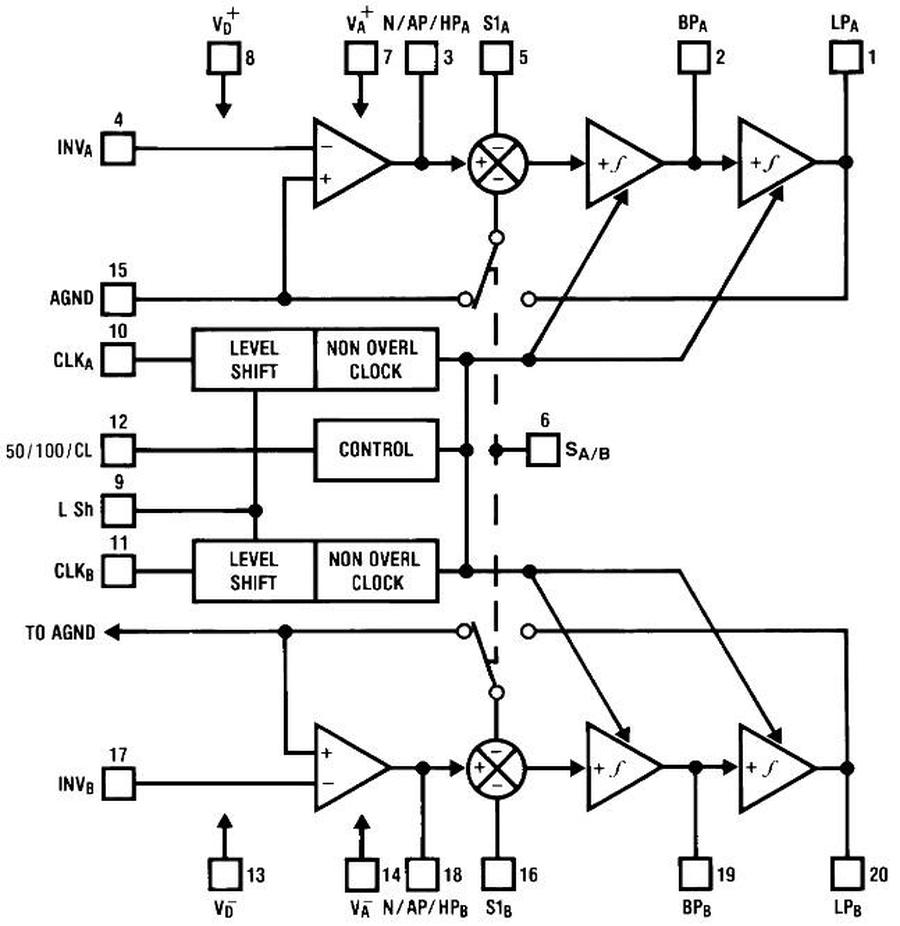
    Block diagram of the MF10 from the Texas Instruments datasheet.

    Block diagram of the MF10 from the Texas Instruments datasheet.

     ↩

  7. The filter frequency of the MF10 can be set to either the clock frequency divided by 50 or divided by 100. You might wonder where these ratios come from, since the capacitors on the chip are in 8:1 or 16:1 ratios, not 50:1 or 100:1. The formula for a switched-capacitor integrator is that the filter frequency is the clock frequency divided by 2π times the capacitor ratio. (This can be derived from the op-amp integrator formula and the equivalent resistance of a switched capacitor.) It turns out 2π×8 is 50.27 and 2π×16 is 100.5, providing the 50 and 100 values.

    Note that these values aren't exactly 50 and 100; they are off by 0.5%. Curiously, the datasheet specifies that the typical frequency error is ±0.2%, significantly smaller. I suspect that the explanation is that the capacitor ratio is not precisely 16:1, due to stray capacitance in the wiring and other factors, and the designers ensured that these factors tweaked the ratio in the desired direction. ↩

  8. I suspect that the ternary input pin was used because the chip didn't have enough physical pins for all the functions they wanted. Note that the two filters are entirely independent, even with separate clocks, except for the 50/100 ratio control and the A/B mode control. I'm sure that these two functions would have independent control pins if the chip had pins available. They could have used a standard 24-pin package for the chip rather than the somewhat unusual 20-pin package, but maybe they had a motivation for avoiding a much larger 24-pin package. ↩

Cores in space: The core memory module from a 1980 Spacelab computer

Spacelab was a reusable laboratory that could be carried in the Space Shuttle's cargo bay, providing lab space for astronauts and experiments.1 Because Spacelab was a European project, it used a French-built minicomputer, the Mitra 125 MS,2 rather than the Shuttle's main computers, IBM-built AP-101 systems. For storage, the Spacelab computer contained 128 kilobytes of RAM. Rather than silicon memory, the computer used magnetic core memory, with each bit stored in a tiny ferrite ring. In this article, I take a close look at this computer's core memory system.

The core stack from the Spacelab computer. I removed the top board to show the core planes.

The core stack from the Spacelab computer. I removed the top board to show the core planes.

The illustration below shows how Spacelab fit inside the Shuttle's cargo bay. The pressurized laboratory is the cylindrical module in the front of the cargo bay, connected to the Shuttle by a tunnel. Experiments were mounted on pallets behind the laboratory. The laboratory held three identical Mitra computers.3 One computer managed Spacelab itself, while the second computer managed the experiments. The third computer provided a backup in case of failures.

Spacelab was a pressurized cylinder in the Shuttle's cargo bay, connected to the Shuttle by a tunnel. It provided a laboratory for researchers to perform experiments. This illustration of Spacelab is from NASA, C-1976-4380.

Spacelab was a pressurized cylinder in the Shuttle's cargo bay, connected to the Shuttle by a tunnel. It provided a laboratory for researchers to perform experiments. This illustration of Spacelab is from NASA, C-1976-4380.

The photo below shows the core memory stack, removed from the computer. The core memory stack takes up roughly a third of the computer. The entire side panel of the computer detaches, and the core memory unit slides out. Since the computer is cooled by conduction, firmly attaching the core memory stack to the side panel kept it cool. The core memory stack consists of seven boards: a driver board, four core plane boards, a second driver board, and an interface board. Each board has two 160-pin connectors that plug into a large daughter board on each side, providing extensive connectivity between the boards. The daughter board on the right has another 160-pin connector that links the memory stack to the rest of the computer. (These connectors are the long blue connectors in the photo.)

The core memory stack in front of the Mitra computer. The circuit boards have been removed from the far side of the computer.

The core memory stack in front of the Mitra computer. The circuit boards have been removed from the far side of the computer.

How core memory works

One of the hardest problems for early computers was storage. Computers of the late 1940s and early 1950s stored data through techniques such as sound waves in mercury, spots on a CRT screen, or spinning magnetic drums, but these all had limitations. What computers needed was dense, inexpensive storage that was fast, reliable, and could be accessed randomly.

During World War II, Germany developed special magnetic alloys that could "flip" from one magnetic state to another. After the war, American researchers realized that these materials could be used for storing binary data: "It was completely obvious that you could make a memory with this material," in the words of Jan Rajchman. Different aspects of core memory were patented by various inventors (including independent inventor Frederick Viehe, An Wang at Harvard, Jan Rajchman at RCA, and Jay Forrester at MIT), leading to expensive patent battles. (IBM ended up paying $400,000 to Wang—who used the money to build the computer company Wang Laboratories—and $13,000,000 to MIT.) I view Jay Forester as the most important inventor, developing the design of practical core memory, researching magnetic materials, and building the first core memory in 1953 for the groundbreaking Whirlwind computer.

Core memory is based around a tiny toroidal magnetic core, one per bit.4 A core can be magnetized clockwise or counterclockwise to store a bit. The core can be magnetized by threading a wire through the core: running a current through the wire produces a magnetic field that magnetizes the core, while running a current in the opposite direction produces the opposite magnetization.

A key problem with core memory was how to wire the cores without an absurd number of wires: if each core had a separate wire, just 16 KB of storage would require over 100,000 wires. The solution was called "coincident current addressing". The cores are arranged in a grid, with horizontal and vertical wires, as shown below. By running a current through one horizontal wire and one vertical wire, the single core at the intersection was selected. But wouldn't that magnetize all the cores along the horizontal and vertical wires? The key was that the cores were constructed from special magnetic materials with a property called hysteresis: a small current leaves the core completely unchanged, while a larger current flips the core's magnetic state. The currents through the horizontal and vertical wires were carefully selected so each wire had half the current necessary to flip the core; where the wires intersected, the two currents provided sufficient magnetic field to flip the core.

Energizing an X drive wire and a Y drive wire selects one core, highlighted in yellow. Diagram adapted from Digital Computer Components and Circuits, R. K. Richards, p355

Energizing an X drive wire and a Y drive wire selects one core, highlighted in yellow. Diagram adapted from Digital Computer Components and Circuits, R. K. Richards, p355

The next step was reading the core. A sense wire was threaded through all the cores in the two-dimensional plane. To read a core, the X and Y select wires were driven to flip the desired core to the 0 state. If the core was already in the 0 state, nothing happened. But if the core was originally in the 1 state, the magnetic field changed as the core changed state. This induced a small current in the sense line, indicating that the core held a 1. Note that reading the value of a bit destroys that value. Thus, a core needs to be rewritten after reading, to restore the original data.

To access a word of memory at a time, core planes were combined into a three-dimensional stack (below). Since each plane held one bit of the word, a 16-bit word would have a stack of 16 planes. All the planes shared the signals to drive the X and Y lines, so a one-word column through the stack was accessed in parallel. Each plane had a separate sense line to read out the bit.

The core stack from the Saturn V LVDC (Launch Vehicle Digital Computer) consists of 14 core planes. This stack is at the US Space & Rocket Center. Photo from NCAR EOL. I retouched the photo to reduce distortion from the plastic case.

The core stack from the Saturn V LVDC (Launch Vehicle Digital Computer) consists of 14 core planes. This stack is at the US Space & Rocket Center. Photo from NCAR EOL. I retouched the photo to reduce distortion from the plastic case.

But how do you write different values to the different bits? The trick was to put an "inhibit" line through all the cores in a plane, running the inhibit line in the opposite direction to the X lines. Putting a current through the inhibit line would cancel out the current through the X line, preventing the core in that plane from being modified. To summarize, a read-write cycle consisted of first energizing a pair of X and Y lines to select a word and write a 0 to the column of cores in that word. The sense lines provided a readout of the bit values. Next, the X and Y lines were energized in the opposite direction to write a 1 to the cores. At the same time, the inhibit lines were energized for each plane with a 0 bit. Thus, the cores either flipped back to 1 or stayed at 0, as required. Many core memories, such as the one below, used a shared wire for sense and inhibit, so there were three wires through each core.

Closeup of an IBM 360 Model 50 core plane. The cores in this computer were called 19-32 because their inner diameter was 19 mils and their outer diameter was 32 mils (0.8 mm).

Closeup of an IBM 360 Model 50 core plane. The cores in this computer were called 19-32 because their inner diameter was 19 mils and their outer diameter was 32 mils (0.8 mm).

The final ingredient to make core memory practical was the diode matrix. The X and Y lines require driver circuits that can produce fast, bidirectional high-current (e.g. 600 mA) pulses. A core memory plane can have hundreds of these lines. Providing a separate driver for each wire would be very expensive, especially in the vacuum tube era. The solution was to put separate drivers at each end of the wire, with each driver supporting multiple wires. For a trivial example, suppose you have 9 vertical lines. Put three drivers (A, B, and C) on the top, each connected to three wires, and three drivers on the bottom (1, 2, and 3), each connected to three wires. By energizing a driver at the top and a driver at the bottom (e.g. B and 1), the corresponding wire will be energized. Now, N drivers on each side control N2 wires, supporting N4 cores in total.

Illustration of how "top" and "bottom" drivers work together to select a single line (red) through the core matrix. However, current can take alternate paths, such as the pink path.

Illustration of how "top" and "bottom" drivers work together to select a single line (red) through the core matrix. However, current can take alternate paths, such as the pink path.

Unfortunately, it's not quite that easy. Current can take "sneak paths" through the cores, such as the path in pink above. The solution is to add diodes to ensure that current can't take the wrong path. Since a wire needs to be driven with currents in both directions (to flip cores both ways), two diodes are required on each wire, as shown below, one in each direction. Each matrix input (A, B, etc.) is replaced with two inputs, one to drive each direction. (The horizontal wires also require diodes, not shown.)

Adding diodes ensures that current only takes the desired path.

Adding diodes ensures that current only takes the desired path.

Since each wire requires two diodes, core memories used many diodes. Fortunately, diodes were small and inexpensive, so a large quantity of diodes was manageable. The photo below shows the diode stack for the computer used in the Saturn V rocket, the Launch Vehicle Digital Computer.

Closeup of the diode matrix in the Saturn V LVDC. Diodes are mounted vertically using cordwood construction between two printed circuit boards.

Closeup of the diode matrix in the Saturn V LVDC. Diodes are mounted vertically using cordwood construction between two printed circuit boards.

Originally, core memories were tediously constructed by hand. For the Whirlwind computer, it took a full 40 hours to wire a 64×64 core plane. Companies such as IBM soon developed automated techniques to manufacture core memory, and the price dropped by a factor of two every two years, similar to Moore's Law.5 Core memories became fast, inexpensive, and reliable, and were the most popular form of main-memory storage until semiconductor memory took over in the 1970s.

The Spacelab computer's core memory

The Spacelab computer's memory was manufactured in 1980, a late date for core memory, so it is advanced and high density. The photo below shows one of the four core plane boards from the computer. Each board holds 16K of 18-bit words (32 KB), so the computer has 128 KB of RAM in total. The computer is a 16-bit computer, but each word also has a parity bit and a "storage protect" bit, bringing the total to 18 bits. (The storage protect bit provided write protection on a word-by-word basis, preventing programs from being accidentally overwritten. Because core memory is nonvolatile, a program could be loaded into memory once and would be immediately available every time the computer was powered on.)

One of the core memory boards from the Spacelab computer.

One of the core memory boards from the Spacelab computer.

The core memory board is arranged with 1024 vertical (Y) wires and 288 horizontal (X) wires, supporting 294,912 lithium ferrite cores. These very thin wires are soldered to tiny pads on the printed-circuit board. The board supports 18 bits, which is visible as 18 alternating stripes of green and copper because alternating sense lines have different colors. The board has 36 sense lines: the left and right halves of the board have independent sense lines to reduce noise, so the board has 36 sense lines for 18 bits. The sense wires pass through four holes in the board (green arrows) and are soldered on the back of the board.

The photo below shows a close-up of the cores. Each core is approximately 32 mils (0.8mm) in diameter, the same as the IBM System/360 cores shown earlier. However, the cores are stacked much closer, with only a small gap between cores. The X and Y select lines are copper-colored, while the sense lines are green. (The wires are all enameled to prevent short circuits.) The sense wires loop around at the left, forming a single circuit through each bit section. Half the Y lines form loops at the bottom; the other half form loops at the top. Thus, each Y line passes through the plane twice in a U-shaped path, which will turn out to be important.

A close-up of the cores. I think that some rows tilt left and some tilt right to ensure that the sense lines keep the same polarity when they switch direction. Photo courtesy of CuriousMarc.

A close-up of the cores. I think that some rows tilt left and some tilt right to ensure that the sense lines keep the same polarity when they switch direction. Photo courtesy of CuriousMarc.

The other side of each circuit board holds the sense amplifiers and the diode matrix for the core plane. The diode chips are the square black packages, each containing 16 diodes for 8 core lines.6 In the red-outlined regions, one end of each vertical U-loop is connected to a diode chip; the lines of diagonal holes are the vias that pass each signal through the board. The other end of each vertical U-loop is connected to one of the blue board connectors on the side; these vias are in the blue-outlined regions. The horizontal lines use the diode chips and vias in the green regions. One end of each line is connected to a diode chip, while the other end is connected to a board connector through traces on the other side. Note that some vertical lines connect to the diode chips at the top of the board, while others connect at the bottom. Similarly, some horizontal lines connect at the left while others connect at the right.

The back side of the core plane board holds the diode matrices and sense amplifiers.

The back side of the core plane board holds the diode matrices and sense amplifiers.

The central region (yellow) holds 18 sense amplifier chips, the black DIP integrated circuits, each containing two amplifiers.7 The white packages are resistor packages, holding multiple resistors to bias and terminate the sense amplifier lines. The wires from the sense amplifiers are connected as twisted pairs that are soldered to the board right next to the corresponding sense amplifier chips. Using twisted pairs for the whole distance prevents the wires from picking up electrical noise, which could overwhelm the tiny signals in the sense wires. The sense wires pass from one side of the board to the other through four holes in the board (yellow arrows), and then are glued down as they traverse a significant distance on the board. (It must have been difficult to manufacture the board without breaking the tiny, fragile wires.)

Each sense wire loop forms a twisted pair that is fed to the other side through a hole in the circuit board. Above the hole, you can see a gray blob where
sense wires were spliced for some reason.
Also note how alternating vertical wires are soldered to the
circuit board, with circular vias connected to the other side. The other vertical wires form loops.
are soldered to the circuit board

Each sense wire loop forms a twisted pair that is fed to the other side through a hole in the circuit board. Above the hole, you can see a gray blob where sense wires were spliced for some reason. Also note how alternating vertical wires are soldered to the circuit board, with circular vias connected to the other side. The other vertical wires form loops. are soldered to the circuit board

Detecting signals on the sense lines is tricky because the pulses are very small, a few millivolts. Because the sense lines run next to the X drive lines, they can easily pick up noise from the high-current pulses on the X lines. To minimize this noise, the sense lines cross each other between two plane sections, forming a "bow tie", as shown below. The result is that an X line runs next to the positive sense line for half the length and the negative sense line for the other half. Thus, the induced noise cancels out.

A close-up of the sense lines. The 16 sense lines in the middle are green, while the sense lines above and below (as well as the X lines) are copper. Note that the sense lines cross, while the X lines continue horizontally. The large circles are vias through the board.

A close-up of the sense lines. The 16 sense lines in the middle are green, while the sense lines above and below (as well as the X lines) are copper. Note that the sense lines cross, while the X lines continue horizontally. The large circles are vias through the board.

The core memory in the Spacelab computer used a different architecture from a typical core memory, improving performance by eliminating the inhibit line. This architecture was called a 2½D memory.8 If you're familiar with core memory, the lack of inhibit lines may seem puzzling: how do you write 1 to some bits and 0 to other bits? The trick is to have separate X driver circuitry for each bit.9 When writing data, the X lines are only energized for bits that receive a 1; the other lines are left unenergized, so the bits remain at 0. The disadvantage is that instead of one set of X driver circuits, you now need one set for each bit, a factor of 18 more for an 18-bit word. However, with the development of core drivers on integrated circuits, the cost of the additional driver circuitry became less significant.

The memory system used an technique called phase reversal to cut the number of vertical drivers in half. Recall that pairs of vertical wires are joined by a U-connection. By driving the wire in a particular direction, the left side or the right side of the pair can be selected. For example, the drawing below shows how the two wires select the left core, but not the right core. In the left core, both currents go through the core in the same direction, inducing a magnetic field in the toroid.10 But in the right core, the two currents cancel out, so there is no magnetic field created. But if the current in the vertical loop is reversed, the right core will be selected, rather than the left core. The point is that instead of using two drivers for the vertical wires, one driver is used, reversing the current to select the left or right core.

Connecting pairs of vertical wires into a U-shaped loop lets each driver control twice as many cores.

Connecting pairs of vertical wires into a U-shaped loop lets each driver control twice as many cores.

The diagram below shows the complex wiring for X drive wires. Each band of 16 wires corresponds to one bit in the 18-bit word, and has a separate sense wire. The top band of 16 X lines is connected to four contacts on the board connector; each contact is connected to four X lines through the curving PCB traces. The bottom band of 16 X lines is wired to diode modules on the other side of the board, connected through the round vias. (Each wire has the opposite connections—diode module or board connector—on the other end.)11 One group of four X wires is energized through the connector, while four wires are energized through the diode matrix, selecting one of the 16 X wires in the group.

The PCB wiring for the X lines.

The PCB wiring for the X lines.

Other boards in the memory stack

The memory stack has seven boards in total, arranged as a driver board, the four core planes, a second driver board, and an interface board. I haven't examined these boards in detail, but I'll give some preliminary information. The photo below shows one of the two driver boards. It provides the high-current pulses for the X and Y select lines. The board is crammed with specialized core memory driver chips12, along with a few logic chips to control the drivers. It has separate drivers for the two ends of the select lines, allowing the matrix selection described earlier.

One of the two memory driver boards. Click this image (or any other) for a larger version.

One of the two memory driver boards. Click this image (or any other) for a larger version.

Since there are two driver boards and four core memory boards, at first I thought that each driver board controlled two core memory boards. The configuration turns out to be more complicated, with one more layer of matrix selections to cut the number of drivers in half. To simplify slightly, consider the X lines on a core board to have left ends and right ends, both of which must be energized to activate a line. For the left ends, the first driver board powers core boards 1 and 2, while the second driver board powers core boards 3 and 4. The right ends are shuffled: the first driver board powers core boards 1 and 3, while the second driver board powers core boards 2 and 4. Now, if the first driver board powers the left and right ends, core board 1 is the only one with both ends active. If the first driver board powers the left ends while the second board powers the right ends, core board 2 is activated. Similarly, core board 3 or 4 can be activated. The point is that since each set of drivers is connected to two core boards, two sets of drivers are required instead of four.

The final board is the interface to the rest of the computer. It has many transistor arrays in DIP packages, along with many resistors. It seems that the board uses discrete transistors to drive the bus, rather than using interface chips, which is unexpected. The board has some wire-wrapped jumpers in the lower center region, presumably for configuration.

The interface board has some unused space in the lower left.

The interface board has some unused space in the lower left.

Conclusions

Core memory had a long life, surviving even as computers migrated from vacuum tubes to transistors and then integrated circuits, but eventually semiconductor memory made it obsolete.13 Core memories lasted even longer in aerospace applications since it had two key advantages over semiconductor memory: it retained data even without power, and it was resistant to radiation. The Spacelab computer, manufactured in 1980, was near the end of core memory's reign, so it is more advanced than a typical core memory system, with higher density, extensive use of integrated circuits, and the 2½D architecture. But eventually the high density, low cost, and low power consumption of semiconductor memory won out. In 1991, the Space Shuttle flew with upgraded main computers, the IBM AP-101S that used semiconductor memory instead of magnetic core. Spacelab's Mitra computers were also replaced, using the AP-101SL, which was based on the AP-101S but modified to support the instruction set and peripherals of the original Spacelab computer.14 Although core memory is now firmly in the past, it still lives on in the expression "core dump".

I plan to investigate the Spacelab computer some more. For updates, follow me on Bluesky (@righto.com), Mastodon (@[email protected]), or RSS. Credits: Thanks to Steve Jurvetson for providing the Spacelab computer. Thanks to CuriousMarc for photography and help disassembling the computer. AI statement: Despite the presence of the em dash, no AI was used in the writing of this article (details).

Notes and references

  1. It seems that 16 Shuttle flights used the Spacelab pressurized module, while 6 or 9 flights just used the unpressurized Spacelab pallets. (Why do sources never agree?) Originally, Spacelab was expected to be used for 30 flights every year (Status Of The Spacelab Program, 1974). ↩

  2. The Spacelab 125 MS computer was built by a French company called CIMSA, using the Mitra architecture created by CII. I explained the complex history of these companies in my previous Spacelab computer article, so I won't go into it here.

    On the ground, the Spacelab project used Mitra 125 S computers that were functionally identical to the Mitra 125 MS (details) computers that were used in space. A core memory board from a Mitra 125 S ground computer was described on EEVblog (video, video). The computers had identical architectures, but the 125 MS was militarized and designed for "severe environmental conditions" (details). The EEVblog memory board was manufactured by Ampex and has a different design from the board that I examined.

    The Mitra 125 S memory board, built by Ampex. Screenshot from EEVblog #668.

    The Mitra 125 S memory board, built by Ampex. Screenshot from EEVblog #668.

     ↩

  3. Spacelab was modular, so it could be be flown in different configurations. The habitable module could be flown in two different sizes, with experiment pallets mounted outside the module. Spacelab could also be flown without the habitable module, with experiments controlled from inside the Shuttle. In this case, the computers and other equipment were mounted in a smaller pressurized cylider called the "igloo". ↩

  4. I'm describing "standard" core memory, but there were many esoteric designs for core memory. One approach used two cores per bit. Another approach used cores with multiple holes, such as cubical BIAX cores, transfluxors with a large hole and a small hole, or IBM's three-hole design. Many of these approaches could read a core without erasing it (non-destructive readout), but almost all cores used standard toroids. ↩

  5. Later, companies discovered that it was cheaper to have core memories hand-manufactured in Asia and moved away from automated production. (See Memories that Shaped an Industry, p. 251. If you're interested in the history of core memory, this is the book to read.) ↩

  6. The diode array chip is marked FSA2977 and contains 16 diodes, 8 common-cathode and 8-common anode. Pins 2 through 9 are connected to eight core wires. Pin 1 is driven high, or pin 10 is driven low, depending on the desired current direction. I couldn't find a datasheet for this part, but it appears to be similar to the Motorola MAD1103 Core-Driver Diode Array or the Silicon General SG5772F.

    ↩A schematic matching the diode array, from the Motorola MC1103P datasheet.

    A schematic matching the diode array, from the Motorola MC1103P datasheet.

  7. The sense amplifiers are National Semiconductor DS5534 chips. Each IC contains two differential amplifiers, converting the tiny sense signals into logic signals. The strobe signals indicate when the amp should read a bit; the strobes come from the IC on the left side of the board, a 54150 dual 4-input NAND gate, 50Ω line driver.

    Diagram of the sense amplifier, from the National Interface Integrated Circuits Databook.

    Diagram of the sense amplifier, from the National Interface Integrated Circuits Databook.

     ↩

  8. The 2½D memory architecture is described in detail in 2 1/2 D High Speed Memory Systems—Past, Present, and Future. Due to complicated factors and tradeoffs, the 2½D approach was attractive for systems of 16 Kword storage and above. In particular, eliminating the inhibit line boosted performance. IBM's Large Capacity Storage system used a 2½D architecture with just two wires per core to provide a megabyte of storage at a comparatively low cost, sharing the X line with the sense line. However, this approach turned out to be slow, so using three wires per core (as in the Spacelab computer) was more common. ↩

  9. Note that the 2½D architecture requires separate per-bit drivers along one axis, not both. Since cores require two currents to flip, inactivating one axis is enough to prevent the corresponding cores from flipping. ↩

  10. The direction of the magnetic field is given by the "right-hand rule": if you point the thumb of your right hand in the direction of the current, the magnetic field curves around the wire in the direction of your fingers.

    It may not be obvious how the currents add or cancel when the wires are in different directions. You can imagine moving the two wires until they are parallel, and then see if the currents are in the same direction or opposite. (This follows from Ampère's law, which states that the magnetic field around a curve (e.g. the core) is proportional to the net current through the corresponding surface.) ↩

  11. For reference, this footnote describes the details of the core plane wiring, probably in more detail than anyone wants. For the Y lines, there are 1024 vertical lines, forming 512 U-shaped loops. Half of these are connected at the top, and half at the bottom. One end of each loop is wired directly to a connector on the side, while the other end connects to a diode matrix. The connectors provide 32 lines that can act as a source or a sink. Each of the 32 lines is connected to 16 vertical wires, for 512 vertical wires in total. Each quadrant of the board has 8 of the 32 lines, connected to a group of 8 vertical wires, a second group of 8 vertical wires, and so forth for 16 groups.

    For the diode connections, the connectors provide 16 source lines and 16 sink lines. Each diode chip has one source line and one sink line, feeding 8 vertical wires. Each source and sink line is connected to four diode chips, one in each quadrant in a mirrored pattern. Thus, the 16 source lines and 16 sink lines are connected to 64 diode chips, feeding 512 vertical loops. (Since each quadrant of the board has unique direct connections and the diode connections within a quadrant are unique, a unique core is selected. Specifically, 32 direct connections times 16 diode connections gives 512 combinations to select a vertical loop. The polarity selects which half of the loop is active, uniquely selecting one of 1024 vertical wires.)

    For the horizontal wiring, the 288 wires are grouped into 18 bands (one for each bit), with 16 wires per band. Each band has four direct signals from the connector. Each one is connected to four horizontal lines, 16 in total. (The visible PCB traces (shown earlier) connect the 16 wires to four connector pins (A,B,C,D) in the pattern AABBCCDDDDCCBBAA.)

    For the horizontal diode connections, the connector provides 4 source wires and 4 sink wires, which feed the 16 horizontal wires in a pattern 1234123412341234. By energizing the appropriate direct and diode wires on either side, one of the 16 lines is selected. One complication is that each diode chip has 8 outputs, but each source/sink goes to 4 wires. The solution is that each bit group uses half of four diode chips (4 outputs from each). Thus, the four source and sink wires are shared across two bit groups. This is not a problem for selection because the direct connections control whether the bit is active or not.

    The horizontal diodes are arranged asymmetrically. The left side has 8 diode chips at the top and 8 at the bottom, supporting 8 groups of 16 wires. The right side has 20 diode chips (4 additional in the middle), supporting 10 groups of 16 wires. Thus, all 18 bit groups are supported, with some asymmetry in the board layout.

    The left and right sides of the core plane have separate sense lines, so there are 36 sense lines in total. These go to the 18 dual sense amplifiers. Each sense amplifier has two outputs connected, a wired-OR to combine the left-hand data with the right-hand data, providing 18 bits of output to the connector.

    A diagram showing the topology of a core board. Click this image (or any other) for a larger version.)

    A diagram showing the topology of a core board. Click this image (or any other) for a larger version.)

    The diagram above summarizes the structure, showing one of the 18 bits. It omits the details of which connections are at the top, bottom, left, or right. ↩

  12. Each driver board has 53 core driver chips of type SN55325.

    The SN55325 core driver chip, from the databook.

    The SN55325 core driver chip, from the databook.

    Each chip has two 600 mA "sources" and two 600 mA "sinks" connected to two outputs. By energizing a source on one end of a line and a sink on the other end, the line can be driven in the desired direction. The driver board also has 39 driver chips of type SN55327. These chips are similar, except they can be used as either four sources or two sinks. These chips are used for the diode matrix inputs, where an input is either a source or a sink. ↩

  13. I wrote about the Spacelab computer's CPU earlier. I've written about other core memory systems including the IBM 1401 core memory, IBM 360 core memory, Saturn V LVDC, and Apollo Guidance Computer. ↩

  14. The Space Shuttle's replacement AP-101S computer used semiconductor memory, so it needed to deal with volatility and radiation. The new computer used battery backup to preserve memory contents when powered off, a feature that core memory had provided automatically. To avoid data corruption from radiation, the new computer had six extra storage bits for each word to implement an error-correcting code. The computer constantly scanned for bit errors and corrected them. Radiation wasn't just a theoretical risk: a single Shuttle flight could encounter over 100 bit flips due to radiation (details).

    For more information on the AP-101S computer, see my previous article, The rise and fall of IBM's 4 Pi aerospace computers. I wrote about Spacelab's original computer and the upgraded AP-101SL computer in Reverse engineering circuitry in a Spacelab computer from 1980. ↩

Energizing a vacuum-tube flip-flop module from a 1948 IBM system

In 1948, IBM introduced the 604 Electronic Calculating Punch. This machine was a programmable calculator, about the size of a double refrigerator. It was not quite a computer, but was programmed by plugging wires into a plugboard. This machine read numbers from a punch card, performed up to 60 calculations on these numbers, and then recorded the results by punching holes in the card.1 It processed 100 cards per minute—over one card per second—and IBM advertised it as the equivalent of 150 engineers. The machine rented for $550 a month, making it very popular, with over 5600 units produced.2

The IBM 604 Electronic Calculating Punch. Photo from Ed Thelen's IBM 604 page.

The IBM 604 Electronic Calculating Punch. Photo from Ed Thelen's IBM 604 page.

The IBM 604 came out just after the transistor was invented, too early to use transistors. At the time, calculators and computers were moving from slow electromechanical components to fast vacuum tubes. One of the innovations of the 604 was to combine a vacuum tube and its associated circuitry into a pluggable module. Along the left side of the photo above, you can see rows of these modules with the handles sticking out, making it easy to replace a faulty module. More modules are behind the silver metal covers. In total, the IBM 604 used about 1300 vacuum tubes.

The photo below shows a pluggable tube module, with a vacuum tube underneath the insulated handle. The nine pins at the bottom of the module plugged into a socket in the 604, with the sockets connected by backplane wiring. The vacuum tube was also socketed, so a bad tube could be quickly replaced. At the left, the resistors and capacitors are mounted on insulating wafers. Modules provided a dense way to implement circuits, packing components into three dimensions.

The TR-3 trigger module from the IBM 604 Electronic Calculating Punch.

The TR-3 trigger module from the IBM 604 Electronic Calculating Punch.

Each pluggable tube module implemented a specific function, such as an inverter, amplifier, or power driver. The module above is a "trigger" module, type TR-3. A trigger is a circuit with two states—on and off—and can be switched from one state to the other, providing one bit of temporary storage. (In modern terminology, this is called a flip-flop.) Triggers were important building blocks in the 604, generating timing signals and storing pulses. Arithmetic in the IBM 604 was implemented with decimal counters, built from TR3 triggers.

In this article, I describe the circuitry of the TR-3 trigger module. (I recently wrote about a thyratron module in the 604; this is a different module.) After reverse-engineering the module, I powered it up. The video above shows the module in operation. By pressing buttons, I switch the trigger from one state to the other. Glowing orange neon bulbs show the state of the trigger module. The fundamental feature of the trigger is that it stays in a state until I push the other button. This might appear trivial, but the ability to store information is vitally important for computation.

How a vacuum tube works

The trigger module uses a common type of vacuum tube called a triode, which amplifies a weak signal to control a stronger signal. The diagram below shows the construction of a triode vacuum tube. The heater is a filament, similar to an incandescent light bulb, that heats the cathode to roughly 750 ºC. At this high temperature, the cathode emits electrons. If a large positive voltage (say, 150 volts) is put on the plate, the negatively charged electrons are attracted to the plate. The stream of electrons from the cathode to the plate causes a current to flow through the tube. Since air would block the electrons, the fragile glass envelope holds a vacuum, giving the vacuum tube its name. The current is controlled by the grid: if a small negative voltage is placed on the grid, it repels the negative electrons, preventing them from reaching the plate and blocking the current through the tube.3 Thus, a small signal on the grid controls the large current through the tube.

The components of a triode vacuum tube. From IBM 604 Customer Engineering manual.

The components of a triode vacuum tube. From IBM 604 Customer Engineering manual.

The advantage of vacuum tubes was that they could switch on and off millions of times per second, phenomenally faster than electromechanical devices such as relays. The clock speed of the IBM 604 was 50 kilohertz, much below what a tube could handle, but three orders of magnitude faster than the 50 hertz pulses in an electromechanical accounting machine like the contemporaneous IBM 407.

The tube that I used in the module is called a 2033.6 This tube is a dual triode, combining two triodes into one physical glass tube. Dual triodes were very popular because they doubled the density of the circuitry. In the photo below, the two vertical black structures are the plates of the two triodes; the other structures are not visible as they are inside the plates.

The 2033 dual-triode vacuum tube.

The 2033 dual-triode vacuum tube.

This tube is a "miniature" vacuum tube, about 5 cm long including the seven pins at the bottom of the glass envelope.4 Since a single triode has five connections, you might wonder how a dual triode manages with seven pins instead of 10. The trick is that both triodes share the cathode and heater connections, which limits the tube to applications that don't require separate cathodes.

One disadvantage of vacuum tubes is that the heater uses considerable power. This tube's heater requires 6.3 volts at 300 milliamps—almost 2 watts per tube. Using 6.3 volts may seem a bit random, but many vacuum tubes used this voltage for historical reasons: this was the typical voltage provided by a 6-volt automobile battery.5 In the photo below, you can see the orange glow from the two heaters, mostly hidden by the plates but visible at the top and bottom.

The tube powered up, showing the glowing filaments.

The tube powered up, showing the glowing filaments.

Inverters and the trigger circuit

The trigger circuit is based on two inverters, so I'll start by explaining the tube inverter circuit.7 The idea of an inverter is to amplify and invert the input signal: a "low" input results in a "high" output and vice versa. First, consider a low input: if a negative voltage is applied to the grid, the flow of electrons is blocked, turning off the tube. In this case, the resistor pulls the output high with 150 volts. However, if a positive voltage is applied to the grid, the tube turns on and conducts current. This current pulls the output down, due to the voltage drop across the resistor, producing a low output of 50 volts. Thus, a low input causes a high (150 V) output, while a high input causes a low (50 V) output, providing the desired inverter action. Note that the input signal has a swing of over 50 volts, very large compared to a transistor circuit. Moreover, the output voltages are much higher than the input voltages, which is somewhat inconvenient when connecting circuits.

An inverter circuit. Adapted from IBM 604 CE Manual.

An inverter circuit. Adapted from IBM 604 CE Manual.

A trigger is constructed from two inverters connected in a loop. The output of the first inverter is fed into the second inverter, and the output of the second inverter is looped back to the first inverter. If the first inverter has a high output, the second inverter has a low output, which is fed back to the first, maintaining the high output from the first inverter. The situation is similar but opposite if the first inverter has a low output. Thus, this circuit has two stable states, with one inverter on and the other off.8 Once the circuit is placed into a state, it will remain in that state until forced into the other state.

Two inverters in a loop can store a 0 or a 1.

Two inverters in a loop can store a 0 or a 1.

I reverse-engineered the TR-3 module, creating the schematic below.9 It's a bit tricky to see the loop of inverters because the two inverters share one tube and are wired in a cross-coupled arrangement. In brief, one inverter uses the left half of the tube and the other uses the right half. The plate output from one side is wired to the grid input on the other side, through 200K and 1K resistors. The two module outputs (pins 7 and 8) are taken from the plates, but output 8 has a resistor between it and the plate. As a result, the two outputs provide different voltage levels, making the module more flexible to use.10 The two inputs force the trigger into one state or the other. The inputs are connected through 40 pF capacitors, providing AC coupling so the inputs can use different voltage levels from the outputs.

Reverse-engineered schematic of the TR-3 trigger module. Note that the pin numbers for the module are different from the pin numbers for the tube.

Reverse-engineered schematic of the TR-3 trigger module. Note that the pin numbers for the module are different from the pin numbers for the tube.

One tricky part is the connection between one inverter's output and the other inverter's input. The problem is that the output voltage is 50 to 150 volts, but the input grid voltage must be close to zero (a bit positive or a bit negative). The solution is to use a large negative voltage (-100 volts) and a resistor divider as a level shifter. With a large positive voltage from the plate and a large negative bias voltage, the resulting grid voltage ends up being moderately positive or moderately negative. As a result, the circuit requires both a high positive voltage (for the plate) and a high negative voltage (for the bias), complicating the power supply requirements.

The inputs are fed into the grid through capacitors, allowing a pulse to pass through the capacitor to the grid. You might expect that a positive pulse would turn on the triode, but the module was used in the opposite way, with a negative pulse to turn off the triode. (This direction is more sensitive, because a tube has more gain when it is on.) Thus, a negative pulse on the left input will turn off the left side. The plate output of the left side goes high, pulling the gate of the right side high, turning the right side on. The plate output from the right side goes low, pulling the gate of the left side low, keeping the left tube off. Similarly, a negative pulse on the right input turns off the right side, causing the left side to turn on. Multiple pulses have no effect; that side remains off. Positive pulses also have no effect; the circuit is designed so a positive pulse is not sufficient to turn a triode on.11

I found the trigger circuit to be somewhat temperamental: the trigger needs to be stable enough to stay in one state or the other, while also unstable enough that an input pulse will reliably flip it to the other state. The circuit depends on carefully balancing the grid voltages and the input voltages. I experimented with different supply voltages and found that in some cases the trigger would oscillate, while in other cases, the trigger would get stuck in one state. Interestingly, the later IBM 650 computer abandoned this type of trigger circuit, instead using diode logic (AND and OR gates) to set and reset a loop of two inverters. With this type of trigger, the state is determined by reliable Boolean logic, rather than analog interactions of changing voltages.

Conclusion

The development of the trigger is an under-appreciated step in the history of digital computers. Because the trigger holds information—state—it can be used to create a state machine. This allows a computer to perform operations step by step, rather than a jumble of actions all happening at the same time.

The trigger circuit dates back to 1918, when two British physicists, William Eccles and Frank Jordan, invented a circuit that used two cross-coupled triodes to create a circuit with two stable states. They viewed this circuit as a type of relay, triggered by a small signal and retaining its state until it was reset. They patented the circuit (Improvements in ionic relays) and wrote about it: A Trigger Relay Utilising Three-Electrode Thermionic Vacuum Tubes. (The Eccles-Jordan trigger circuit below is conceptually similar to the TR-3 trigger module, using cross-coupled triodes. One difference is that the input is coupled with a transformer.)

A diagram of the Eccles-Jordan trigger relay, from their 1919 paper.

A diagram of the Eccles-Jordan trigger relay, from their 1919 paper.

The Eccles-Jordan trigger eventually led to digital counters. In 1939, the journal Electronics published an article Trigger Circuits, describing how trigger circuits could be combined to construct high-speed counters. One problem was that triggers can be easily combined to count in binary, but in the 1940s, calculating and accounting machines generally used decimal numbers, not binary. In the groundbreaking ENIAC computer (1945), bulky counters were constructed by putting ten triggers in a ring to count each decimal digit. IBM engineers invented a more efficient decimal counter that used four triggers instead of ten, coming up with binary-coded decimal (BCD) and obtaining a 1946 patent: Electronic Counting Circuit. IBM used this counting circuit in the 603 Electronic Multiplier (1946), followed by the 604 Electronic Calculating Punch (1948).

Modern computers use triggers—albeit under the modern name "flip-flops"—by the millions, but now they are microscopic transistor circuits instead of vacuum-tube modules.

For updates, follow me on Bluesky (@righto.com), Mastodon (@[email protected]), or RSS. Thanks to Robert Garner for providing the module and to CuriousMarc for hardware support. AI statement: Despite the presence of the em dash, no AI was used in the writing of this article (details).

A 1951 advertisement for the IBM 604, describing how the system was like having 150 extra engineers. Slide rules were the common calculating tool at the time. Notice that diversity amongst engineers was limited to hairstyle. From Fortune, December 1951 via Wikimedia, scanned by Michael Holley.

A 1951 advertisement for the IBM 604, describing how the system was like having 150 extra engineers. Slide rules were the common calculating tool at the time. Notice that diversity amongst engineers was limited to hairstyle. From Fortune, December 1951 via Wikimedia, scanned by Michael Holley.

Notes and references

  1. The punch cards were read and punched by a separate unit, the IBM 521 Card Reader/Punch, which was connected to the IBM 604 through a thick cable. The 521 had a card magazine on the upper left to hold cards to be read. After cards were processed, they were collected in the hopper in the middle of the 521. Note the plugboard control panels in both the 604 and the 521.

    The IBM 521 Card Reader/Punch to the right of the IBM 604 Electronic Calculating Punch.
Photo from Customer Engineering Manual of Instruction.

    The IBM 521 Card Reader/Punch to the right of the IBM 604 Electronic Calculating Punch. Photo from Customer Engineering Manual of Instruction.

    The punch cards were standard IBM 80-column cards, introduced back in 1928. The position of a hole in a column indicated the digit value for that column. For a particular task, the 80 columns would be divided into fields to hold various numbers. The 604 only supported numbers, not other alphanumeric symbols. A negative number was indicated by punching an additional hole over the units digit, using the second row from the top. (This was called an "X-punch", unrelated to the letter X.)

    Punch card code, from IBM 29 Card Punch Reference Manual. This code is somewhat later, with a variety of special characters.

    Punch card code, from IBM 29 Card Punch Reference Manual. This code is somewhat later, with a variety of special characters.

     ↩

  2. An interesting video showing the manufacturing and operation of the IBM 604 is here. For information on the IBM 604, see the Operating Manual. The Customer Engineering Manual of Instruction explains the 604 in detail, showing a TR-3 tube module on page 20. See IBM's Early Computers for information on the development of the 604. ↩

  3. You can think of a triode as analogous to an NPN transistor, with the grid as the base, the plate as the collector, and the cathode as the emitter. ↩

  4. The IBM 604 also used dual-triode vacuum tubes with nine pins, rather than seven, such as the type 5965. (Seven and nine pins were standard sizes for tubes.) The nine-pin tubes had separate connections for each cathode; this allowed the tubes to be used in circuits such as "cathode followers". The two filaments were in series, sharing a common "middle" pin, which is why the tube used nine pins instead of 10. ↩

  5. For a discussion of filament voltages, see Valves, 1939. This article discusses how car radios motivated the use of 6.3 volt filaments in the United States, where 6-volt car batteries were common. ↩

  6. The 2033 tube is very similar to the popular 6J6 tube, but optimized for computer circuits. The IBM 1684 tube is also very similar. The tube module that I examined was missing its tube, so I can't guarantee that the 2033 is the correct tube. ↩

  7. The standardized tube modules weren't as standardized as one might expect. For instance, the 604 used 27 different types of inverter modules in total. For a detailed discussion of the tube inverter, see IBM 604 CE Manual, pages 26-41. ↩

  8. A trigger circuit is symmetrical, so how do you define whether a trigger circuit is on or off? IBM's convention was that if the left triode was conducting, the trigger was on, while if the right triode was conducting, the trigger was off. See IBM 604 CE Manual, page 54. ↩

  9. The 604 manual includes a schematic of the TR-3 module (and other modules). Inconveniently, I didn't find this schematic until I had reverse-engineered the module; I made minor adjustments to my schematic based on this. This schematic is a bit tricky to interpret. All the resistances are in thousands of ohms (e.g. 1 is 1 KΩ), and capacitances are in "micromicrofarads" (i.e. pF). The circled numbers indicate pins of the module, while numbers in square boxes indicate voltages according to an obscure standard: 2 is +150V, and 5 is -100 V. "2-110" and "300638" are IBM part numbers. "6J" indicates that the tube is in the 6J family, where 6 indicates the heater voltage and J indicates a triode. The 604 documentation used cryptic boxes as symbols for the modules, with the arrows indicating the inputs and outputs; note that output 7 is at a lower position than output 8, indicating a lower voltage level.

    Schematic from the CE Manual of Instruction, page 260.

    Schematic from the CE Manual of Instruction, page 260.

     ↩

  10. The two outputs from the trigger module are at different voltage levels. The idea is that a circuit could use either output, depending on which voltage level was more convenient. The asymmetrical outputs caused me great trouble, however, since I wanted to attach neon bulb indicators to show the state of both outputs. I had to carefully adjust the voltages so that the bulbs had enough voltage in the "on" state to turn on, but also a sufficiently low voltage in the "off" state to turn off. (When a neon bulb turns on, the neon gas ionizes, so it requires a significantly lower voltage to turn the bulb off.)

    The IBM 604 used neon bulbs to show the state of various circuits, both in the front panel and internally. However, unlike me, IBM used a single bulb for each trigger, either on or off, so the inconsistent voltage levels didn't cause problems. ↩

  11. The 604 used 12 different types of trigger modules, from TR-1 through TR-42. The different trigger circuits were similar, but had different component values to tune the characteristics, as well as different resistors for the output levels. A few types used resistive inputs instead of capacitively coupled inputs.

    The trigger modules were used in a variety of different ways. Briefly removing the negative bias from one side would turn that side on; this was used for reset circuits. Second, a plate could be pulled low, turning off the tube on the other side. Third, the input could be connected directly to the input, rather than going through a capacitor, with a negative voltage turning the triode off and a positive voltage turning the triode on. Other triggers used a capacitor between the plate and grid on each side to filter out noise and contact bounce. Some triggers used capacitor inputs (as in the module I described), but fed the same negative input pulse to both sides. The pulse is ignored by the triode that is on, but flips the triode that is off. The result is that the trigger switches state on each pulse—analogous to a toggle flip-flop—and divides the input pulses by two. ↩