

The CREATE SCHEMA statement in PostgreSQL is used to create a new schema within a database. It provides a logical container for organizing database objects and managing them efficiently.
- Creates a new schema in the current database.
- Groups related database objects under a single namespace.
- Helps organize and manage database objects effectively.
Syntax
CREATE SCHEMA schema_name;You can also create a schema with authorization:
CREATE SCHEMA schema_name
AUTHORIZATION role_name;
Where:
- schema_name: The name of the schema to be created.
- role_name: The database role that owns the schema.
Examples
Example 1: Create a New Schema
The following query creates a schema named sales.
Query:
CREATE SCHEMA sales;Output:
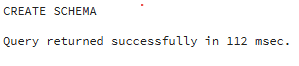
CREATE SCHEMA- The CREATE SCHEMA statement creates a new schema named sales.
- The schema can now contain tables, views, functions, indexes and other database objects.
Example 2: Create a Table Inside a Schema
The following query creates a table named Customers inside the sales schema.
Query:
CREATE TABLE sales.Customers (
    CustomerID INT PRIMARY KEY,
    CustomerName VARCHAR(50),
    City VARCHAR(50)
);

INSERT INTO sales.Customers VALUES
(101, 'James Carter', 'New York'),
(102, 'Emily Johnson', 'Chicago'),
(103, 'Michael Brown', 'Dallas');- The Customers table is created inside the sales schema.
- The table is referenced using sales.Customers.
Example 3: Retrieve Data from a Schema Table
The following query retrieves all records from the Customers table.
Query:
SELECT *
FROM sales.Customers;
Output:
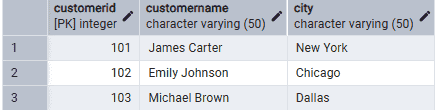
- The schema name is specified before the table name.
- PostgreSQL retrieves data from the Customers table stored in the sales schema.
Example 4: Create a Schema with AUTHORIZATION
The following query creates a schema and assigns ownership to a database role.
Query:
CREATE SCHEMA hr
AUTHORIZATION postgres;
Output:
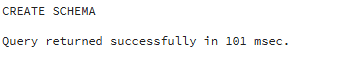
- The AUTHORIZATION clause assigns ownership of the hr schema to the postgres role.
- The schema owner can manage objects and permissions within the schema.
