

The GRANT statement in PostgreSQL is used to assign privileges to users or roles on database objects such as tables, schemas, databases, sequences and functions.
- Improve database security through permission management.
- Assign different levels of access for different users.
Syntax
Grant Privileges on a Table
GRANT privilege [, ...]ON TABLE table_nameTO role_name;
Grant All Privileges
GRANT ALL PRIVILEGESON TABLE table_nameTO role_name;
Where:
- privilege: The permission to grant, such as SELECT, INSERT, UPDATE or DELETE.
- table_name: The table on which the privilege is granted.
- role_name: The user or role receiving the privilege.
Note: Only the object owner or a superuser can grant privileges on a database object.
Examples
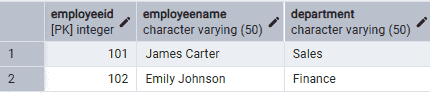
Firstly, create a role and a table.
Query:
CREATE ROLE analystLOGINPASSWORD 'Analyst@123';CREATE TABLE Employees (EmployeeID INT PRIMARY KEY,EmployeeName VARCHAR(50),Department VARCHAR(50));INSERT INTO Employees VALUES(101, 'James Carter', 'Sales'),(102, 'Emily Johnson', 'Finance');
Example 1: Grant SELECT Privilege
The following query grants permission to read data from the Employees table.
Query:
GRANT SELECTON EmployeesTO analyst;
Output:

GRANT
Explanation:
- The SELECT privilege allows the analyst role to retrieve data from the Employees table.
- The role cannot modify the table because only read permission is granted.
Example 2: Grant Multiple Privileges
The following query grants SELECT and INSERT privileges to the analyst role.
Query:
GRANT SELECT, INSERTON EmployeesTO analyst;
Output:
- The analyst role can now view existing records and insert new records.
- Other privileges such as UPDATE and DELETE are not granted.
Example 3: Grant ALL Privileges
The following query grants all available privileges on the Employees table.
Query:
GRANT ALL PRIVILEGESON EmployeesTO analyst;
Output:
- The analyst role receives all privileges on the Employees table.
- The role can perform operations such as SELECT, INSERT, UPDATE, DELETE, TRUNCATE, REFERENCES and TRIGGER, depending on the object type.
Example 4: Verify Granted Privileges
The following query displays the privileges granted on the Employees table.
Query:
SELECTgrantee,privilege_typeFROM information_schema.role_table_grantsWHERE table_name = 'employees';
Output:
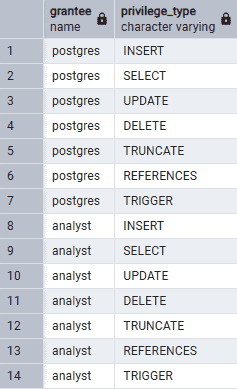
- The information_schema.role_table_grants view displays table privileges.
- The query lists all privileges granted to the analyst role on the Employees table.
